Social housing & property

Social housing inspections
recorded room by room.

SiteSurvey is a mobile inspection and survey app for housing associations, councils, ALMOs and the contractors who survey for them. Inspectors record damp and mould, stock condition, void, fire door and inventory visits against the room they are in, with photographs, measurements and video, even with no signal. Every entry is dated and attributed, so the landlord keeps a property-level record of what was found, by whom and when.

7-day free trial · full access · no card required
No credit cardWorks offlineBuilt for mobile
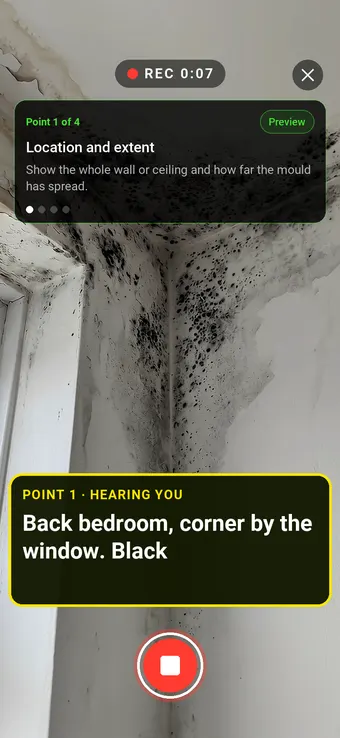
Walk Cam recording a black mould patch in a bedroom ceiling corner, with the point card and the live transcription on screen
Social housing recordLive
5Rooms
18Photos
2Actions
Flat 14 · Damp and mould inspectionUpdated

Bedroom and bathroom findings filed with photos and readings, and two works items raised.

01Housing associations
02Councils & ALMOs
03Surveyors & inspectors
04Contractors

Evidence that holds up later

The visit is quick. The record has to last.

Since 27 October 2025, Awaab's Law has set fixed timeframes for social landlords in England to investigate and fix damp and mould and emergency hazards, and from 30 November 2026 it extends to more HHSRS hazards. The regulator also expects an accurate, property-level record of the condition of every home. Both depend on inspections that show what was found, in which room, by whom and when.

01

Photos with no address

Pictures sit in an inspector's camera roll with no property, room or date attached, so they cannot show what was found where, or when.

02

Every surveyor, a different format

Stock condition data comes back differently from each contractor, so results cannot be compared across the stock or against the last survey.

03

No signal in the block

Tower blocks, basements and older homes are where damp is often worst and where the phone connection drops out, so notes come back on paper to be retyped.

One continuous record

From the first visit to a property-level record.

Keep the home, the room, the evidence and the follow-up attached to each other from the moment the inspection is made.

01

Open the property

Start the inspection for the address and pick the form set up for the visit: damp and mould, stock condition, void, fire door or inventory.

02

Map the rooms

Bedrooms, bathrooms, landings and communal areas sit on the floor plan, so every finding lands in a named room rather than 'somewhere in the flat'.

03

Capture the evidence

Photograph each defect and mark it up where you stand, measure it on the image, add a voice note, or hold Walk Cam to film the point while live on-device voice-to-text writes down what you say.

04

Produce the report

The device syncs when it reconnects, and the answers already captured become the inspection report, as a PDF or a link, with nothing typed twice.

Across the whole stock

Each home builds on the record it already has.

Every property is its own project with its rooms and records, so a follow-up visit adds to that record rather than starting a new spreadsheet. Housing and compliance teams can see which inspections are done, what was found and which works are still open.

Offline capture in blocks, basements and empty homes

Photos, measurements and video tied to the exact room

Every entry dated and attributed to the person who captured it

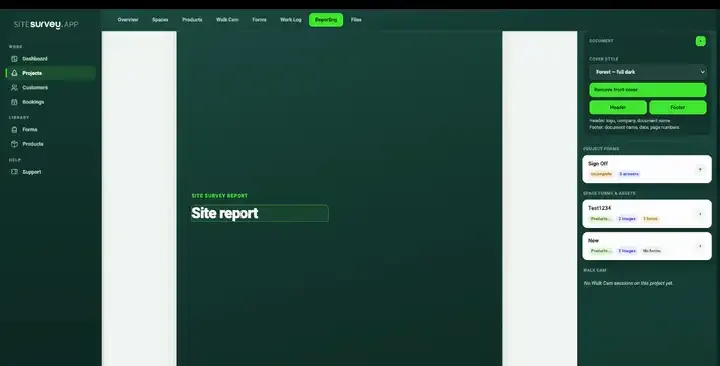
Social housing workspace in SiteSurvey
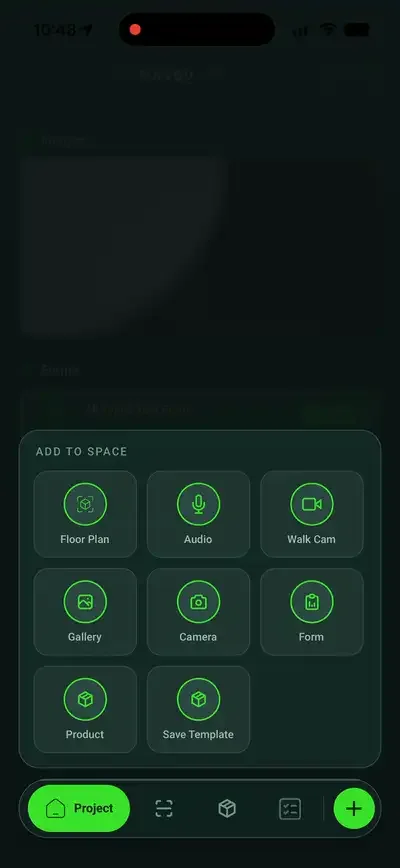
Social housing mobile field workflow

Social housing toolkit

The inspections a housing stock runs on.

Awaab's Law

Damp and mould inspections

Record location, extent, likely cause, readings and ventilation in every room, with marked-up photos, as the evidence the resident's written summary is based on.

Stock condition

Stock condition surveys

Survey each home against the same form, element by element, with the hazards you find and a photograph of each. Record an HHSRS score as a field if your assessor gives one.

Voids

Void and pre-tenancy inspections

Walk an empty home room by room, photograph condition and the works needed, and produce the void report on site, with a signature captured on the device.

Fire doors

Fire door checks

Run the same checklist on every door, including the gap in millimetres, with a photograph tied to the door reference and the floor it sits on.

Inventories

Inventories and routine inspections

Record check-in, mid-tenancy and check-out condition in the same room by room structure, signed and dated on the device.

Planned works

Pre-works surveys

Record the condition of each room before planned works start, with dated photographs to compare against when the works are finished.

Every update has a place

See the room behind every finding.

Place bedrooms, bathrooms, kitchens, landings and communal areas on the plan, then give each one its own forms and evidence, so 'bedroom 2, north wall' means the same thing to the inspector, the housing officer and the contractor.

Explore floor plans ↗

Social housing FAQ

The practical questions.

01What does SiteSurvey do for social housing?+

SiteSurvey is a mobile and web app that housing associations, councils, ALMOs and their contractors use to carry out inspections and surveys of homes. The inspector opens a structured form on a phone or tablet, records each finding against the room it is in, and attaches photographs, on-image measurements, voice notes or Walk Cam video. Forms are shared centrally, so in-house inspectors and contractor surveyors work from the same version, and every entry records who captured it and when. The result is a room by room record for each property that can be issued as a report and added to at the next visit.

02Does SiteSurvey make us compliant with Awaab's Law?+

No. No software makes a landlord compliant: compliance means investigating and acting within the legal timeframes, and that depends on your people and your processes. SiteSurvey does not track the Awaab's Law deadlines for you. What it gives you is the record: a room by room account of what was found, with photographs, measurements, and who inspected it and when. GOV.UK's guidance for social landlords is the authoritative source for the requirements.

03Which housing inspections can it be used for?+

Damp and mould inspections, stock condition surveys, void and pre-tenancy inspections, fire door checks, inventories at check-in and check-out, routine mid-tenancy inspections and pre-works surveys. Every form is editable, so each one can follow your own policy and the fields your contractors need. From 30 November 2026, when Awaab's Law Phase 2 extends to more HHSRS hazards, a damp and mould form can be extended to cover them or a separate form built for each hazard.

04Does SiteSurvey calculate HHSRS scores?+

No. SiteSurvey records the inspection: the hazard, where it is, what it looks like and what needs doing, with photographs and a date and name against every entry. Scoring a hazard under HHSRS is a professional judgement for a competent assessor, and any score you use can be recorded as a field on the form.

05Does it work in homes with no signal?+

Yes. Forms, photographs, measurements, signatures and video are all captured on the device and sync once you are back in coverage. That matters for housing in particular, because blocks, basements and empty homes are often where the signal is weakest.

06How much does SiteSurvey cost?+

Plans start from £13 per user per month. There is a 7-day free trial with full access, and no card is required to start.

See it in your environment

Record every home room by room, and find it again.