Stock condition and HHSRS

Stock condition survey app with every element and hazard on record.

Survey each home against the same form, room by room: the condition of every element, the hazards you find and a photograph of each. The result is a property-level record you can keep up to date, not a spreadsheet that is out of date the day it is finished.

£25 per user per month on The Works, Base from £13 · trial from £1, cancel any time

See a sample report ↓Start from the stock condition survey template ↓

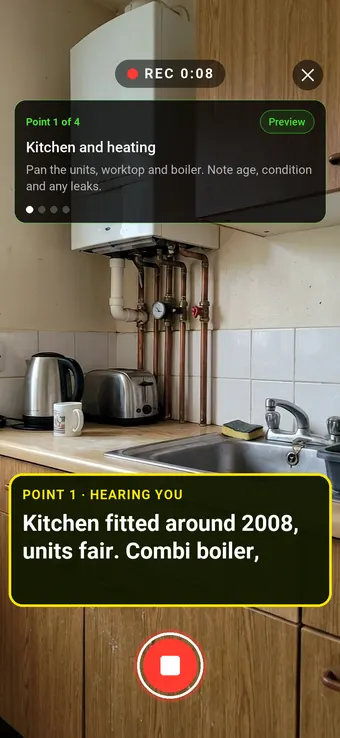
Walk Cam recording a housing association kitchen and its combi boiler, with the point card and the live transcription on screen

9

Elements rated

3

Hazards

3

Urgent jobs

14 Hawthorn Road, the sample report below

What is a stock condition survey, and do social landlords need one?

A stock condition survey is a physical inspection that records the condition of each element of a home and any hazards found. The Regulator of Social Housing requires registered providers to keep an accurate, up to date record of every home's condition based on a physical assessment. The regulator describes surveying about 20% of homes a year as a standard approach.

Last updated 4 October 2026. Facts checked on 26 September 2026 against the RSH Safety and Quality Standard, the RSH focus report on the condition of tenants' homes and the HHSRS Operating Guidance.

Stock condition survey vs HHSRS inspection

The two are often done on the same visit, but they answer different questions.

Stock condition surveyHHSRS inspection
PurposeRecord the condition and remaining life of each element so the landlord can plan investmentAssess the risk that hazards in the home pose to the health and safety of the occupier
Who does itA stock condition surveyor, in-house or contractedSomeone trained in HHSRS, for full scoring. Council officers use it to enforce standards in rented homes
What is recordedEach element's condition, install year and estimated remaining life, plus heating, electrics and alarmsEach of the 21 hazards found, with its likelihood and outcomes, scored and banded High, Medium or Low
How oftenNo fixed legal interval. The regulator describes surveying about 20% of homes a year as a standard approachNo fixed interval. Done when a hazard is suspected or reported, or alongside a stock condition visit
OutputA property-level condition record and a programme of worksA hazard score and band; 1,000 or more is Category 1, which the council has a duty to act on

Sources: the RSH Safety and Quality Standard, the RSH focus report on the condition of tenants' homes and the HHSRS Operating Guidance.

SiteSurvey for stock condition surveys, at a glance

What it is
A mobile survey app for iOS and Android, with a web portal, used to record stock condition surveys and HHSRS hazards home by home.
Who it is for
Housing associations, councils and ALMOs, and the surveying contractors who carry out their stock condition programmes.
What it records
Element condition, install year and remaining life, heating, electrics and alarms, and hazards by room, with marked-up photos and Walk Cam video.
Evidence
Every entry is dated and attributed to the surveyor, and the survey works fully offline, syncing when back in signal.
Price
£25 per user per month on The Works plan, which includes the form builder, floor plans and reports. Trial from £1, cancel any time.
What it does not do
It does not score HHSRS hazards, plan capital programmes or report Decent Homes compliance, and it does not replace a trained assessor.

Every home, surveyed the same way, and kept current.

A rolling programme only works if the surveyor in year five records a home the same way as the surveyor in year one. When ratings, wording and photographs vary from person to person, the data cannot be compared across the stock or over time, and the record the regulator expects quietly falls out of date.

Surveys that don't compare

Different surveyors, different wording, different ratings. A home surveyed in 2022 cannot be read against the same home today.

Hazards buried in notes

An HHSRS hazard written into a free-text comment is easy to miss and impossible to report on across the stock.

Photos with no home

Evidence sits in a camera roll or a shared drive, detached from the property, the room and the date it was taken.

How does a stock condition survey work, from the front door to the record?

01 · Map the home

Capture the rooms as you walk them, or start from a floor plan you already hold, so every finding has a place.

02 · Survey the elements

Rate kitchens, bathrooms, windows, doors, roof, heating and electrics against the same fields in every home.

03 · Record the hazards

Flag an HHSRS hazard where you find it, with its location, a photograph and the action it needs.

04 · Keep it current

The survey becomes the record for that home, ready for the next visit to update rather than replace.

Walk Cam, point by point

One home, surveyed the same way every time.

Walk Cam takes every surveyor through the same points in the same order, films each one and writes down what they say, so every home's record is built the same way.
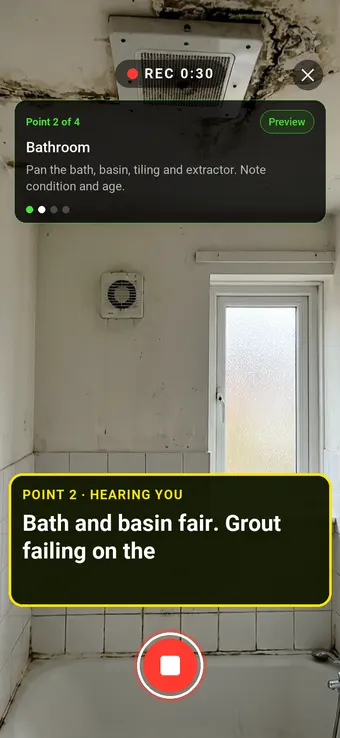
A social housing bathroom with failing grout and ceiling mould, with the Walk Cam point card and live transcription

Point 2 of 4

Bathroom

Bath, basin, tiling and extraction, with their condition in the surveyor's own words.
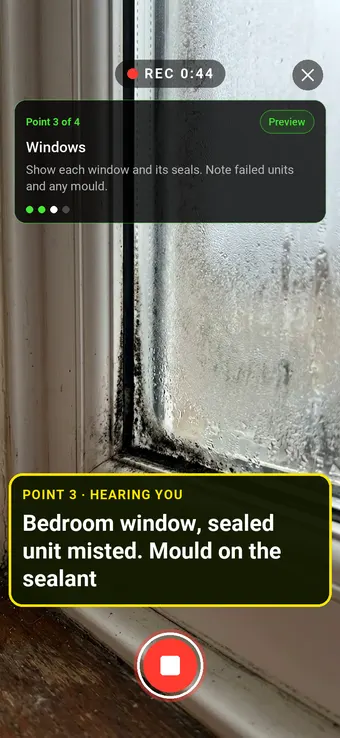
A misted double-glazed window with mould on the sealant, with the Walk Cam point card and live transcription

Point 3 of 4

Windows

Each window and its seals, with failed units and mould called out as they are found.
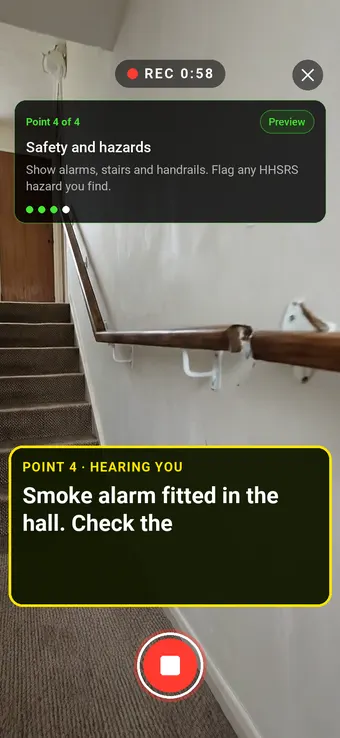
A hallway smoke alarm and staircase with a handrail, with the Walk Cam point card and live transcription

Point 4 of 4

Safety and hazards

Alarms, stairs and handrails, with any HHSRS hazard flagged on the spot.

What the report looks like

What a stock condition survey report looks like.

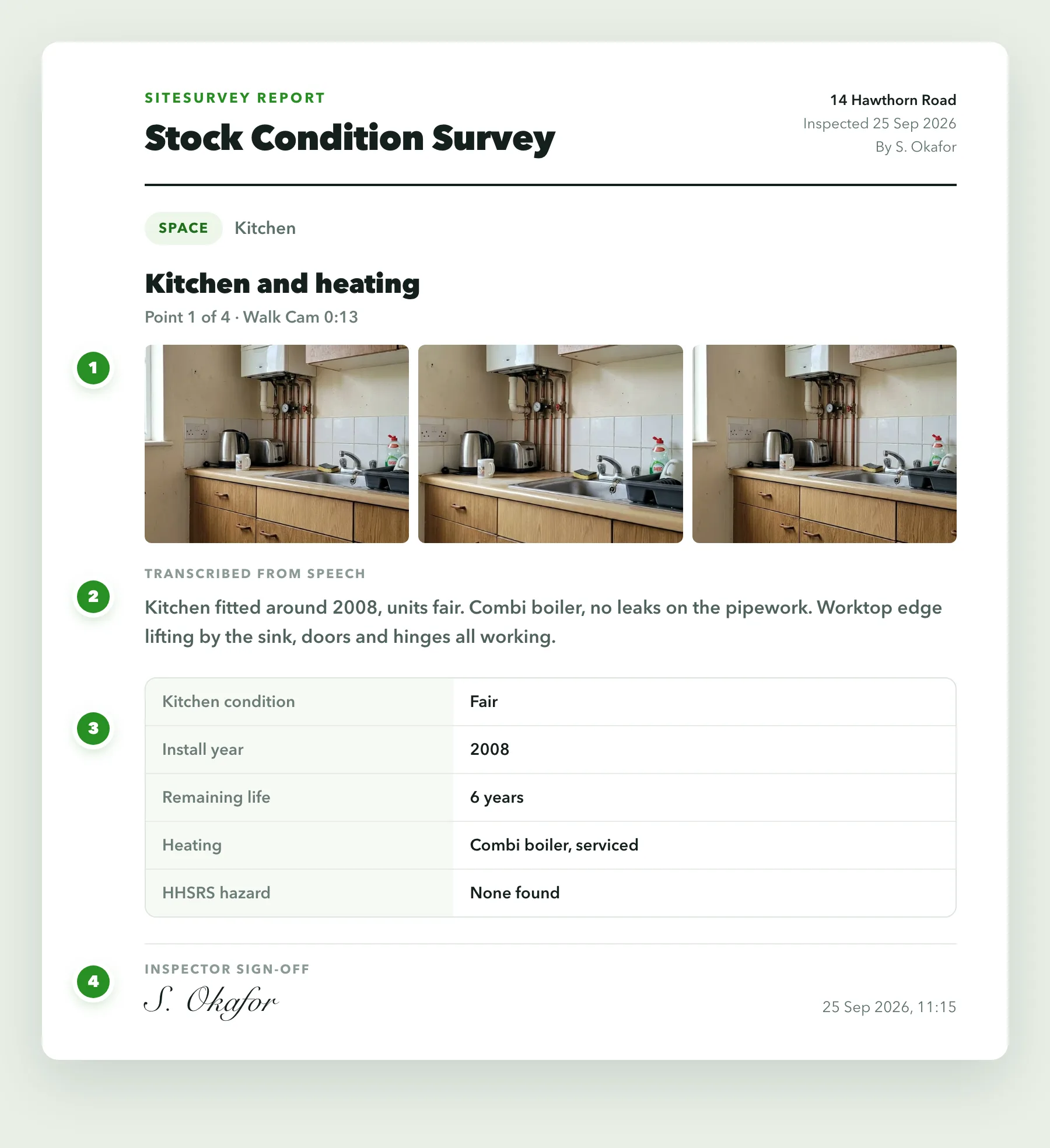
This is a full sample report, made with the SiteSurvey report builder. Scroll through it here or download the PDF. The photographs are stills from the Walk Cam clips on this page.

  1. 1The home and the visitThe property, its age and construction, who surveyed it and when, and the areas that could not be inspected.
  2. 2Room by room, with photosEach Walk Cam point has its stills and the surveyor's spoken notes, written down as they were said.
  3. 3Elements and lifecyclesCondition, install year, age and estimated remaining life for each element, with the heating, electrics and alarms.
  4. 4Hazards, Decent Homes and workEach hazard with its location and action, a check against the Decent Homes guidance, the work by year and a dated sign-off.
Download the full sample report (PDF)
Stock condition survey report8 pagesDownload PDF
Cover of a sample stock condition survey report for 14 Hawthorn RoadStock condition survey report, page 2Stock condition survey report, page 3Stock condition survey report, page 4Stock condition survey report, page 5Stock condition survey report, page 6Stock condition survey report, page 7Stock condition survey report, page 8

Try the form

The form behind the report. Open it and try it.

A live SiteSurvey form, shared by link with no login. It asks only what applies, works out ages and replacement years, and takes a separate record for each element and each hazard. Answers are cleared every night.

Open the live form →See every question in the stock condition survey template →

Or see it filled in: the finished record with every answer, and the Walk Cam report with its clips, stills and spoken notes. See the finished record → Watch the Walk Cam report →

The stock condition survey form showing no access chosen, the attempt number and two notices about what to do next

Questions that follow the answers

Choose no access and the form asks which attempt it was. On the third attempt it says to refer the home on.

A picture choice in the stock condition survey form with four reference photos of a bathroom, a window, stairs and a boiler

Reference photos in the form

Surveyors pick the picture closest to what they can see, then add their own photos of the hazard.

An element record in the stock condition survey form with a calculated age, lifetime left and replacement year, and a warning that it is old and in poor condition

Ages that raise a warning

Enter the install year and the standard lifetime. The form works out the age and says when an element is both old and in poor condition.

More than Walk Cam

Build the form. Share it by link.

Walk Cam films the inspection. The form behind it is yours to build, and anything you capture can be sent to someone outside your team as a link, with no login or app needed.

The SiteSurvey AI form builder assembling an inspection form field by field from a plain-English description

Build your stock condition survey form with AI

Describe the checks you carry out and the AI assistant builds the form: fields, required photos, readings as numbers and follow-up questions that only appear when something fails. Refine it in chat, edit it visually, or start from a template.

How the form builder works →
SiteSurvey form settings, turning on the shareable link with password protection
A customer opening a shared form link, entering the password and completing the form in their browser

Share by link, no login needed

Make any form shareable and SiteSurvey gives it a unique URL, with an optional password. Customers, tenants or contractors fill it in on their phone’s browser, and their answers land in the same project. Walk Cam recordings and finished reports can be shared the same way, by link or by email.

How Walk Cam sharing works →

What should stock condition survey software record?

Consistency is the point of a stock condition survey. Structured fields, the same form in every home and evidence tied to each room give you data you can compare across the stock and over time.

The same form everywhere

Every surveyor opens the same stock condition form, so condition ratings mean the same thing in every home.

Typed fields, not prose

Condition ratings, install years and remaining life are choice and number fields, so they can be counted and compared.

Hazards that ask for more

Mark a hazard as present and the form asks for its location, a photograph and the action needed. Clear homes stay quick.

Room by room evidence

Photographs sit against the room they were taken in, with markup and on-image measurement where the extent matters.

Dated and attributed

Every entry records who surveyed it and when, so the age and source of each record is never in doubt.

Offline in the block

Basements, stairwells and older blocks with no signal are no obstacle. Everything captures on the device and syncs later.

Start from a stock condition survey checklist.

Use this list as the starting point for your own stock condition form, or describe your survey to the AI form builder and let it draft one. Every field is editable, in chat or visually.

Property reference, archetype and year built

Element: kitchen, bathroom, windows, doors, roof

Condition rating and install year per element

Estimated remaining life, in years

Heating, electrics and smoke and CO alarms

HHSRS hazard present, with location

Photo of each hazard or failed element, required

Surveyor sign-off and date

Try it on your phone

Fill in the stock condition survey template on your phone now

Scan the code with your phone camera. It opens the real form, no sign-up needed.

Open the form on this phone

Frequently asked questions

Stock condition surveys and HHSRS: common questions.

Browse every FAQ →

What is a stock condition survey?

A stock condition survey is a physical inspection of a landlord's homes that records the condition of each building element, such as kitchens, bathrooms, windows, roofs, heating and electrics, along with any health and safety hazards. The results tell the landlord which homes need work, what it will involve and roughly when, and they are the evidence behind reporting on the Decent Homes Standard. The Regulator of Social Housing describes inspecting about 20% of homes a year, so every home is seen roughly every five years, as a standard approach.

Do social landlords have to carry out stock condition surveys?

Registered providers must have an accurate, up to date record of the condition of each home, based on a physical assessment of all homes, under the Regulator of Social Housing's Safety and Quality Standard. The standard does not prescribe a single method, but a rolling programme of stock condition surveys is how most landlords meet it. Check the standard and the regulator's guidance for the full expectations.

What is HHSRS?

The Housing Health and Safety Rating System is the risk-based method, under the Housing Act 2004, for assessing hazards to health and safety in homes. In England it was revised on 23 June 2026: it now covers 21 hazards (previously 29), from damp and mould growth and excess cold to falls, fire and explosions and structural collapse, with scores banded High, Medium or Low. A hazard scoring 1,000 or more is a Category 1 hazard, which the local housing authority has a duty to act on; lower scores are Category 2, where action is discretionary.

Is a stock condition survey the same as an HHSRS inspection?

No, although they are often done on the same visit. A stock condition survey records the condition and remaining life of each element so the landlord can plan investment. An HHSRS inspection assesses the risk that hazards in the home pose to the occupier, and full HHSRS scoring should be done by someone trained in it. Many landlords record both on one form: element condition for planning, and any hazard found, with its location and a photograph, for action.

What should a stock condition survey report include?

At a minimum: the property reference and date, who surveyed it, and for each element its condition, install year and estimated remaining life, plus heating, electrics and alarms, any health and safety hazard with its location and a photograph, and the works recommended. Using the same fields in every home is what lets the results be added up across the stock. The full sample report above shows how SiteSurvey lays one out.

What is the best stock condition survey software?

It depends on what you need it to do. For the survey itself, look for a mobile app that uses the same structured form in every home, records hazards by room with photographs, dates and attributes every entry, and works offline. If you need the software to model capital programmes, score HHSRS hazards or report Decent Homes compliance across the stock, that is asset management software, a different category. SiteSurvey is a survey app: strong on consistent room by room capture, offline working and Walk Cam video, and it does not do capital planning or HHSRS scoring.

Does SiteSurvey calculate HHSRS scores?

No. SiteSurvey records the inspection: the hazard, where it is, what it looks like and what needs doing, with photographs and a date and name against every entry. Scoring a hazard under HHSRS is a professional judgement for a trained assessor, and any score or band you use can be recorded as a field on the form.

How does this connect to Awaab's Law and the new Decent Homes Standard?

Both widen what a stock condition survey needs to capture. From 30 November 2026 Awaab's Law Phase 2 extends beyond damp and mould to hazards including excess cold and heat, falls, structural collapse, fire, electrical and hygiene hazards. The new Decent Homes Standard, which the government says will apply from 2035 to social and private rented homes, includes criteria on dangerous hazards, repair, facilities, thermal comfort and damp and mould. A survey that records hazards room by room gives you the evidence base for both. For damp and mould inspections specifically, see our damp and mould page.

Who is it for?

Housing associations, councils and ALMOs running a stock condition programme, and the surveying contractors who carry out the surveys for them. It suits in-house asset teams and contractors who need to hand the landlord the same structured, dated record for every home.

How much does it cost?

Pricing is per user, not per home or survey. The Works plan, which includes the custom form builder, floor plans and reports used for stock condition surveys, is £25 per user per month. The Base plan starts at £13 per user per month. Every plan starts with a trial from £1, cancel any time.

Can the survey be updated rather than redone, and does it work with no signal?

Yes to both. Each home is its own project with its rooms and records, so a follow-up visit adds to that record rather than starting a new spreadsheet, and because each entry is dated and attributed you can see how current each part is. The whole survey, including photographs and video, runs on the device and syncs when the connection returns.

See it on your next job

Every home recorded the same way, and kept that way.