HVAC and air conditioning service
HVAC maintenance software with the F gas record on every unit.
Record every unit the same way: filters, coils, condensate, fans, electrics and temperatures, plus the refrigerant, charge and leak check for units holding F gas. Photos go against each unit, it works offline on the roof, and the customer signs before you leave.
£25 per user per month on The Works, Base from £13 · trial from £1, cancel any time
See a sample report ↓Start from the HVAC maintenance checklist ↓
3
Units
1
Defect
0
Leaks
The sample service visit on this page
What is HVAC maintenance software?
HVAC maintenance software replaces paper service sheets with a mobile app that records each visit unit by unit: filters, coils, condensate, fans, electrics, supply and return temperatures, photographs and, for units holding F gas, the refrigerant, charge and leak check result. The record becomes the service report the customer signs.
Last updated . Facts checked on 4 October 2026 against Regulation (EU) No 517/2014, article 4 (GB), article 6, records and GOV.UK F gas guidance.
How often do air conditioning systems need F gas leak checks?
In Great Britain, stationary air conditioning, refrigeration and heat pump equipment holding 5 tonnes of CO₂ equivalent or more of F gas must be leak checked at least this often. The interval depends on the CO₂ equivalent, which the SiteSurvey form works out from the charge and GWP on the rating label.
| CO₂ equivalent held | Minimum interval | With a leak detection system |
|---|---|---|
| Under 5 tonnes | No leak checks required | Not applicable |
| 5 to under 50 tonnes | Every 12 months | Every 24 months |
| 50 to under 500 tonnes | Every 6 months | Every 12 months |
| 500 tonnes or more | Every 3 months | Every 6 months |
Hermetically sealed equipment holding under 10 tonnes of CO₂ equivalent, labelled as hermetically sealed, is not subject to leak checks.
The operator must keep the dates and results of leak checks, with the gas installed, added and recovered, for at least 5 years.
This is article 4 of Regulation (EU) No 517/2014 as retained in GB law, read on legislation.gov.uk on 4 October 2026. Northern Ireland follows the EU rules.
Sources: Regulation (EU) No 517/2014, article 4 (GB), article 6, records and GOV.UK F gas guidance.
SiteSurvey for HVAC service visits, at a glance
- What it is
- A mobile inspection and forms app for iOS and Android, with a web portal, used to record HVAC and air conditioning service visits unit by unit.
- Who it is for
- HVAC and air conditioning engineers, building services and refrigeration contractors, and in-house maintenance teams.
- What it records
- Each unit's checks, supply and return temperatures, photos, refrigerant, charge, CO₂ equivalent, leak check method and result, defects, parts used and signatures.
- Evidence
- Every entry is dated and attributed to the engineer. It works offline on roofs and in plant rooms and syncs when back in signal.
- Price
- £25 per user per month on The Works plan, which includes the form builder and reports. Trial from £1, cancel any time.
- What it does not do
- It does not dispatch engineers, schedule visits, quote or invoice, keep the operator's F gas register, or certify engineers.
A job sheet that says “serviced” does not show what was done to each unit.
The client wants to know which units were serviced, what was found and what still needs doing. The operator of equipment that holds F gas also needs the leak check dates, results and any gas added or recovered, unit by unit, to keep their F gas records. Free-text job sheets and photos left on an engineer's phone lose exactly that.
Units you can't tell apart
Six indoor units on one sheet, and nobody can say later which one had the blocked condensate drain.
F gas details left off
Refrigerant, charge and leak check result go unrecorded, so the client's F gas records have gaps.
Defects that go nowhere
A failing pump is spotted on the visit, written in a note, and never reaches the person who approves the repair.
How does an HVAC service visit work in SiteSurvey, from arrival to the signed report?
01 · Open the job
Start the HVAC service form against the site, with the job reference, visit type and your F gas certificate details.02 · Record each unit
Add a section per unit: reference, location, photos, filters, coils, condensate, fans, electrics and temperatures.03 · Log the F gas details
For units holding F gas, enter the refrigerant, charge and GWP from the label, and the leak check method and result.04 · Sign and send
Record defects, parts used and the next service date, get the customer's signature and send the PDF from site.Walk Cam, point by point
The service visit, unit by unit.
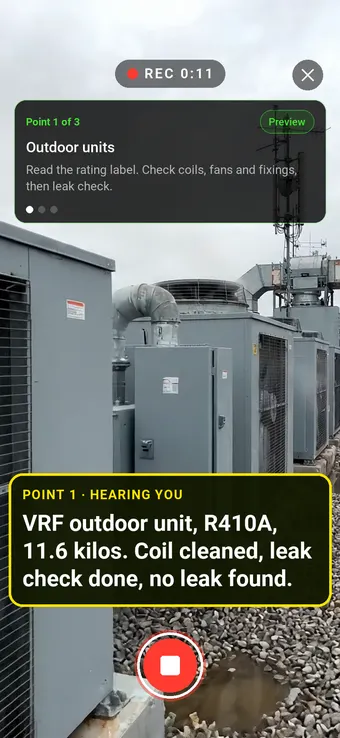
From the outdoor units in the clip above, Walk Cam takes the engineer on to the air handling unit and the chilled water pumps, films each one and writes down what was found and done as they speak.
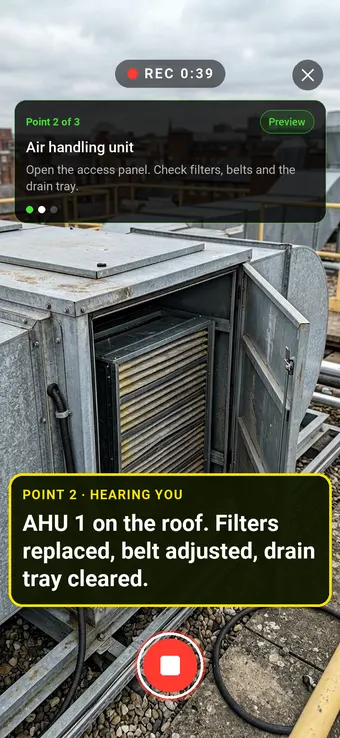
Point 2 of 3
Air handling unit
AHU 1 on the roof: filters replaced and the belts and drain tray checked, all spoken against that unit.
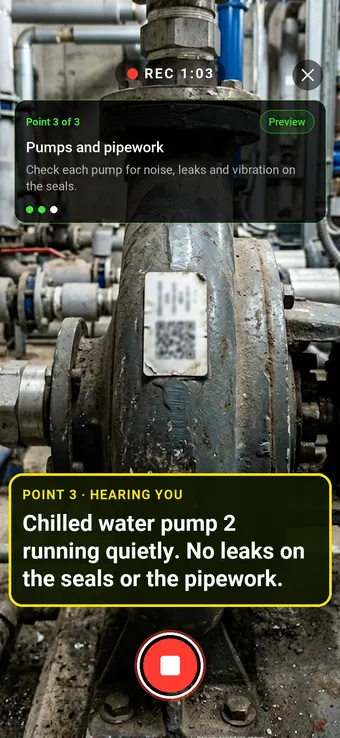
Point 3 of 3
Chilled water pumps
Chilled water pump 2 checked at the seals for leaks and vibration, with the result spoken against the pump.
What the report looks like
What an HVAC service report looks like.
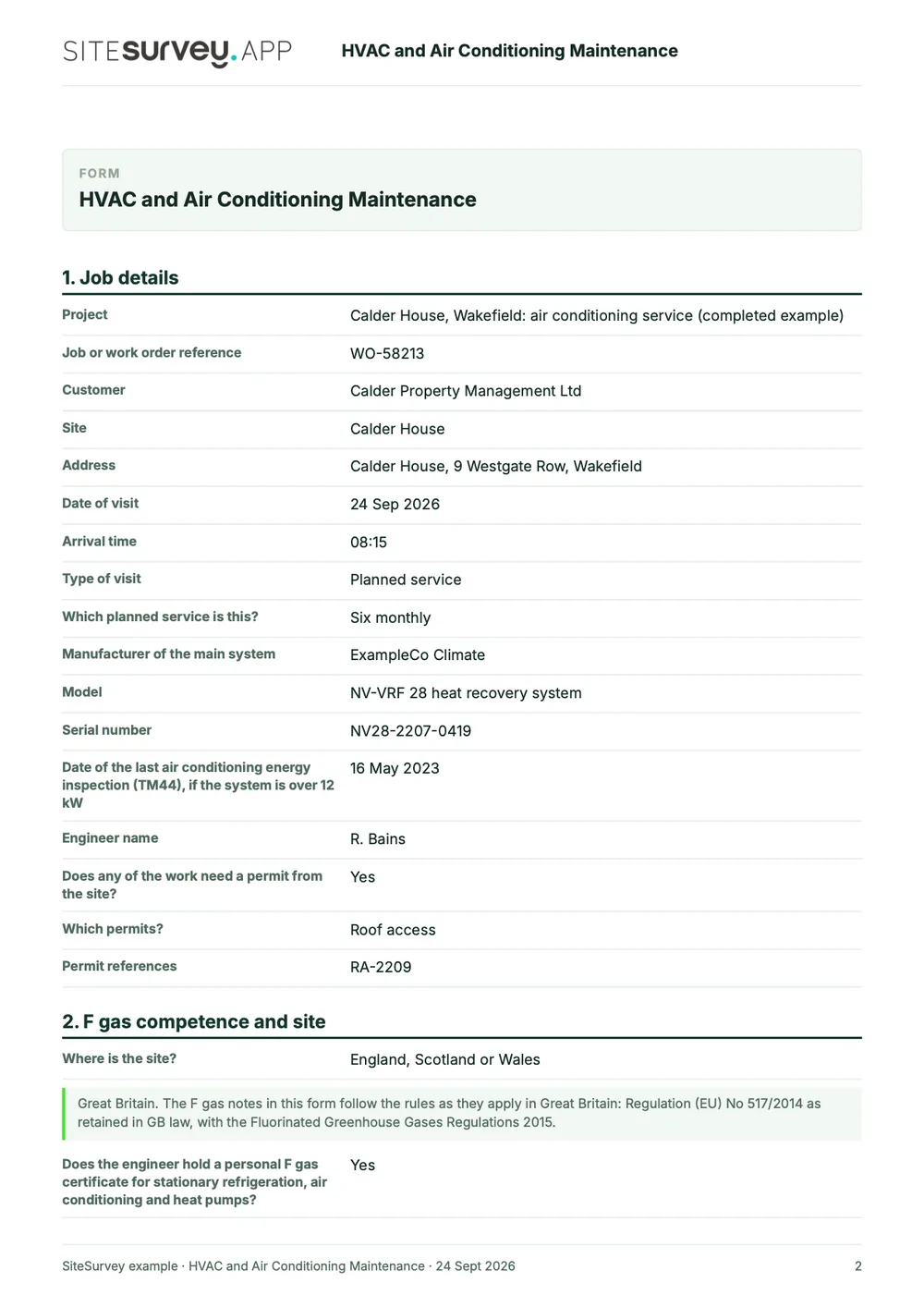
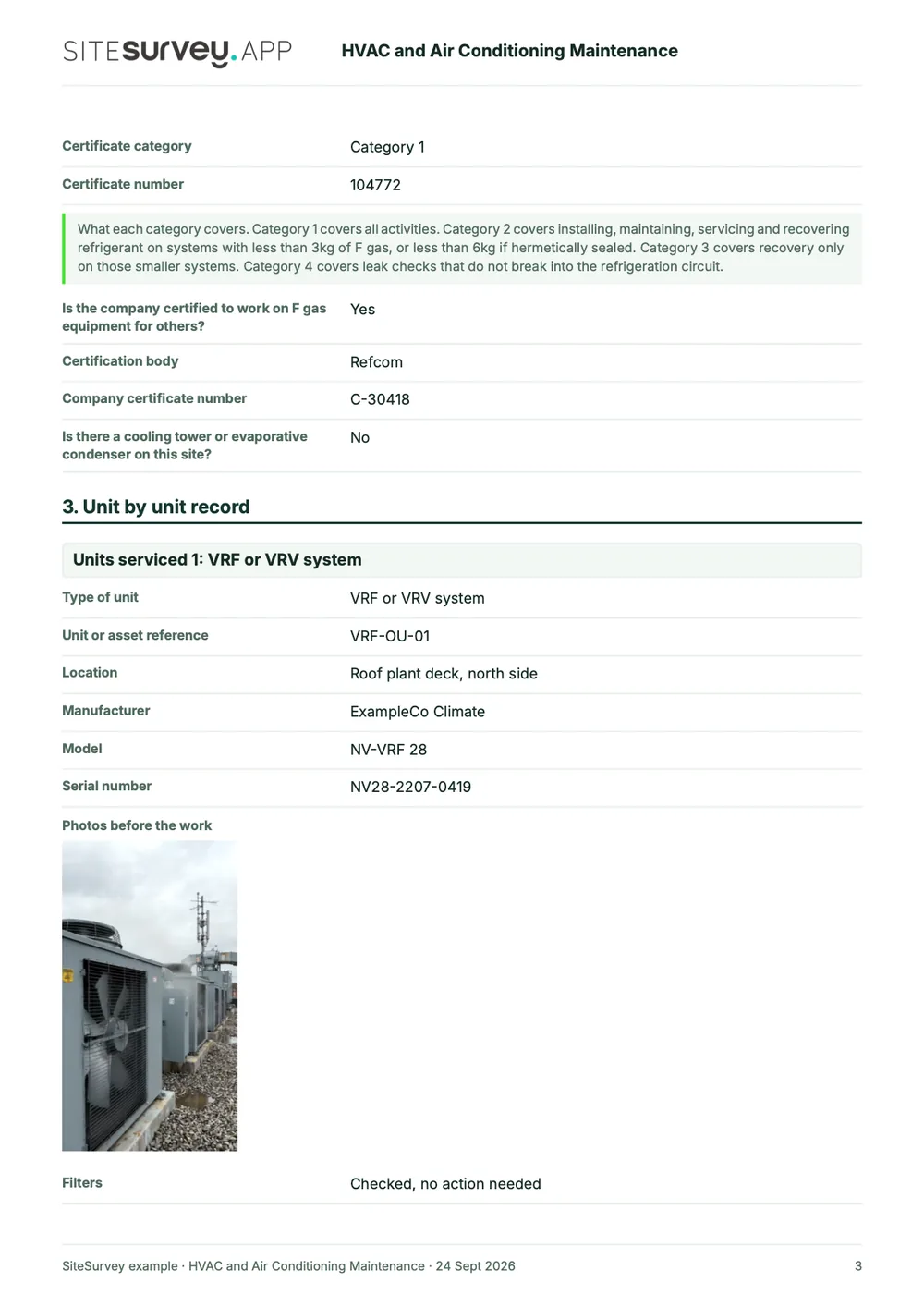
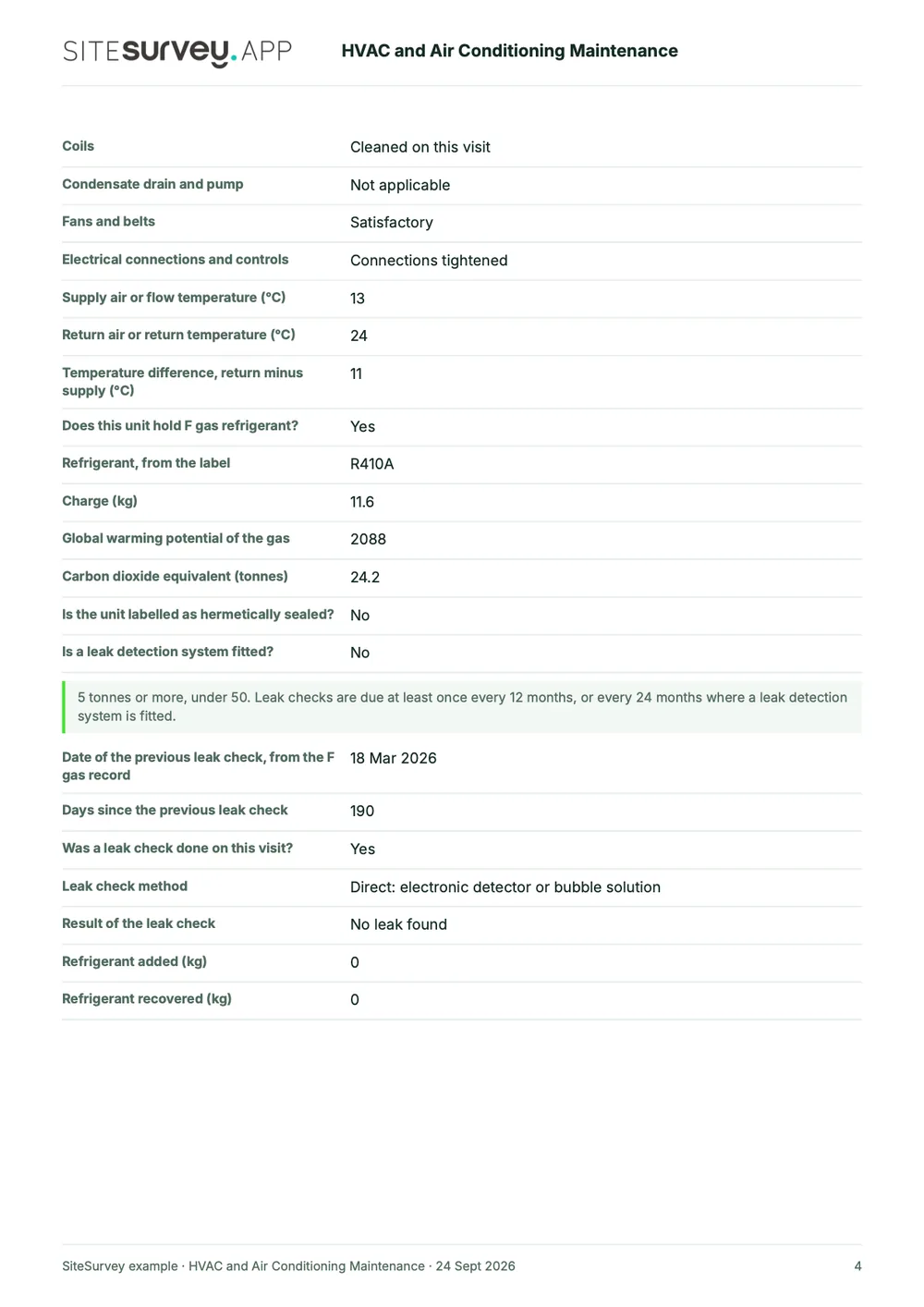
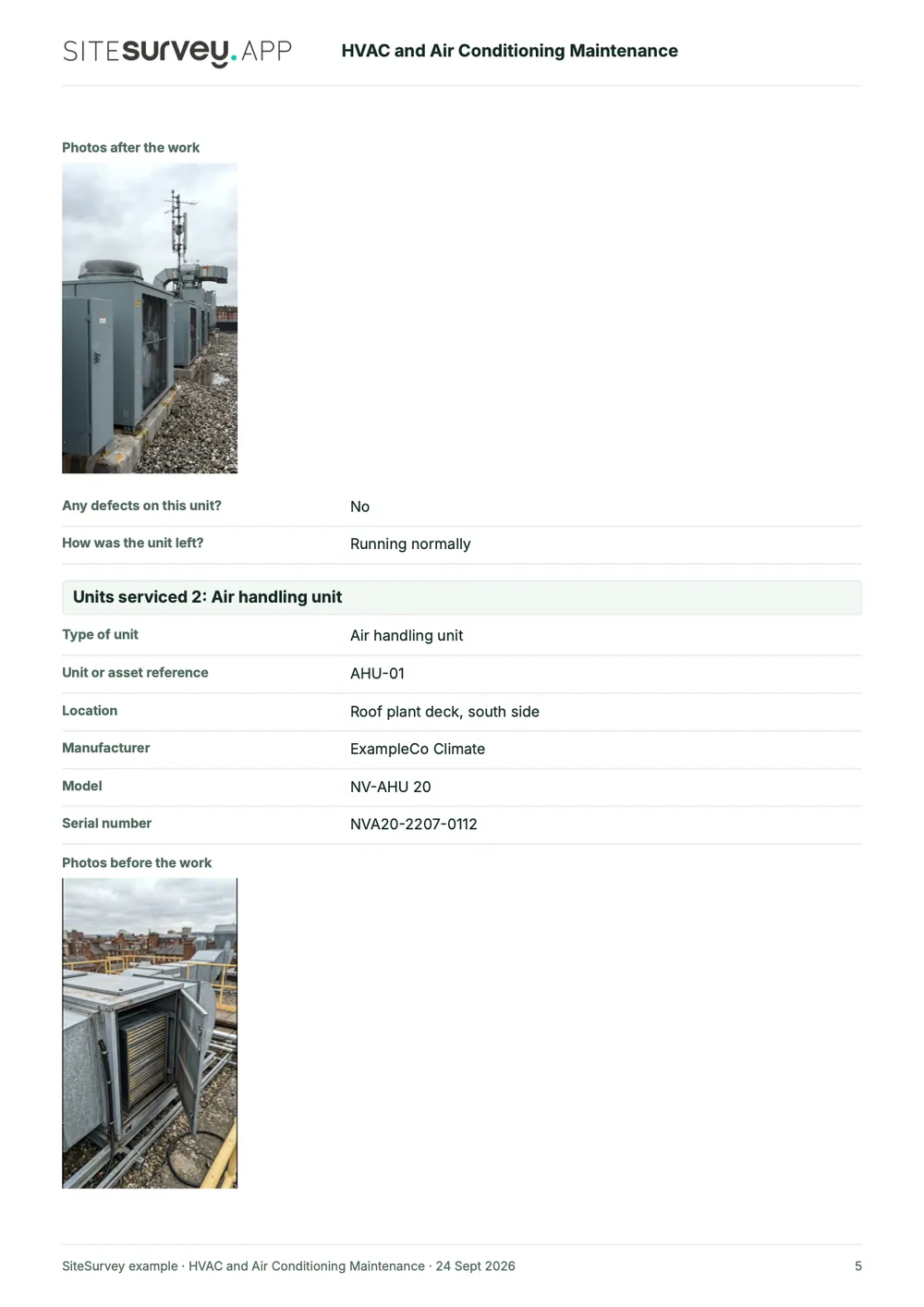
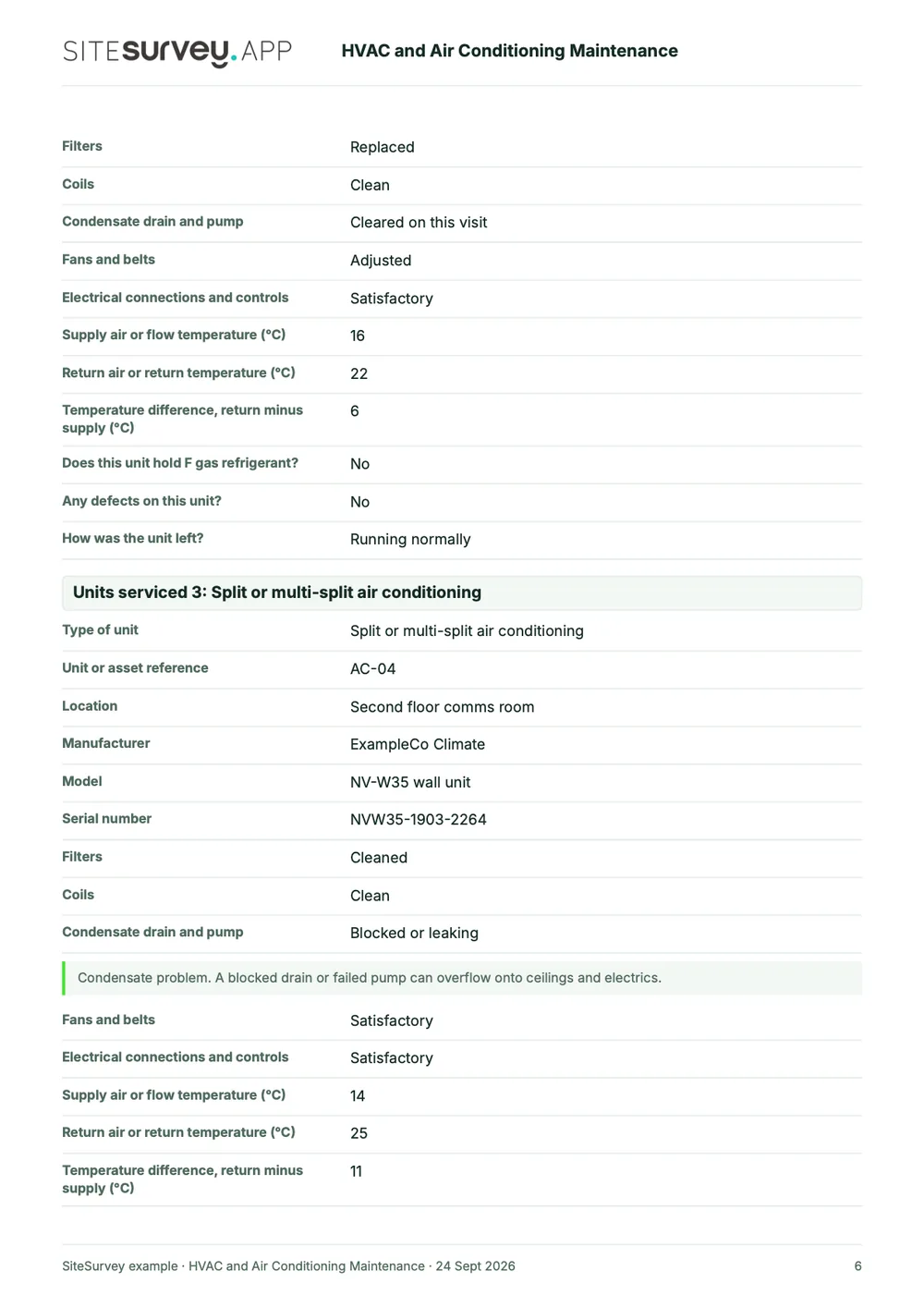
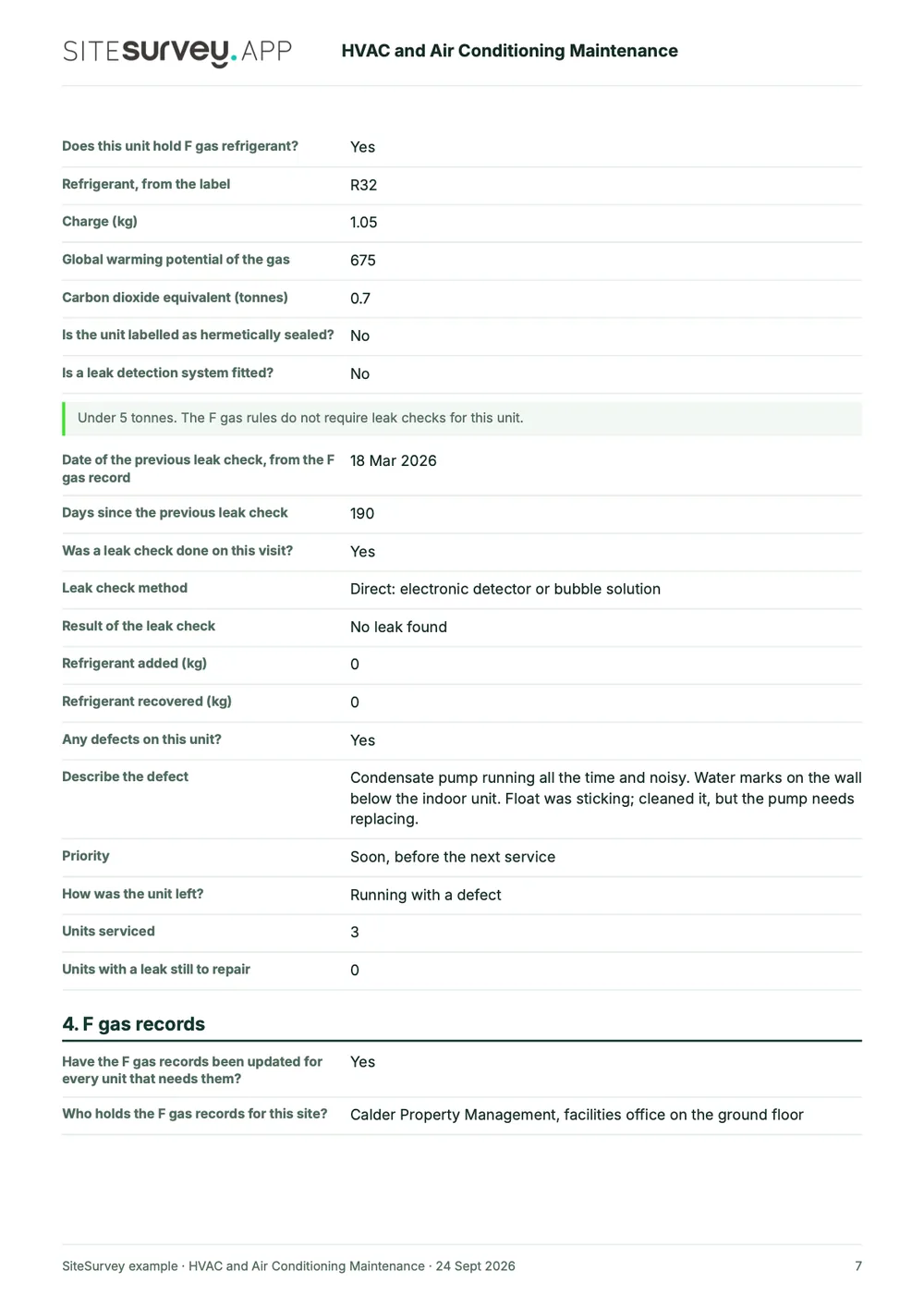
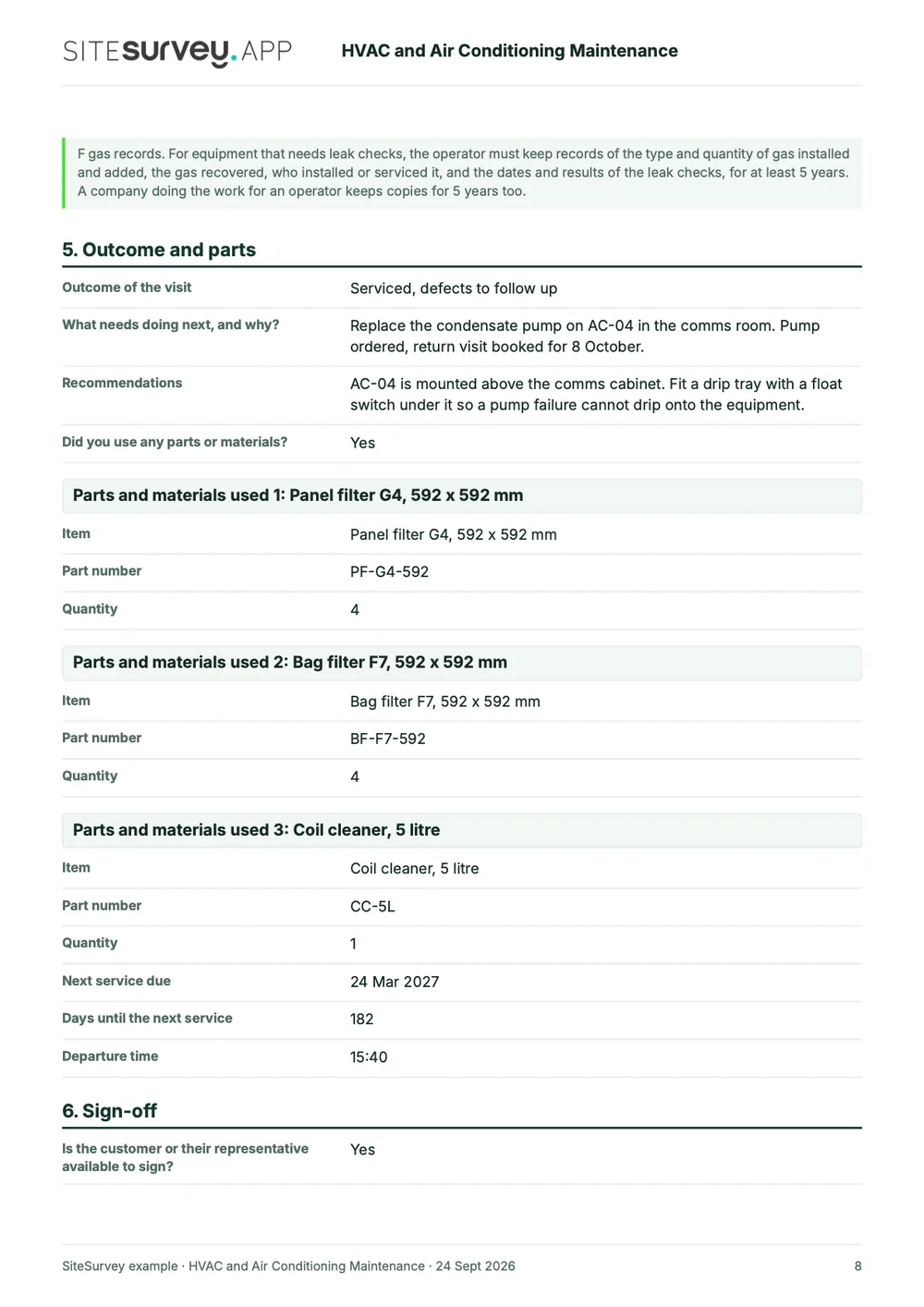
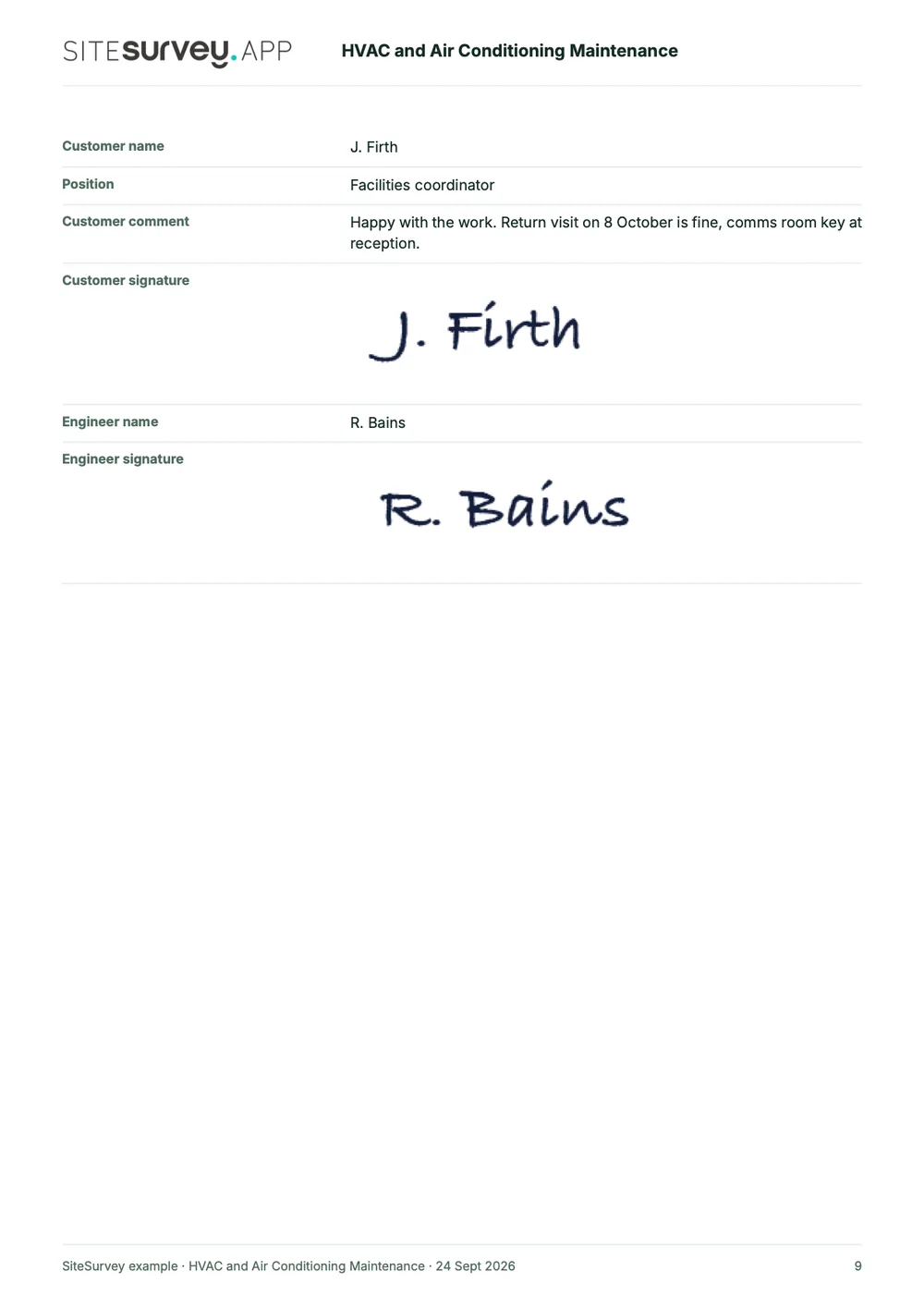
This is a full sample report for a six monthly air conditioning service, made from the HVAC and air conditioning maintenance form. Scroll through it here or download the PDF. Each unit comes out with its checks, temperatures, F gas details and photographs.
- 1The visit and the engineerJob reference, visit type, the system, the TM44 inspection date, and the engineer's F gas certificate category and number.
- 2Unit by unitEach unit with its reference, location, photographs, filters, coils, condensate, fans and electrics, and supply and return temperatures.
- 3The F gas detailsRefrigerant, charge, GWP and CO₂ equivalent, the leak check band, the method and result, and any gas added or recovered.
- 4Outcome and sign-offDefects with priority, what happens next, parts used, the next service date and the customer's and engineer's signatures.
Try the form
The form behind the report. Open it and try it.
A live SiteSurvey HVAC and air conditioning service form, shared by link with no login. It asks only what applies to the unit in front of you, works out the CO₂ equivalent and shows the F gas rule beside the answer.
Open the live form →See every question in the HVAC maintenance checklist →Or see it filled in: the finished service record with every answer. See the finished record →
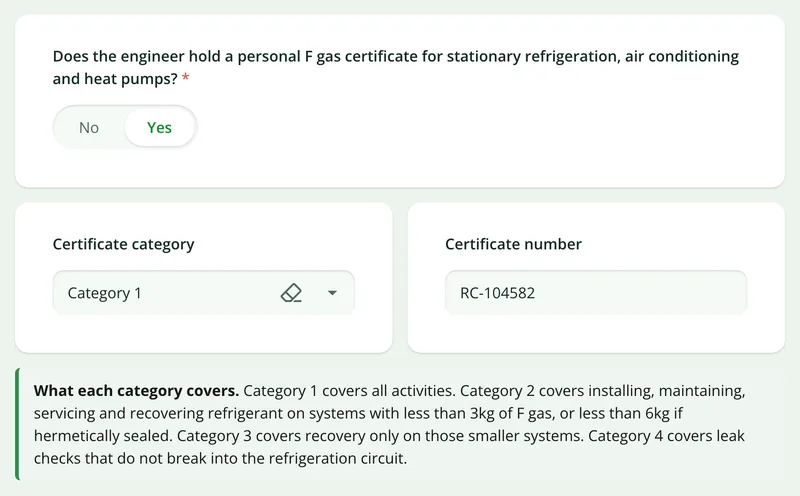
The engineer's F gas certificate
Answer yes and it asks for the category and number, and explains what each category lets the engineer do.
More than Walk Cam
Build the form. Share it by link.
Walk Cam films the inspection. The form behind it is yours to build, and anything you capture can be sent to someone outside your team as a link, with no login or app needed.
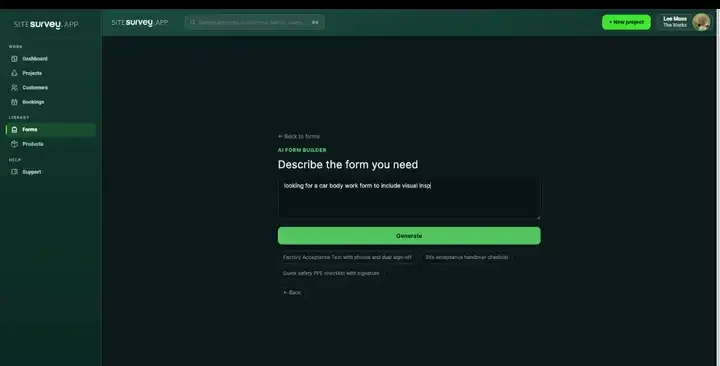
Build your HVAC service form with AI
Describe the checks you carry out and the AI assistant builds the form: fields, required photos, readings as numbers and follow-up questions that only appear when something fails. Refine it in chat, edit it visually, or start from a template.
How the form builder works →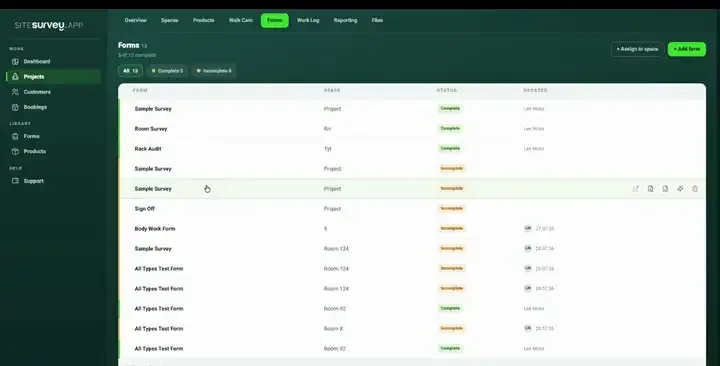
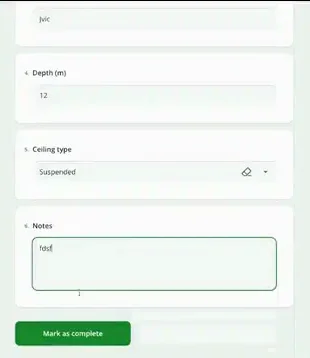
Share by link, no login needed
Make any form shareable and SiteSurvey gives it a unique URL, with an optional password. Customers, tenants or contractors fill it in on their phone’s browser, and their answers land in the same project. Walk Cam recordings and finished reports can be shared the same way, by link or by email.
How Walk Cam sharing works →What should HVAC service software record on each visit?
The unit, not just the job. The value is in recording every unit the same way, with readings as numbers, the F gas details the operator needs, and evidence of the work.
One record per unit
Each unit is its own section with its reference, location, make, model and serial, so findings are never put against the wrong one.
Temperatures as numbers
Supply and return temperatures are number fields, and the form works out the difference for you.
CO₂ equivalent worked out
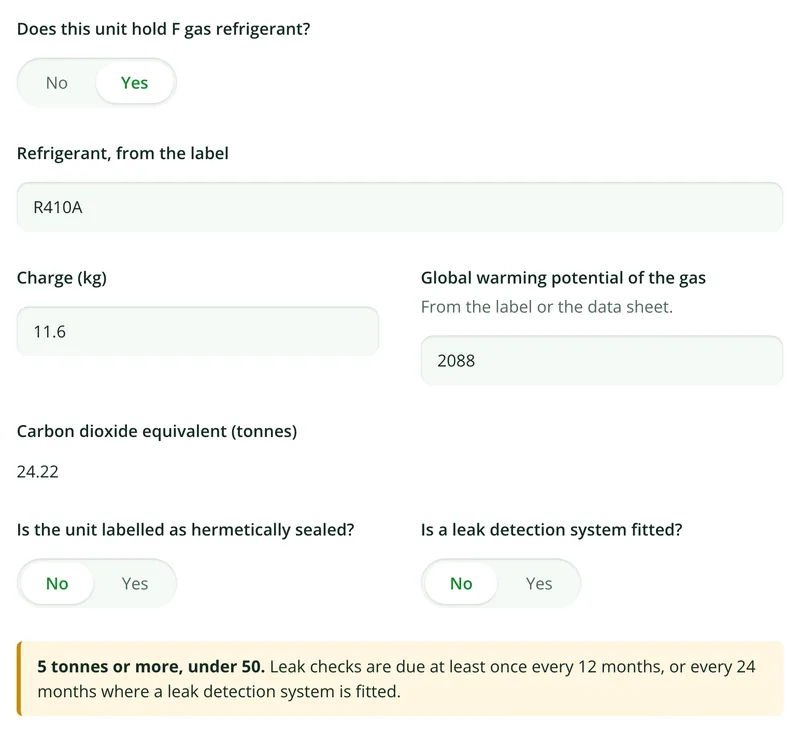
Enter the charge and GWP from the label and the form calculates the tonnes of CO₂ equivalent, then shows which leak check band applies.
Leak checks on the record
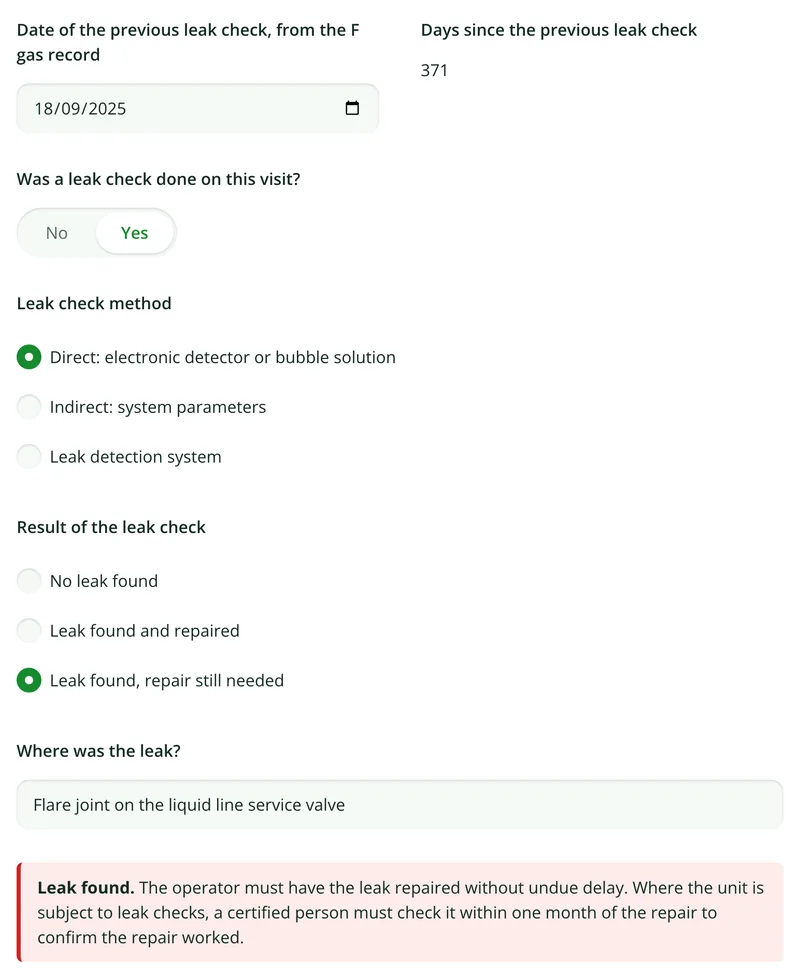
Previous leak check date, days since, method used, result, where any leak was, and gas added or recovered, per unit.
Photos before and after
Photograph the unit and its rating label before the work and again after, with any defect close up.
Offline on the roof
Roof plant, risers and basements rarely have signal. The visit captures on the device and syncs when you are back in coverage.
Start from the HVAC and air conditioning maintenance form.
Open the ready-made form and change it to suit your own service sheet. Every field below is editable, in chat or visually.
Job reference, visit type and service frequency
Engineer's F gas certificate category and number
A section per unit: type, reference, location, serial
Filters, coils, condensate drain, fans and belts, electrics
Supply and return temperatures, as numbers
Refrigerant, charge, GWP and CO₂ equivalent
Leak check method, result and gas added or recovered
Defects, parts used, next service due and signatures
Try it on your phone
Try it on this phone
Fill in the HVAC maintenance checklist on your phone now
See how the HVAC maintenance checklist looks on your phone
Scan the code with your phone camera. It opens the real form, no sign-up needed.
Open the live example and fill it in, just as your team would on site. No sign-up needed.
See it on this phoneEvery question is editable. Add this form to your account, then change the wording, add or remove questions and options, and make it fit your own jobs.
Records for this workflow
Keep the service visit and measured results distinct.
Use the right record for the work performed. Routine service findings, air measurements and boiler service evidence answer different questions even when they belong to the same site visit.
1. Record the service findings
Capture the unit reference, maintenance tasks, observations and work that remains open against the air handling unit.
AHU maintenance checklist →2. Retain air measurement evidence
Record the measurement locations and entered results with their design or target references. Do not substitute a general service tick for measured balancing evidence.
Air balancing report template →3. Keep boiler work identifiable
Use the boiler service record for the relevant asset and visit, with the procedure and specialist evidence needed for the work undertaken.
Boiler service checklist →
What is HVAC maintenance software?
HVAC maintenance software replaces paper service sheets for heating, ventilation and air conditioning with a mobile app that records each visit unit by unit. A typical record covers the job and site, the engineer and their F gas certificate, then for each unit its reference and location, filters, coils, condensate drain, fans and belts, electrical connections, supply and return temperatures, photographs, and for units holding F gas, the refrigerant, charge and leak check result. The finished record becomes the service report the customer signs.
What is the best HVAC service software?
The best HVAC service software depends on which part of the job you need help with. If you need to dispatch engineers, schedule visits, quote and invoice, choose a field service management tool built for that. If the problem is the service record itself, where units are recorded differently, F gas details are missed and photos stay on phones, look for a mobile app with a section per unit, readings as numbers, photos, leak check fields, offline working and a signed report. SiteSurvey is strong on the record: it does not dispatch, schedule or invoice.
How often do air conditioning systems need F gas leak checks?
In Great Britain, stationary air conditioning, refrigeration and heat pump equipment holding 5 tonnes of CO₂ equivalent or more of F gas must be leak checked: at least every 12 months from 5 to under 50 tonnes, every 6 months from 50 to under 500 tonnes, and every 3 months at 500 tonnes or more. A leak detection system doubles each interval. Hermetically sealed equipment under 10 tonnes, labelled as such, is exempt. This is article 4 of Regulation (EU) No 517/2014 as retained in GB law. Northern Ireland follows the EU rules.
What F gas records does the operator have to keep?
For each piece of equipment that needs leak checks, the operator must keep a record of the type and quantity of F gas installed, any gas added, the quantity recovered, who installed or serviced it, and the dates and results of the leak checks, for at least 5 years. A company doing the work for an operator keeps copies for 5 years too. SiteSurvey records these details on every visit so the operator can add them to their records; it is not an F gas register itself.
Can it work out the CO₂ equivalent of a unit?
Yes. The engineer enters the charge in kilograms and the global warming potential from the rating label or data sheet, and the form calculates the tonnes of CO₂ equivalent. It then shows the leak check band that applies, so it is clear on the report why a leak check was or was not needed.
What happens when a leak is found?
The form asks where the leak was and whether it was repaired on the visit or still needs repair. The operator must have a leak repaired without undue delay, and where the unit is subject to leak checks, a certified person must check it within one month of the repair to confirm it worked. Units with a leak still to repair are counted at the end of the form.
Does it record the engineer's F gas certificate?
Yes. The form asks whether the engineer holds a personal F gas certificate for stationary refrigeration, air conditioning and heat pumps, its category and number, and whether the company is certified to work on F gas equipment for others. It is against the law to work on equipment containing F gas without the correct qualification, so an engineer without one is told to record the non refrigerant checks only. SiteSurvey records the certificate; it does not check or issue it.
Does it schedule, dispatch or invoice HVAC jobs?
No. SiteSurvey records the service visit and produces the report. It does not dispatch engineers, generate recurring service visits, quote or invoice. The form records the next service due date and the parts used, but booking that visit and billing for the parts happen in your own systems. For planned rounds across all kinds of plant, see the PPM software page.
Does it work on roofs and in plant rooms with no signal?
Yes. The whole visit runs on the device, including photographs, Walk Cam video and signatures, and syncs to the project when the connection returns. Roof plant decks, risers and basement plant rooms are where signal is usually worst.
Who is it for?
HVAC and air conditioning engineers, building services and refrigeration contractors, and in-house maintenance teams who service split and VRF systems, packaged units, air handling units, fan coil units, heat pumps, ventilation and chillers, and need to give the customer a consistent record of every unit.
How much does it cost?
Pricing is per user, not per unit or site. The Works plan, which includes the custom form builder and reports used for HVAC service visits, is £25 per user per month. The Base plan starts at £13 per user per month. Every plan starts with a trial from £1, cancel any time.
Go deeper
Guides and tools behind this workflow.
See it on your next job