Form library · Facilities and maintenance
Work order template
A work order and service report form for reactive repairs, planned work, installations and return visits. It records the job, the safety checks before starting, the work done, parts used, tests, the outcome and the customer's sign-off. Every question is listed below, and you can fill the live form in on this page.
Ready to use from the form library, and editable. Trial from £1, cancel any time.
What should a work order include?
A work order should record the job reference, customer, site and address, the reported fault or task, the equipment and the engineer. The service report then records the safety checks, what was found, the work carried out, parts used, tests and results, and whether the job was completed, left with a temporary fix or needs a follow-up. It ends with the customer's and engineer's signatures.
Last updated . Facts checked on 30 September 2026 against regulation 13 of the Electricity at Work Regulations 1989, regulation 14 of the Electricity at Work Regulations 1989 and regulation 3 of the Gas Safety (Installation and Use) Regulations 1998.
Try the work order form live
Answer a few questions and watch it adapt. Your answers are not saved, and any photos you add are deleted within the hour.
This is the real form as your team would use it: questions appear as you answer, scores work themselves out and you can add photos and signatures. No sign-up needed.
Fill it in on a phone or tablet
Your team completes the work order and service report on site in the SiteSurvey app on iPhone, iPad and Android phones and tablets. The project name and address fill in for them, it works without signal, and it syncs when the device is back online with photos kept against the question they answer.
Customers and subcontractors do not need the app: send them a link and they can fill it in from any browser.
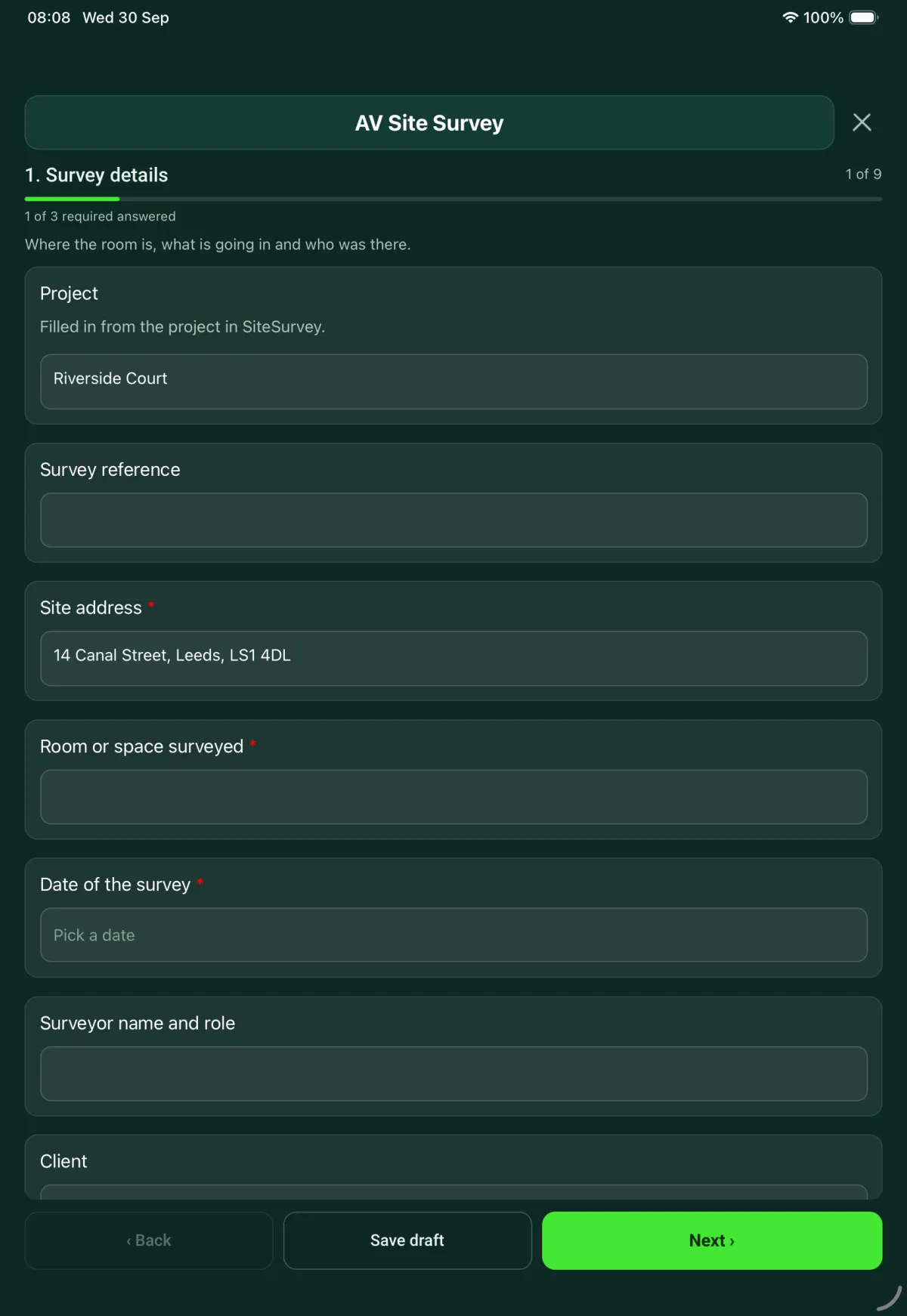
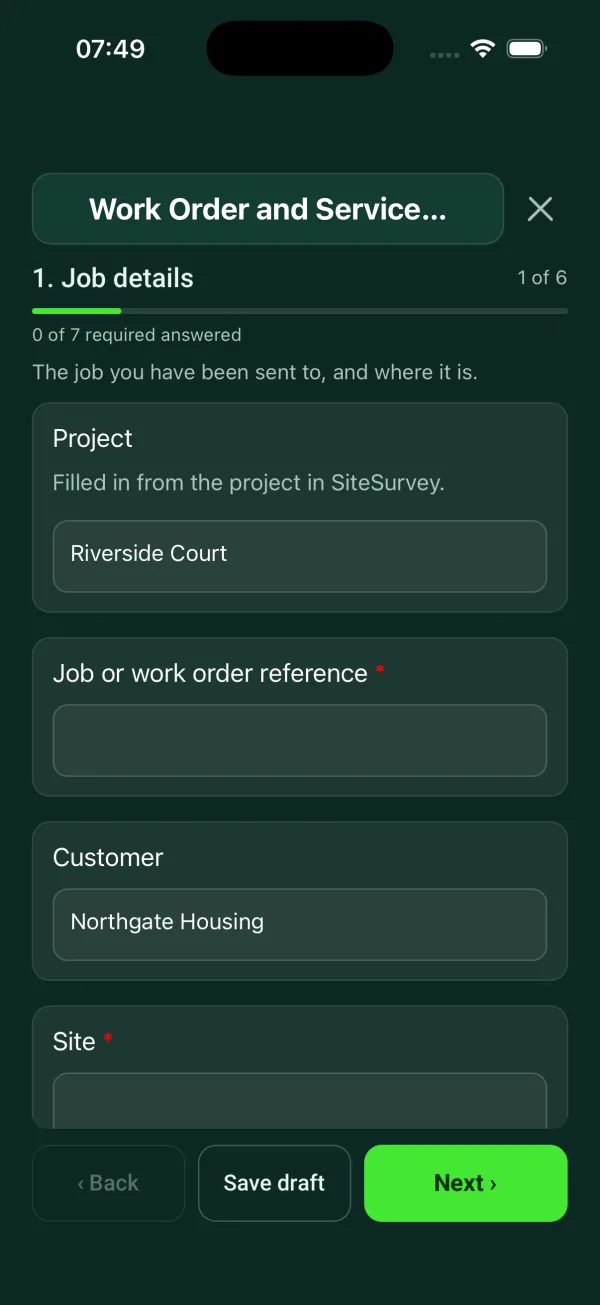
Every question in the work order template
Job sheet for a reactive or planned job: safety before starting, work done, parts used, tests, outcome and customer sign-off. 6 sections and 72 questions. Follow-up questions and guidance appear only when an answer calls for them, so the person on site never sees the ones that do not apply.
Details you only enter once
Add this form to a project in SiteSurvey and it fills in what the project already knows, so nobody on site retypes it and every form on the job uses the same names. Anything filled in can still be changed.
- Project: the project name
- Customer: the project's customer
- Site: the site, when the form is opened for a space or a product
- Address: the site address, from the space or the project
- Equipment worked on: the product it is opened for
- Manufacturer: the product's manufacturer
- Model: the product's model
Job details
The job you have been sent to, and where it is.
- ProjectShort answerFills in from the project name
- Job or work order reference*Short answer
- CustomerShort answerFills in from the project's customer
- Site*Short answerFills in from the site, when the form is opened for a space or a product
- AddressShort answerFills in from the site address, from the space or the project
- Date of visit*Date
- Arrival timeTime
- Type of job*Choose one
- Reactive repair
- Planned work
- Installation
- Return visit
- Reference of the earlier jobShort answerShown when “Type of job” is “Return visit”
- PriorityChoose one
- Emergency
- Urgent
- Routine
- CheckEmergency job. Make the fault safe first. Record the permanent repair as a follow-up if it cannot be done on this visit.Shown when “Priority” is “Emergency”
- Requested byShort answer
- Date the job was reportedDate
- Days from report to visitWorked out by the formShown when “Date the job was reported” is answered and “Date of visit” is answered
- CheckThe date reported is after the date of the visit. Check the dates.Shown only when the answers above make it relevant
- TradeChoose one
- Electrical
- Plumbing and heating
- Gas
- Ventilation and air conditioning
- Building fabric
- Doors, locks and access control
- AV
- IT and network
- Other (describe)
- Reported fault or task*Notes
- Where on site is the work?Short answer
- Equipment worked onShort answerFills in from the product it is opened for
- ManufacturerShort answerFills in from the product's manufacturer
- ModelShort answerFills in from the product's model
- Serial number or asset tagShort answer
- Engineer or technicianShort answer
Safety before starting
Answer these before you touch anything.
- Have you read the risk assessment and method statement for this job?Yes or No
- CheckRead the risk assessment for the job before you start. If there is not one, do your own check of the hazards and tell your supervisor.Shown when “Have you read the risk assessment and method statement for this job?” is No
- Is there anything on site the risk assessment does not cover?Yes or No
- What, and what have you done about it?NotesShown when “Is there anything on site the risk assessment does not cover?” is Yes
- Does any of the work need a permit from the site?Yes or No
- Which permits?Tick all that apply
- Electrical isolation
- Hot work
- Roof access
- Confined space
- Other (describe)
Shown when “Does any of the work need a permit from the site?” is Yes - Permit referencesShort answerShown when “Does any of the work need a permit from the site?” is Yes
- WarningDo not start work that needs a permit until the permit has been issued.Shown only when the answers above make it relevant
- Will you work on or near electrical equipment or wiring?Yes or No
- How is it being made safe?Choose one
- Isolated and locked off
- Isolated, no lock fitted
- Working live
- No exposed live parts
Shown when “Will you work on or near electrical equipment or wiring?” is Yes - Where was it isolated?Short answerShown only when the answers above make it relevant
- Did you prove it dead with a suitable tester before starting?Yes or NoShown only when the answers above make it relevant
- WarningNot proved dead. HSE guidance is that conductors should be proven dead, using suitable test equipment, before work starts. Do not start until they have been.Shown only when the answers above make it relevant
- CheckNo lock fitted. Equipment made dead for the work must be kept from becoming charged again while the work is done (Electricity at Work Regulations 1989, regulation 13). HSE guidance is to put a lock on each isolation device and for the person doing the work to keep the keys.Shown when “Will you work on or near electrical equipment or wiring?” is Yes and “How is it being made safe?” is “Isolated, no lock fitted”
- WarningLive work. Nobody may work on or near a live conductor where danger may arise unless it is unreasonable for it to be dead, it is reasonable to work on it live, and suitable precautions are taken to prevent injury (Electricity at Work Regulations 1989, regulation 14).Shown when “Will you work on or near electrical equipment or wiring?” is Yes and “How is it being made safe?” is “Working live”
- Why can it not be made dead, and what precautions are in place?NotesShown when “Will you work on or near electrical equipment or wiring?” is Yes and “How is it being made safe?” is “Working live”
- Will you work on a gas fitting?Yes or No
- CheckGas work. No one may work on a gas fitting unless they are competent to do so, and an employer or self-employed person doing gas work must be a member of the class of persons approved by HSE (Gas Safety (Installation and Use) Regulations 1998, regulation 3). HSE says anyone employed to work on gas appliances in homes must be a Gas Safe registered engineer.Shown when “Will you work on a gas fitting?” is Yes
- Gas Safe registration numberShort answerShown when “Will you work on a gas fitting?” is Yes
- Who on site knows you are working?Short answer
Work carried out
What you found, what you did and what you used.
- GuidanceWhat a good photo shows. Take the before photo from where you will take the after photo, so the two can be compared. Include the label or asset tag where there is one.
- Before photosPhotos
- What did you find?Notes
- Work carried out*Notes
- After photosPhotos
- Did you use any parts or materials?Yes or No
- Parts and materials usedRepeat for each part. Each one asks:Shown when “Did you use any parts or materials?” is Yes
- ItemShort answer
- Part numberShort answer
- QuantityNumber
- Total quantity usedWorked out by the formShown when “Did you use any parts or materials?” is Yes
- Did you take old parts and waste away?Yes or NoShown when “Did you use any parts or materials?” is Yes
Tests carried out
The checks you did to show the work is right.
- Tests carried outTick all that apply
- Function test
- Electrical tests
- Leak or pressure test
- Flow or temperature check
- Signal, network or picture test
- Other (describe)
- No tests needed
- Readings and resultsNotesShown only when the answers above make it relevant
- Did everything pass?Choose one
- All passed
- Some failed
Shown only when the answers above make it relevant - Which failed, and what was done?NotesShown when “Did everything pass?” is “Some failed”
- WarningA test has failed. Do not record the job as completed until it has been put right, or record it as a follow-up below.Shown when “Did everything pass?” is “Some failed”
- Was a certificate or test record issued?Yes or NoShown only when the answers above make it relevant
- Certificate or record referenceShort answerShown when “Was a certificate or test record issued?” is Yes
Outcome
How you left the job, and what happens next.
- Outcome*Choose one
- Completed
- Temporary fix
- Follow-up needed
- CheckYou have recorded the job as completed, but a test failed. Check the test results or change the outcome.Shown when “Outcome” is “Completed” and “Did everything pass?” is “Some failed”
- What is temporary about the fix?NotesShown when “Outcome” is “Temporary fix”
- Why is a follow-up needed?Choose one
- Parts on order
- Specialist or other trade needed
- No access
- Needs a quote or approval
- Ran out of time
- Other (describe)
Shown only when the answers above make it relevant - What needs doing on the next visit?NotesShown only when the answers above make it relevant
- Next visit dateDateShown only when the answers above make it relevant
- Days until the next visitWorked out by the formShown only when the answers above make it relevant
- CheckThe next visit date is before today's visit. Check the date.Shown only when the answers above make it relevant
- How did you leave it?Choose one
- Safe and working
- Safe, but not working
- Isolated and labelled out of use
- Not safe
- WarningLeft unsafe. Do not leave site until it is made safe, isolated or kept out of use, if you are competent to do that. Tell the person responsible for the site before you go.Shown when “How did you leave it?” is “Not safe”
- CheckLabel the isolator so nobody switches it back on, and tell the person responsible for the site.Shown only when the answers above make it relevant
- Who on site did you tell, and when?Short answerShown only when the answers above make it relevant
- RecommendationsNotes
- Does the customer need a quote for further work?Yes or No
- Departure timeTime
- Time on site (hours)Number
- CheckMore than 12 hours on site. Check the figure.Shown only when the answers above make it relevant
Sign-off
The customer signs for the visit. The engineer signs for the work.
- GuidanceThis report records the work done on this visit. It is not a test certificate.
- WarningYou recorded that the job was left unsafe. Make sure the customer knows before they sign.Shown when “How did you leave it?” is “Not safe”
- Is the customer or their representative available to sign?Yes or No
- Why not, and who will you send the report to?Short answerShown when “Is the customer or their representative available to sign?” is No
- Customer nameShort answerShown when “Is the customer or their representative available to sign?” is Yes
- PositionShort answerShown when “Is the customer or their representative available to sign?” is Yes
- Is the customer satisfied with the work?Yes or NoShown when “Is the customer or their representative available to sign?” is Yes
- Customer commentNotesShown when “Is the customer or their representative available to sign?” is Yes
- CheckThe customer is not satisfied. Write down what they are unhappy with in their comment, and pass it to the office today.Shown when “Is the customer or their representative available to sign?” is Yes and “Is the customer satisfied with the work?” is No
- Customer signatureSignatureShown when “Is the customer or their representative available to sign?” is Yes
- Engineer nameShort answer
- Engineer signatureSignature
Work order template questions
Is this a work order or a service report?
Both. The first page holds the job details you would put on a work order, and the rest is the report of the visit, so it also works as a job sheet. It covers electrical, plumbing and heating, gas, ventilation and air conditioning, building fabric, doors and access control, AV and IT work.
What safety checks does it ask for before work starts?
It asks whether the engineer has read the risk assessment and method statement, whether anything on site is not covered by it, and whether a permit is needed for electrical isolation, hot work, roof access or a confined space. It then asks about electrical isolation, gas work and who on site knows the work is happening.
What does it check on electrical isolation?
It asks how the equipment is made safe and whether it was proved dead with a suitable tester. Regulation 13 of the Electricity at Work Regulations 1989 says equipment made dead for the work must be kept from becoming charged again, and HSE guidance is to lock each isolation device. Regulation 14 says nobody may work on or near a live conductor unless it is unreasonable for it to be dead, reasonable to work on it live, and suitable precautions are taken.
Who can work on gas?
No one may work on a gas fitting unless they are competent to do so, and an employer or self-employed person doing gas work must be a member of the class of persons approved by HSE. That is regulation 3 of the Gas Safety (Installation and Use) Regulations 1998. HSE says anyone employed to work on gas appliances in homes must be a Gas Safe registered engineer, so the form asks for the registration number.
What if the job cannot be finished on this visit?
The outcome is completed, temporary fix or follow-up needed. A temporary fix or follow-up asks why, such as parts on order or no access, what needs doing next time and the next visit date. The form also records how the job was left, from safe and working to not safe, and who on site was told.
Can the customer sign the job sheet on site?
Yes. The customer gives their name, position, whether they are satisfied and a comment, then signs on the device, and the engineer signs for the work. Before and after photos go with the report, which goes out as a PDF or a share link. The report records the visit and is not a test certificate.
Related
Related templates
Templates that go with the work order form
One issue, fast: where, what, photo, priority, who owns it.
Planned maintenance visit: records seen, asset by asset tasks, water temperatures, work done and next visit.
Customer acceptance at handover: work completed, outstanding items, customer name and signature.
Service visit record for air conditioning, heat pumps, ventilation and air handling units. Unit by unit checks, refrigerant and F gas leak checks, parts used and sign-off.
Use this work order form with your team
Add it from the form library in one click, change any question, and every completed form becomes a branded PDF report.
Start your trial →