Routine property inspections

Property inspection app with the report sent before you leave.

Walk the property room by room, record the condition of each one against the same checklist, photograph anything that needs attention and flag the repair. The inspection report is ready to send to the landlord from the doorstep, not typed up at the end of the day.

£25 per user per month on The Works, Base from £13 · trial from £1, cancel any time

See a sample report ↓Start from the property inspection checklist ↓

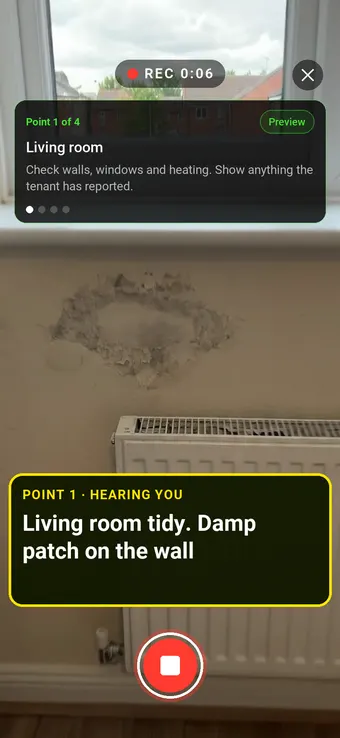
Walk Cam recording a damp patch on a rented flat's living room wall, with the point card and the live transcription on screen

6

Rooms

2

Alarms tested

3

Repairs

27 Mill Lane, the sample report below

What is a routine property inspection, and how much notice is needed?

A routine property inspection is a visit during a tenancy to check the home's condition, test alarms and catch repairs early. In England, the landlord or someone authorised in writing may enter at reasonable times to view the condition, on 24 hours' written notice to the occupier. Wales also requires at least 24 hours' notice.

Last updated 4 October 2026. Facts checked on 4 October 2026 against the Landlord and Tenant Act 1985, section 11 and the Renting Homes (Wales) Act 2016, section 98.

Property inspection notice and frequency

What the law sets, and what is common practice.

QuestionAnswerSource
Notice before a routine inspection, EnglandAt least 24 hours, in writing, at a reasonable time of dayLaw: Landlord and Tenant Act 1985, section 11(6)
Notice before a routine inspection, WalesAt least 24 hours, to the contract-holder, at a reasonable timeLaw: Renting Homes (Wales) Act 2016, section 98
How often to inspectCommonly every 3 to 6 monthsPractice, not law: there is no statutory frequency
HMOs and known problemsOften more frequent than other letsPractice, not law

Sources: the Landlord and Tenant Act 1985, section 11 and the Renting Homes (Wales) Act 2016, section 98.

SiteSurvey for property inspections, at a glance

What it is
A mobile inspection app for iOS and Android, with a web portal, used to record routine property inspections room by room.
Who it is for
Landlords, letting and managing agents, and social landlords inspecting occupied homes, and the inspectors who visit for them.
What it records
Room condition and cleanliness, damp and leaks, alarm tests, tenant-reported issues and repairs with priority, photographed and marked up.
Evidence
Every entry is dated and attributed to the inspector, signatures are taken on the device, and it works fully offline.
Price
£25 per user per month on The Works plan, which includes the form builder, booking calendar and reports. Trial from £1, cancel any time.
What it does not do
It does not serve notice on tenants, collect rent or manage tenancies, and it does not assess HHSRS hazards for you.

The inspection takes twenty minutes. The report takes an evening.

Notes on a clipboard, photos on a phone and a report written up later mean the landlord hears about a leak days after you saw it, and every inspector's report looks different. The visit is the easy part; turning it into something the landlord can act on is where the time goes.

Reports that vary by inspector

Each person writes it their own way, so landlords cannot compare one visit with the last.

Repairs that wait for the write-up

A problem found on Monday reaches the landlord on Friday, because the report had to be typed first.

Photos without context

A picture of a stained ceiling means little without the room, the date and what was done about it.

How does a property inspection app work, from booking to report?

01 · Book the visit

Schedule the inspection so it lands in the inspector's own calendar with the property details attached.

02 · Inspect each room

Work through the same checklist in every room: condition, cleanliness, safety checks and anything reported by the tenant.

03 · Flag the repairs

Photograph each issue, mark it up, and record the priority and who should fix it.

04 · Send the report

Share the finished inspection as a PDF or a link, with photographs in place, before you are back in the car.

Walk Cam, point by point

The whole visit, room by room.

Walk Cam guides the inspector through each room in turn, films it and writes down what they say, so the landlord's report is done by the time the visit is.
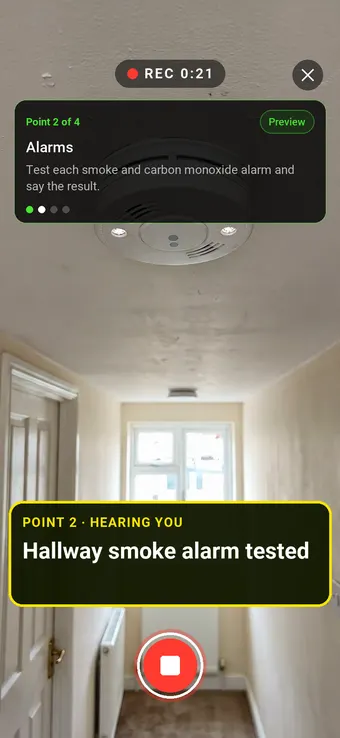
A finger pressing the test button on a hallway smoke alarm, with the Walk Cam point card and live transcription

Point 2 of 4

Alarms

Every smoke and carbon monoxide alarm tested, with the result said and recorded.
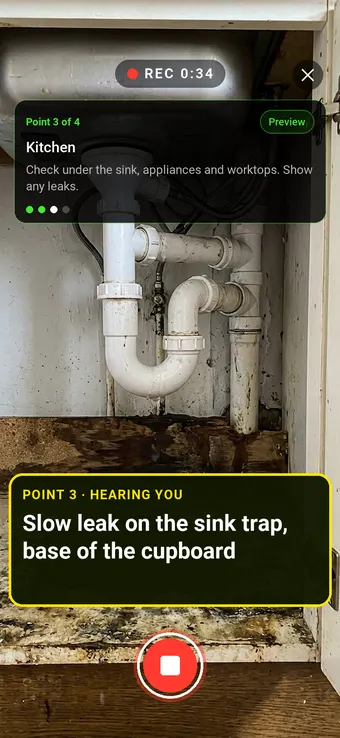
Water leaking from a trap under a kitchen sink, with the Walk Cam point card and live transcription

Point 3 of 4

Kitchen

Leaks and damage filmed where they are, with the repair and its priority.
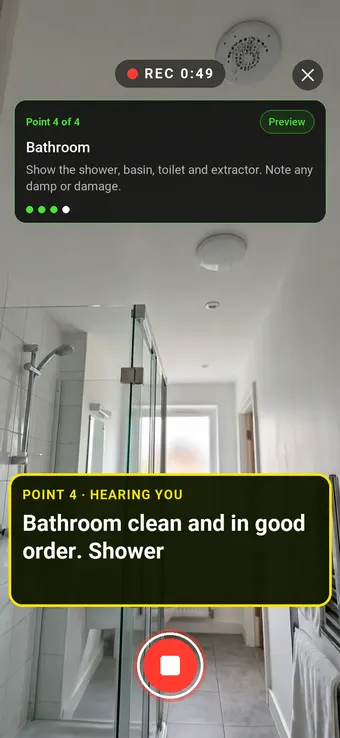
A clean rented flat bathroom with a shower enclosure, with the Walk Cam point card and live transcription

Point 4 of 4

Bathroom

The bathroom checked for damp, damage and working extraction.

What the report looks like

What a property inspection report looks like.

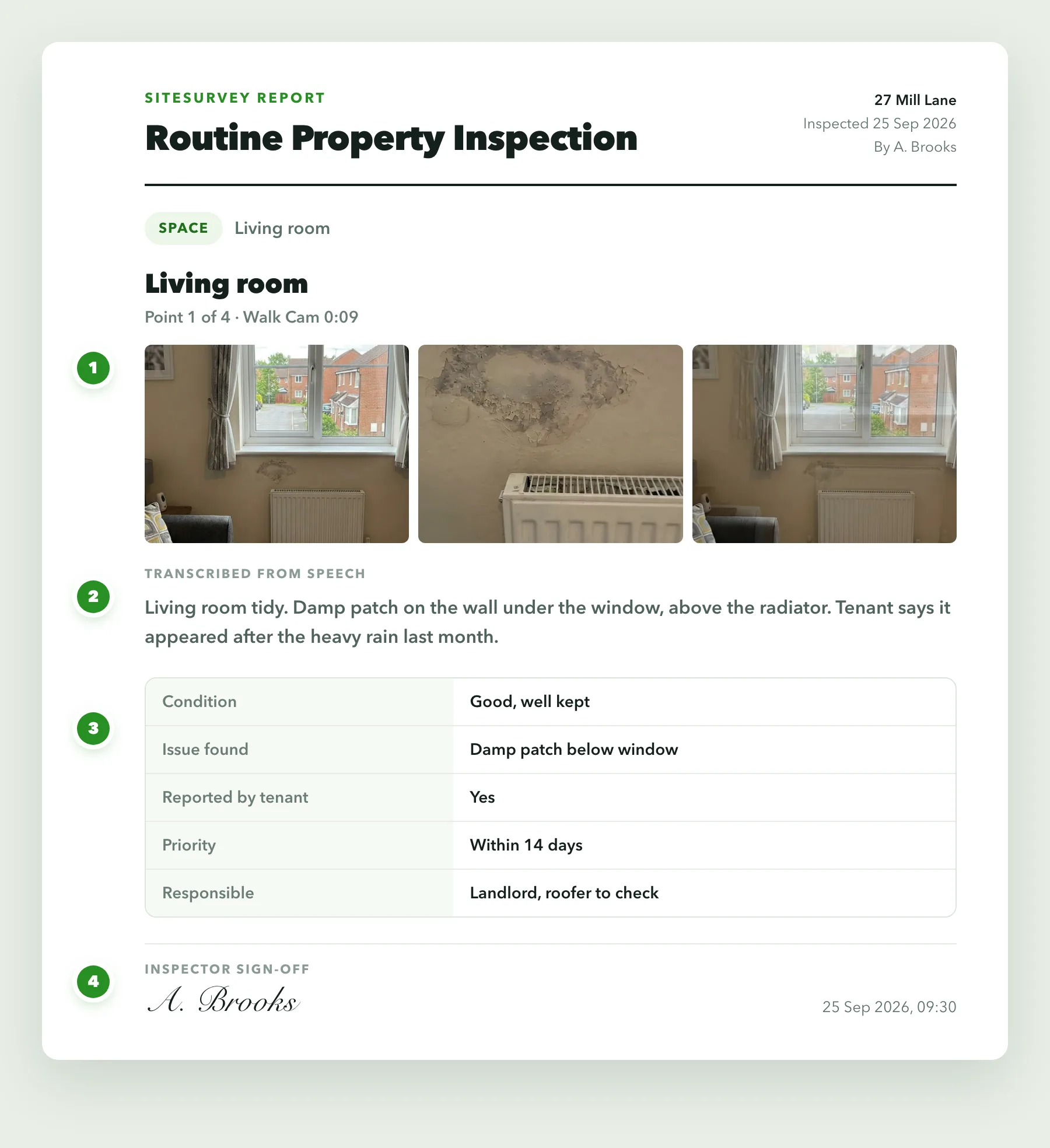
This is a full sample report, made with the SiteSurvey report builder. Scroll through it here or download the PDF. The photographs are stills from the Walk Cam clips on this page.

  1. 1The visit and the noticeWho inspected, when, and the date written notice was given to the tenant.
  2. 2Alarms and safety recordsEach smoke and carbon monoxide alarm tested on the visit, with the dates of the gas and electrical records seen.
  3. 3Room by room, with photosEach Walk Cam point has its stills and the inspector's spoken notes, followed by the condition of all seven rooms.
  4. 4Repairs and next stepsThree repairs, each with its action, priority and who is responsible, then the follow-up date and a dated sign-off.
Download the full sample report (PDF)
Routine property inspection report8 pagesDownload PDF
Cover of a sample routine property inspection report for 27 Mill LaneRoutine property inspection report, page 2Routine property inspection report, page 3Routine property inspection report, page 4Routine property inspection report, page 5Routine property inspection report, page 6Routine property inspection report, page 7Routine property inspection report, page 8

Try the form

The form behind the report. Open it and try it.

A live SiteSurvey form, shared by link with no login. It asks only what applies, shows a warning when an alarm fails or notice was short, and takes a separate record for each room. Answers are cleared every night.

Open the live form →See every question in the property inspection checklist →

Or see it filled in: the finished record with every answer, and the Walk Cam report with its clips, stills and spoken notes. See the finished record → Watch the Walk Cam report →

The property inspection form showing a short notice warning and a question asking whether the occupier agreed to the visit

Questions that follow the answers

Say the notice was under 24 hours and the form shows the rule, then asks whether the occupier agreed to the visit.

A picture choice in the property inspection form with reference photos of a damp patch, a leak under a sink and a bathroom in good order

Reference photos in the form

Inspectors pick the picture closest to the room in front of them, then add their own photos.

The alarm count in the property inspection form, with a calculated number of alarms that did not sound and a red warning

Counts that raise a warning

Enter how many alarms were tested and how many sounded. The form works out the difference and asks which ones failed.

More than Walk Cam

Build the form. Share it by link.

Walk Cam films the inspection. The form behind it is yours to build, and anything you capture can be sent to someone outside your team as a link, with no login or app needed.

The SiteSurvey AI form builder assembling an inspection form field by field from a plain-English description

Build your property inspection checklist with AI

Describe the checks you carry out and the AI assistant builds the form: fields, required photos, readings as numbers and follow-up questions that only appear when something fails. Refine it in chat, edit it visually, or start from a template.

How the form builder works →
SiteSurvey form settings, turning on the shareable link with password protection
A customer opening a shared form link, entering the password and completing the form in their browser

Share by link, no login needed

Make any form shareable and SiteSurvey gives it a unique URL, with an optional password. Customers, tenants or contractors fill it in on their phone’s browser, and their answers land in the same project. Walk Cam recordings and finished reports can be shared the same way, by link or by email.

How Walk Cam sharing works →

What should property inspection software record?

One checklist, used the same way at every property, so every landlord gets the same standard of report and every visit can be read against the last.

The same checklist every time

Every inspector uses the same form, so reports are consistent across properties, visits and staff.

Room by room record

Every finding sits against the room it was found in, so the report follows the layout of the home.

Repairs that ask for detail

Mark an item as needing attention and the form asks for a photograph, a priority and the action needed.

Photos with markup

Circle the damage, add a label or measure it on the image, so the landlord sees exactly what you saw.

Signed on site

Capture the inspector's sign-off, and the tenant's where you want it, on the phone at the end of the visit.

Works offline

No signal in the flat is no problem. Everything saves on the device and syncs when you are back in range.

Start from a property inspection checklist.

Use this list as the starting point for your own property inspection form, or describe your process to the AI form builder and let it draft one. Every field is editable, in chat or visually.

Property, tenancy and date of visit

Date written notice was given to the occupier

Condition and cleanliness per room

Signs of damp, mould or leaks

Smoke and carbon monoxide alarms tested

Issues reported by the tenant

Photo of every issue, required

Repair priority and responsibility

Inspector and tenant sign-off

Try it on your phone

Fill in the property inspection checklist on your phone now

Scan the code with your phone camera. It opens the real form, no sign-up needed.

Open the form on this phone

Frequently asked questions

Property inspections: common questions.

Browse every FAQ →

What is a property inspection app?

A property inspection app is a mobile form that replaces paper checklists and loose phone photos for routine inspections. The inspector records the condition of each room, tests alarms, notes anything the tenant has reported and photographs every issue, and the app turns the visit into a report the landlord can read straight away.

How much notice does a landlord have to give before an inspection?

At least 24 hours. In England, where the landlord's repairing obligations under section 11 of the Landlord and Tenant Act 1985 apply, the landlord, or someone they have authorised in writing, may enter at reasonable times of the day to view the condition and state of repair, on 24 hours' notice in writing to the occupier. In Wales, most tenancies became occupation contracts on 1 December 2022, and section 98 of the Renting Homes (Wales) Act 2016 lets the landlord enter at any reasonable time to inspect, on at least 24 hours' notice to the contract-holder. The tenancy agreement or contract may add its own terms.

Sources: the Landlord and Tenant Act 1985, section 11 and the Renting Homes (Wales) Act 2016, section 98.

How often should a rental property be inspected?

There is no single legal frequency. Many landlords and agents carry out a routine inspection every three to six months, with more frequent visits for HMOs or where there are known issues. What matters is that the inspections happen consistently, with proper notice, and are recorded the same way each time.

What should a property inspection report include?

At a minimum: the property, the date and who inspected, the condition and cleanliness of each room, signs of damp, mould or leaks, the result of smoke and carbon monoxide alarm tests, anything the tenant has reported, a photograph of every issue, and for each repair its priority and who is responsible. The full sample report above shows how SiteSurvey lays one out.

What is the best property inspection app?

It depends on how you work. For routine inspections, look for an app that uses the same checklist at every property, records findings room by room with photographs, captures signatures, works offline and produces the report on the spot. If you need rent collection, tenant portals or accounting, that is property management software, a different category. SiteSurvey is an inspection app: strong on consistent room by room records, photo markup, Walk Cam video and same-day reports, and it does not manage tenancies, rent or tenant notices.

How is a property inspection different from an inventory?

An inspection happens during the tenancy; an inventory records the contents and condition at the start and end. A routine inspection checks the property is being looked after and catches repairs early, while the inventory is what check-in, check-out and deposit decisions are based on. SiteSurvey handles both; for check-ins, check-outs and voids, see our property inventory app page.

Can the report be sent to the landlord straight away?

Yes. The captured record becomes the report, with every finding and photograph in place, and can be exported as a PDF or shared as a link as soon as the inspection is finished.

Can I use my own inspection checklist, and can the tenant sign it?

Yes to both. Forms are fully editable, so you can match the checklist your agency or your landlords already use, and the AI form builder can draft one from a description of your process. Forms can include signature fields, so the inspector, and the tenant if you choose, can sign on the phone at the end of the visit.

Who is it for?

Landlords, letting and managing agents, and social landlords carrying out routine inspections of occupied homes, along with the inspectors and contractors who visit on their behalf. It suits teams that want every property inspected against the same checklist and reported the same way.

How much does it cost?

Pricing is per user, not per property or inspection. The Works plan, which includes the custom form builder, the staff booking calendar and reports used for routine inspections, is £25 per user per month. The Base plan starts at £13 per user per month. Every plan starts with a trial from £1, cancel any time.

See it on your next job

Inspect it, flag it, send it. Same visit.