Form library · Facilities and maintenance
Asset register template
An asset register survey form for walking a building and recording what is there: tag, make, model, serial, location, install year, expected life, condition and photos. It also records servicing evidence and what has changed since the last register. Every question is listed below, and you can fill the live form in on this page.
Ready to use from the form library, and editable. Trial from £1, cancel any time.
What should an asset register include?
An asset register should give each asset a tag and say what it is and exactly where it is. Record the make, model and serial number from the label, the install year, expected life, condition and a photograph. Note warranty, servicing and any action needed with a priority, and what has been added, moved, disposed of or not found since the last survey.
Last updated . Facts checked on 30 September 2026.
Try the asset register form live
Answer a few questions and watch it adapt. Your answers are not saved, and any photos you add are deleted within the hour.
This is the real form as your team would use it: questions appear as you answer, scores work themselves out and you can add photos and signatures. No sign-up needed.
Fill it in on a phone or tablet
Your team completes the asset register survey on site in the SiteSurvey app on iPhone, iPad and Android phones and tablets. The project name and address fill in for them, it works without signal, and it syncs when the device is back online with photos kept against the question they answer.
Customers and subcontractors do not need the app: send them a link and they can fill it in from any browser.
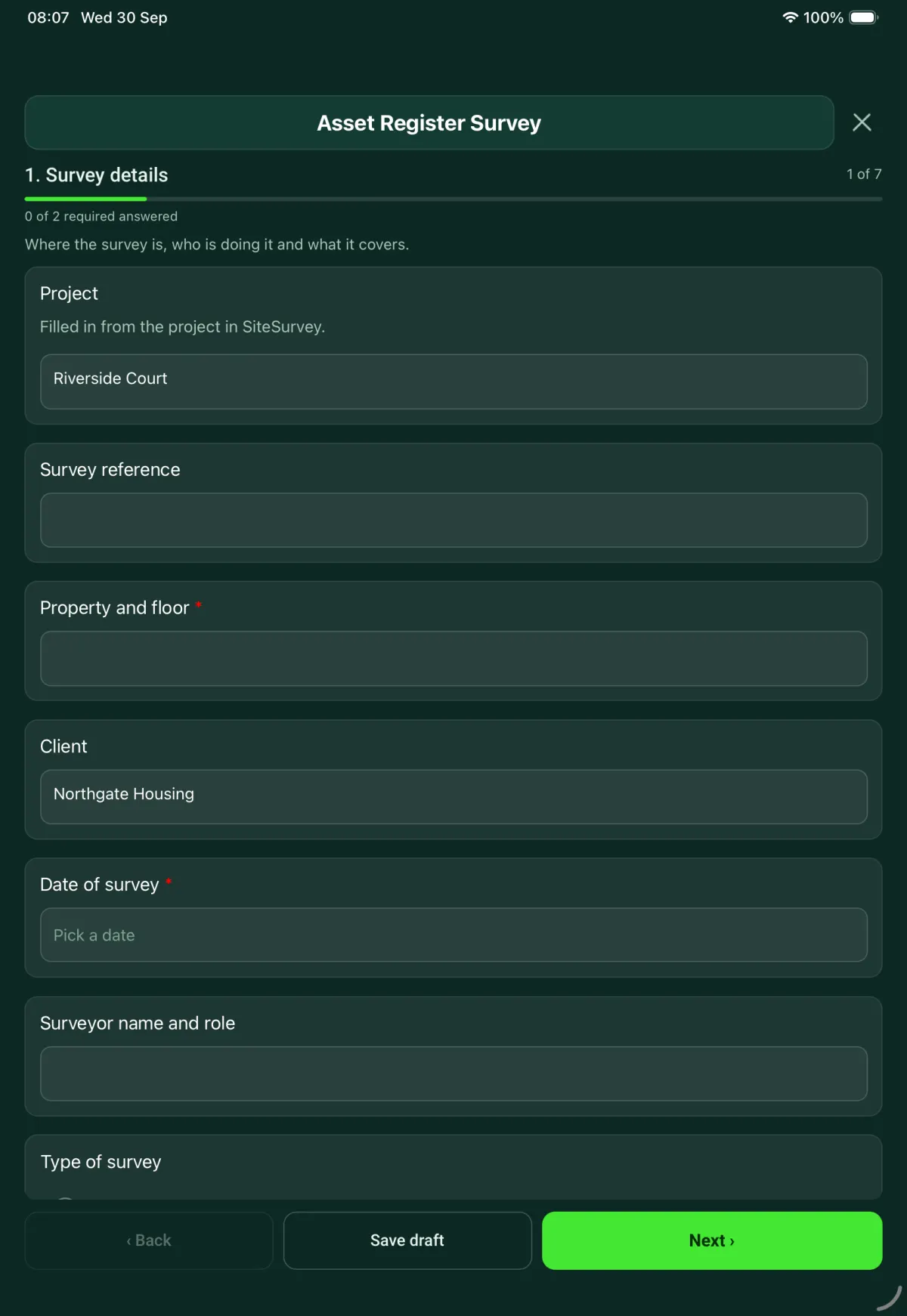
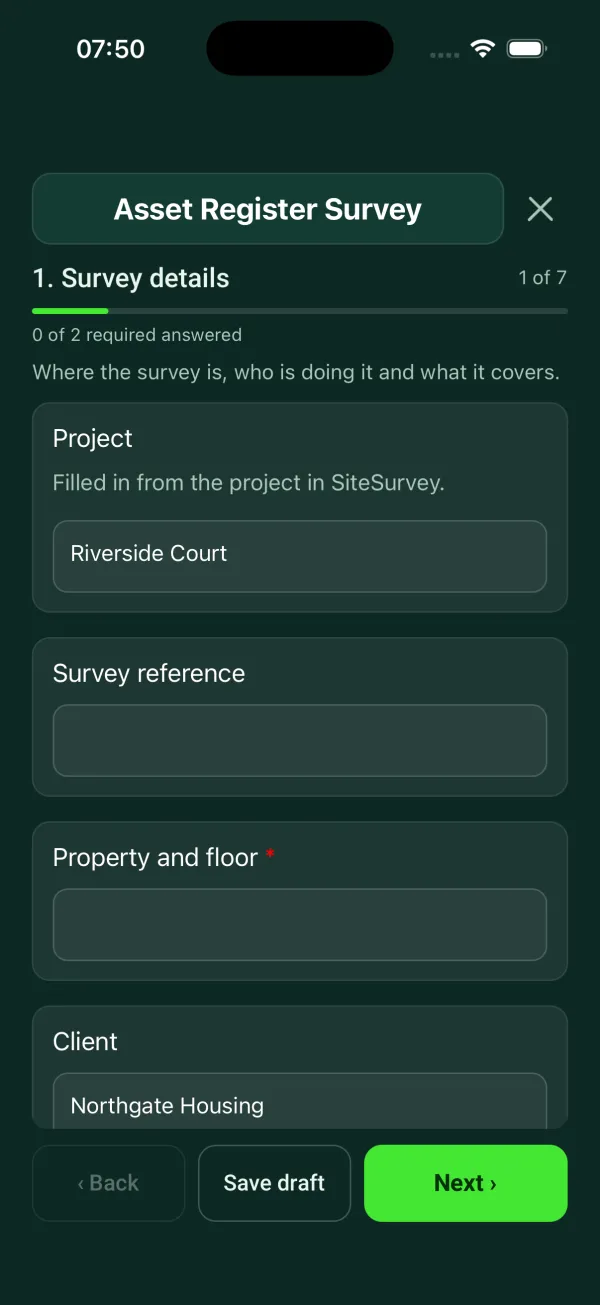
Every question in the asset register template
Build or update an asset register: asset records with make, model, serial, condition and photos, changes to the register. 7 sections and 73 questions. Follow-up questions and guidance appear only when an answer calls for them, so the person on site never sees the ones that do not apply.
Details you only enter once
Add this form to a project in SiteSurvey and it fills in what the project already knows, so nobody on site retypes it and every form on the job uses the same names. Anything filled in can still be changed.
- Project: the project name
- Client: the project's customer
Survey details
Where the survey is, who is doing it and what it covers.
- ProjectShort answerFills in from the project name
- Survey referenceShort answer
- Property and floor*Short answer
- ClientShort answerFills in from the project's customer
- Date of survey*Date
- Surveyor name and roleShort answer
- Type of surveyChoose one
- New register
- Update of an existing register
- Spot check of part of a register
- GuidanceNew register. Every asset in scope gets a tag, a location and a photograph, so it can be found again.Shown when “Type of survey” is “New register”
- Date of the register you are checking againstDateShown when “Type of survey” is “Update of an existing register”
- GuidanceUpdate. Check each asset against its existing entry. Record anything added, moved, disposed of or not found in section 5.Shown when “Type of survey” is “Update of an existing register”
- Which assets or areas are being checked, and why?Short answerShown when “Type of survey” is “Spot check of part of a register”
- CheckA spot check covers part of the register only. The report should say which part, so it is not read as a full survey.Shown when “Type of survey” is “Spot check of part of a register”
- Asset groups in scopeTick all that apply
- Furniture
- IT and workstation equipment
- Displays and AV
- Mechanical and electrical plant
- Fire and safety equipment
- Other (describe)
- Are items issued to staff (laptops, phones) left out?Yes or No
- Which register holds them?Short answerShown when “Are items issued to staff (laptops, phones) left out?” is Yes
- Condition scale usedChoose one
- A to D, with priority 1 to 4
- Client's own scale
- Describe the client's scaleNotesShown only when the answers above make it relevant
Area and access
Record the room or area the assets sit in, so the next person can find them.
- BuildingShort answer
- FloorShort answer
- Room or areaShort answer
- Type of areaChoose one
- Open plan office
- Meeting or training room
- Plant room or cupboard
- Riser
- Comms room
- Store
- Roof
- Other (describe)
- Was there safe access and enough light to read labels?Yes or NoShown only when the answers above make it relevant
- WarningDo not survey an area you cannot reach safely. Record it as not surveyed and say why, so the register shows the gap.Shown when “Was there safe access and enough light to read labels?” is No
- Were all areas in scope surveyed?Yes or No
- Which areas were not surveyed, and why?NotesShown when “Were all areas in scope surveyed?” is No
- CheckAssets in these areas stay on the register as not checked at this visit. Plan a return visit.Shown when “Were all areas in scope surveyed?” is No
Asset records
One entry for each asset, or each group of identical assets in the same area.
- GuidanceWhat a register entry needs. A tag, what the asset is, where it is, when it was installed, its condition and a photograph. Read the serial from the label, do not guess it.
- AssetsRepeat for each asset. Each one asks:
- Which is closest to this asset?Choose one
- Workstation equipment
- Display or AV
- Plant
- What is it?Short answer
- How many, if identicalNumber
- Where in the room?Short answer
- Asset tagChoose one
- Tag found
- No tag, new tag fitted
- No tag, could not fit one
- Tag number or rangeShort answerShown only when the answers above make it relevant
- CheckAn asset with no tag is hard to find again. Record exactly where it is and photograph it, then plan to tag it.Shown when “Asset tag” is “No tag, could not fit one”
- Why could a tag not be fitted?Short answerShown when “Asset tag” is “No tag, could not fit one”
- Can the maker's label be read?Yes or No
- Make and modelShort answerShown when “Can the maker's label be read?” is Yes
- Serial numberShort answerShown when “Can the maker's label be read?” is Yes
- CheckRecord the asset as not identified. Photograph the label or the place it should be, and say what stopped you reading it.Shown when “Can the maker's label be read?” is No
- What stopped you reading it?Short answerShown when “Can the maker's label be read?” is No
- Install yearNumber
- Expected life (years)Number
- Where is the install year from?Choose one
- Label on the asset
- Client's records
- Earlier register
- Estimated by the surveyor
- CheckAn estimated install year makes the age and remaining life estimates too. Say so in the notes.Shown when “Where is the install year from?” is “Estimated by the surveyor”
- GuidanceExpected life is a planning figure. Take it from the client's standard, the maker's data or a published table, and say which.Shown when “Expected life (years)” is answered
- Age (years)Worked out by the formShown only when the answers above make it relevant
- Calculated remaining life (years)Worked out by the formShown only when the answers above make it relevant
- Share of expected life remaining (%)Worked out by the formShown only when the answers above make it relevant
- CheckTwo years or less of expected life remain. Consider this asset when the replacement budget is set.Shown only when the answers above make it relevant
- WarningThis asset is at or past its expected life. That is a planning figure, not a failure. Check its condition before deciding to replace it.Shown only when the answers above make it relevant
- ConditionChoose one
- A, good
- B, satisfactory
- C, poor
- D, bad
- What deterioration or defect can you see?NotesShown only when the answers above make it relevant
- Photos of the defectPhotosShown only when the answers above make it relevant
- WarningGrade D. Life expired or at serious risk of failure. Tell the client on the day, do not wait for the report.Shown when “Condition” is “D”
- Your assessed remaining life (years)NumberShown only when the answers above make it relevant
- Is it in warranty?Yes or No
- Warranty end dateDateShown when “Is it in warranty?” is Yes
- Is any action needed?Yes or No
- What needs doing?NotesShown when “Is any action needed?” is Yes
- PriorityChoose one
- 1, urgent: immediate or within 1 year
- 2, essential: 1 to 2 years
- 3, desirable: 3 to 5 years
- 4, long term: beyond 5 years
Shown when “Is any action needed?” is Yes - Photos of the asset and its labelPhotos
- NotesNotes
Service and maintenance records
Record what you saw on site. Say when a record is held elsewhere and was not checked.
- Do any assets here need regular servicing?Yes or No
- Last service dateDateShown when “Do any assets here need regular servicing?” is Yes
- Next service dueDateShown when “Do any assets here need regular servicing?” is Yes
- What evidence of servicing did you see?Choose one
- Service sticker on the asset
- Log book on site
- Service sheet from the client
- None seen
Shown when “Do any assets here need regular servicing?” is Yes - CheckNo evidence of servicing was seen. Record the dates as given by the client, not as checked.Shown when “What evidence of servicing did you see?” is “None seen”
- Do any assets store or heat water?Yes or No
- Is it covered by the building's legionella risk assessment?Choose one
- Yes, confirmed by the client
- No
- Not known
Shown when “Do any assets store or heat water?” is Yes - CheckHSE guidance says the duty holder must assess the risk from legionella and keep records of the checks. Tell the client this asset may not be covered.Shown only when the answers above make it relevant
- Electrical inspection labels on portable equipmentChoose one
- Seen, in date
- Seen, out of date
- None seen
- No portable equipment here
- GuidanceHSE guidance says there is no legal requirement to label equipment or to keep records of inspection and testing, but both can be a useful management tool. How often to inspect depends on the equipment and where it is used.Shown only when the answers above make it relevant
- Are operating and maintenance manuals held for the plant?Yes or NoShown when “Do any assets here need regular servicing?” is Yes
- Which manuals are missing?Short answerShown when “Are operating and maintenance manuals held for the plant?” is No
Changes to the register
What is different from the register you started with.
- What changed?Tick all that apply
- New asset added
- Asset moved
- Asset not found
- Asset disposed of
- Details corrected
- Nothing changed
- Which assets were added?NotesShown when “What changed?” includes “New asset added”
- Which assets moved, from where to where?NotesShown when “What changed?” includes “Asset moved”
- Which tags were not found, and where were they last recorded?NotesShown when “What changed?” includes “Asset not found”
- CheckDo not delete an asset that was not found. Mark it as not found at this visit and ask the client to confirm what happened to it.Shown when “What changed?” includes “Asset not found”
- Which assets were disposed of, and who confirmed it?NotesShown when “What changed?” includes “Asset disposed of”
- Is there anything you could not identify?Yes or No
- Describe it and where it isNotesShown when “Is there anything you could not identify?” is Yes
- Photos of items not identifiedPhotosShown when “Is there anything you could not identify?” is Yes
Summary
Totals for this area.
- Assets recordedWorked out by the form
- How many have a tag?Number
- Share tagged (%)Worked out by the formShown only when the answers above make it relevant
- CheckSome assets have no tag. List them in the notes so they can be tagged at the next visit.Shown only when the answers above make it relevant
- WarningThe number tagged is higher than the number of assets recorded. Check the quantities in section 3.Shown only when the answers above make it relevant
- Summary for the clientNotes
- Next survey dateDate
Surveyor sign-off
- GuidanceThe report records what was seen and read from labels on the day. Expected life and remaining life are estimates.
- NameShort answer
- Surveyor signatureSignature
Asset register template questions
Is this a fixed asset register template?
It records the physical details of each asset so it can be found, maintained and planned for. It has no fields for purchase cost, value or depreciation, which a finance team's fixed asset register would add. The form is editable if you want to add them.
How is condition graded?
The default scale is A good, B satisfactory, C poor and D bad, with action priorities from 1, urgent (immediate or within 1 year) to 4, long term (beyond 5 years). You can use the client's own scale instead. A grade D asset prompts the surveyor to tell the client on the day.
How does it work out remaining life?
The form calculates age from the install year and remaining life from the expected life, and flags assets with two years or less left. Expected life is a planning figure, not a failure, so the surveyor can give their own figure when the condition suggests otherwise. The form also records where the install year came from, such as the label or an estimate.
What if an asset has no tag or cannot be found?
The surveyor records whether a tag was found, a new tag fitted or one could not be fitted, and why. An asset on the old register that is not found should be marked as not found at this visit, not deleted, and the client asked to confirm what happened to it.
Do portable appliances need inspection labels?
HSE guidance says there is no legal requirement to label equipment or to keep records of inspection and testing, but both can be a useful management tool. The form records whether labels were seen and whether they were in date.
Can I export the register?
In the SiteSurvey app, yes. The survey works offline with photos of each asset and its label, and exports as a PDF, CSV or share link.
Related
Related templates
Templates that go with the asset register form
Planned maintenance visit: records seen, asset by asset tasks, water temperatures, work done and next visit.
Inspection round for plant: asset condition, refrigerant and leak checks, pressure vessels, next due dates.
Job sheet for a reactive or planned job: safety before starting, work done, parts used, tests, outcome and customer sign-off.
Service visit record for air conditioning, heat pumps, ventilation and air handling units. Unit by unit checks, refrigerant and F gas leak checks, parts used and sign-off.
Use this asset register form with your team
Add it from the form library in one click, change any question, and every completed form becomes a branded PDF report.
Start your trial →