Form library · AV and IT
Rack audit checklist
A cabinet by cabinet audit for comms rooms and data cabinets. Record each item by U position with its make, label and power state, check the PDUs, UPS, temperature and fans, then note patching and cable management issues with photos. Every question is listed below, and you can fill the live form in on this page.
Ready to use from the form library, and editable. Trial from £1, cancel any time.
What should a rack audit checklist include?
A rack audit checklist should identify the cabinet, its size and whether it is locked, with photos of the front and back. It should list every item by U position with its make, model, label and power state, then check the PDUs, the UPS, the temperature at the front of the cabinet, fans, blanking plates, patching, labelling and cable management.
Last updated . Facts checked on 30 September 2026.
Try the rack audit form live
Answer a few questions and watch it adapt. Your answers are not saved, and any photos you add are deleted within the hour.
This is the real form as your team would use it: questions appear as you answer, scores work themselves out and you can add photos and signatures. No sign-up needed.
Fill it in on a phone or tablet
Your team completes the rack audit on site in the SiteSurvey app on iPhone, iPad and Android phones and tablets. The project name and address fill in for them, it works without signal, and it syncs when the device is back online with photos kept against the question they answer.
Customers and subcontractors do not need the app: send them a link and they can fill it in from any browser.
Every question in the rack audit template
Cabinet by cabinet audit: equipment by U position, power, cooling, labelling, cable management. 5 sections and 32 questions. Follow-up questions and guidance appear only when an answer calls for them, so the person on site never sees the ones that do not apply.
Details you only enter once
Add this form to a project in SiteSurvey and it fills in what the project already knows, so nobody on site retypes it and every form on the job uses the same names. Anything filled in can still be changed.
- Project: the project name
- Site: the site, when the form is opened for a space or a product
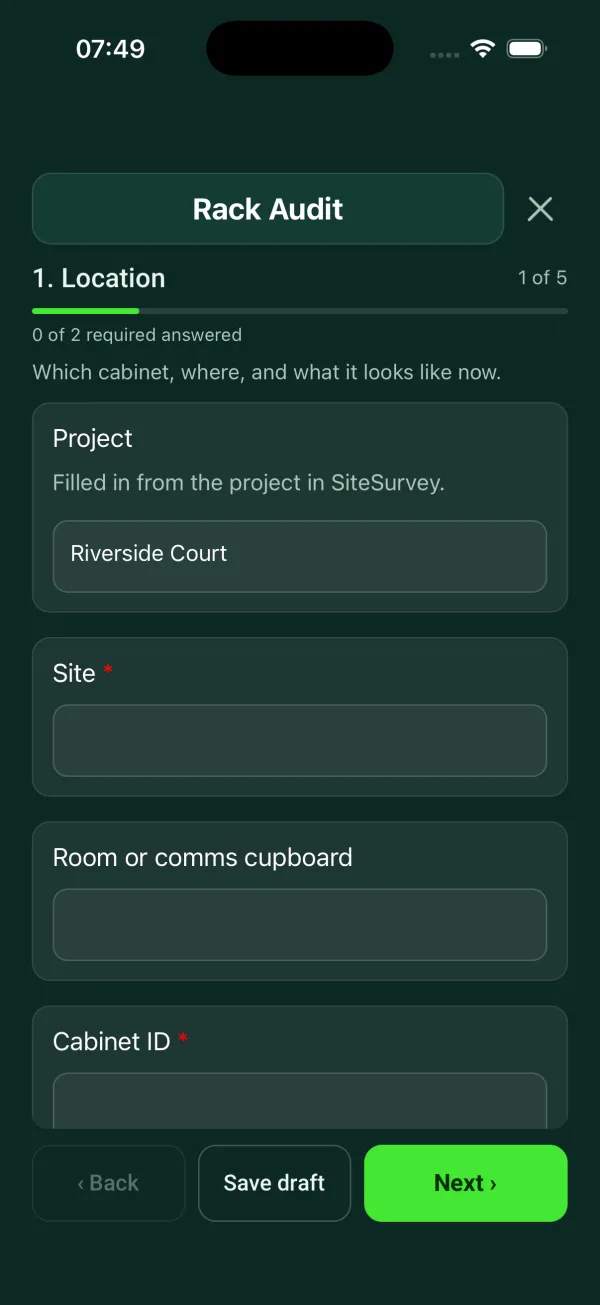
Location
Which cabinet, where, and what it looks like now.
- ProjectShort answerFills in from the project name
- Site*Short answerFills in from the site, when the form is opened for a space or a product
- Room or comms cupboardShort answer
- Cabinet ID*Short answer
- Rack size (U)Number
- Cabinet lockChoose one
- Locked
- Lockable, found unlocked
- No lock
- Photos of the front, doors openPhotos
- Photos of the backPhotos
Equipment
One entry for each item, working from the top of the cabinet down.
- GuidanceMost cabinets number U1 at the bottom. Check the numbers on the rails before you start and record the lowest and highest U an item takes, for example 38 to 39.
- EquipmentRepeat for each item. Each one asks:
- U positionShort answer
- DeviceChoose one
- Patch panel
- Fibre patch panel
- Network switch
- Router or firewall
- Server
- Storage or NAS
- NVR or DVR
- UPS
- PDU
- Shelf
- Cable manager or brush panel
- Blanking plate
- AV matrix or processor
- Amplifier
- Other (describe)
- Make and modelShort answer
- Labelled?Yes or No
- Powered on?Yes or No
- Items recordedWorked out by the form
- Items with no labelWorked out by the form
Power and cooling
How the cabinet is fed, and whether it is running cool.
- Number of PDUsNumber
- Is there a UPS?Yes or No
- UPS status on the displayChoose one
- Normal
- On battery
- Alarm or fault showing
Shown when “Is there a UPS?” is Yes - WarningThe UPS is on battery or showing a fault. Tell the site contact now: the cabinet could lose power without warning.Shown only when the answers above make it relevant
- Is dual-corded equipment fed from two different PDUs?Yes or No
- Load notesNotes
- Temperature at the front of the cabinet (°C)Number
- CheckThis is above 27 °C, the top of the ASHRAE recommended range for air going into IT equipment. Check the room cooling and anything blocking the airflow.Shown only when the answers above make it relevant
- Cabinet fansChoose one
- Working
- Not working
- No fans fitted
- Are empty U spaces fitted with blanking plates?Yes or No
Cabling
Patching, labels and cable management.
- Is the patching tidy?Yes or No
- Does the labelling meet the site standard?Yes or No
- Cable managementRating 1 to 5 (Poor to Very good)
- Issues foundTick all that apply
- Unlabelled cables
- Over-length patch leads
- Cables blocking airflow
- Tight bends or crushed cables
- Loose or unsupported cables
- Redundant cables left in place
- Doors cannot close
- Power and data not separated
- Other (describe)
- Photos of the issuesPhotosShown when “Issues found” is answered
- Action neededNotesShown when “Issues found” is answered
Auditor sign-off
- NameShort answer
- DateDate
- Auditor signatureSignature
Rack audit template questions
Which way are rack units numbered?
Most cabinets number U1 at the bottom, but check the numbers on the rails before you start. Record the lowest and highest U an item takes, for example 38 to 39. The form counts the items recorded and how many have no label.
What temperature should a server rack be?
The form warns when the temperature at the front of the cabinet is above 27 °C, the top of the ASHRAE recommended range for air going into IT equipment. If it is, check the room cooling and anything blocking the airflow. The form also records whether the fans work and whether empty U spaces have blanking plates.
What does the audit check on power?
It records the number of PDUs, whether there is a UPS and what its display shows, and whether dual-corded equipment is fed from two different PDUs. If the UPS is on battery or showing a fault, the form tells you to tell the site contact straight away, because the cabinet could lose power without warning. Load notes cover PDU readings, overloaded strips and daisy-chained extensions.
What cabling issues does it look for?
Unlabelled cables, over-length patch leads, cables blocking airflow, tight bends or crushed cables, loose or unsupported cables, redundant cables left in place, doors that cannot close, and power and data not separated. Ticking any issue opens photos and the action needed. Cable management is also given an overall rating.
Does it work in a comms room with no signal?
In the SiteSurvey app, yes. The form works offline and syncs when the device is back online. Each record covers one cabinet, identified by site, room and cabinet ID, and ends with the auditor's signature.
Related
Related templates
Templates that go with the rack audit form
Room survey for AV installs: dimensions, photos, power and data, ceiling and structure, equipment positions, access.
Containment and cable routes, comms room and cabinet, power and cooling, existing and required outlets by area.
Commissioning and handover for AV and network installs: tests, equipment and photos, snags, documents and training.
Per screen: mounting, height, fixings, power and signal, final picture test and photos.
Use this rack audit form with your team
Add it from the form library in one click, change any question, and every completed form becomes a branded PDF report.
Start your trial →