AI Visual Inspector Beta

AI fire door inspection app.Film it. Check it. Confirm it.

Walk up to the door and the parts are boxed live as you film. Finish each point and the AI picks the sharpest stills, judges every item and tells you what to do. You confirm each verdict, and the report builds itself from what you confirmed.

Kestrel systemIn early testing, on Google Gemini.

Kestrel modelsIn development.

In the appIt is coming in the next SiteSurvey app update, in early access.

FootageAI-generated demo clips, made for testing.

Gap gauge foundInspector confirms

What is an AI fire door inspection?

An AI fire door inspection is a fire door check where you film the door and an AI suggests a verdict for each part. In SiteSurvey's AI Visual Inspector (Beta) you film four points: door and signage, gaps, seals and hinges, and the closer. Each part is boxed on a still and marked pass, fail or check with an action, gaps are judged only from a gauge reading on camera, and the inspector confirms every verdict before it reaches the report.

Last updated . Facts checked by the SiteSurvey team on 28 October 2026 against Regulation 10, Fire Safety (England) Regulations 2022, GOV.UK fire door guidance and Regulation 10 fact sheet.

AI fire door inspection at a glance

What it is
A guided Walk Cam that films a fire door in four points and suggests pass, fail or check for each part, with the part marked on a still.
Points and checks
Four points (door and signage, gaps, seals and hinges, closer) and 18 checks in the fire door brief.
Status
AI Visual Inspector (Beta). The Kestrel system behind it is in early testing on Google Gemini. Kestrel models are in development.
In the app
Coming in the next SiteSurvey app update, switched on per company. Early access: ask support to join.
Gaps
Judged only from a gap gauge or caliper reading it can read on camera. Never estimated by eye.
Who decides
The inspector accepts, changes or dismisses every finding. Only confirmed verdicts reach the report.
What you get
A door record and report with marked-up stills, findings, actions and who confirmed them. A visual record, not a certificate.

Two ways in

The same fire door form. Typed or filmed.

SiteSurvey has two fire door pages because there are two ways to fill the record. Use the checklist for the round and the paperwork. Use the AI Visual Inspector when you want the camera to do the looking with you.

Form based

Fire door inspection checklist

Every question in the form, door by door: damage, glazing, hinges, seals, gaps and closing, plus the regulation 10 round totals, the 12 month flat entrance door record and remedial work.

  • 7 sections, 73 questions
  • Fill it in on the page or in the app
  • Works with or without the AI
Open the checklist →
Visual · AI Visual Inspector (Beta) · Coming in the next app update

AI fire door inspection

The form's Walk Cam field, with the AI switched on. Film four points per door, see each part boxed and judged, confirm the verdicts, and the findings and stills fill the same door record.

  • 4 points, 18 checks
  • Marked-up stills on every finding
  • You confirm every verdict
See it on one door ↓

How it works

Film. Spot. Judge. Confirm.

The Kestrel system turns each clip into a few sharp stills, finds the parts of the door, judges each one against the fire door brief, and hands you the result to accept or change.

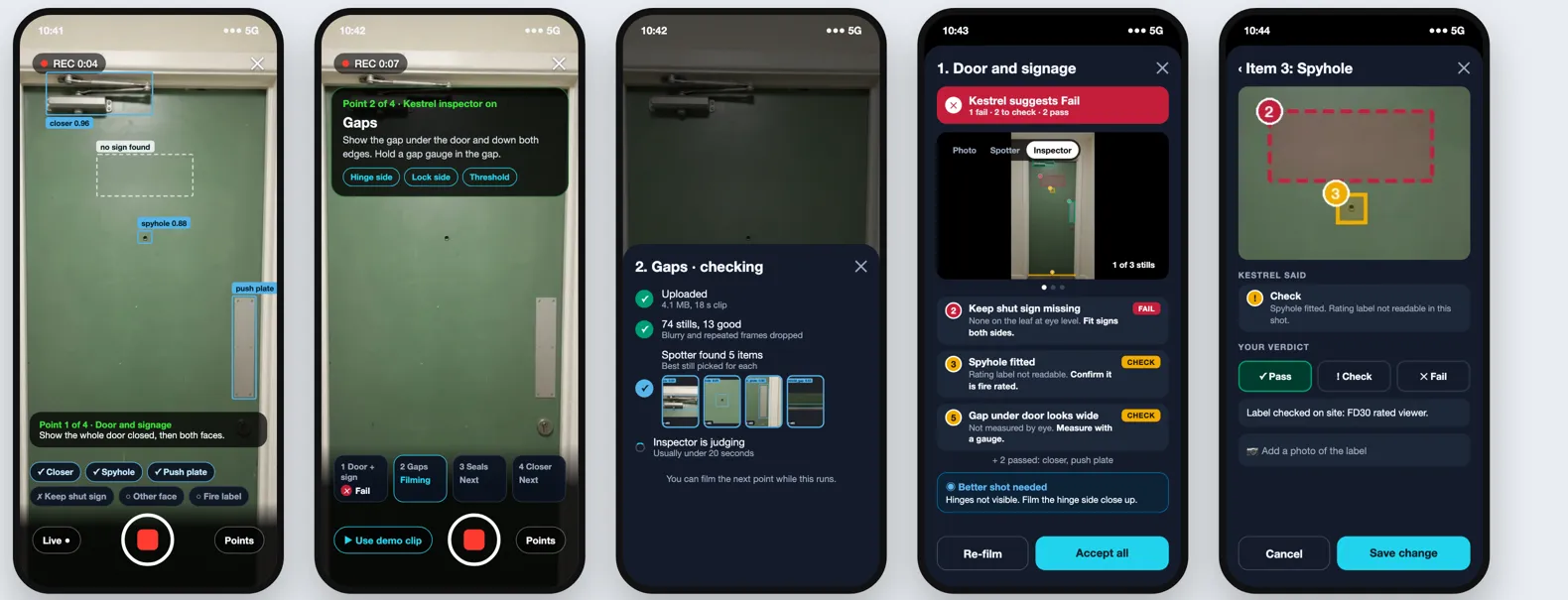
  1. 1 · FilmHold record on each point. Parts are boxed live while you film, and a checklist ticks off what it has seen.
  2. 2 · SpotThe clip is cut into stills. Blurry and repeated frames are dropped. The spotter boxes each part in light blue and keeps the best still of it.
  3. 3 · JudgeThe inspector stage colours each part by verdict, says why, and gives an action. A gap gets a verdict only from a legible gauge reading.
  4. 4 · ConfirmYou accept, change or dismiss each finding, or re-film. Only confirmed verdicts and the stills you keep reach the report.
Five phone screens: live boxes while filming, the gaps point with a gauge prompt, a progress sheet with the spotter's best stills, the findings for a point with Accept all, and changing one item's verdict

Design mockup of the phone flow, on AI-generated footage. Screens may change before release.

Worked example

One door, four points, every verdict.

Each point below shows the clip, the best still the system picked (switch between what the spotter found and what the inspector stage judged), the findings it returned, and what the inspector did with them.

The clips are AI-generated demo footage, made for testing: no real building or person is shown. The stills and findings are real output from the Kestrel system in early testing on 28 October 2026, run on those clips. The four clips show different generated doors, joined here as one example door, and the inspector's decisions are scripted.

1

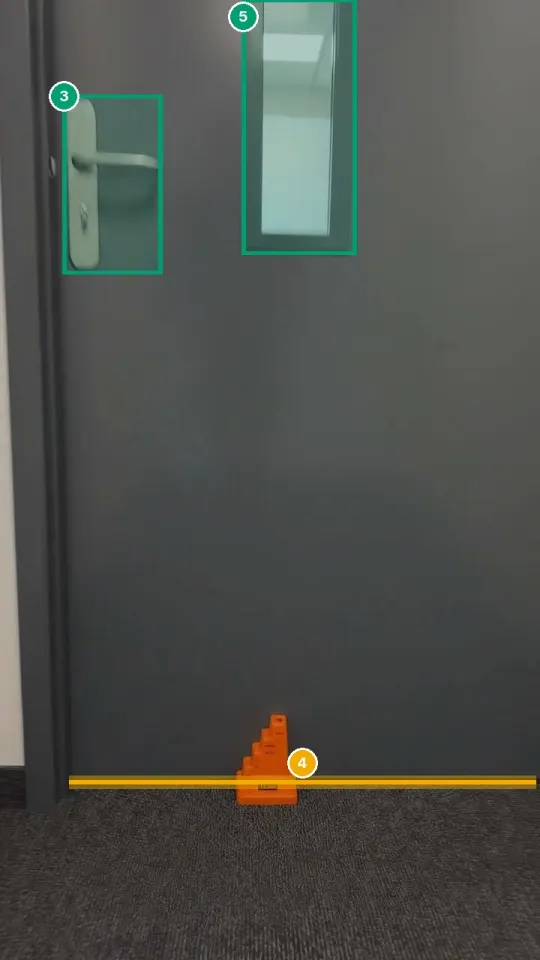
Door and signage

Film: The whole door closed, both faces, the door reference and the signs.

Fail
Demo clip, generated for testing.
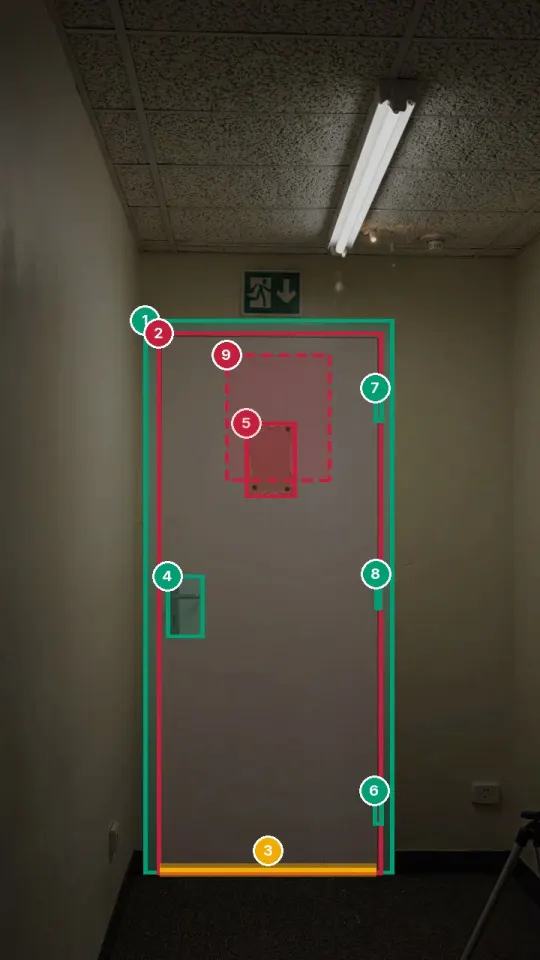
Inspector view: the patched panel and missing sign marked as fails in red, the gap under the door marked check in amber, hinges and frame marked pass in green

Best still for this point.

Kestrel suggested

  • Fail
    Door leaf alteredA rectangular section has been cut out and patched over. Refer the door to a competent fire door inspector for repair or replacement.
  • Fail
    No "Fire door keep shut" signNone on this face. Fit the sign.
  • Check
    Gap under the doorNo gauge in shot, so no verdict. Measure it at the gaps point.

Passed: Frame, three hinges, handle

Better shot asked for: Film the door edges with the seals, the certification label and the other face.

Inspector: Accepted both fails. The gap was left to point 2.

2

Gaps

Film: The gap under the door, at the head and down both edges, with a gap gauge in each.

Check
Demo clip, generated for testing.
Inspector view: the gap under the door traced in amber as check, the handle and glazing boxed in green as pass

The amber line is the gap it would not judge without a reading.

Kestrel suggested

  • Check
    Gap under the doorNo legible reading: the gauge is standing in front of the door, not in the gap. Measure it on site.
  • Check
    Head and side gapsNo gauge shown at the head or edges. Film the gauge in each one.

Passed: Gauge seen, closer, frame, handle, glazing, door leaf

Better shot asked for: Film the gauge pushed into the gap under the door, at the head and down both edges.

Inspector: Measured under the door by hand: 15 mm, over the 10 mm in the brief, so changed Check to Fail. Head and edges 3 mm, within 2 to 4 mm.

3

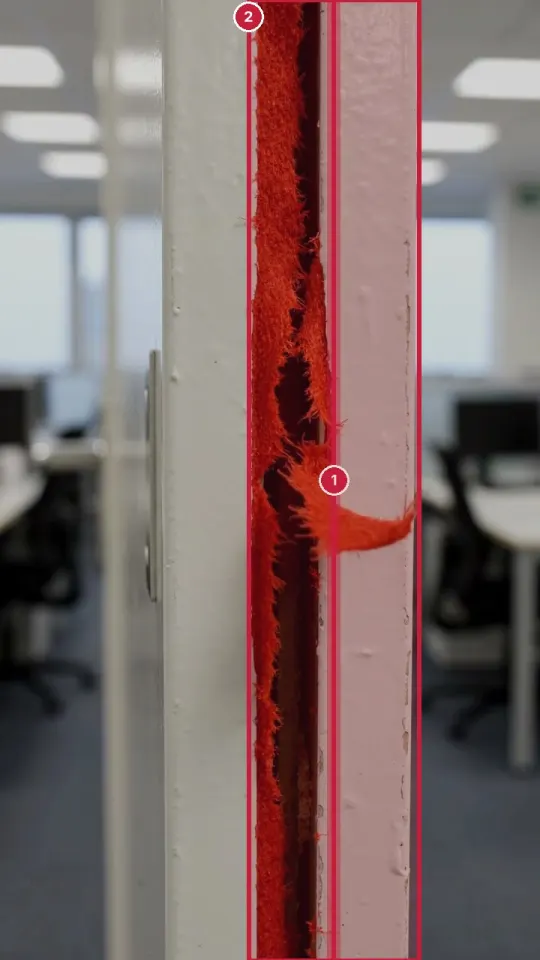
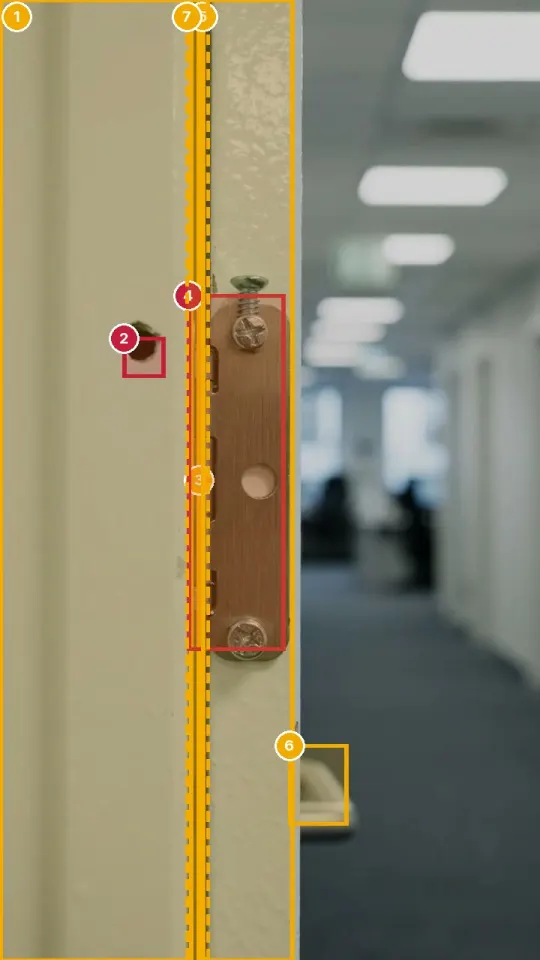
Seals and hinges

Film: The intumescent strips and smoke seals all the way round, and all three hinges close up.

Fail
Live boxes on a demo clip, early testing.
Inspector view: the torn smoke seal and the damage boxed in red as fails

Seal close-up, a second demo door.

Inspector view: the hinge with a missing screw and the hole in the frame boxed in red, the strip and edge marked check in amber

Hinge close-up.

Kestrel suggested

  • Fail
    Smoke seal tornRipped and coming away from its groove along the leaf edge. Replace the seal.
  • Fail
    Hinge screw missingThe middle screw is missing and the top one stands proud. Refix with the screws the door's documents specify.
  • Fail
    Hole in the frame by the hingeAn unsealed hole through the frame rebate. Have it made good to the door maker's instructions.
  • Check
    Intumescent stripNot clear in this tight shot. Film the whole rebate.

Passed: None on this point

Better shot asked for: Film one continuous shot round the whole frame, with all three hinges.

Inspector: Accepted the fails. Changed the strip from Check to Pass after looking on site.

4

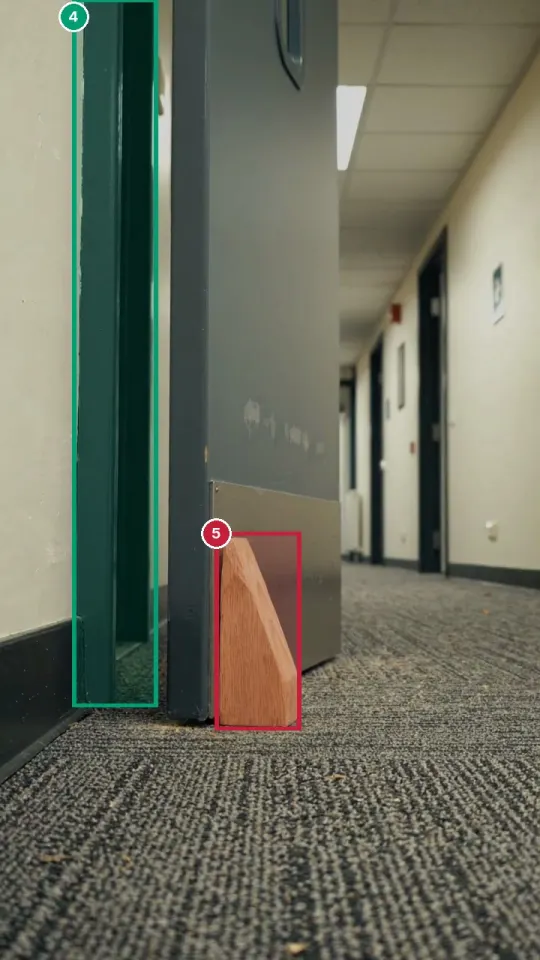
Closer

Film: Open the door fully and let it go, then from about 75 mm, so it is clear whether it closes and latches.

Fail
Live boxes on a demo clip, early testing.
Inspector view: the wedge boxed in red as a fail, the frame boxed in green as a pass

Best still for this point.

Kestrel suggested

  • Fail
    Door wedged openA wooden wedge is holding the door open. Remove it.
  • Check
    Closer not seen workingIt cannot close while wedged, and the closer is out of shot. Remove the wedge and film it closing.

Passed: Kick plate, glazing, frame

Better shot asked for: Remove the wedge, film the closer, then the door closing from fully open and from 75 mm.

Inspector: Accepted. Removed the wedge, re-filmed: the door closed and latched both times.

In point 2 the gauge stands in front of the door rather than in the gap, so Kestrel gave no reading and the inspector measured it. Spotter numbers are its own confidence that it found the right part. They are not accuracy figures. The 10 mm limit under the door is the figure in the fire door brief; the door's own documents decide.

The completed inspection

What the report looks like when you are done.

Only what the inspector confirmed. The marked-up still beside a numbered findings table, problems first, the best still for each point, one action list, and who confirmed it.

Fictional example report. The company, building and door are made up, the stills come from the AI-generated demo clips above, and the layout may change before release.

Rules it follows

Built to ask, not to guess.

The inspector decides

Every finding has Accept, Change and Dismiss. Nothing reaches the report until a person confirms it, and the report says so.

No gaps by eye

A gap passes or fails only from a gauge or caliper reading it can read. Otherwise it is check, with the shot to take.

Signs must be readable

A sign counts as "Fire door keep shut" only when those words can be read. Any other sign is just another sign.

It says when it cannot see

Too dark, too far or out of shot comes back as cannot assess, with what to film instead.

FailA defect that needs fixing. Says what to do.
CheckSomething to confirm or measure on site.
PassSeen and fine.
Better shot neededNot visible enough to judge. Says what to film.
Spotter boxLight blue, with a name and how sure it is. Found, not judged.
ObjectA box round a closer, hinge, sign or handle.
Gap or sealA traced line along long, thin things.
MissingDashed where something should be but is not.

A visual record, not a certificate

The AI Visual Inspector checks what the camera can see. It does not certify a door, replace a competent fire door inspector, test a door's fire performance, or decide whether a door is the right type for where it is: that is for the fire risk assessment. In England, regulation 10 sets quarterly checks of communal fire doors and best-endeavours annual checks of flat entrance doors in buildings over 11 metres. See the GOV.UK fire door guidance ↗.

Frequently asked questions

AI fire door inspection: common questions.

Can AI inspect a fire door?

It can help a person inspect one. In SiteSurvey's AI Visual Inspector (Beta) you film four points of the door, and the AI boxes the parts it finds and suggests pass, fail or check for each, with the reason and an action. The inspector accepts, changes or dismisses every finding, and only confirmed verdicts reach the report.

Is this different from the fire door inspection checklist?

It is the same fire door form underneath, seen from the camera side. The fire door inspection checklist page lists every question in the form, the regulation 10 round record and the flat entrance door access record. This page shows the AI Visual Inspector working through the form's Walk Cam points on one door, and the report it produces.

Does the AI measure fire door gaps?

Only from a reading it can see. A gap passes or fails when a gap gauge or caliper is in the gap and its reading is legible on camera. Without one, the gap is marked check, with a request to film the gauge. It never estimates a gap by eye.

Is the AI Visual Inspector available now?

It is coming in the next SiteSurvey app update, in early access. It is a beta: the Kestrel system behind it is in early testing on Google Gemini, and is switched on company by company. Ask support to join.

Is the report a fire door certificate?

No. It is a visual record of what the camera showed and what the inspector confirmed. It does not certify a door, replace a competent fire door inspector, or decide whether a door is the right type for its location, which is a matter for the fire risk assessment.

What happens if the clip is too dark or a part is out of shot?

The AI says so instead of guessing. The point comes back as cannot assess, or the item as check, with the exact shot that would settle it, such as the hinge side close up or the gauge in the gap.

Is Kestrel your own AI model?

Kestrel is SiteSurvey's inspection AI system: the flow from clip to verdict, live detection and the safety rules are built by SiteSurvey. Recognition uses Google's Gemini models today. Our own Kestrel models are in development and will only replace Gemini once they pass testing.

Are my clips used to train AI?

No. Clips checked by the AI Visual Inspector are not used to train any model. Kestrel models will be trained only on images that partners share under a data-sharing agreement or that customers explicitly opt in to share.
Early access

Try it on your next fire door round.

It is coming in the next SiteSurvey app update, in early access. Tell us who you are and how many doors you check, and we will switch it on for your company.

Already use SiteSurvey?

The fire door form is in the library with the brief ready. Ask and we will turn the AI on for your company.

Prefer the checklist?

The fire door inspection checklist works on its own, on the page or in the app.

Join early access

The AI inspector is switched on company by company while we read the first results. Included in the subscription.

What would you inspect? (optional)