- 01
Open the form designer
In the web portal, open Forms and edit the form that should include the video inspection.
- 02
Add the Walk Cam field
Choose the Walk Cam field type and place it where the inspection belongs in the form's flow.
- 03
Define the points and guidance
Create the inspection points in order, with the on-screen prompt for each, so every technician films the same checklist.
- 04
Complete it on mobile
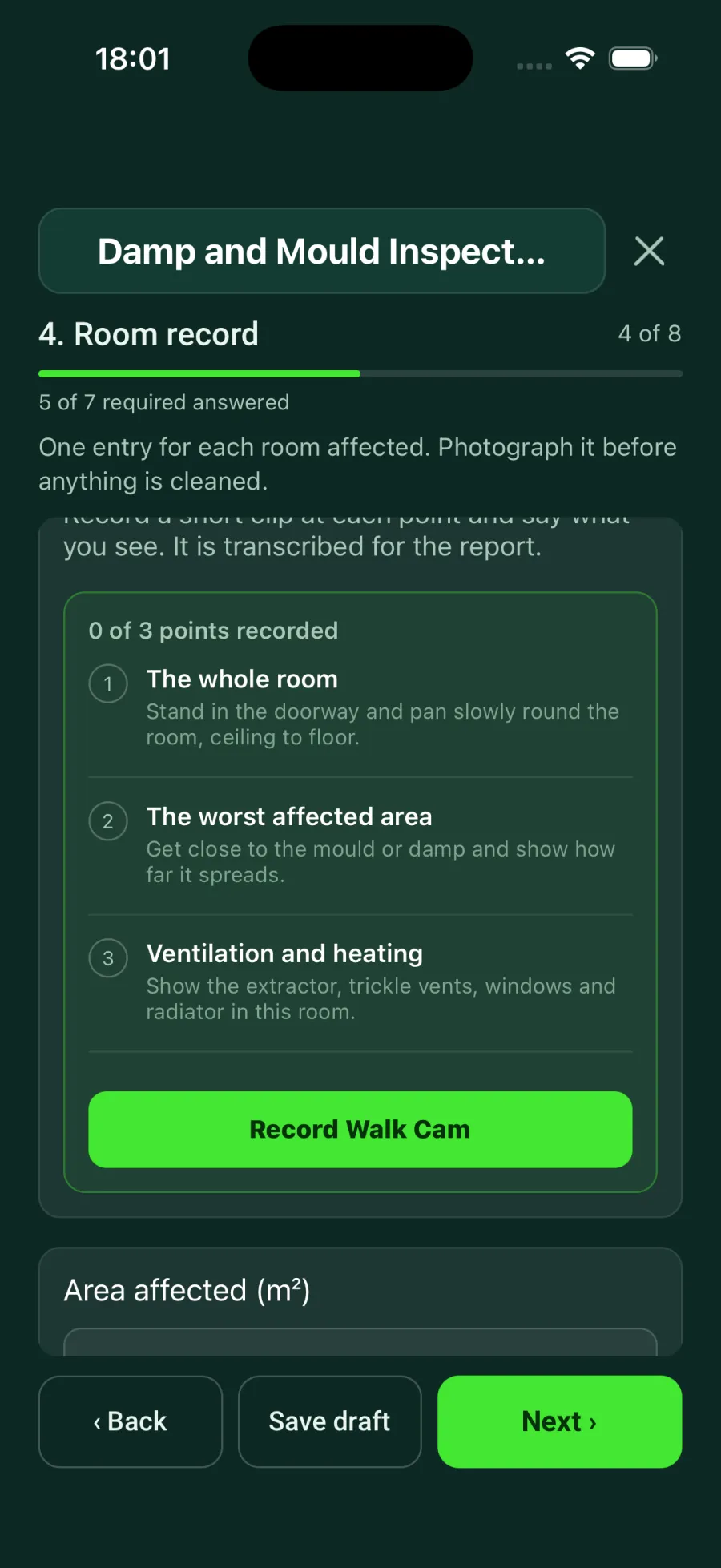
On site, the question lists its points and a Record Walk Cam button. Hold to record one video clip per point while live on-device voice-to-text captions the observation. Releasing seals the clip as the answer. A Walk Cam question can also sit inside a repeating section, so each room gets its own walk.
- 05
Find the clips afterwards
The recorded answers stay attached to the form response against its project, space or product, ready for review and reporting alongside the rest of the form.
Good to know
- ✓Keep prompts short and spoken-answer friendly—each clip answers exactly one point.
- ✓A Walk Cam field works anywhere a normal field does, including behind conditional logic.
Was this guide helpful?
Your feedback helps us improve support content.