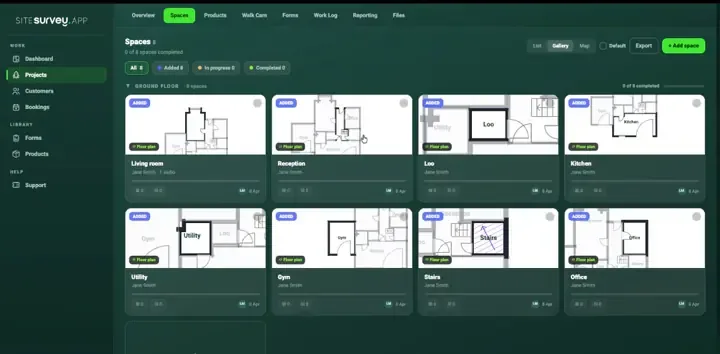
Damage without a bay
A photo of a bent upright or split beam arrives with no aisle, bay or rack run attached, so nobody can find it again to fix it.
Warehouse inspections & asset capture
Rack damage inspections, loading bay and dock condition checks, fit-out surveys, MHE pre-use records and barcode capture of stock and equipment, completed on a phone in the aisle, fully offline, and filed against the bay, zone or asset they belong to.
From £25 per user per month · trial from £1, cancel any time
Bent upright photographed, damage level recorded and a follow-up action raised against the bay.
HSE guidance (HSG76) says a technically competent person should inspect racking at least every 12 months and give a written report to the person responsible for racking safety. That person should also make sure visual inspections are made weekly or at other regular intervals set by risk assessment.
Last updated 26 September 2026. Facts checked on 26 September 2026 against HSE HSG76, Warehousing and storage.
Logistics & warehousing forms
Each one is in the SiteSurvey form library. See every question and try it live, then use it on your projects and change anything you need.
Daily check before using a van, car, forklift or other mobile plant. Failed items get a photo and a note, with the result, who it was reported to and a supervisor sign-off.
Inspection record for a scaffold, ladder, harness and lanyard or pallet racking. The checks change with the equipment, with defects, photos and a result.
Delivery record signed on the device: items with quantities and condition, where they were left, photos, exceptions and the name and signature of who received them.
Manual handling assessment using task, individual, load and environment: can it be avoided, risk factors, handling aids, controls and actions.
Record an accident, injury, near miss, dangerous occurrence, ill health or damage, with people involved, witness statements, RIDDOR checks, investigation and actions.
Workplace audit with walkways, first aid, fire equipment and records, findings and corrective actions, closing meeting.
Build or update an asset register: each asset with its tag, make, model, serial, position (GPS outside), condition, life and photos, totals by condition and life, and changes to the register.
Hazards, who might be harmed, controls and risk scores, with a briefing record and review date.
Daily, weekly or deep clean record: each area with the tasks done, anything missed and why, issues with photos, supplies to reorder and a supervisor check.
Logistics & warehousing FAQ
The best warehouse inspection software is the one that ties every finding to the exact bay, dock or machine and gets it fixed. For racking walks, dock checks and MHE records, look for a mobile app with forms you can build to your own scheme, photographs and barcode scanning, locations mapped to the warehouse plan, offline capture in the aisle, and actions tracked to close-out. If you need warehouse management, stock control or a racking design tool, that is a different category. SiteSurvey is strong on the inspection record: it does not assess rack damage for you or replace the technically competent person's expert inspection.
Warehouse inspection software replaces paper checklists for routine warehouse checks: rack damage inspections, loading bay and dock condition surveys, fire safety and sprinkler rounds, MHE and forklift pre-use records, and stock or asset audits. The inspector completes a structured form on a phone or tablet at the location itself, attaching photos, video, measurements and scanned barcodes as evidence. Each record is tied to a specific site, zone, aisle or bay, so a finding can be traced back to exactly where it was raised and re-checked later. Because signal is unreliable in racking aisles, chillers and yards, capture needs to work fully offline and sync when the device reconnects. The output is a searchable history per location and per asset, plus a report that can be shared with managers, landlords or contractors.
Yes. Build a rack inspection form with the fields your scheme uses (rack run, bay, component, damage description, severity and remedial action) and complete it in the aisle. Photograph the bent upright or split beam, attach it to the bay on the warehouse plan, and record the remedial action, owner and due date on the finding, so it sits on the inspection record rather than in a photo folder.
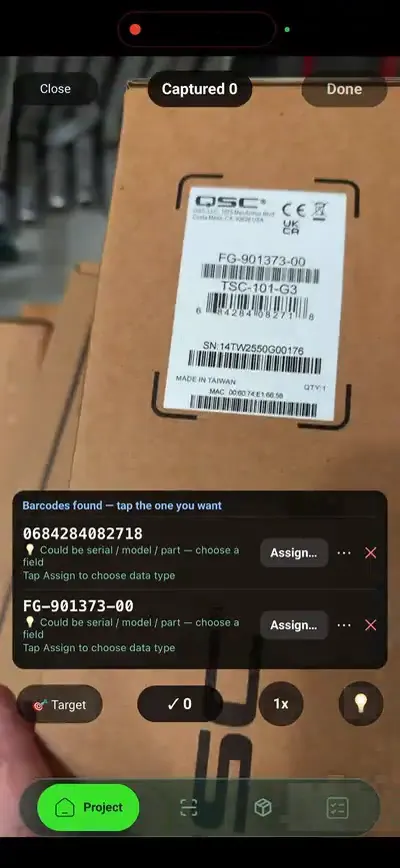
Yes. Point the camera at a carton, pallet label or equipment rating plate and the codes on it are read straight off the label. Any codes found, such as serial, model, part or batch numbers, can be assigned to data points on the product or asset record, so a stock or equipment register is built from what is physically on the shelf rather than retyped afterwards.
HSE guidance in HSG76 says a technically competent person should inspect racking at intervals of not more than 12 months and give a written report to the person responsible for racking safety. That person should also make sure visual inspections happen weekly or at other regular intervals set by risk assessment, and that damage is reported as soon as it is seen. SiteSurvey can run both the regular walk and the expert inspection form, but it does not decide the frequency for you.
Yes. Forms, photos, scans and Walk Cam clips are captured on the device and stored locally, so racking aisles, chillers, mezzanines and external yards are no obstacle. The record syncs to the workspace automatically once the device reconnects, and nothing captured offline is lost in the meantime.
Yes. Spaces represent the real layout (aisles, racking runs, dock doors, chillers, mezzanines and yards) and can be mapped onto a warehouse floor plan. Every check, photo and asset stays attached to the location it came from, so history builds up per bay instead of per file name.
Yes. Forms are reusable, so one racking walk, dock condition check or fit-out survey can be issued to every site and shift. Because each depot runs the identical structure, completion and findings can be compared across the network rather than reconciled by hand.
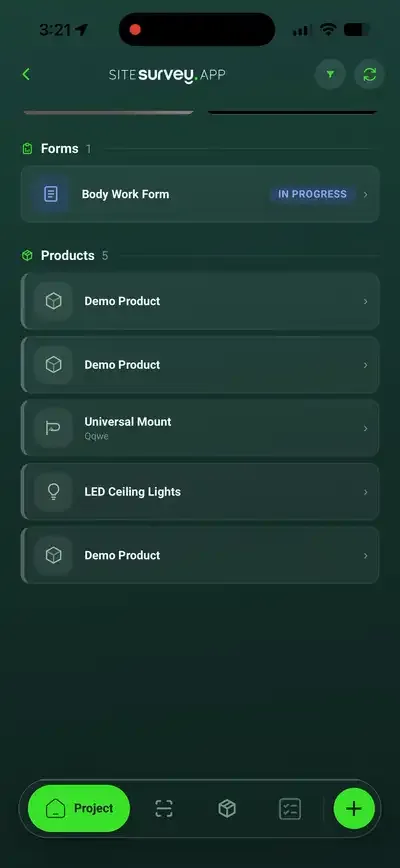
Yes. Each forklift, MEWP, dock leveller, shutter or piece of racking can exist as an asset holding whatever data points matter (serial, model, inspection date, condition, test results), plus its photos, forms and inspection history, so the record travels with the machine rather than the paperwork.
Warehouse and logistics operators, racking inspectors, QHSE teams and the fit-out contractors who work in warehouses. It suits anyone running the same checks across several depots who needs each finding tied to a bay, dock or machine with photographs and a date.
Pricing is per user, not per site or inspection. The Works plan, which includes the custom form builder, floor plans and reports these inspections use, is £25 per user per month. The Base plan starts at £13 per user per month. Every plan starts with a trial from £1, cancel any time.
Go deeper
See it in your environment