Form library · General
Delivery note template
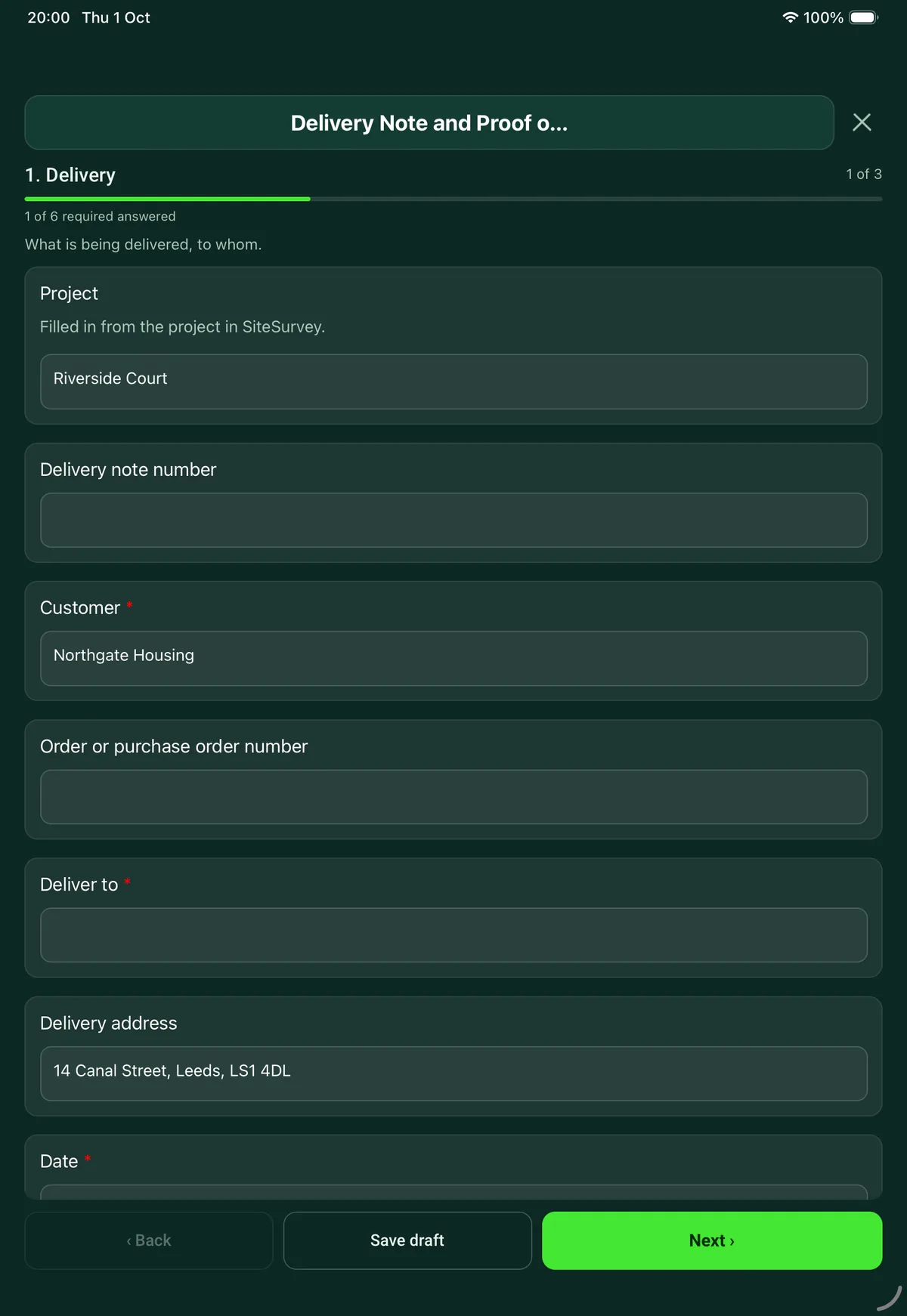
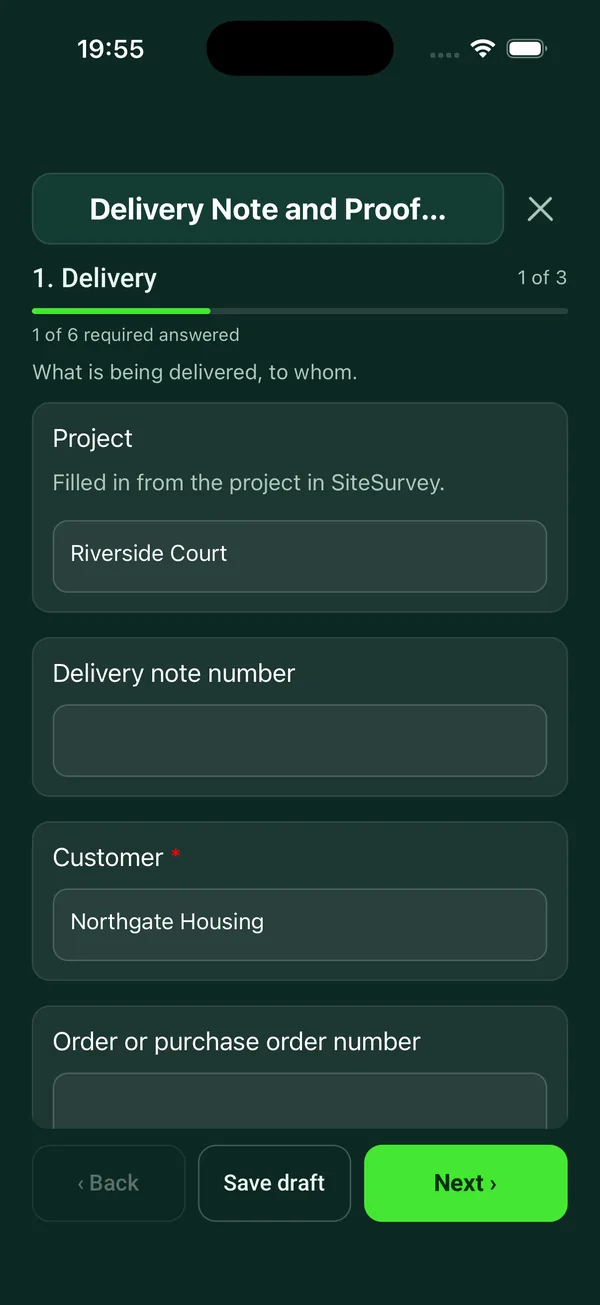
A delivery note the driver completes on a phone. List the items with quantity ordered and delivered, mark anything damaged, short or wrong with a photo, record whether the goods were handed to a person or left in a safe place, and collect the receiver's name and signature. Every question is listed below, and you can fill the live form in on this page.
Ready to use from the form library, and every question is yours to edit. Trial from £1, cancel any time.
Try it on your phone
Try it on this phone
Fill in the delivery note on your phone now
See how the delivery note looks on your phone
Scan the code with your phone camera. It opens the real form, no sign-up needed.
Open the live example and fill it in, just as your team would on site. No sign-up needed.
See it on this phoneEvery question is editable. Add this form to your account, then change the wording, add or remove questions and options, and make it fit your own jobs.
What should a delivery note include?
A delivery note should show who the goods are from and for, the delivery address, the order number, the date, and each item with the quantity ordered and delivered. As proof of delivery it should record the condition of the goods, where they were left, any problems noted at the time, and the name and signature of the person who received them.
Last updated . Facts checked by the SiteSurvey team on 5 October 2026 against section 34 of the Sale of Goods Act 1979 and section 29 of the Consumer Rights Act 2015.
Try the delivery note form live
Answer a few questions and watch it adapt. Your answers are not saved, and any photos you add are deleted within the hour.
This is the real form as your team would use it: questions appear as you answer, scores work themselves out and you can add photos and signatures. No sign-up needed.
Want to see one filled in? See a completed delivery note report (PDF), made by SiteSurvey from a fictional site visit.
Fill it in on a phone or tablet
Your team completes the delivery note and proof of delivery on site in the SiteSurvey app on iPhone, iPad and Android phones and tablets. The project name and address fill in for them, it works without signal, and it syncs when the device is back online with photos kept against the question they answer.
Customers and subcontractors do not need the app: send them a link and they can fill it in from any browser.
Every question in the delivery note template
Delivery record signed on the device: items with quantities and condition, where they were left, photos, exceptions and the name and signature of who received them. 3 sections and 32 questions. Follow-up questions and guidance appear only when an answer calls for them, so the person on site never sees the ones that do not apply.
Make it your own: every question is editable
This is a starting point, not a fixed form. Once it is in your SiteSurvey account you can reword any question, add or remove questions, sections and answer options, and add your own logo, so it fits the way your team works and the jobs you do.
Details you only enter once
Add this form to a project in SiteSurvey and it fills in what the project already knows, so nobody on site retypes it and every form on the job uses the same names. Anything filled in can still be changed.
- Project: the project name
- Customer: the project's customer
- Deliver to: the site, when the form is opened for a space or a product
- Delivery address: the site address, from the space or the project
Delivery
What is being delivered, to whom.
- ProjectShort answer
Filled in from the project in SiteSurvey.
Fills in from the project name - Delivery note numberShort answer
- Customer*Short answerFills in from the project's customer
- Order or purchase order numberShort answer
- Deliver to*Short answerFills in from the site, when the form is opened for a space or a product
- Delivery addressShort answerFills in from the site address, from the space or the project
- Date*Date
- DriverShort answer
- Vehicle registrationShort answer
- Sent fromShort answer
Items
One entry for each line on the order.
- ItemsRepeat for each item. Each one asks:
- Description*Short answer
- Quantity orderedNumber
- Quantity deliveredNumber
- Condition*Choose one
- Good
- Damaged
- Short
- Wrong item
- What is wrong?Short answerShown only when the answers above make it relevant
- PhotosPhotosShown only when the answers above make it relevant
- LinesWorked out by the form
- Lines with a problemWorked out by the form
Handover
Where the goods were left and with whom.
- Arrival timeTime
- Pallets or packages handed overShort answer
For example 2 pallets, 14 cartons.
- Outcome*Choose one
- Handed to a person
- Left in an agreed safe place
- Could not deliver
- Where exactly?Short answerShown when “Outcome” is “Left in an agreed safe place”
- Why not, and what happens next?Short answerShown when “Outcome” is “Could not deliver”
- Photos of the goods where they were leftPhotos
- ReceivedChoose one
- In good order
- With the problems noted above
- Refused
Shown when “Outcome” is “Handed to a person” - Comments from the person receivingNotesShown when “Outcome” is “Handed to a person”
- Were the goods checked before signing?Choose one
- Checked
- Signed for unchecked
Shown when “Outcome” is “Handed to a person” - GuidanceCheck the goods before signing. Damage or shortages not noted here are harder to claim for later.Shown when “Outcome” is “Handed to a person”
- Received byShort answerShown when “Outcome” is “Handed to a person”
- PositionShort answerShown when “Outcome” is “Handed to a person”
- Signature of the person receivingSignatureShown when “Outcome” is “Handed to a person”
- Time signedTimeShown when “Outcome” is “Handed to a person”
- Driver signatureSignature
See it filled in
A completed delivery note report, made by SiteSurvey from a fictional site visit: every answer, the photos, the guidance that applied and the sign-off, ready to send as a PDF.
Delivery note FAQs
How does it work as proof of delivery?
The driver records the arrival time and the outcome: handed to a person, left in an agreed safe place or could not deliver. For a handover it takes the receiver's name, position, comments and signature on the device, with photos of the goods where they were left. The driver signs too.
How are damaged or short deliveries recorded?
Each line is marked good, damaged, short or wrong item. Anything other than good opens a description and photos, and the form counts the lines with a problem. The receiver can accept in good order, accept with the problems noted, or refuse.
Should the goods be checked before signing?
The form asks whether they were checked or signed for unchecked, and warns that damage or shortages not noted at the time are harder to claim for later. Under the Sale of Goods Act 1979, unless otherwise agreed, a seller delivering goods must on request give the buyer a reasonable opportunity to examine them.
What if nobody is there to sign?
Choose left in an agreed safe place and record exactly where, with photos, or could not deliver with the reason and what happens next. No receiver signature is asked for in either case. For goods sold to consumers, the Consumer Rights Act 2015 generally keeps them at the trader's risk until they reach the consumer or a person the consumer named to take them.
Can it be used as a goods received note?
Yes. The same form works from the receiving side: check each line against the order, note the condition and sign for what arrived.
Does it work without signal?
Yes. In the SiteSurvey app it works offline and syncs when the device is back online, and the record goes out as a PDF or a share link.
Related
Related templates
Templates that go with the delivery note form
Customer acceptance at handover: work completed, outstanding items, customer name and signature.
Job sheet for a reactive or planned job: safety before starting, work done, parts used, tests, outcome and customer sign-off.
Record equipment return authorisation, reported faults, arrival condition and the proposed resolution in one traceable record.
Daily check before using a van, car, forklift or other mobile plant. Failed items get a photo and a note, with the result, who it was reported to and a supervisor sign-off.
Use this delivery note form with your team
Add it from the form library in one click, change any question, and every completed form becomes a branded PDF report.
Start your trial →