Remote evidence
A hydrant or enclosure photo arrives without the asset number, site or reading that would make it actionable.
Utilities inspection software
Record readings, condition, photographs and follow-up actions against network sites and assets. Field teams work offline, then sync the inspection evidence for review. SiteSurvey keeps the field record; it does not send automated certificate or renewal alerts.
From £25 per user per month · trial from £1, cancel any time
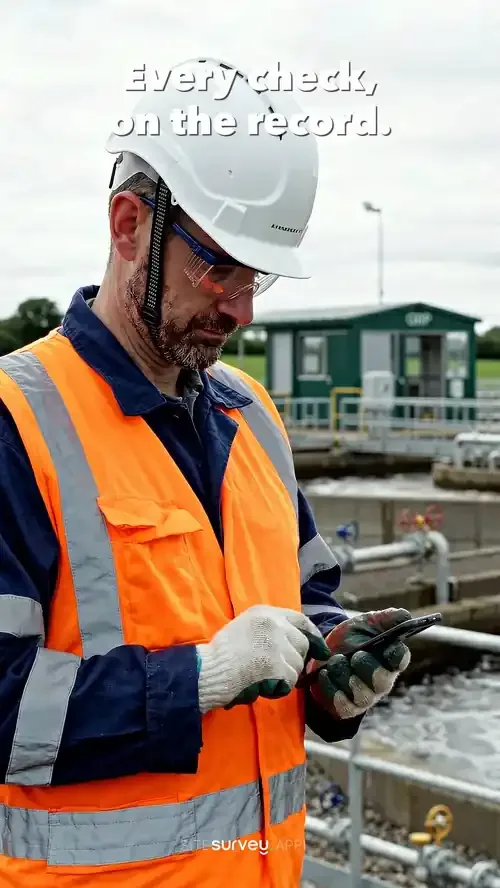
Compliance check and enclosure photographs synced to the site record.
It replaces paper sheets and loose photos for recurring checks on network assets such as hydrants, substations, meters and pumping stations. Engineers complete the same form at every site, record readings and photographs against the asset, and work offline, so compliance teams read each asset's history rather than rebuild it.
Last updated 10 October 2026.
Utilities forms
Each one is in the SiteSurvey form library. See every question and try it live, then use it on your projects and change anything you need.
Daily check before using a van, car, forklift or other mobile plant. Failed items get a photo and a note, with the result, who it was reported to and a supervisor sign-off.
Hazards, who might be harmed, controls and risk scores, with a briefing record and review date.
Permit for hot work, work at height, confined space entry and other high risk jobs: precautions, isolations, authorisation, hand-back and close-out.
Risk assessment for someone working alone: the work and place, violence, health, high risk tasks, check-in arrangements, what happens if contact is lost and scored hazards.
Construction site safety walk: perimeter, work at height, welfare, housekeeping, plant, hazards and actions.
Inspection round for plant: asset condition, refrigerant and leak checks, pressure vessels, next due dates.
Service visit for a standby or prime power generator: engine, fuel, battery and controls checks, a recorded run test, defects, parts and sign-off.
Planned maintenance visit: records seen, asset by asset tasks, water temperatures, work done and next visit.
Record a toolbox talk: topic, key points, attendees with signatures.
Utilities FAQ
The best utility inspection software is the one your field teams will use at every site, in the same way, with no signal. Look for forms you can build per asset type, readings and identifiers stored on the asset, photographs and video tied to the site and asset, offline capture and sync, and actions that stay open until closed. If you need network modelling, work order management or automated regulatory reporting, choose a system built for that. SiteSurvey is strong on the field record and each asset's history: it has no pre-built regulatory templates and does not send automated certificate alerts.
Yes. Field teams capture safety and condition surveys on mobile, and each one is filed against the site and asset it belongs to rather than arriving as a loose document. Because the survey, its photographic evidence and any action it raised stay attached to the same asset record, compliance review becomes a matter of reading the history rather than rebuilding it from emails and shared drives. Surveys are repeatable, so the same check run across a network produces comparable records instead of six crews' worth of different formats.
Yes. SiteSurvey is built and supported in the UK, prices in pounds, and is used by field teams running distributed asset networks. The forms are yours to define, which matters more than any pre-built template: water, electricity, gas and telecoms networks each inspect different things to different standards, so the survey is configured to the checks your organisation actually carries out rather than a fixed regulatory template that never quite fits.
Certificate details can be held as custom data points (reference, issuing body, category and expiry date) against the person, asset or site they belong to, in the same way an asset register holds install dates and warranty expiry. A survey that depends on a valid authorisation can capture the reference at the point of work, so the evidence shows who carried out the task and under which certificate. Renewals are handled as actions with an owner and a due date that stay open until closed, rather than by an automated alerting system.
Yes, and this is the case it is designed for. Everything is captured on the device, including forms, readings, photographs, annotations and video, so a chamber, substation or pumping station with no coverage at all is no obstacle. The record syncs to the project automatically once the engineer is back in range, which means work is never deferred to the drive home and then written from memory.
Yes. Reusable forms can be tailored to each infrastructure category, safety check or maintenance process, and assigned to the assets or sites they apply to. A hydrant check, a substation safety survey and a pump-station visit are three different forms drawing on one library, so crews always open the right one for what is in front of them.
Yes. Products and assets hold whatever data points your network needs: identifiers, serial and meter numbers, readings, condition ratings, test results and inspection dates. Because the values sit on the asset rather than inside a document, condition can be compared across inspection rounds instead of being locked in a PDF from each visit.
Yes. Contractor visits and the evidence captured on them stay connected to the relevant project, location and asset record, so third-party work is held to the same structure as work done in house. That matters most at audit, when the question is usually whether the contractor's report can be tied back to a specific asset on a specific date.
A utility site survey is a structured visit to a piece of network infrastructure to record its condition, its safety status and the readings or identifiers that describe it. It typically covers the asset itself, the enclosure or compound around it, access and safety observations, and photographic evidence of anything that needs attention. Because utility assets are inspected repeatedly over many years, the value of each survey depends on whether it can be compared with the last one, which is why the record needs to sit against the asset rather than in a folder named after the date.
Field engineers, asset managers, compliance teams and contractors working on water, energy and telecoms networks. It suits teams inspecting many remote sites who need each visit recorded against the asset in the same structure.
Pricing is per user, not per site or asset. The Works plan, which includes the custom form builder, floor plans and reports these inspections use, is £25 per user per month. The Base plan starts at £13 per user per month. Every plan starts with a trial from £1, cancel any time.
Go deeper
See it in your environment