Kitchen checks, temperature logs & audits

Food safety records
your team actually completes.

Opening and closing checks, fridge and food temperature logs, cleaning schedules and a HACCP plan, completed on a phone in the kitchen and filed against the right site, so the record is there when the manager, the owner or the environmental health officer asks for it.

From £25 per user per month · trial from £1, cancel any time
Trial from £1Works offlineBuilt for mobile
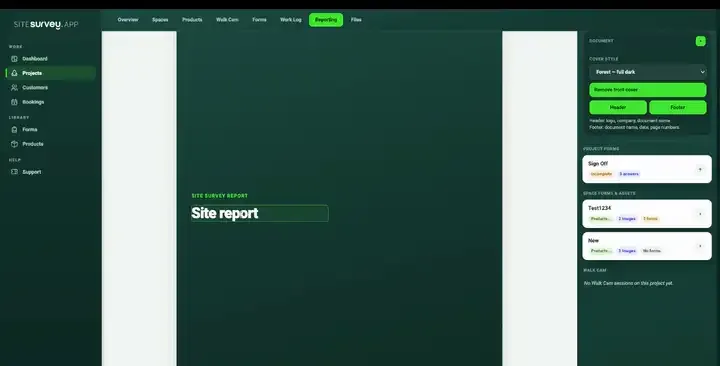
The SiteSurvey reporting workspace assembling a report from completed forms, with the forms and captured evidence listed on the right as the branded document builds on the page
Hospitality and food recordLive
6Sites
94%Checks done
2Actions
Main kitchen · Opening checksUpdated

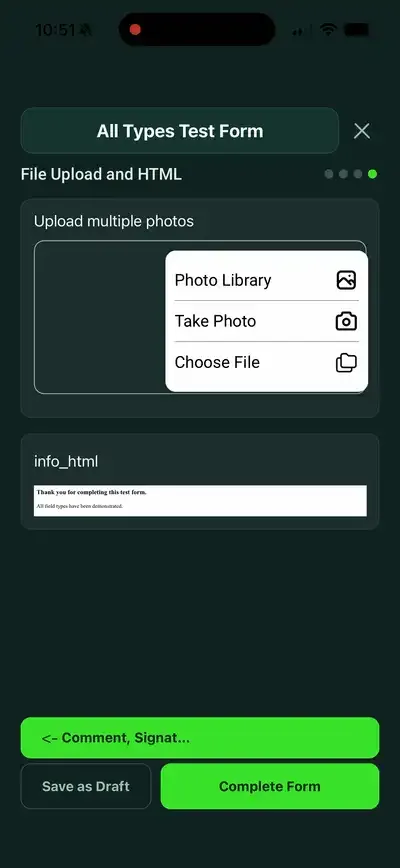
Fridges logged, handwash stocked, allergen information checked and signed before service.

What does food safety software do for a kitchen?

It replaces paper diaries and temperature sheets with forms completed on a phone or tablet. Opening and closing checks, fridge and food temperatures, cleaning and deliveries are recorded at the time, with warnings when a reading is outside the limit, photos against problems and a signature. Each site ends up with a dated record it can show to a manager or an inspector.

Last updated 10 October 2026.

SiteSurvey for hospitality and food, at a glance

What it is
A mobile forms and inspection app for iOS and Android, with a web portal, used for food safety checks, temperature logs and audits.
Who it is for
Restaurant and pub groups, hotels and venues, contract caterers, and care home and school kitchens.
What it records
Opening and closing checks, fridge and food temperatures, cleaning, deliveries and problems, with photos, filed against each site and area.
Evidence
Every entry is dated and attributed, sign-offs are captured on the device, and capture works offline, syncing later.
Price
£25 per user per month on The Works plan, which includes the form builder, floor plans and reports. Trial from £1, cancel any time.
What it does not do
It does not read fridge temperatures automatically, hold recipes, print allergen labels or write your HACCP plan for you.
01Restaurant and pub groups
02Hotels and venues
03Contract caterers
04Care and school kitchens

Paper that nobody trusts

A temperature sheet filled in at the end of the week proves nothing.

Clipboards get wet, sheets go missing and boxes get ticked from memory. When something goes wrong, or an inspector asks for last month's records, nobody can show what was checked, by whom and when.

01

Checks done from memory

A paper sheet cannot show when it was filled in. A dated, signed record on a phone can.

02

Problems that stay on the sheet

A fridge reading that is too warm is written down and forgotten, because nothing tells the person what to do next or who needs to know.

03

Every site doing it differently

One kitchen has a diary, another a spreadsheet, a third nothing at all, so an area manager cannot compare them or see which checks were missed.

One continuous record

From opening checks to a record you can show.

One connected record for each site: daily checks, temperature logs, cleaning, audits and the HACCP plan behind them.

01

Set up each site

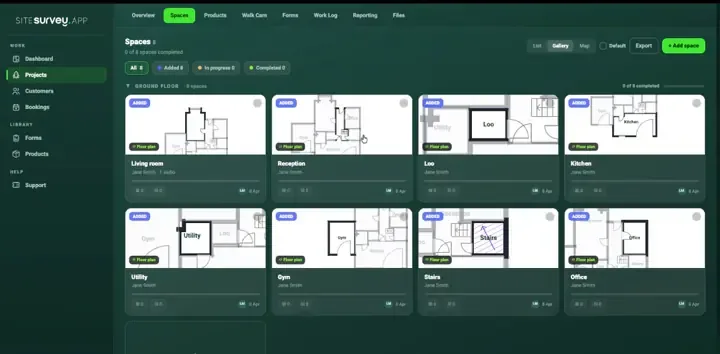
Create the kitchen, bar, cellar and stores as spaces so every check is filed against the place it was done.

02

Run the daily checks

Opening and closing checks and temperature logs are completed on a phone or tablet, with a warning on screen when a reading is outside the limit.

03

Record what went wrong

Add a photo and a note against the fridge, the delivery or the area, with what was done about it and who was told.

04

Show the record

Turn completed checks into a PDF or share a link, signed and dated, for the manager, the owner or an inspector.

The same standard at every site

One set of checks across every kitchen.

Chefs and managers follow the same forms in every site, on their own phones or a kitchen tablet, with or without signal, while operations managers see which checks are complete.

Ready-made opening, closing and temperature forms

Warnings when a reading is outside the limit

Signed, dated records for every check

Hospitality and food workspace in SiteSurvey
Hospitality and food mobile field workflow

Hospitality and food toolkit

Built for busy kitchens.

Forms

Ready-made food safety forms

A temperature log, opening and closing checks, a HACCP plan and a cleaning schedule from the form library, each one editable.

Spaces

Kitchen, bar, cellar and stores

Each area of a site has its own forms and history, so a check is always filed against the place it was done.

Evidence

Photos with every problem

Photograph the delivery, the fridge display or the damage and it stays attached to the answer it belongs to.

Equipment

Fridges and equipment on record

Record each fridge, freezer and oven as a product with its make, model and serial, scanned from the label.

Teams

Every site in one workspace

See which checks are complete and which are outstanding across kitchens, without phoning round.

Reports

A record you can hand over

Turn completed checks into a branded PDF or a share link, with signatures and dates.

Every update has a place

File every check against the place it was done.

Set up the kitchen, cold room, bar, cellar and dry store as spaces. Each carries its own checks, temperature logs, photos and sign-off, so the history of one fridge or one prep area is always in one place.

Explore floor plans ↗

Hospitality and food forms

Each one is in the SiteSurvey form library. See every question and try it live, then use it on your projects and change anything you need.

Fridge and food temperature log

Daily temperature record for a kitchen: fridges and freezers, cooking and reheating, hot holding and cold display, cooling and deliveries, with corrective actions.

6 sections · 47 questions · See every question →
Kitchen opening and closing checklist

Opening and closing checks for a commercial kitchen: fridges, handwashing, cleanliness, pests, allergens, date labels, waste and close-down, with problems and sign-off.

4 sections · 42 questions · See every question →
HACCP plan template

HACCP plan for a food business: each process step with its hazards and controls, critical control points with limits, monitoring and corrective action, checks and review.

4 sections · 41 questions · See every question →
Cleaning schedule template

Daily, weekly or deep clean record: each area with the tasks done, anything missed and why, issues with photos, supplies to reorder and a supervisor check.

4 sections · 31 questions · See every question →
Cleaning audit checklist

A cleaning quality audit and housekeeping inspection, area by area, with a pass score, chemical and waste checks, actions and sign-off by the auditor and the cleaning supervisor.

5 sections · 83 questions · See every question →
Fire risk assessment template

Fire risk assessment following the five steps in GOV.UK guidance: hazards, people at risk, fire precautions, emergency plan and training, findings with actions and review.

7 sections · 68 questions · See every question →
First aid kit checklist

Check of a first aid box against its contents list: each item present and in date, expiry dates, restocking, the box itself and the next check date.

3 sections · 32 questions · See every question →
Incident report template

Record an accident, injury, near miss, dangerous occurrence, ill health or damage, with people involved, witness statements, RIDDOR checks, investigation and actions.

7 sections · 96 questions · See every question →
Delivery note template

Delivery record signed on the device: items with quantities and condition, where they were left, photos, exceptions and the name and signature of who received them.

3 sections · 32 questions · See every question →
Linen inventory sheet

Count linen by item and location, separating clean stock, items in use, laundry stock and damaged items, with discrepancies and follow-up.

3 sections · 20 questions · See every question →
Kitchen equipment maintenance checklist

Record commercial kitchen appliance service tasks, manufacturer references, findings, parts and follow-up work across a maintenance visit.

3 sections · 22 questions · See every question →
Grease trap cleaning log

A grease trap service log recording asset condition, cleaning and removal work, waste handling references, restored operation and maintenance follow-up.

6 sections · 39 questions · See every question →

Browse all 200 forms in the library

Hospitality and food FAQ

Food safety checks and records: common questions.

01What is the best food safety app for a restaurant?+

The best food safety app is the one your team will fill in at the time, not afterwards. Look for opening and closing checks and temperature logs that work on a phone, warnings when a reading is outside the limit, photos against problems, offline use in cellars and cold rooms, and signed, dated records you can show an inspector. If you need wireless temperature sensors that log fridges automatically, choose a system built for that. SiteSurvey is strong on the checks people carry out and record: it does not read temperatures for you.

02Do I need a food safety management system?+

GOV.UK says that if you run a food business you need a food safety management system, and it must meet the Hazard Analysis and Critical Control Point (HACCP) principles. Small caterers and retailers can use the Food Standards Agency's Safer food, better business packs. The SiteSurvey form library has a HACCP plan template for businesses that want their own plan.

03What temperature should a fridge be?+

The Food Standards Agency recommends setting fridges between 0 and 5 °C and freezers at around -18 °C. In England it is an offence, under Schedule 4 of the Food Safety and Hygiene (England) Regulations 2013, to keep food that needs chilling above 8 °C. The temperature log in the form library flags readings above 5 °C and above 8 °C as they are entered.

04Can staff complete checks on their own phones?+

Yes. Checks can be completed in the SiteSurvey app on iPhone, iPad and Android, or from a share link in a browser with no app or account.

05Does it work without signal?+

Yes. Capture works offline, which matters in cellars, cold rooms and basement kitchens. Forms and photos are held on the device and sync when it is back online.

06Can I change the forms?+

Yes. Every form in the library is copied into your account and can be edited: add your own fridges, your own cleaning tasks or your own checks. The AI form builder can also create a form from a plain description.

07Can I see whether every site has done its checks?+

Yes. Each site runs as its own project in a shared workspace, so an operations manager can see which forms are complete and which are outstanding.

08Does it include allergen management?+

The opening checks ask whether allergen information for the day's menu is up to date, and the HACCP plan covers allergens as a hazard. Food businesses must tell customers if food contains any of the 14 allergens named in food law. SiteSurvey does not hold recipes or produce allergen labels.

09Who is it for?+

Restaurant and pub groups, hotels and venues, contract caterers, and care home and school kitchens. It suits anyone who needs the same food safety checks completed and recorded across one or many sites.

10How much does it cost?+

Pricing is per user, not per site or check. The Works plan, which includes the custom form builder, floor plans and reports, is £25 per user per month. The Base plan starts at £13 per user per month. Every plan starts with a trial from £1, cancel any time.

See it in your environment
Give every kitchen the same checks, completed and signed.