Audits, walk rounds & safety checks

Care home audits
done on the floor, not at a desk.

Manager's quality audits, medication and infection control audits, hand hygiene observations, fire and water safety checks, completed on a phone or tablet as you walk the home and filed against the right unit or room, with a dated record of what was found and what was done.

From £25 per user per month · trial from £1, cancel any time
Trial from £1Works offlineBuilt for mobile
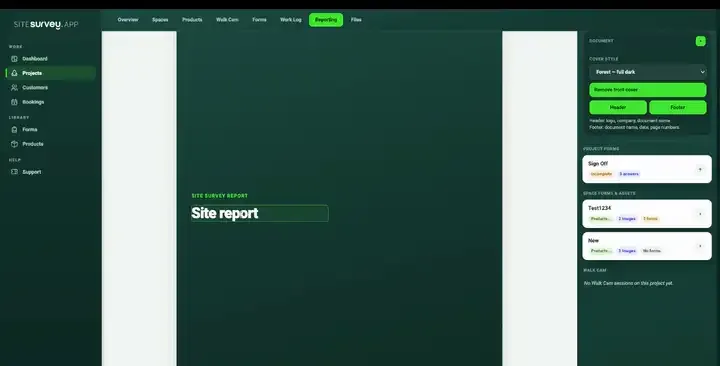
The SiteSurvey reporting workspace assembling a report from completed forms, with the forms and captured evidence listed on the right as the branded document builds on the page
Care homes recordLive
4Homes
88%Audits done
5Actions
Willow unit · Infection control auditUpdated

Environment, hand hygiene, sharps and laundry checked, with three findings raised for action.

What does care home audit software do?

It replaces paper audits with forms completed on a phone or tablet as the manager walks the home. Quality, medication, infection control and safety audits are answered from what is seen on the day, findings get a risk, an owner and a date, and the result is a signed, dated report that can be shared with the provider, a commissioner or an inspector.

Last updated 1 October 2026.

SiteSurvey for care homes, at a glance

What it is
A mobile audit and inspection app for iOS and Android, with a web portal, used for care home audits, walk rounds and safety checks.
Who it is for
Registered managers, quality and compliance leads, operations managers and estates teams in care homes and care groups.
What it records
Audit answers, findings with a risk, owner and date, and photos of the environment, filed against each home, unit or room.
Evidence
Every entry is dated and attributed, sign-offs are captured on the device, and capture works offline, syncing later.
Price
£25 per user per month on The Works plan, which includes the form builder, floor plans and reports. Trial from £1, cancel any time.
What it does not do
It is not a care planning system or an electronic medicines record, and it does not make clinical decisions or replace your regulator's requirements.
01Registered managers
02Quality and compliance leads
03Operations and regional managers
04Estates and maintenance teams

Audits that live in a folder

An audit nobody can find is an audit that was never done.

Paper audits are written up after the walk round, filed in the office and hard to compare from one month to the next. When the regulator, a commissioner or a family asks what was checked, the evidence takes days to pull together.

01

Written up afterwards

Notes taken on a clipboard are typed up later, so details are lost and the record has no time attached to it.

02

Findings with no owner

A problem noted on page six of an audit has no named person, no date and no photo, so it is found again at the next audit.

03

Every home on its own format

Each home uses a different checklist, so a group cannot compare homes or see which audits were missed.

One continuous record

From walk round to evidence.

One connected record for each home: audits, observations, safety checks and the actions that came out of them.

01

Set up the home

Create units, floors, communal areas, the kitchen and the laundry as spaces so each audit is filed against the place it covers.

02

Audit on the floor

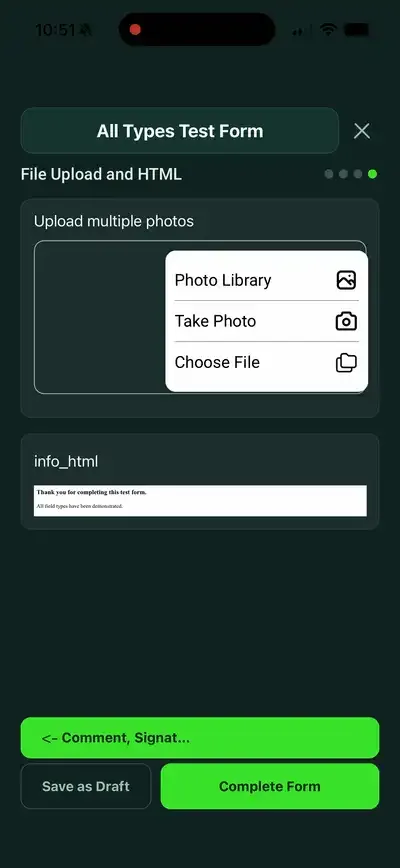
Work through the audit on a phone or tablet as you walk, answering from what you see, the records you sample and what people tell you.

03

Record findings as you go

Each finding gets a risk, an action, an owner and a date, with a photo of the environment where it helps. Residents are not photographed.

04

Share the result

Turn the audit into a PDF or a share link, signed by the auditor and the manager, for the provider, a commissioner or an inspection.

The same audits in every home

One audit programme across the group.

Managers follow the same forms in every home, with or without signal, while quality leads see which audits are complete and which findings are still open in the forms.

Ready-made audits with the guidance they are based on

Findings with a risk, an owner and a date

Signed, dated records for every audit

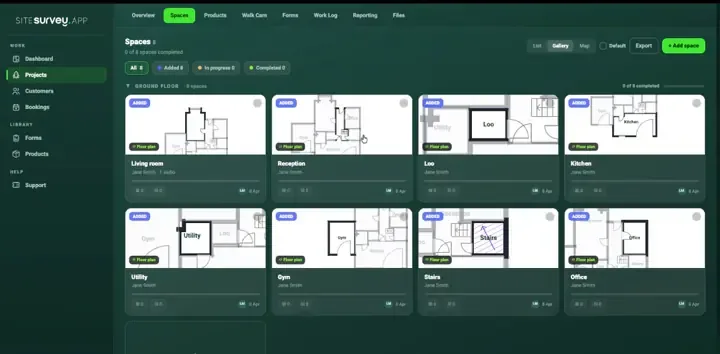
Care homes workspace in SiteSurvey
Care homes mobile field workflow

Care homes toolkit

Built for audits on the move.

Forms

Ready-made care audits

A care home audit under CQC's five key questions, medication, infection control and hand hygiene audits, and a falls assessment record, each one editable.

Spaces

Units, floors and rooms

Each area of a home has its own forms and history, so an audit is always filed against the place it covers.

Evidence

Photos of the environment

Photograph a damaged mattress, a cluttered corridor or a blocked sink and it stays attached to the finding. Do not photograph residents.

Equipment

Hoists, beds and equipment

Record equipment as products with make, model and serial scanned from the label, alongside its checks.

Teams

Every home in one workspace

See which audits are complete and which are outstanding across homes.

Reports

Audit reports without retyping

Turn a completed audit into a branded PDF or a share link, with signatures and dates.

Every update has a place

File every audit against the place it covers.

Set up each unit, floor, lounge, kitchen, laundry and clinical room as a space. Each carries its own audits, checks, photos and sign-off, so the history of one unit is always in one place.

Explore floor plans ↗

Care homes forms

Each one is in the SiteSurvey form library. See every question and try it live, then use it on your projects and change anything you need.

Care home audit template

Manager's quality audit of a care home, set out under CQC's five key questions: safe, effective, caring, responsive and well-led, with findings and actions.

7 sections · 62 questions · See every question →
Medication audit template

Medicines audit for a care home: storage, a sample of administration records, controlled drugs, staff training and competence, incidents and findings with actions.

6 sections · 64 questions · See every question →
Infection control audit checklist

Infection control audit for a care home or clinic: management, cleanliness, hand hygiene, protective equipment, sharps and waste, laundry, equipment and outbreaks.

7 sections · 64 questions · See every question →
Hand hygiene audit tool

Observation audit using WHO's five moments: each opportunity, the staff group, what was done, a compliance percentage, facilities and feedback to the team.

4 sections · 38 questions · See every question →
Falls risk assessment template

Falls assessment record for an older person in a care home or at home: falls history, the risk factors NICE lists, the environment, and actions with referrals. No score.

5 sections · 73 questions · See every question →
PEEP template

A PEEP for one person who would need help to leave a building in a fire: how they are warned, their route, refuges, equipment, helpers, practice and review.

4 sections · 44 questions · See every question →
Fire safety checklist

Routine fire safety checks: extinguishers, emergency lighting tests, the weekly alarm test, escape routes, signs and fire drills, with actions.

8 sections · 97 questions · See every question →
Legionella risk assessment template

Legionella risk assessment for a hot and cold water system: who is responsible, tanks and heaters, outlet temperatures, little-used outlets, findings and actions.

5 sections · 54 questions · See every question →
Fridge and food temperature log

Daily temperature record for a kitchen: fridges and freezers, cooking and reheating, hot holding and cold display, cooling and deliveries, with corrective actions.

6 sections · 47 questions · See every question →

Browse all 200 forms in the library

Care homes FAQ

Care home audits and checks: common questions.

01What is the best care home audit software?+

The best care home audit software is the one managers will use on the floor. Look for ready-made audits you can edit, findings with a risk, an owner and a date, photos of the environment, offline use, signatures, and reports you can share without retyping. If you need electronic care plans or an electronic medicines administration record, choose a system built for that. SiteSurvey is strong on audits, inspections and safety checks: it is not a care planning or medicines system.

02What audits should a care home carry out?+

That depends on the service and its regulator. Common ones are a manager's quality audit, medication, infection prevention and control, hand hygiene, care plans, health and safety, fire safety and water safety. In England, the code of practice under the Health and Social Care Act 2008 expects evidence of a rolling programme of infection control audit. The form library has templates for several of these.

03Are the audits based on CQC requirements?+

The care home audit is set out under the five key questions CQC asks: safe, effective, caring, responsive and well-led. It is a manager's own check under those headings, not a CQC assessment, and it does not list every regulation. CQC regulates care in England: Scotland, Wales and Northern Ireland have their own regulators.

04Does the falls risk assessment give a score?+

No. NICE guideline NG249 says not to use falls risk prediction tools to predict a person's risk of falling. The falls form in the library records the individual risk factors NICE lists and an action for each. It is a record for trained staff, not a clinical tool.

05Is it safe to record resident information?+

The audit templates are designed to avoid it: they record residents by room or reference, not by name, and remind auditors not to photograph residents. The falls assessment does relate to one person, so decide who can see it and how long you keep it, as you would for any care record. Only add personal details you need.

06Does it work without signal?+

Yes. Capture works offline, which matters in older buildings and basements. Forms and photos are held on the device and sync when it is back online.

07Can I change the audits?+

Yes. Every form in the library is copied into your account and can be edited to match your own policies. The AI form builder can also create a form from a plain description.

08Can it be used for fire, water and maintenance checks too?+

Yes. The form library includes fire safety checks, a fire risk assessment, personal emergency evacuation plans, a legionella risk assessment, planned maintenance visits and cleaning audits, which estates and maintenance teams use alongside the care audits.

09Who is it for?+

Registered managers, quality and compliance leads, operations and regional managers, and estates teams in care homes and care groups. It suits anyone who needs the same audits completed and evidenced across one or many homes.

10How much does it cost?+

Pricing is per user, not per home or audit. The Works plan, which includes the custom form builder, floor plans and reports, is £25 per user per month. The Base plan starts at £13 per user per month. Every plan starts with a trial from £1, cancel any time.

See it in your environment

Give every home the same audits, completed and evidenced.