Form library · Construction and handover

Snagging list template

A snag list form for handover walks, new home inspections, practical completion and the end of the rectification period. Record each snag where you stand, with the room, element, photos, trade, priority and status, then the checks that passed, the totals and the re-inspection. Every question is listed below, and you can fill the live form in on this page.

Ready to use from the form library, and every question is yours to edit. Trial from £1, cancel any time.

Try it on your phone

Try it on this phone

Fill in the snagging on your phone now

See how the snagging looks on your phone

Scan the code with your phone camera. It opens the real form, no sign-up needed.

Open the live example and fill it in, just as your team would on site. No sign-up needed.

See it on this phone

Every question is editable. Add this form to your account, then change the wording, add or remove questions and options, and make it fit your own jobs.

Or start your trial with this form ready →

One email, and we won't add you to a mailing list.

What should a snagging list include?

A snagging list should give each snag its room and exact location, the element affected, a description and photos, the trade to put it right, a priority and a target date, and a status through to closed with a photo of the finished work. It should also record the conditions of the inspection, what could not be checked, who received the list and when it will be re-inspected.

Last updated . Facts checked by the SiteSurvey team on 5 October 2026 against the New Homes Quality Code (Version 2), NHQB: which Code applies and the NHQB Pre-Completion Inspection Checklist (house, Version 2).

Built for a room by room snag walk

Walk a new home room by room on a phone. Each room holds its own snags, each snag gets its photo, trade, priority and target date, and the snag list counts itself as you go, ready to issue to the trades.

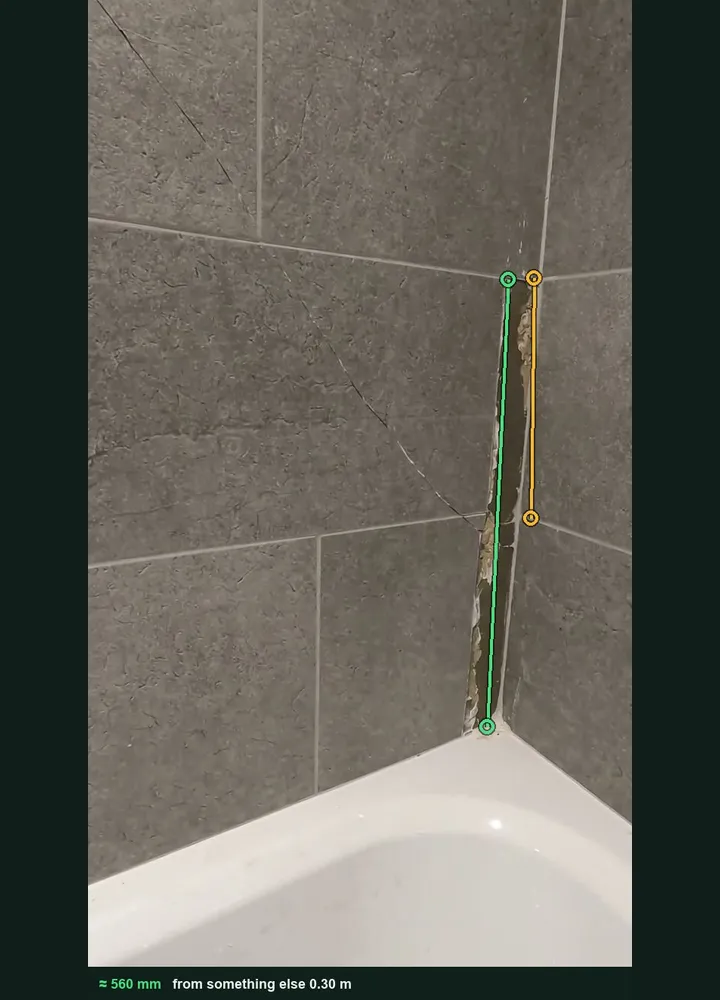
A bathroom tile corner marked up in Measure from photo: an amber line on one 300 mm tile and a green line along the open grout joint, about 560 mm

Measure a crack or open joint from a photo

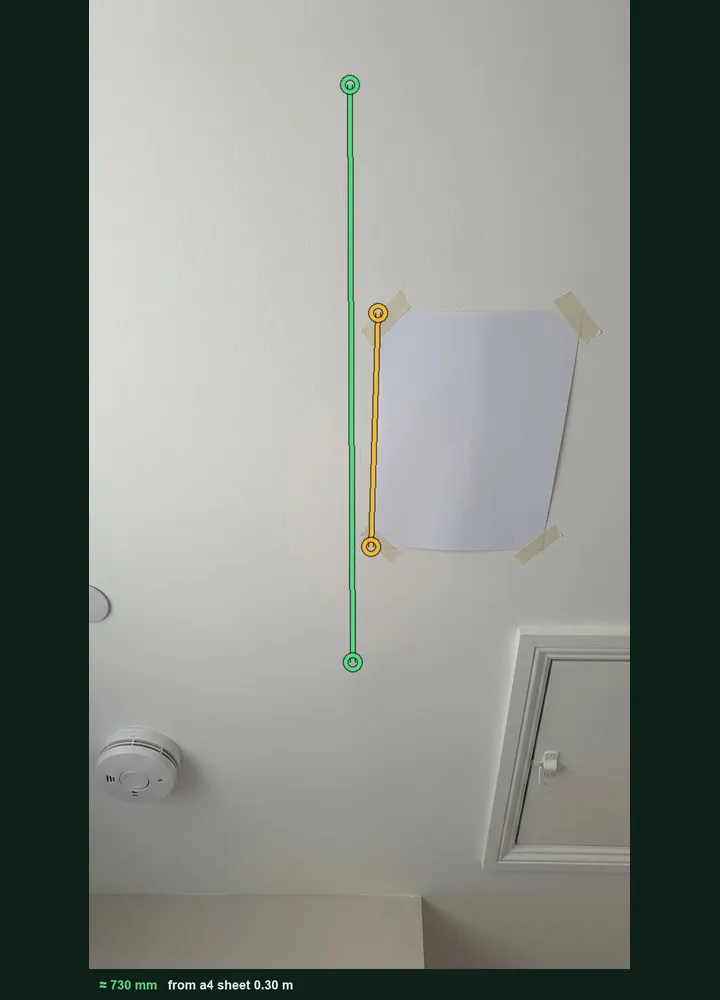
Tape an A4 sheet beside a ceiling crack, or use a tile or a switch plate as the reference, tap both ends and the length goes into the snag with the marked-up photo kept. It works on web forms in any phone browser today, and the app version is on its way.

How measuring from a photo works →
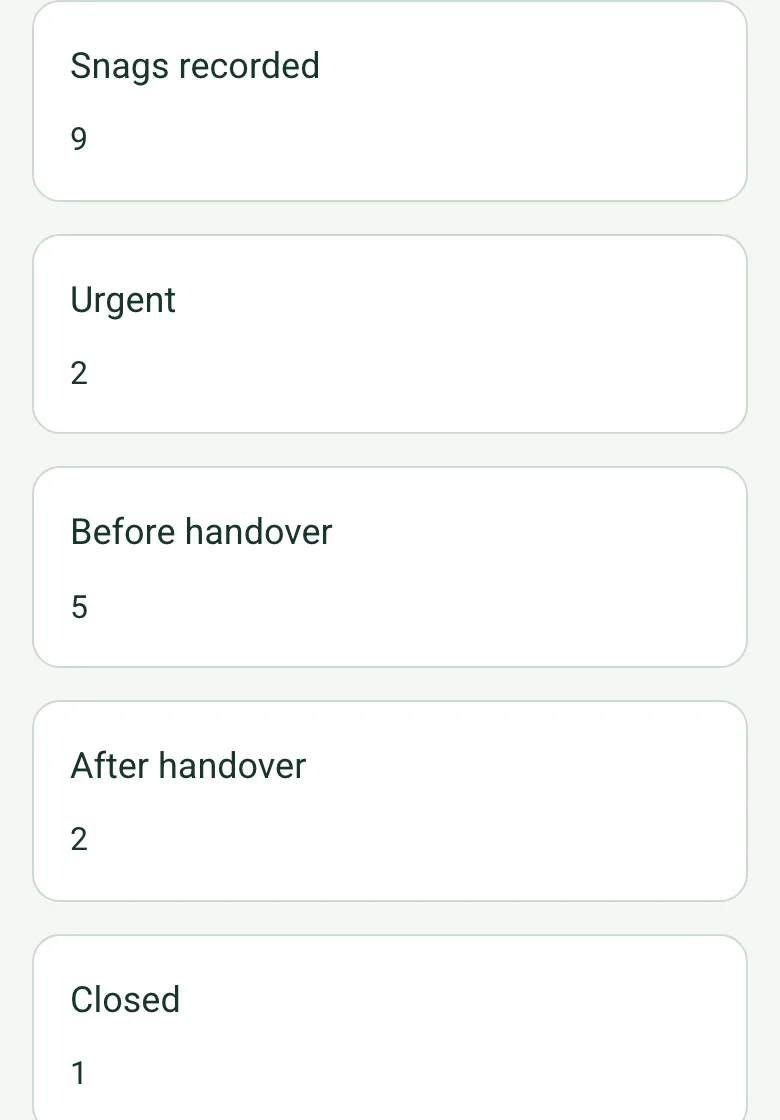
The completed snag list on a phone: snags recorded 9, urgent 2, before handover 5, after handover 2, closed 1, all worked out

The snag list counts itself

Each room counts its own snags by priority, and the totals page adds up every room: snags recorded, urgent, before and after handover, closed, still open and the rooms with an urgent snag.

How calculated fields work →
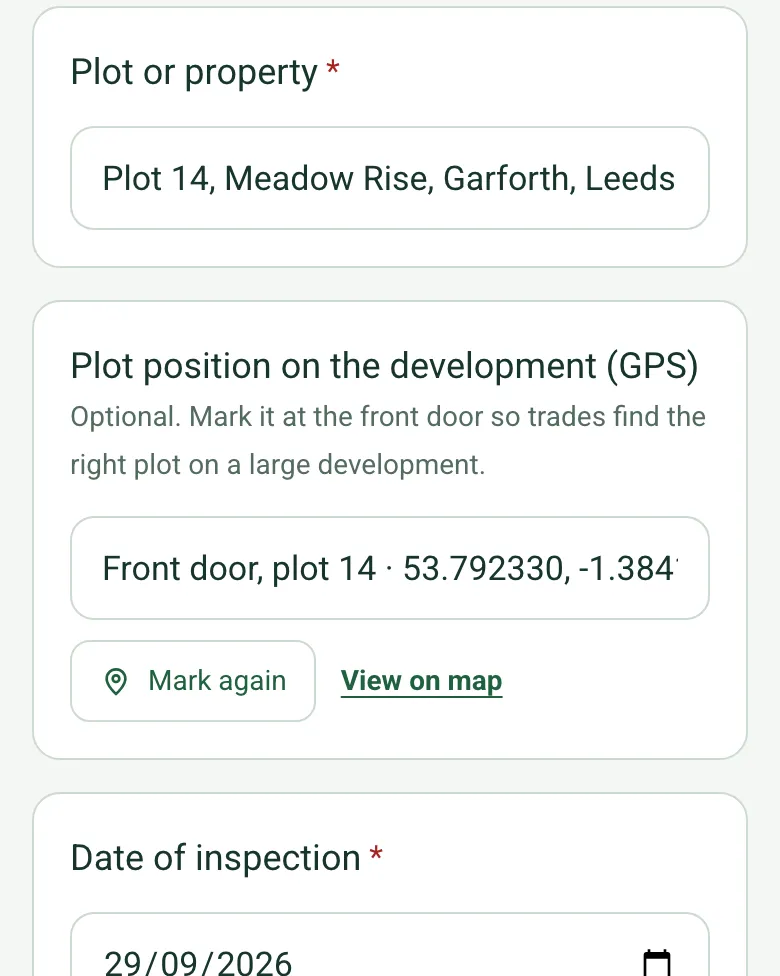
Plot position on the development (GPS) filled in at the front door of plot 14 with coordinates and an OS grid reference, with Mark again and View on map

Pin the plot on a big development

Mark the plot's position at the front door, so trades coming back for the snags find the right house on a site of a hundred plots.

How GPS location works →

Talk through the snags on video

Walk Cam records the walk with a guided point for each room and turns what you say into text, so nothing gets missed between the plot and the office.

A completed new build snag list

A fictional snag walk on plot 14 before handover: eight rooms, nine snags with photos, three measured from a photo, two urgent items reported to the site manager, one kitchen snag already closed with a photo of the fix, and a re-inspection booked.

A landing ceiling with an A4 sheet taped beside a hairline crack, marked up in Measure from photo at about 730 mm
Landing ceiling · crack about 730 mm · after handover
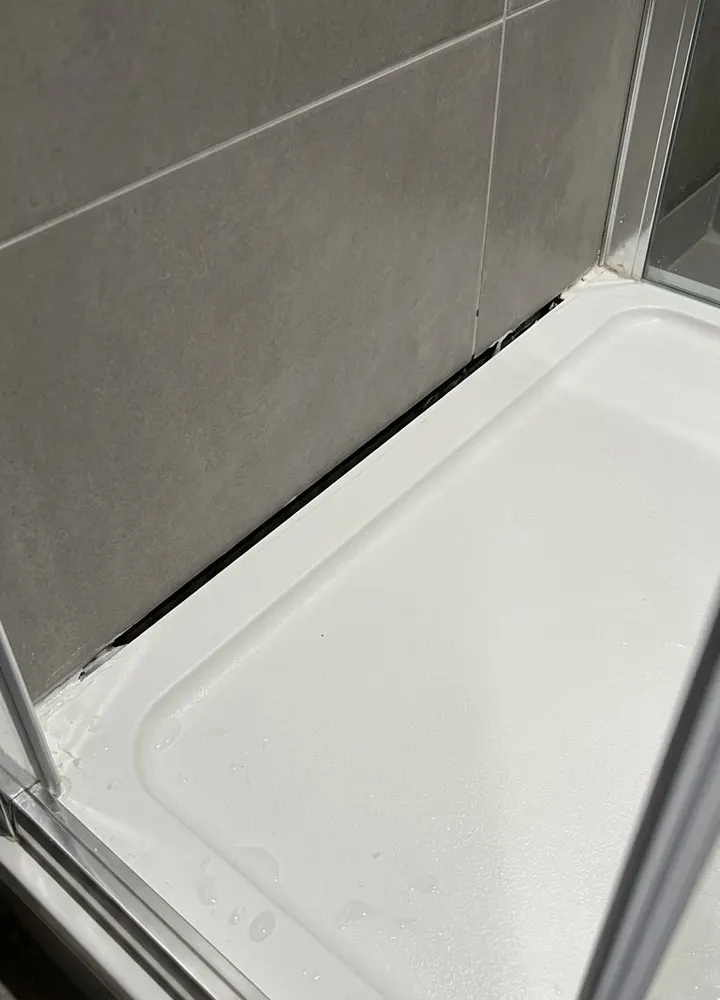
A white shower tray against grey tiles with the silicone missing along the back edge
En-suite · tray seal missing · urgent, shower taped off
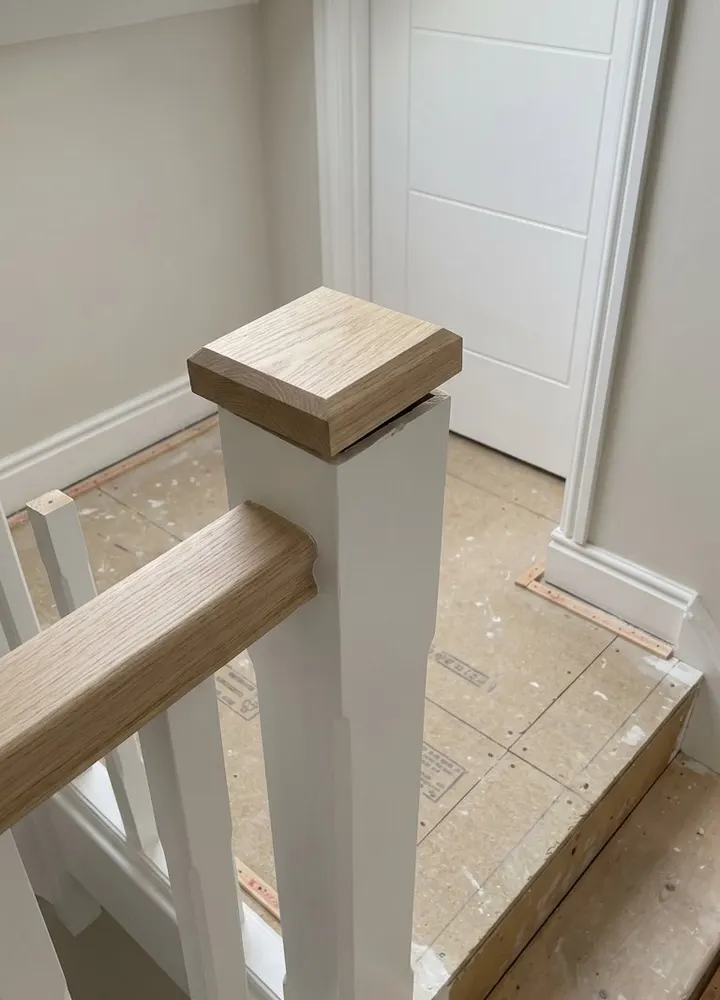
The top of a new white staircase with a loose oak newel cap
Stairs and landing · newel loose · urgent, fixed next day

Try the snagging form live

Answer a few questions and watch it adapt. Your answers are not saved, and any photos you add are deleted within the hour.

Live form: Snagging InspectionOpen full screen ↗
Fill it in right here

This is the real form as your team would use it: questions appear as you answer, scores work themselves out and you can add photos and signatures. No sign-up needed. Or open a completed example to see every answer, photo and score filled in.

Want to see one filled in? See a completed snagging report (PDF), made by SiteSurvey from a fictional site visit.

For teams

Using the snagging template for client work?

Paper or a spreadsheet works for the odd job. When your team does this every week, SiteSurvey keeps every visit in one place and turns each one into a report you can send.

  • Everyone fills in the same form on their phone, with photos attached to the answer they belong to.
  • Each visit becomes a branded PDF report for the client, with no retyping.
  • Every site, visit and report is kept together in one account, not scattered across email and shared drives.

Fill it in on a phone or tablet

Your team completes the snagging inspection on site in the SiteSurvey app on iPhone, iPad and Android phones and tablets. The project name and address fill in for them, it works without signal, and it syncs when the device is back online with photos kept against the question they answer.

Customers and subcontractors do not need the app: send them a link and they can fill it in from any browser.

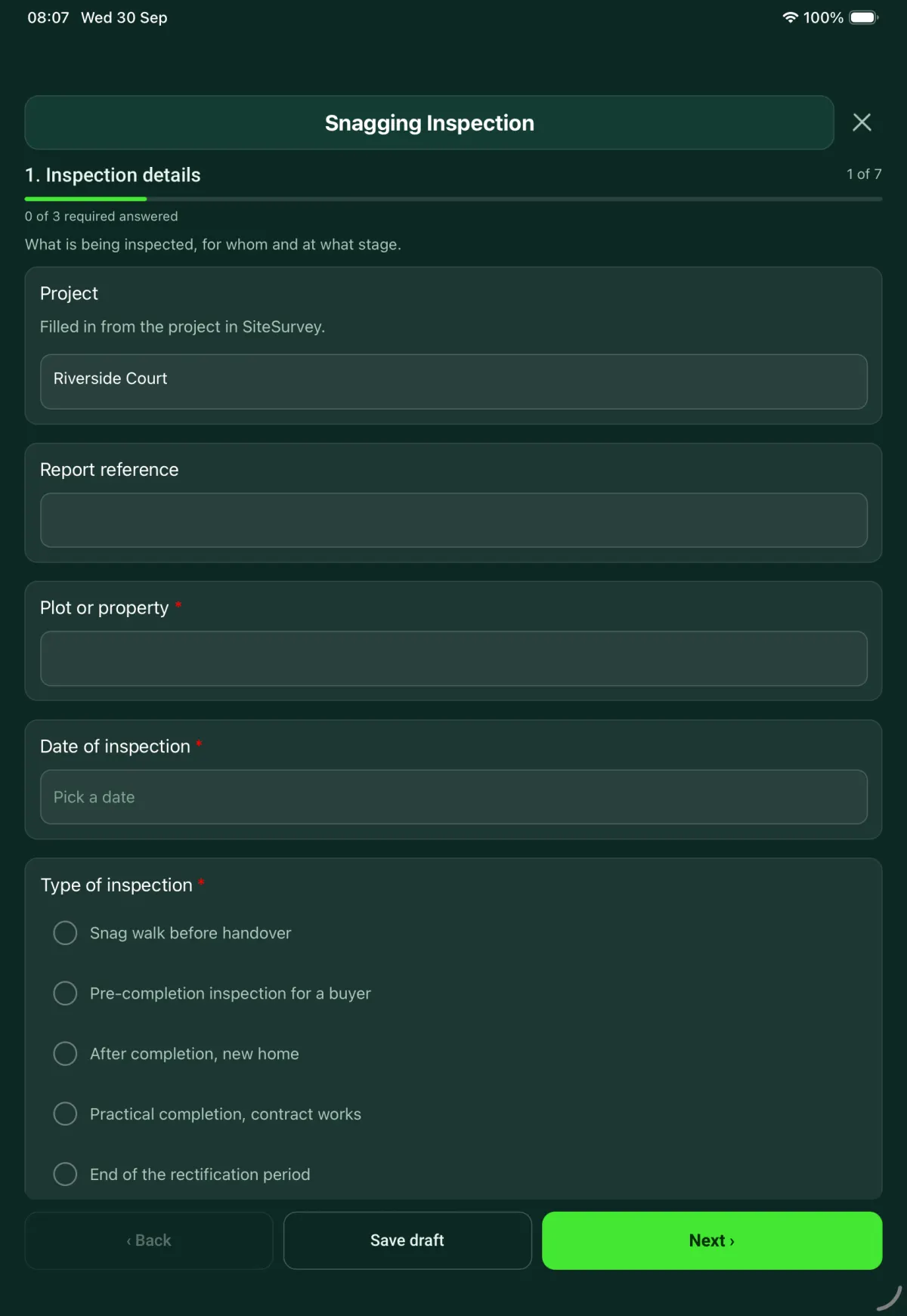
The Snagging Inspection form in the SiteSurvey app on a tablet
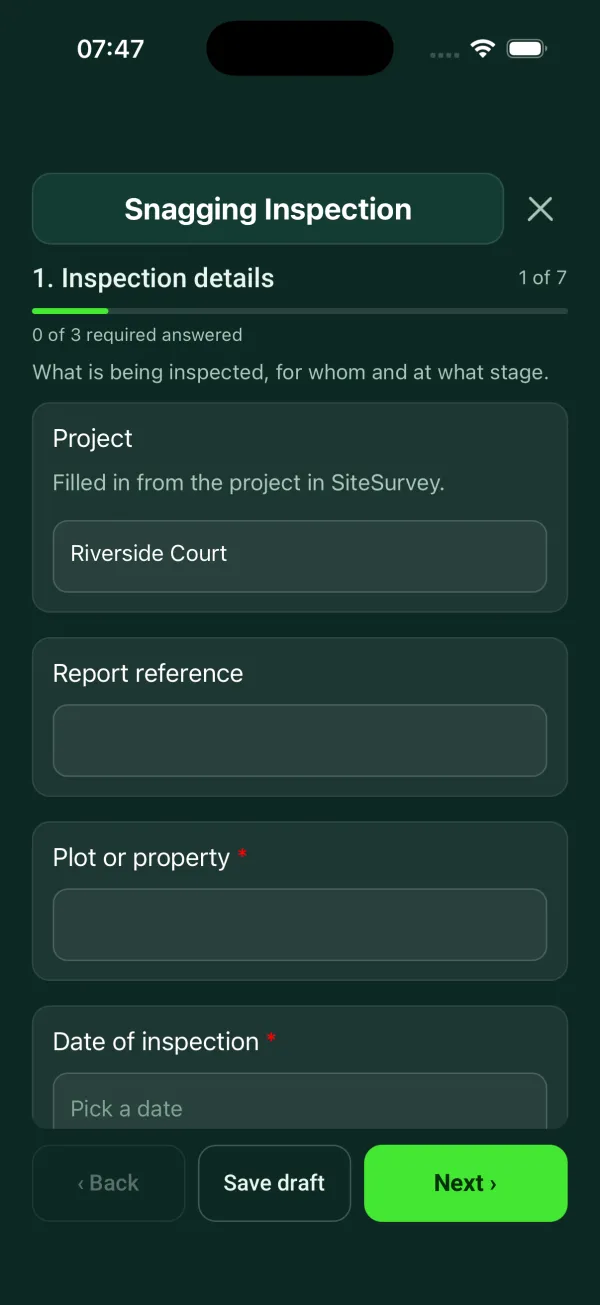
The Snagging Inspection form in the SiteSurvey app on a phone

Every question in the snagging template

Snag by snag record with room, element, photo and priority, checks with no snag, totals and re-inspection. 7 sections and 96 questions. Follow-up questions and guidance appear only when an answer calls for them, so the person on site never sees the ones that do not apply.

Make it your own: every question is editable

This is a starting point, not a fixed form. Once it is in your SiteSurvey account you can reword any question, add or remove questions, sections and answer options, and add your own logo, so it fits the way your team works and the jobs you do.

Details you only enter once

Add this form to a project in SiteSurvey and it fills in what the project already knows, so nobody on site retypes it and every form on the job uses the same names. Anything filled in can still be changed.

  • Project: the project name
  • Client: the project's customer
  • Property address: the site address, from the space or the project

Inspection details

What is being inspected, for whom and at what stage.

  • ProjectShort answer

    Filled in from the project in SiteSurvey.

    Fills in from the project name
  • ClientShort answer
    Fills in from the project's customer
  • Property addressShort answer
    Fills in from the site address, from the space or the project
  • Report referenceShort answer
  • Plot or property*Short answer
  • Plot position on the development (GPS)Short answer

    Optional. Mark it at the front door so trades find the right plot on a large development.

  • Date of inspection*Date
  • Type of inspection*Choose one
    • Snag walk before handover
    • Pre-completion inspection for a buyer
    • After completion, new home
    • Practical completion, contract works
    • End of the rectification period
  • Planned handover dateDate
    Shown when “Type of inspection” is “Snag walk before handover”
  • Days until handoverWorked out by the form
    Shown only when the answers above make it relevant
  • GuidancePre-completion inspection. The New Homes Quality Code says the inspection must be carried out and recorded in line with the NHQB Pre-Completion Inspection Checklist. This form is a snag record. It does not replace that checklist.
    Shown when “Type of inspection” is “Pre-completion inspection for a buyer”
  • Has the notice to complete been served?Yes or No
    Shown when “Type of inspection” is “Pre-completion inspection for a buyer”
  • Date the notice to complete was servedDate
    Shown when “Type of inspection” is “Pre-completion inspection for a buyer” and “Has the notice to complete been served?” is Yes
  • CheckThe Code says the inspection should take place after the notice to complete has been served, or earlier if the developer and the buyer both agree. Record that agreement.
    Shown when “Type of inspection” is “Pre-completion inspection for a buyer” and “Has the notice to complete been served?” is No
  • Have the developer and the buyer both agreed to an earlier inspection?Yes or No
    Shown when “Type of inspection” is “Pre-completion inspection for a buyer” and “Has the notice to complete been served?” is No
  • Legal completion dateDate
    Shown only when the answers above make it relevant
  • Inspector's professional body and membership numberShort answer
    Shown when “Type of inspection” is “Pre-completion inspection for a buyer”
  • Date the snags were reported to the developerDate
    Shown when “Type of inspection” is “After completion, new home”
  • Days since the snags were reportedWorked out by the form
    Shown only when the answers above make it relevant
  • CheckMore than 30 days have passed since the snags were reported. The Code says that in most situations a registered developer must settle an after-sales issue within 30 days. If there is a delay, the buyer must be told why and updated at least once a month.
    Shown only when the answers above make it relevant
  • When was the home reserved?Choose one
    • Before 2 March 2026
    • On or after 2 March 2026
    • Not known
    Shown only when the answers above make it relevant
  • GuidanceVersion 2 of the New Homes Quality Code applies, if the developer is registered with the New Homes Quality Board.
    Shown when “When was the home reserved?” is “On or after 2 March 2026”
  • GuidanceVersion 1 of the New Homes Quality Code applies, if the developer is registered with the New Homes Quality Board. Check the wording of that version.
    Shown when “When was the home reserved?” is “Before 2 March 2026”
  • Contract and projectShort answer
    Shown only when the answers above make it relevant
  • Date of practical completionDate
    Shown when “Type of inspection” is “End of the rectification period”
  • Date the rectification period endsDate
    Shown when “Type of inspection” is “End of the rectification period”
  • GuidanceThe length of the rectification period, and how and when defects must be notified, are set by the contract. Check the contract particulars before you issue the list.
    Shown only when the answers above make it relevant
  • Inspector name and roleShort answer
  • Developer or contractorShort answer
  • Weather on siteAnswer

    If it is dry, gutters, downpipes and water butts cannot be checked for leaks: record that as a limit of the inspection.

  • Walk Cam: Snagging walkWalk Cam video with voice-to-text

    Optional. Film a guided walk-through on the SiteSurvey app.
Conditions and limits

How the inspection was carried out, and anything that could not be checked.

  • GuidanceViewing distances in the NHQB checklist guidance. Internal walls, ceilings and paintwork: daylight, from at least 2 m, without shining a light on the surface. Kitchens and fitted furniture: from 0.5 m. External walls: from at least 10 m.
  • Was there natural daylight in every room?Yes or No
  • Which rooms had no daylight?Short answer
    Shown when “Was there natural daylight in every room?” is No
  • CheckWhere there is no natural daylight, the guidance is to inspect with a single light source. Do not shine a light along the surface. Record this as a limit of the inspection.
    Shown when “Was there natural daylight in every room?” is No
  • Could every room and area be inspected?Yes or No
  • Which areas were not inspected, and why?Notes
    Shown when “Could every room and area be inspected?” is No
  • LoftChoose one
    • Inspected
    • Not inspected
    • No loft
  • Why was the loft not inspected?Choose one
    • No fixed ladder
    • Not safe to enter
    • Hatch could not be opened
    • Other (describe)
    Shown when “Loft” is “Not inspected”
  • Were water, power and heating on?Yes or No
  • Which were off?Tick all that apply
    • Water
    • Electricity
    • Gas
    • Heating
    Shown when “Were water, power and heating on?” is No
  • CheckAnything that needs a service that was off could not be tested. List it in the areas not inspected or come back to it at the re-inspection.
    Shown when “Were water, power and heating on?” is No
  • Rooms and areas inspectedTick all that apply
    • Hall
    • Living room
    • Dining room
    • Kitchen
    • Utility
    • WC
    • Stairs and landing
    • Bedroom 1
    • Bedroom 2
    • Bedroom 3
    • Bathroom
    • En-suite
    • Garage
    • Front outside area
    • Rear outside area
    • Other (describe)

Snags

One entry for each snag. Record it while you are standing in front of it.

  • GuidanceWhat a good snag photo shows. Step back far enough to show where it is in the room, then get close enough to show what is wrong.
  • Rooms and areas
    Repeat for each entry. Each one asks:
    • Room or area*Choose one
      • Hall
      • Living room
      • Dining room
      • Kitchen
      • Utility
      • WC
      • Stairs and landing
      • Bedroom 1
      • Bedroom 2
      • Bedroom 3
      • Bathroom
      • En-suite
      • Garage
      • Outside
      • Other (describe)
    • Snags in this room
      Repeat for each snag. Each one asks:
      • Exactly where?Short answer
      • Length of the crack, scratch or damage (mm)Number

        Optional. Tape an A4 sheet beside it and measure from a photo, or use a tape.

        Shown only when the answers above make it relevant
      • What is it?Choose one
        • Walls and ceilings
        • Floors
        • Windows and glazing
        • Doors
        • Skirting and joinery
        • Kitchen and fitted furniture
        • Tiles
        • Sanitaryware
        • Services
        • Appliances
        • Outside
      • Which looks most like what you can see?Choose one
        • Damaged plaster or paint
        • Door or unit out of line
        • Cracked tile or open joint
      • What is wrong with the wall or ceiling?Tick all that apply
        • Paint patchy or uneven
        • Plaster chipped or damaged
        • Filler left rough
        • Paint or filler on a switch or socket
        • Crack
        • Fixing showing through
        • Other (describe)
        Shown only when the answers above make it relevant
      • What is wrong with the unit?Tick all that apply
        • Door out of line
        • Door does not close flush
        • Gaps uneven
        • Handle loose or not square
        • Scratched or chipped
        • Shelf missing or loose
        • Other (describe)
        Shown only when the answers above make it relevant
      • What is wrong with the tiling?Tick all that apply
        • Tile cracked
        • Tile chipped or scratched
        • Grout missing
        • Joint not straight
        • Sealant missing or untidy
        • Other (describe)
        Shown when “What is it?” is “Tiles”
      • Is it next to a bath, shower or basin?Yes or No
        Shown when “What is it?” is “Tiles”
      • CheckAn open joint or cracked tile in a wet area lets water get behind the tiles. Put it right before the bath or shower is used.
        Shown when “What is it?” is “Tiles” and “Is it next to a bath, shower or basin?” is Yes
      • Is it a fire door?Yes or No
        Shown when “What is it?” is “Doors”
      • Largest gap at the head or sides (mm)Number
        Shown when “What is it?” is “Doors” and “Is it a fire door?” is Yes
      • Gap at the base (mm)Number
        Shown when “What is it?” is “Doors” and “Is it a fire door?” is Yes
      • CheckA gap is outside the figures in the NHQB checklist. It says gaps at the head and sides of a fire door need to be between 2 and 4 mm, and the gap at the base no more than 4 mm. Check the door's certification data as well, as it may give other figures.
        Shown only when the answers above make it relevant
      • Gap between skirting and floor (mm)Number
        Shown only when the answers above make it relevant
      • Over the 5 mm in the NHQB checklist by (mm)Worked out by the form
        Shown only when the answers above make it relevant
      • Does it affect safety, or is water leaking?Yes or No
        Shown only when the answers above make it relevant
      • WarningTell the site manager now. Do not wait for the list to be issued. The New Homes Quality Code treats emergency issues separately from snags.
        Shown when “Does it affect safety, or is water leaking?” is Yes
      • Describe the snagNotes
      • Photos of the snagPhotos
      • Trade to put it rightChoose one
        • Decorator
        • Plasterer
        • Joiner
        • Kitchen fitter
        • Tiler
        • Plumber
        • Electrician
        • Flooring
        • Glazier
        • Groundworker
        • Cleaner
        • Other (describe)
      • PriorityChoose one
        • Urgent
        • Before handover
        • After handover
      • WarningUrgent. Report it by phone today as well as on the list, and record who you told.
        Shown when “Priority” is “Urgent”
      • Who was told, and when?Short answer
        Shown when “Priority” is “Urgent”
      • Why can it wait until after handover?Notes
        Shown when “Priority” is “After handover”
      • Target dateDate
      • Days from inspection to targetWorked out by the form
        Shown only when the answers above make it relevant
      • CheckThe target date is after the planned handover, but the priority is before handover. Change one of them.
        Shown only when the answers above make it relevant
      • StatusChoose one
        • Open
        • Fixed, waiting for a check
        • Closed
      • Fix checked byShort answer
        Shown only when the answers above make it relevant
      • Date checkedDate
        Shown only when the answers above make it relevant
      • GuidanceCheck the work yourself and photograph it before you close the item.
        Shown when “Status” is “Fixed, waiting for a check”
      • Photo of the finished workPhotos
        Shown when “Status” is “Closed”
      • Date closedDate
        Shown when “Status” is “Closed”
      • Closed byShort answer
        Shown when “Status” is “Closed”
    • This room: snags recordedWorked out by the form
    • This room: urgentWorked out by the form
    • This room: before handoverWorked out by the form
    • This room: after handoverWorked out by the form
    • This room: closedWorked out by the form

Checks with no snag

What was tested and found working. It shows the item was looked at.

  • Sockets tested with a plug testerChoose one
    • All tested, no fault
    • Fault found
    • Not tested
  • CheckAdd the socket fault to the snag list with the room and which socket it is.
    Shown when “Sockets tested with a plug tester” is “Fault found”
  • Smoke, heat and carbon monoxide detectorsChoose one
    • Present and sounded on test
    • Present, did not sound
    • Missing
    • Not tested
  • WarningA detector is missing or did not sound. Add it to the snag list as urgent.
    Shown only when the answers above make it relevant
  • Heating and hot waterChoose one
    • Working
    • Fault found
    • Not tested
  • What is wrong with it?Short answer
    Shown when “Heating and hot water” is “Fault found”
  • Bath and basins filled to the overflow and drainedChoose one
    • No leaks or movement
    • Leak or movement found
    • Not tested
  • Where is the leak or movement?Short answer
    Shown when “Bath and basins filled to the overflow and drained” is “Leak or movement found”
  • Windows and outside doors open, close and lockChoose one
    • Yes, keys present
    • Fault found
    • Keys missing
  • Which window or door, and what is wrong?Short answer
    Shown when “Windows and outside doors open, close and lock” is “Fault found”
  • What was not tested, and why?Notes
    Shown only when the answers above make it relevant
  • Overall standard of finishRating 1 to 5 (Poor to Very good)

Totals

Worked out from the snags you entered.

  • Snags recordedWorked out by the form
  • UrgentWorked out by the form
  • Before handoverWorked out by the form
  • After handoverWorked out by the form
  • ClosedWorked out by the form
  • Share closed (%)Worked out by the form
    Shown only when the answers above make it relevant
  • Still openWorked out by the form
  • Rooms with an urgent snagWorked out by the form
  • WarningThere is at least one urgent item. Check that each one has been reported by phone.
    Shown only when the answers above make it relevant
  • GuidanceEvery snag is closed. Check that each one has a photograph of the finished work.
    Shown only when the answers above make it relevant

Actions and re-inspection

Who gets the list and when it is checked again.

  • List issued toTick all that apply
    • Each trade
    • Site manager
    • Contracts manager
    • Customer care
    • Buyer or client
    • Contract administrator
    • Other (describe)
  • Date the list was issuedDate
  • GuidanceThe NHQB checklist guidance says a completed pre-completion checklist should go to the buyer and to the developer.
    Shown when “Type of inspection” is “Pre-completion inspection for a buyer” and “List issued to” includes “Buyer or client”
  • Is a re-inspection needed?Yes or No
  • Re-inspection dateDate
    Shown when “Is a re-inspection needed?” is Yes
  • What will be checked again?Notes
    Shown when “Is a re-inspection needed?” is Yes
  • CheckThe re-inspection is after the planned handover date.
    Shown only when the answers above make it relevant
  • Has the buyer or client been told about items left until after handover?Yes or No
    Shown only when the answers above make it relevant
  • Who agreed, and whenShort answer
    Shown only when the answers above make it relevant
  • Other notesNotes

Inspector sign-off

  • WarningThis inspection has urgent items. Check that who was told, and when, is filled in for each one.
    Shown only when the answers above make it relevant
  • NameWorked out by the form
  • Inspector signatureSignature

See it filled in

A completed snagging report, made by SiteSurvey from a fictional site visit: every answer, the photos, the guidance that applied and the sign-off, ready to send as a PDF.

See completed form (PDF) ↗

Snagging FAQs

Is a snagging list the same as a punch list?

Yes. Punch list is the name used in the US and in some contracts for the same thing: a list of defects and unfinished work to put right before handover. This template works as a punch list, with a photo, location and owner against each item.

Can I use this for a new build snagging inspection?

Yes, as a snag record. For a pre-completion inspection with a developer registered with the New Homes Quality Board, the Code says the inspection must use the NHQB Pre-Completion Inspection Checklist. This form does not replace that checklist, and it says so when you choose that type of inspection.

When should a new build pre-completion inspection happen?

The New Homes Quality Code says the inspection should take place after the notice to complete has been served, or earlier if the developer and the buyer both agree. The form asks whether the notice has been served and records the agreement if it has not.

How long does a developer have to fix snags after completion?

The New Homes Quality Code says that in most situations a registered developer must settle an after-sales issue within 30 days, and if there is a delay the buyer must be told why and updated at least once a month. The form counts the days since the snags were reported and flags anything over 30.

Which version of the New Homes Quality Code applies?

Version 2 applies to homes reserved from a registered developer on or after 2 March 2026, and Version 1 to homes reserved before that date. The form asks when the home was reserved and shows which version applies.

How close should I stand when checking walls and paintwork?

The NHQB checklist guidance says internal walls, ceilings and paintwork are viewed in daylight from at least 2 m, without shining a light on the surface. Kitchens and fitted furniture are viewed from 0.5 m and external walls from at least 10 m.

Can the snag list be shared with trades?

Yes. In the SiteSurvey app the form works offline, attaches photos to each snag and produces a PDF report or share link. The form records who the list was issued to, such as each trade, the site manager or the buyer.

Related

Use this snagging form with your team

Add it from the form library in one click, change any question, and every completed form becomes a branded PDF report.

Start your trial →