Form library · AV and IT

Display installation checklist

A room by room, screen by screen check for installers fitting displays and TVs. The form compares the weight of each screen and mount with the mount's rating, checks the height to the centre against the agreed height and your tolerance, measured with a tape or from a photo, and counts the screens over their rating, off height or failing the picture test across the job. Try the form below, see every question or open a completed example.

Ready to use from the form library, and every question is yours to edit. Trial from £1, cancel any time.

Try it on your phone

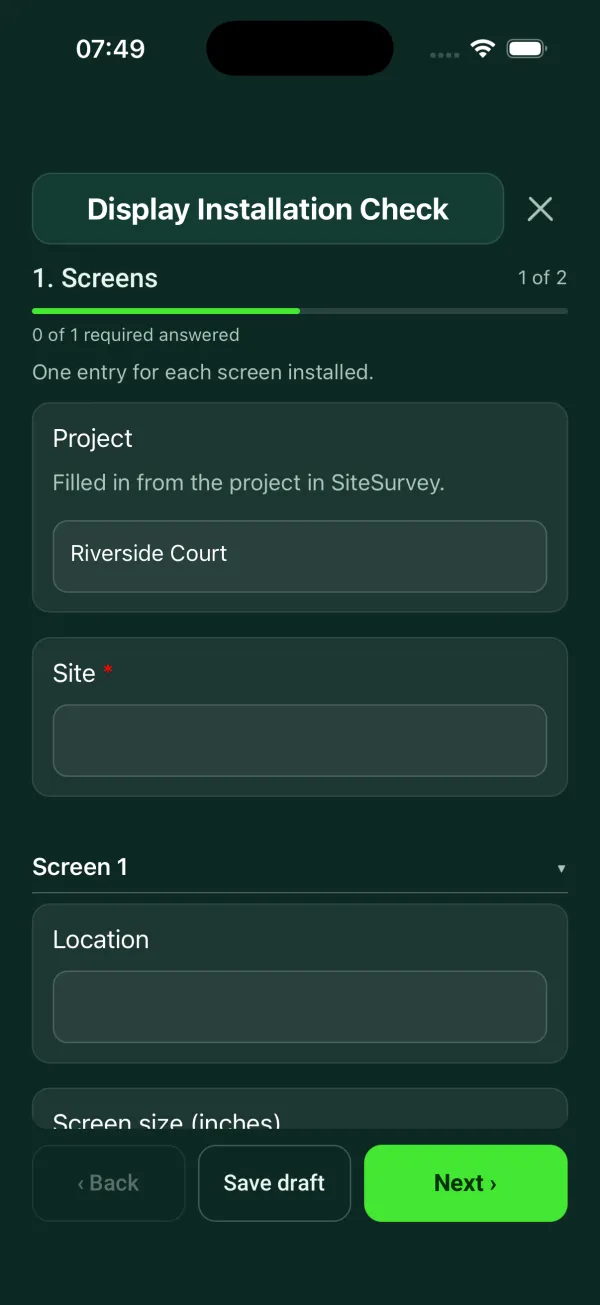
Try it on this phone

Fill in the display installation on your phone now

See how the display installation looks on your phone

Scan the code with your phone camera. It opens the real form, no sign-up needed.

Open the live example and fill it in, just as your team would on site. No sign-up needed.

See it on this phone

Every question is editable. Add this form to your account, then change the wording, add or remove questions and options, and make it fit your own jobs.

Or start your trial with this form ready →

One email, and we won't add you to a mailing list.

What should a display installation checklist include?

A display installation checklist should record each screen's location, size, make and model, the mount, and the wall or ceiling it is fixed to. It should confirm the fixings suit that surface and the combined weight of screen and mount, then check the height to the centre of the screen, that it is level, power and signal, a picture test on every input, and photos.

Last updated . Facts checked by the SiteSurvey team on 5 October 2026 against BS 8539:2012+A1:2021, selection and installation of post-installed anchors in concrete and masonry (BSI) and HSE safety notice on height adjustable display screen stands in education.

Built for installers fitting screens room by room

Go room by room and add each screen. The form checks the weight of the screen and mount against the mount's rating, compares the height to the centre with the agreed height and your tolerance, and counts the screens that are over their rating, off height or failing the picture test across the whole job. Measure the height with a tape, or from a photo with a door or another known size in it.

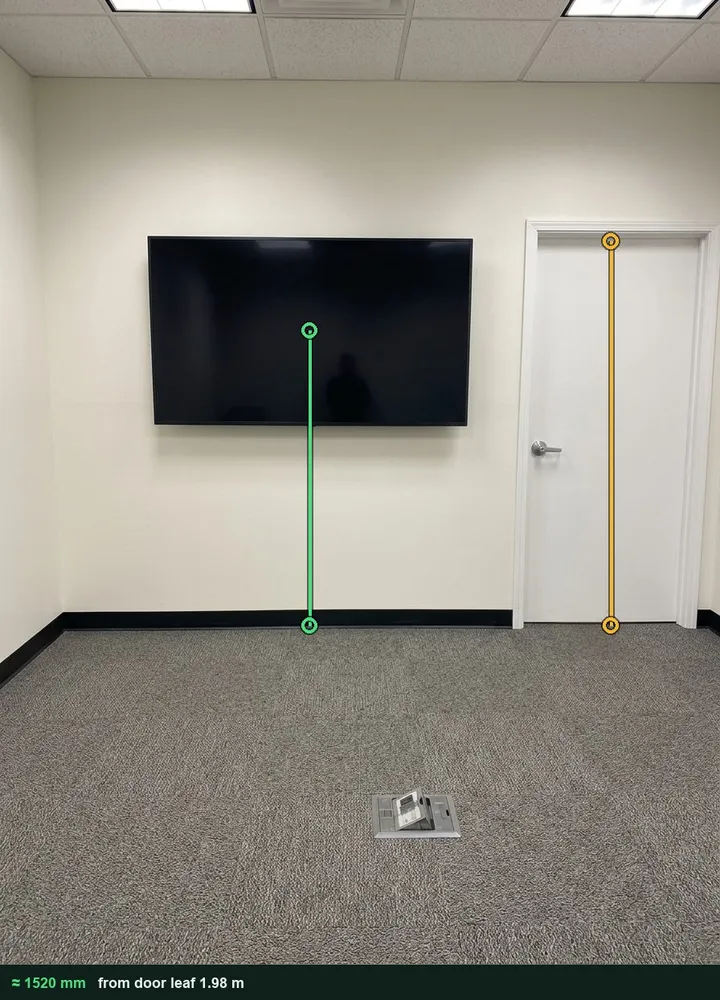
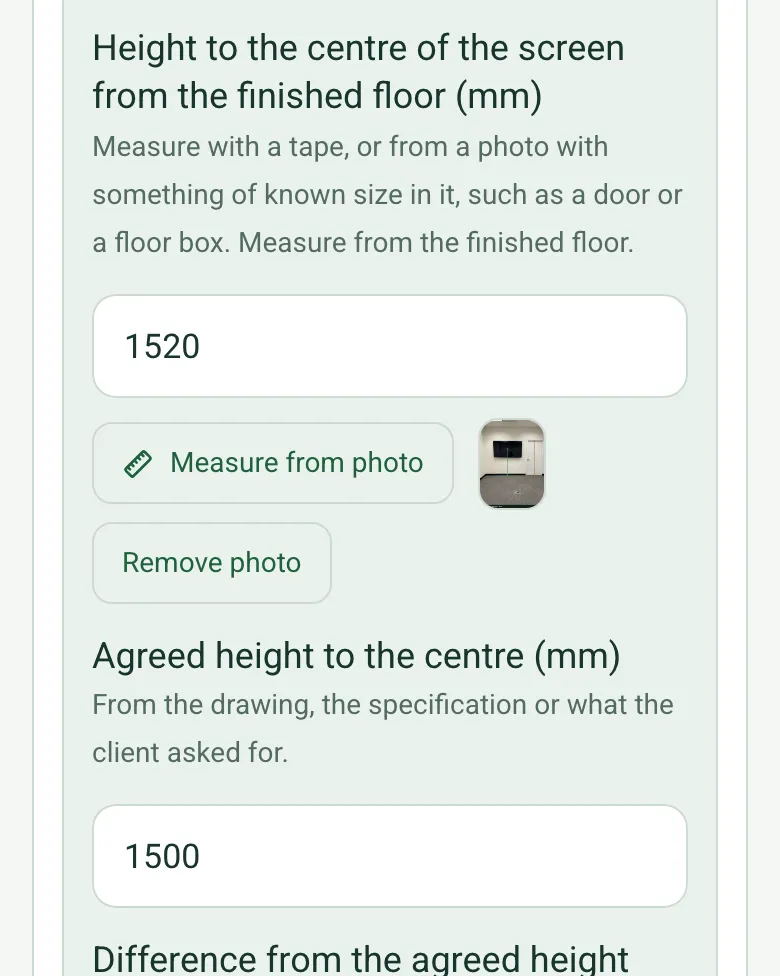
Height to the centre of the screen from the finished floor, 1520 mm, with the marked-up measuring photo, and an agreed height of 1500 mm

Height to the centre, from a photo

Measure with a tape as usual, or mark the door on a photo as the reference and the floor to the centre of the screen. The marked-up photo is kept with the answer. It works on web forms in any phone browser today, and the app version is on its way.

How measuring from a photo works →
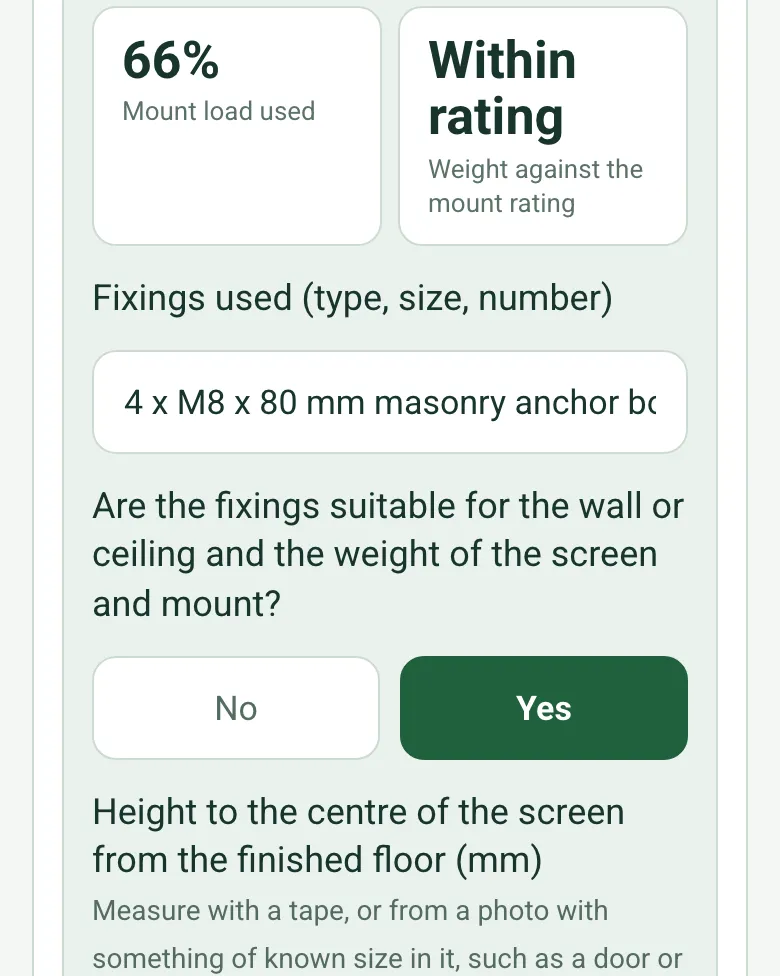
Mount load used 66% and Within rating for a 33 kg screen and mount on a mount rated for 50 kg

Weight against the mount rating

Enter the weight of the screen and mount and the rating from the mount's label. The form shows the share of the rating used and says Within rating or Over rating, with a red note not to leave a screen on a mount that is over.

How calculated fields work →
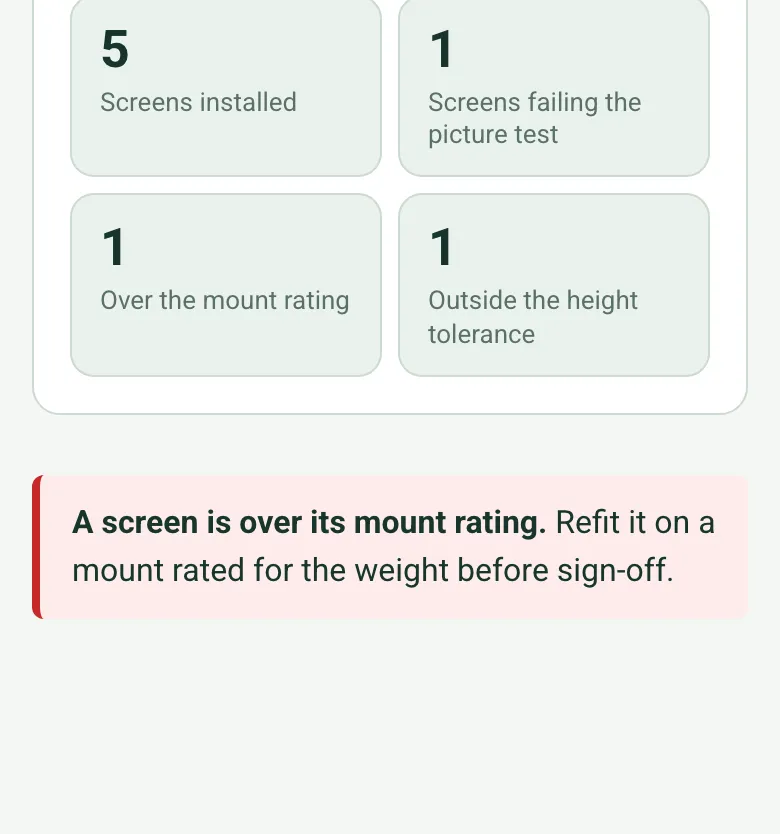
5 screens installed, 1 screen failing the picture test, 1 over the mount rating and 1 outside the height tolerance, with a red note

The whole job in four numbers

Each room counts its own screens, and the job totals show how many were installed, failed the picture test, are over the mount rating or sit outside the height tolerance, before anyone signs off.

How calculated fields work →

The finished install on video

Add photos of each installed screen and its back box, and film the finished wall if the client wants to see the cable route.

A completed display installation check

Five screens in a fictional primary school: one fails the picture test on the HDMI wall plate, one sits 30 mm above the agreed height against a 25 mm tolerance, and an articulating arm in the music room is over its rating and needs refitting. The meeting room screen was measured from a photo at 1520 mm. Open it as a filled-in form, or switch to a blank copy and try it yourself.

A meeting room screen with the door marked as the reference and the floor to the centre of the screen measured at about 1520 mm
Height to the centre ≈ 1520 mm · agreed 1500 ± 25 mm
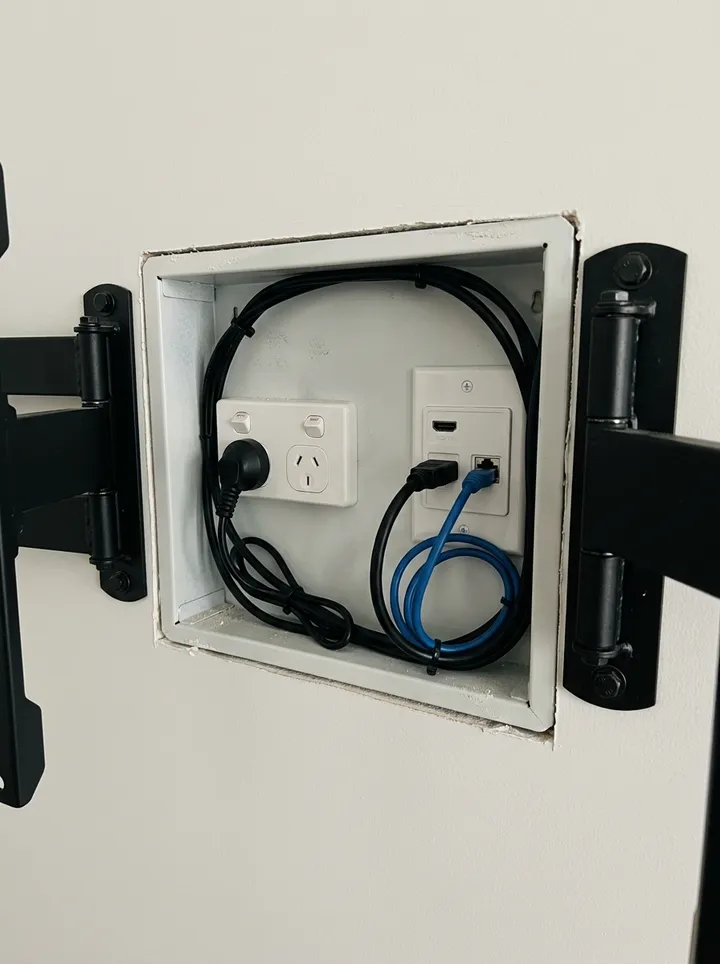
A recessed back box with power and a data wall plate between the arms of a screen bracket
Back box and connections behind the meeting room screen
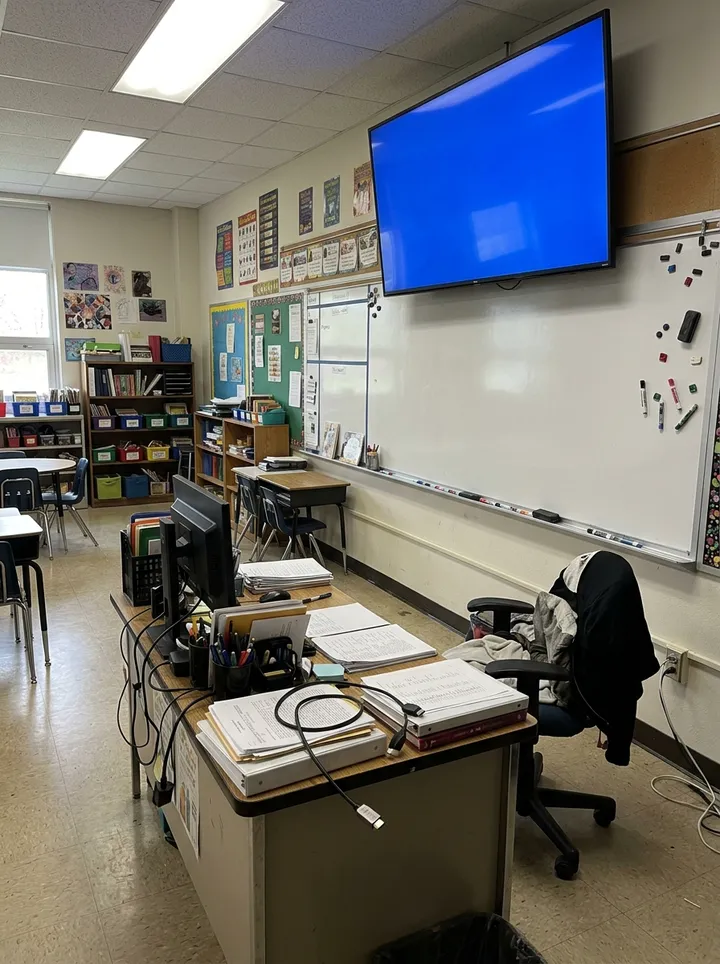
A classroom display showing a plain blue screen with no picture above a whiteboard
Classroom 6 · no picture from the HDMI wall plate

Try the display installation form live

Answer a few questions and watch it adapt. Your answers are not saved, and any photos you add are deleted within the hour.

Live form: Display Installation CheckOpen full screen ↗
Fill it in right here

This is the real form as your team would use it: questions appear as you answer, scores work themselves out and you can add photos and signatures. No sign-up needed. Or open a completed example to see every answer, photo and score filled in.

Want to see one filled in? See a completed display installation report (PDF), made by SiteSurvey from a fictional site visit.

Fill it in on a phone or tablet

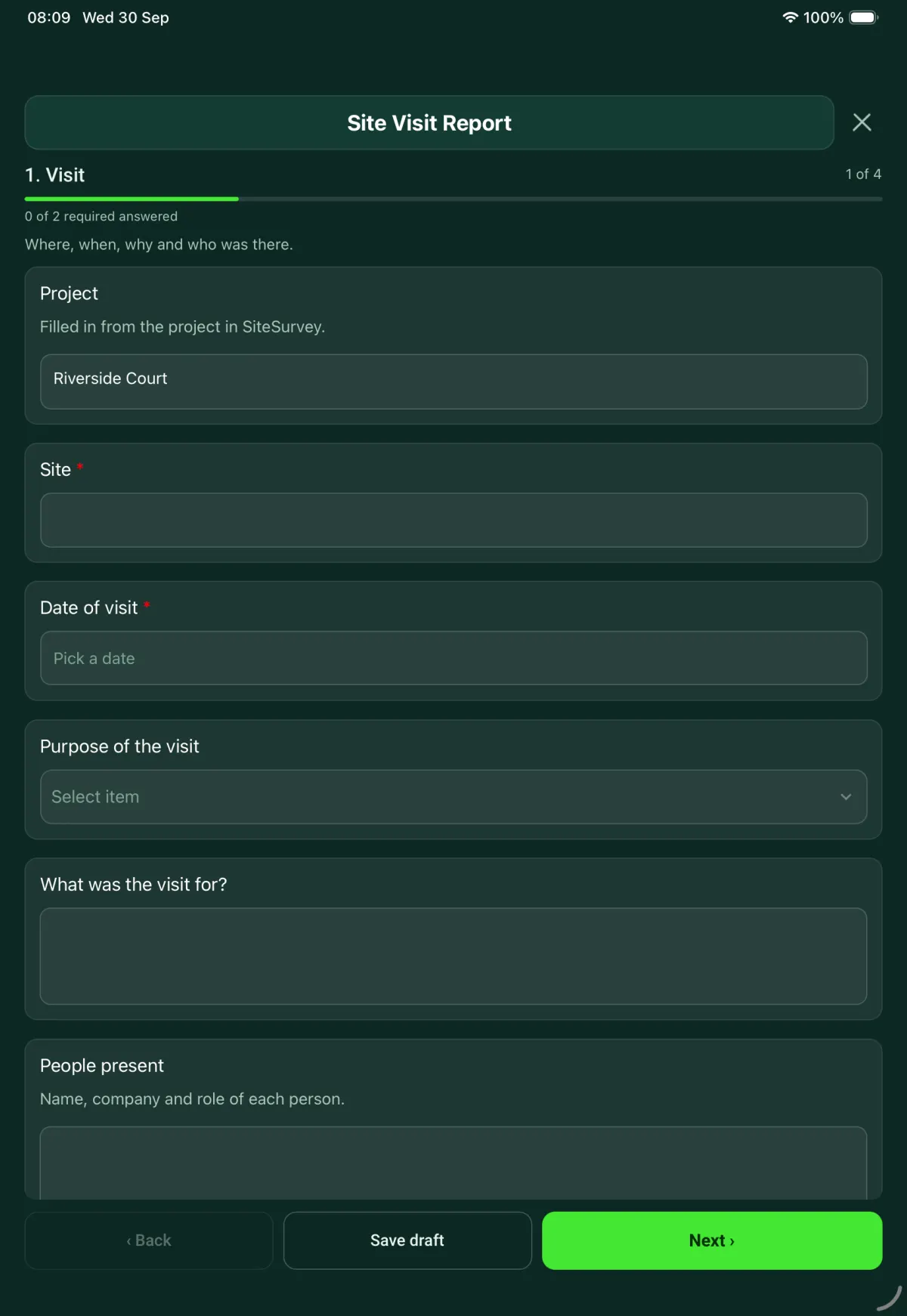
Your team completes the display installation check on site in the SiteSurvey app on iPhone, iPad and Android phones and tablets. The project name and address fill in for them, it works without signal, and it syncs when the device is back online with photos kept against the question they answer.

Customers and subcontractors do not need the app: send them a link and they can fill it in from any browser.

The Display Installation Check form in the SiteSurvey app on a tablet
The Display Installation Check form in the SiteSurvey app on a phone

Every question in the display installation template

Per room and per screen: mount, weight against the mount rating, fixings, height to centre measured or from a photo against the agreed height, level, power and signal, picture test, photos and sign-off. 2 sections and 45 questions. Follow-up questions and guidance appear only when an answer calls for them, so the person on site never sees the ones that do not apply.

Make it your own: every question is editable

This is a starting point, not a fixed form. Once it is in your SiteSurvey account you can reword any question, add or remove questions, sections and answer options, and add your own logo, so it fits the way your team works and the jobs you do.

Details you only enter once

Add this form to a project in SiteSurvey and it fills in what the project already knows, so nobody on site retypes it and every form on the job uses the same names. Anything filled in can still be changed.

  • Project: the project name
  • Site: the site, when the form is opened for a space or a product
  • Client: the project's customer
  • Site address: the site address, from the space or the project

Screens

One entry for each screen installed.

  • ProjectShort answer

    Filled in from the project in SiteSurvey.

    Fills in from the project name
  • Site*Short answer
    Fills in from the site, when the form is opened for a space or a product
  • ClientShort answer
    Fills in from the project's customer
  • Site addressShort answer
    Fills in from the site address, from the space or the project
  • Date of the checkDate
  • Installer (company)Short answer
  • Height tolerance agreed for the job (± mm)Number

    From the specification or the client, for example 25 mm. Leave blank to skip the height check.

  • Rooms and areas
    Repeat for each entry. Each one asks:
    • Room or area*Short answer
    • Screens in this room
      Repeat for each screen : inch. Each one asks:
      • Screen size (inches)Number
      • Make and modelShort answer
      • Mount typeChoose one
        • Fixed wall mount
        • Tilting wall mount
        • Articulating arm
        • Recessed or in-wall
        • Ceiling mount
        • Floor stand
        • Trolley
        • Other (describe)
      • Wall typeChoose one
        • Masonry
        • Concrete
        • Timber stud
        • Metal stud
        • Plasterboard on dabs
        • Other (describe)
        Shown only when the answers above make it relevant
      • Weight of screen and mount (kg)Number
        Shown only when the answers above make it relevant
      • Mount's rated load (kg)Number

        From the mount's label or data sheet.

        Shown only when the answers above make it relevant
      • Mount load used (%)Worked out by the form
        Shown only when the answers above make it relevant
      • Weight against the mount ratingWorked out by the form
        Shown only when the answers above make it relevant
      • WarningOver the mount's rating. The screen and mount weigh more than the mount is rated for. Do not leave the screen on it: fit a mount rated for the weight.
        Shown only when the answers above make it relevant
      • Fixings used (type, size, number)Short answer
        Shown only when the answers above make it relevant
      • Trolley checksTick all that apply
        • Rated for the screen size and weight
        • Screen bolted to the trolley
        • Brakes on at least two castors
        • Cables managed so they cannot be pulled
        Shown when “Mount type” is “Trolley”
      • Are the fixings suitable for the wall or ceiling and the weight of the screen and mount?Yes or No
        Shown only when the answers above make it relevant
      • WarningDo not leave the screen on this mount. Refit it with fixings rated for the surface and the combined weight of the screen and mount.
        Shown when “Are the fixings suitable for the wall or ceiling and the weight of the screen and mount?” is No
      • Height to the centre of the screen from the finished floor (mm)Number

        Measure with a tape, or from a photo with something of known size in it, such as a door or a floor box. Measure from the finished floor.

      • Agreed height to the centre (mm)Number

        From the drawing, the specification or what the client asked for.

      • Difference from the agreed height (mm)Worked out by the form
        Shown only when the answers above make it relevant
      • Height checkWorked out by the form
        Shown only when the answers above make it relevant
      • Is the screen level?Yes or No
      • Are power and signal presented at the screen?Yes or No
      • What is missing?Short answer
        Shown when “Are power and signal presented at the screen?” is No
      • Picture test passed on every input?Yes or No
      • Describe the faultNotes
        Shown when “Picture test passed on every input?” is No
      • Photo of the faultPhotos
        Shown when “Picture test passed on every input?” is No
      • Who will fix it?Short answer
        Shown when “Picture test passed on every input?” is No
      • By when?Date
        Shown when “Picture test passed on every input?” is No
      • Photos of the installed screenPhotos
      • Photos of the back box and connectionsPhotos
    • This room: screensWorked out by the form
    • This room: screens failing the picture testWorked out by the form
    • This room: over the mount ratingWorked out by the form
    • This room: outside the height toleranceWorked out by the form
  • Screens installedWorked out by the form
  • Screens failing the picture testWorked out by the form
  • Over the mount ratingWorked out by the form
  • Outside the height toleranceWorked out by the form
  • WarningA screen is over its mount rating. Refit it on a mount rated for the weight before sign-off.
    Shown only when the answers above make it relevant

Sign-off

  • CheckAt least one screen failed the picture test. Record the fault and the next step before you sign.
    Shown only when the answers above make it relevant
  • Installer nameShort answer
  • Installer signatureSignature
  • Accepted by (name and role)Short answer
  • Client signatureSignature

See it filled in

A completed display installation report, made by SiteSurvey from a fictional site visit: every answer, the photos, the guidance that applied and the sign-off, ready to send as a PDF.

See completed form (PDF) ↗

Display installation FAQs

What if the fixings are not suitable?

Do not leave the screen on that mount. The form tells the installer to refit it with fixings rated for the surface and the combined weight of the screen and mount, and it compares that weight with the mount's rated load, with a red note if the mount is over its rating. For wall and recessed mounts it asks for the wall type, from masonry and concrete to timber stud, metal stud and plasterboard on dabs, and it records the mount's rated load and the fixings used. For anchors in concrete and masonry, BS 8539 is the code of practice for selection and installation.

How is the screen height recorded?

As the height to the centre of the screen from the finished floor, in millimetres, with a tape or measured from a photo that has a door or another known size in it. The form does not set a height itself: enter the height agreed for the job and the tolerance, and it shows the difference and whether the screen is within tolerance.

What happens if a screen fails the picture test?

The form opens a description of the fault, a photo of it, who will fix it and by when. It counts the screens that failed the picture test, and at sign-off it reminds the installer to record the fault and the next step before signing.

Can one checklist cover several screens?

Yes. Add one entry for each screen installed, each with its own mount, checks and photos of the installed screen, the back box and the connections. The installer signs once at the end, and the client can sign to accept the work.

Does it cover screens on trolleys and stands?

Yes. Choosing trolley opens checks that it is rated for the screen size and weight, the screen is bolted to it, brakes are on at least two castors and cables are managed so they cannot be pulled. HSE has warned that heavy height adjustable screen stands in schools can fall forward and crush, and says they must be fixed to a surface strong enough to prevent toppling.

Can I use it as a TV installation checklist?

Yes. The mount types run from fixed, tilting and articulating wall mounts to recessed mounts, ceiling mounts, floor stands and trolleys, so it suits TVs and commercial displays. The form is in the SiteSurvey form library and can be edited if you need extra checks.

Related

Use this display installation form with your team

Add it from the form library in one click, change any question, and every completed form becomes a branded PDF report.

Start your trial →