Form library · AV and IT
IT equipment handover form
A signed record of IT equipment issued to, or returned by, a member of staff. Use it for a new starter, a loan or replacement, a leaver or the return of a loan. List each item with its serial number and condition, run the setup or return checks, and both people sign on the device. Every question is listed below, and you can fill the live form in on this page.
Ready to use from the form library, and every question is yours to edit. Trial from £1, cancel any time.
Try it on your phone
Try it on this phone
Fill in the IT equipment handover on your phone now
See how the IT equipment handover looks on your phone
Scan the code with your phone camera. It opens the real form, no sign-up needed.
Open the live example and fill it in, just as your team would on site. No sign-up needed.
See it on this phoneEvery question is editable. Add this form to your account, then change the wording, add or remove questions and options, and make it fit your own jobs.
What should an IT equipment handover form include?
An IT equipment handover form should name the person and who handed over or received the equipment, and list each item with its make, model, serial number, asset tag and condition, with photos of any damage. For an issue it should confirm the account, security and policies are set up. For a return it should record what came back, what did not, and that accounts were disabled. Both people should sign.
Last updated . Facts checked by the SiteSurvey team on 5 October 2026 against NCSC Cyber Essentials: Requirements for IT Infrastructure v3.3 and Acas on deductions from pay and wages.
Try the IT equipment handover form live
Answer a few questions and watch it adapt. Your answers are not saved, and any photos you add are deleted within the hour.
This is the real form as your team would use it: questions appear as you answer, scores work themselves out and you can add photos and signatures. No sign-up needed.
Want to see one filled in? See a completed IT equipment handover report (PDF), made by SiteSurvey from a fictional site visit.
Fill it in on a phone or tablet
Your team completes the it equipment handover and return on site in the SiteSurvey app on iPhone, iPad and Android phones and tablets. The project name and address fill in for them, it works without signal, and it syncs when the device is back online with photos kept against the question they answer.
Customers and subcontractors do not need the app: send them a link and they can fill it in from any browser.
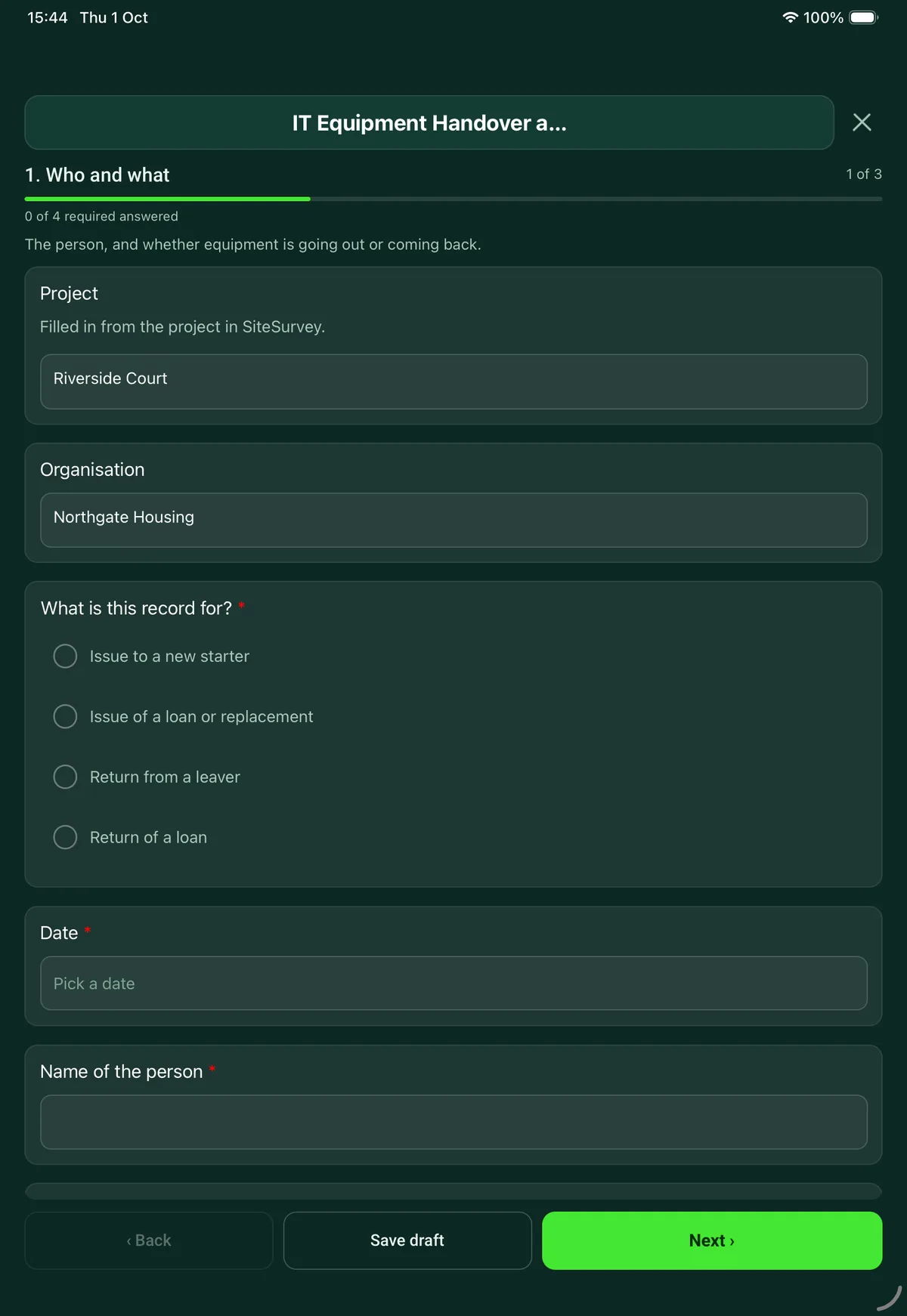
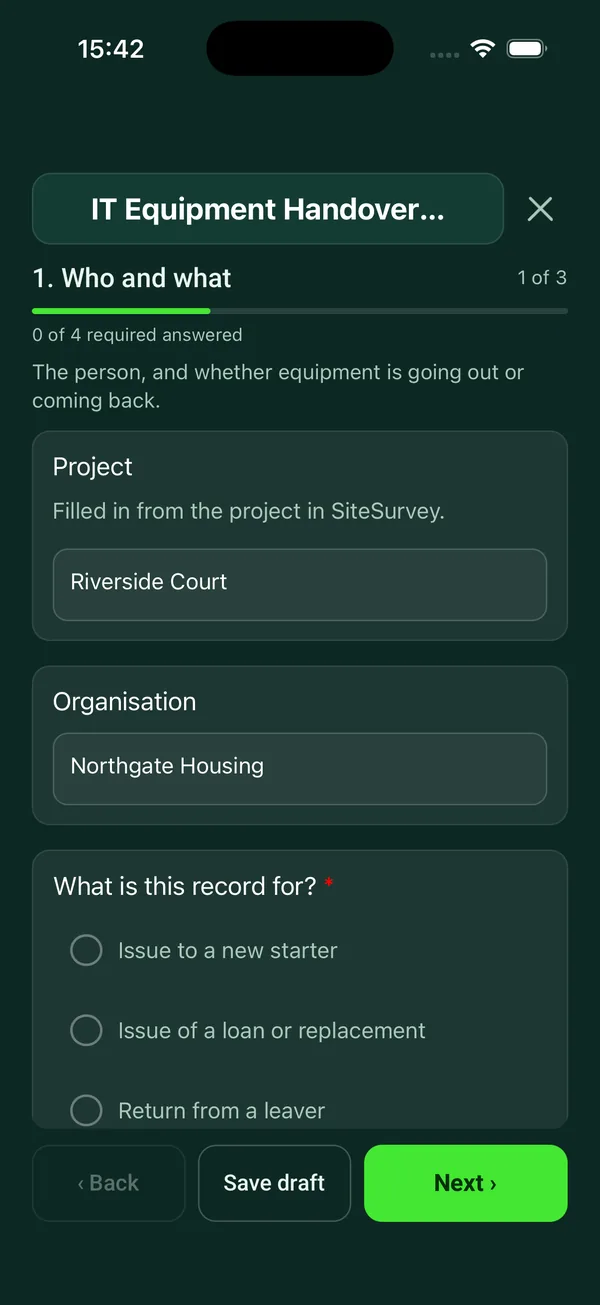
Every question in the IT equipment handover template
Signed record of IT equipment issued to or returned by a member of staff: each item, serial number, condition, setup or leaver checks and both signatures. 5 sections and 37 questions. Follow-up questions and guidance appear only when an answer calls for them, so the person on site never sees the ones that do not apply.
Make it your own: every question is editable
This is a starting point, not a fixed form. Once it is in your SiteSurvey account you can reword any question, add or remove questions, sections and answer options, and add your own logo, so it fits the way your team works and the jobs you do.
Details you only enter once
Add this form to a project in SiteSurvey and it fills in what the project already knows, so nobody on site retypes it and every form on the job uses the same names. Anything filled in can still be changed.
- Project: the project name
- Organisation: the project's customer
Who and what
The person, and whether equipment is going out or coming back.
- ProjectShort answer
Filled in from the project in SiteSurvey.
Fills in from the project name - OrganisationShort answerFills in from the project's customer
- What is this record for?*Choose one
- Issue to a new starter
- Issue of a loan or replacement
- Return from a leaver
- Return of a loan
- Date*Date
- Name of the person*Short answer
- Job title or departmentShort answer
- Line managerShort answer
- Handed over or received byShort answer
- Date the loan is due backDateShown when “What is this record for?” is “Issue of a loan or replacement”
- Last working dayDateShown when “What is this record for?” is “Return from a leaver”
Equipment
One entry for each item. Photograph any damage, going out or coming back.
- ItemsRepeat for each item. Each one asks:
- Item*Choose one
- Laptop
- Desktop
- Monitor
- Docking station
- Phone
- Tablet
- Keyboard and mouse
- Headset
- Charger or power supply
- Security key or token
- Access card or keys
- Other (describe)
- Make and modelShort answer
- Serial numberShort answer
- Asset tagShort answer
- Returned?Choose one
- Returned
- Returned damaged
- Not returned
Shown only when the answers above make it relevant - ConditionChoose one
- New
- Good
- Fair: marks or wear
- Damaged
- Describe the damageNotesShown only when the answers above make it relevant
- PhotosPhotos
- Items recordedWorked out by the form
- Items not returnedWorked out by the formShown only when the answers above make it relevant
- CheckCharging for items not returned. Acas says an employer can only take money from someone's wages in limited cases, such as where the employment contract specifically allows the deduction or the worker agreed to it in writing beforehand. Check with HR before promising or threatening a charge.Shown only when the answers above make it relevant
Setup checks
Before equipment goes out.
- Is the user account set up and tested?Yes or No
- Is multi-factor authentication set up?Yes or No
- Is the laptop or phone encrypted?Yes or No
- Are updates installed and anti-malware running?Yes or No
- Has the acceptable use policy been explained?Yes or No
- Does the person know how to get IT support and report a lost device?Yes or No
Return checks
When equipment comes back.
- Have the accounts been disabled?Choose one
- Yes
- Scheduled for the last working day
- No
Shown when “What is this record for?” is “Return from a leaver” - Date and time accounts were disabledShort answerShown when “What is this record for?” is “Return from a leaver” and “Have the accounts been disabled?” is “Yes”
- GuidanceCyber Essentials requires user accounts to be removed or disabled when they are no longer needed, for example when someone leaves the organisation.Shown when “What is this record for?” is “Return from a leaver”
- Has work data been handed over or moved?Yes or No
- Has the device been wiped?Choose one
- Wiped
- To be wiped
- Being kept as it is, on instruction
- To be wiped byDateShown when “Has the device been wiped?” is “To be wiped”
- Has the person removed personal accounts and files, and signed out of device tracking?Yes or No
- Anything still outstandingNotes
Signatures
Both people sign.
- GuidanceI have received the equipment listed in the condition recorded. I will look after it, use it in line with the organisation's policies, and return it when asked or when I leave.Shown only when the answers above make it relevant
- GuidanceI have returned the equipment listed. The condition and anything not returned are recorded above.Shown only when the answers above make it relevant
- NameShort answer
- Signature of the personSignature
- Issued or received byShort answer
- Signature for the organisationSignature
See it filled in
A completed IT equipment handover report, made by SiteSurvey from a fictional site visit: every answer, the photos, the guidance that applied and the sign-off, ready to send as a PDF.
IT equipment handover FAQs
Can one form cover new starters, loans and leavers?
Yes. Choose issue to a new starter, issue of a loan or replacement, return from a leaver or return of a loan. Issues show the setup checks and a statement that the person has received the equipment. Returns show the return checks, whether each item was returned, returned damaged or not returned, and a count of items not returned.
What setup checks does it include for a new starter?
That the user account is set up and tested, multi-factor authentication is set up, the laptop or phone is encrypted, updates are installed and anti-malware is running, the acceptable use policy has been explained, and the person knows how to get IT support and report a lost device.
What does it check when someone leaves?
Whether accounts have been disabled (or are scheduled for the last working day), whether work data has been handed over, whether the device has been wiped or is due to be, and whether the person has removed personal accounts and files and signed out of device tracking. Cyber Essentials requires user accounts to be removed or disabled when they are no longer needed, for example when someone leaves the organisation.
Can an employer charge for equipment that is not returned?
Acas says an employer can only take money from someone's wages in limited cases, such as where the employment contract specifically allows the deduction or the worker agreed to it in writing beforehand. When an item is marked not returned, the form shows this and says to check with HR before promising or threatening a charge.
Does it work as an equipment loan form?
Yes. Choose issue of a loan or replacement and record the date the loan is due back. When the equipment comes back, a second record as return of a loan notes the condition of each item and anything missing.
How do both people sign?
On the phone or tablet. The person signs the statement for an issue or a return, and the member of staff handing over or receiving the equipment signs for the organisation. Photos of any damage stay with the item. The record goes out as a PDF or a share link.
Related
Related templates
Templates that go with the IT equipment handover form
Walk round audit of IT equipment against the register: tag, make, model, serial, user, location, condition and support status for every device.
Record of IT equipment leaving service: each item and serial number, how its data was erased or destroyed, verification, waste transfer and signed certificate.
Customer acceptance at handover: work completed, outstanding items, customer name and signature.
Room survey for AV installs: dimensions, photos, power and data, ceiling and structure, equipment positions, access.
Use this IT equipment handover form with your team
Add it from the form library in one click, change any question, and every completed form becomes a branded PDF report.
Start your trial →