Form library · AV and IT
Wi-Fi site survey checklist
A wireless site survey form for a new network, an existing one with problems, or a check after installation. Agree what the network must do, record the building, take signal and speed readings area by area, then set out each access point position with its cable run. Every question is listed below, and you can fill the live form in on this page.
Ready to use from the form library, and every question is yours to edit. Trial from £1, cancel any time.
Try it on your phone
Try it on this phone
Fill in the wi-fi site survey on your phone now
See how the wi-fi site survey looks on your phone
Scan the code with your phone camera. It opens the real form, no sign-up needed.
Open the live example and fill it in, just as your team would on site. No sign-up needed.
See it on this phoneEvery question is editable. Add this form to your account, then change the wording, add or remove questions and options, and make it fit your own jobs.
What should a Wi-Fi site survey include?
A Wi-Fi site survey should record what the network must do (people, devices, critical uses and the target signal strength), what the building is made of, sources of interference, the existing network and cabling, and signal and speed readings for each area against the target. It should end with a position, mounting and cable route for every access point, and what the install team needs for access, including the asbestos register where the building was built before 2000.
Last updated . Facts checked by the SiteSurvey team on 5 October 2026 against HSE on finding out if asbestos could be present in a building and regulation 4 of the Control of Asbestos Regulations 2012 (duty to manage).
Try the wi-fi site survey form live
Answer a few questions and watch it adapt. Your answers are not saved, and any photos you add are deleted within the hour.
This is the real form as your team would use it: questions appear as you answer, scores work themselves out and you can add photos and signatures. No sign-up needed.
Want to see one filled in? See a completed wi-fi site survey report (PDF), made by SiteSurvey from a fictional site visit.
Fill it in on a phone or tablet
Your team completes the wi-fi site survey on site in the SiteSurvey app on iPhone, iPad and Android phones and tablets. The project name and address fill in for them, it works without signal, and it syncs when the device is back online with photos kept against the question they answer.
Customers and subcontractors do not need the app: send them a link and they can fill it in from any browser.
Every question in the wi-fi site survey template
Wireless survey for a new or existing network: requirements, building, signal readings area by area, access point positions, cabling and PoE. 8 sections and 76 questions. Follow-up questions and guidance appear only when an answer calls for them, so the person on site never sees the ones that do not apply.
Make it your own: every question is editable
This is a starting point, not a fixed form. Once it is in your SiteSurvey account you can reword any question, add or remove questions, sections and answer options, and add your own logo, so it fits the way your team works and the jobs you do.
Details you only enter once
Add this form to a project in SiteSurvey and it fills in what the project already knows, so nobody on site retypes it and every form on the job uses the same names. Anything filled in can still be changed.
- Project: the project name
- Customer: the project's customer
- Site: the site, when the form is opened for a space or a product
- Site address: the site address, from the space or the project
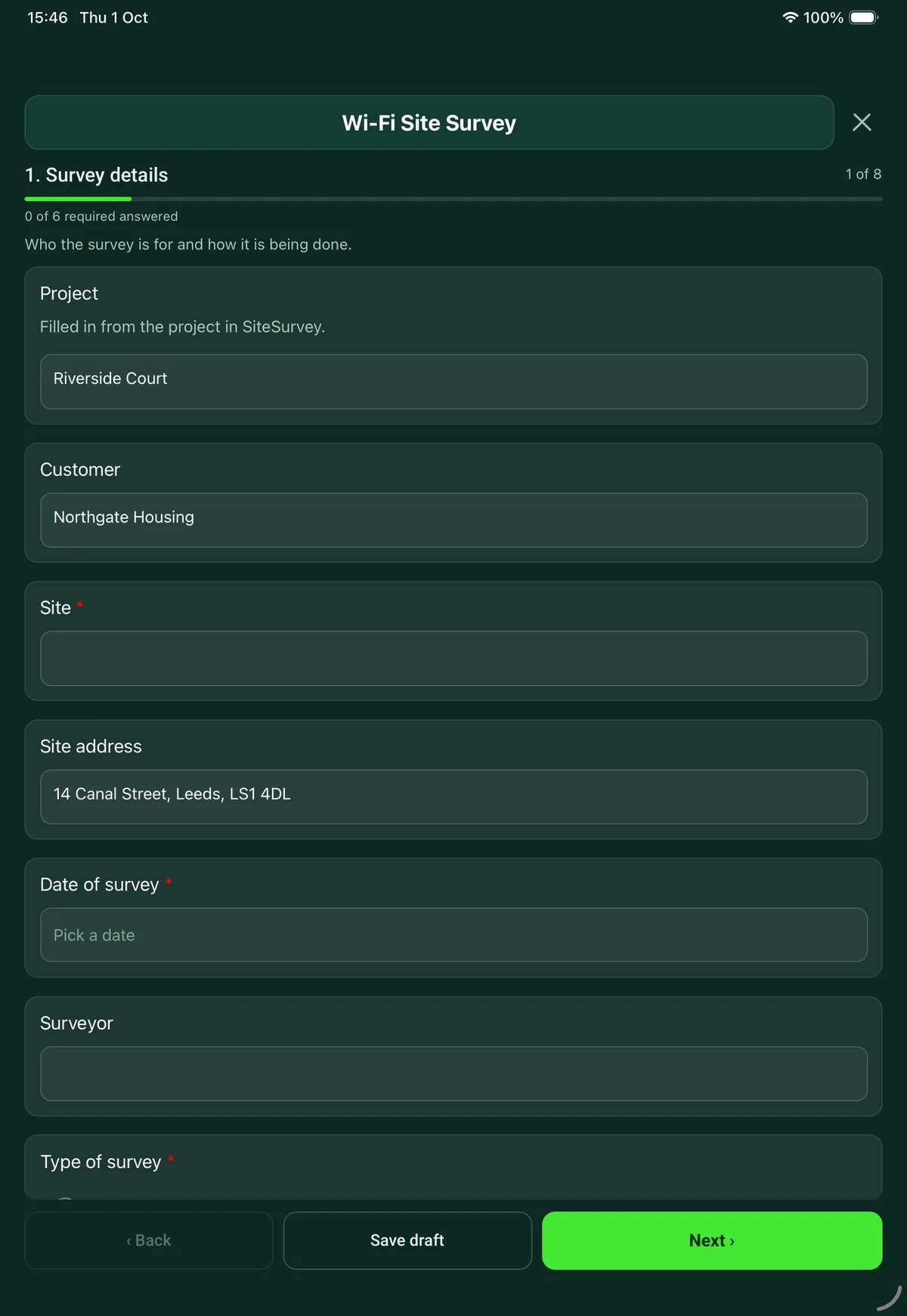
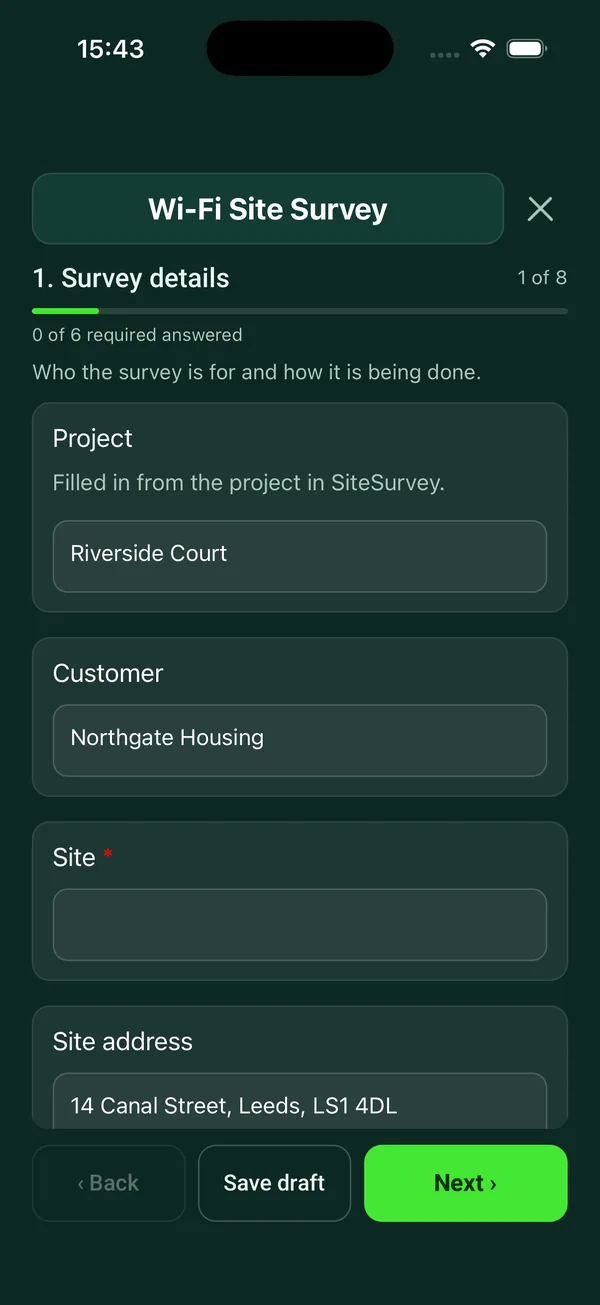
Survey details
Who the survey is for and how it is being done.
- ProjectShort answer
Filled in from the project in SiteSurvey.
Fills in from the project name - CustomerShort answerFills in from the project's customer
- Site*Short answerFills in from the site, when the form is opened for a space or a product
- Site addressShort answerFills in from the site address, from the space or the project
- Date of survey*Date
- SurveyorShort answer
- Type of survey*Choose one
- Before installing a new network
- Existing network with problems
- Check after installation
- What problems have been reported, and where?NotesShown when “Type of survey” is “Existing network with problems”
- How are you surveying?Tick all that apply
- Walk round with a survey tool and floor plan
- Speed and connection tests on the live network
- Test access point on a pole
- Checking a predictive design on site
- Visual inspection only
- Survey tool and device usedShort answer
For example the app, the adapter and the phone or laptop.
- Do you have scaled floor plans?Yes or No
- CheckWithout a scaled plan the readings cannot be placed accurately. Sketch each floor, mark at least one measured wall and photograph the sketch.Shown when “Do you have scaled floor plans?” is No
- Floor plan marked with readings and proposed access point positionsPhotos
What the network must do
Agree this with the customer before you measure anything.
- People on Wi-Fi at the busiest timeNumber
- Devices at the busiest timeNumber
- What will connect?Tick all that apply
- Laptops
- Phones and tablets
- Voice or video calls over Wi-Fi
- Handheld scanners
- Payment terminals
- Printers
- Sensors and smart building devices
- Wireless presentation in meeting rooms
- Guest devices
- Other (describe)
- What must never drop out?Notes
For example tills, warehouse scanners, calls in the boardroom.
- Where is coverage needed?Notes
List the areas, and any that do not need coverage.
- Is outdoor coverage needed?Yes or No
- Is a separate guest network needed?Yes or No
- Bands to design forTick all that apply
- 2.4 GHz
- 5 GHz
- 6 GHz
- Target signal strength at the edge of coverageChoose one
- -65 dBm or better
- -67 dBm or better
- -70 dBm or better
- -72 dBm or better
- Other (describe)
- GuidanceAgree the target first. Many designers aim for -67 dBm or better where people make voice or video calls, and -70 dBm or better for general use. These are common design figures, not a legal standard, and the access point maker may publish its own.
The building
What the signal has to get through, and what it competes with.
- Type of buildingChoose one
- Office
- School or college
- Warehouse or industrial
- Shop or retail
- Hotel or hospitality
- Healthcare
- Housing block
- Outdoor site
- Other (describe)
- Number of floors to coverNumber
- What are the walls and obstructions made of?Tick all that apply
- Plasterboard or stud partitions
- Brick or block
- Concrete
- Metal cladding or foil-backed insulation
- Glass partitions
- Lift shafts or stairwells
- Racking with stock
- Fire doors kept closed
- Other (describe)
- CeilingsChoose one
- Suspended tile
- Solid plasterboard or concrete
- Open to the roof or soffit
- Mixed
- Typical ceiling height (m)Number
- Possible sources of interference seenTick all that apply
- Neighbouring Wi-Fi networks
- Microwave ovens
- Wireless cameras or video senders
- Bluetooth devices in large numbers
- Machinery or motors
- Radar nearby (5 GHz channel changes)
- Other (describe)
- Neighbouring networks seen at the worst spotNumber
- Guidance2.4 GHz channels. The usual non-overlapping plan is channels 1, 6 and 11. Note neighbours on other channels, as each one overlaps two of the three.
Existing network and cabling
What is there now and what the new access points can plug into.
- Is there Wi-Fi on site now?Yes or No
- Make and model of the access pointsShort answerShown when “Is there Wi-Fi on site now?” is Yes
- Number of access pointsNumberShown when “Is there Wi-Fi on site now?” is Yes
- How are they managed?Choose one
- Cloud managed
- Controller on site
- Each one on its own
- Not known
Shown when “Is there Wi-Fi on site now?” is Yes - Comms room or cabinet the access points will connect toShort answer
- Do the switches have spare PoE ports for the access points?Yes or No
- PoE standard on the switchesChoose one
- 802.3af (PoE)
- 802.3at (PoE+)
- 802.3bt (PoE++)
- No PoE
- Not known
- GuidancePoE power at the switch port. 802.3af supplies up to 15.4 W, 802.3at up to 30 W and 802.3bt up to 60 W or 90 W depending on type. Check the data sheet for what the chosen access point needs to run all its radios.
- Existing data cablingChoose one
- Cat5e
- Cat6
- Cat6A
- Fibre between cabinets only
- None
- Not known
- Internet speed, download (Mbps)Number
- Internet speed, upload (Mbps)Number
Area by area readings
One entry for each room or area you measure.
- GuidanceMeasure where people actually use their devices, with doors closed as they would normally be. Signal strength is a negative number: -60 dBm is stronger than -75 dBm.
- Areas measuredRepeat for each area. Each one asks:
- Room or area*Short answer
- FloorShort answer
- How is the area used?Choose one
- Open plan desks
- Meeting room
- Classroom
- Warehouse aisle
- Shop floor
- Reception or public area
- Bedroom or flat
- Corridor or stairwell
- Outdoor
- Other (describe)
- People at the busiest timeNumber
- Strongest signal (dBm)Number
Enter it with the minus sign, for example -68.
- Signal to noise ratio (dB)Number
- Band measuredChoose one
- 2.4 GHz
- 5 GHz
- 6 GHz
- Speed test, download (Mbps)Number
- Speed test, upload (Mbps)Number
- Result against the targetChoose one
- Meets the target
- Marginal
- Does not meet the target
- Not measured
- CheckWeaker than -75 dBm. Most devices will struggle to hold a good connection here.Shown only when the answers above make it relevant
- NotesNotes
Dead spots, drop-outs when moving, what blocks the signal.
- Photos of the areaPhotos
- Areas measuredWorked out by the form
- Areas that do not meet the targetWorked out by the form
Proposed access point positions
One entry for each new or moved access point.
- Access point positionsRepeat for each ap. Each one asks:
- Reference on the planShort answer
- Location*Short answer
- Indoor or outdoorChoose one
- Indoor
- Outdoor
- MountingChoose one
- Ceiling
- Wall
- Pole or mast
- Desk or shelf
- Mounting height (m)Number
- Cable route back to the cabinetNotes
- Estimated cable length (m)Number
- CheckLong cable run. Structured cabling standards allow 90 m of fixed copper cable, and 100 m once patch leads are added. Plan a nearer cabinet, a fibre link or a PoE extender for this position.Shown only when the answers above make it relevant
- Does it need a new cable?Yes or No
- Does the route pass through a fire-resisting wall, floor or riser?Choose one
- No
- Yes, fire-stopping needed
- Not known
Shown when “Does it need a new cable?” is Yes - Photos of the positionPhotos
- Access points proposedWorked out by the form
- Total cable (m)Worked out by the form
Access and safe working
What the install team needs to know before they arrive.
- Hours the work can be doneShort answer
For example out of hours only, or term time only.
- Access restrictionsNotes
Permits, inductions, escorts, parking, keys, areas that need notice.
- Will any of the work be at height?Yes or No
- Access equipment neededChoose one
- Step ladder
- Podium steps
- Mobile tower
- MEWP or scissor lift
- Not decided
- Other (describe)
Shown when “Will any of the work be at height?” is Yes - Was the building built before 2000?Choose one
- Yes
- No
- Not known
- Have you seen the asbestos register for the areas where you will drill or work above ceilings?Choose one
- Seen
- Asked for, not received
- Not asked for
Shown only when the answers above make it relevant - CheckAsbestos. Buildings built before 2000 can contain asbestos. Get the asbestos register from the person in charge of the building before anyone drills, fixes to walls or lifts ceiling tiles.Shown only when the answers above make it relevant
- Other hazards the install team should know aboutNotes
Summary and sign-off
What you found and what happens next.
- Overall result*Choose one
- Coverage meets the requirement
- Changes needed to the existing network
- New design needed
- RecommendationsNotes
- Next steps and who will do themNotes
- Surveyor nameShort answer
- Surveyor signatureSignature
See it filled in
A completed wi-fi site survey report, made by SiteSurvey from a fictional site visit: every answer, the photos, the guidance that applied and the sign-off, ready to send as a PDF.
Wi-Fi site survey FAQs
What signal strength should a Wi-Fi survey aim for?
The form asks you to agree a target with the customer before measuring. Many designers aim for -67 dBm or better where people make voice or video calls, and -70 dBm or better for general use. These are common design figures, not a legal standard, and the access point maker may publish its own. Each area is then marked as meeting the target, marginal or not meeting it, and a reading weaker than -75 dBm is flagged.
Does it cover existing networks as well as new installs?
Yes. Choose a survey before installing a new network, an existing network with problems, or a check after installation. For an existing network the form records the problems reported and where, the make, number and management of the current access points, and readings in each area so weak spots can be compared with the complaints.
Which 2.4 GHz channels should be used?
At 20 MHz width only channels 1, 6 and 11 do not overlap each other. The form records how many neighbouring networks you can see at the worst spot and reminds you to note any on other channels, as they interfere with two of the three.
Does it check PoE and cabling for the access points?
Yes. It records whether the switches have spare PoE ports and which standard they support. At the switch port 802.3af supplies up to 15.4 W, 802.3at up to 30 W and 802.3bt up to 60 W or 90 W depending on type. Each access point position has an estimated cable length, and the form flags a run over 90 m, the limit for fixed copper cable in structured cabling standards.
Is this a replacement for survey software such as a heatmap tool?
No. A heatmap tool measures and draws the coverage. This form is the record around it: the requirement, the building, the readings that matter, the access point schedule, the access arrangements and the sign-off, with photos of every position. Record which tool and device you used on the first page.
Can I use it on a phone on site?
Yes. In the SiteSurvey app the survey works offline and syncs when the device is back online, with photos kept against the area or access point they belong to. The project, customer and site address fill in from the project. The report goes out as a PDF or a share link.
Related
Related templates
Templates that go with the wi-fi site survey form
Containment and cable routes, comms room and cabinet, power and cooling, existing and required outlets by area.
Cabinet by cabinet audit: equipment by U position, power, cooling, labelling, cable management.
Pre-installation CCTV survey: purpose and data protection, camera by camera positions and views, lighting, cabling, recorder and network.
Room survey for AV installs: dimensions, photos, power and data, ceiling and structure, equipment positions, access.
Use this wi-fi site survey form with your team
Add it from the form library in one click, change any question, and every completed form becomes a branded PDF report.
Start your trial →