Form library · AV and IT
CCTV site survey checklist
A pre-installation CCTV survey form. It starts with why the customer wants cameras and the data protection points an installer should raise, then records each camera position with what it must show, the mounting, lighting and cable route, and finishes with the recorder, network and access for the install. Every question is listed below, and you can fill the live form in on this page.
Ready to use from the form library, and every question is yours to edit. Trial from £1, cancel any time.
Try it on your phone
Try it on this phone
Fill in the CCTV site survey on your phone now
See how the CCTV site survey looks on your phone
Scan the code with your phone camera. It opens the real form, no sign-up needed.
Open the live example and fill it in, just as your team would on site. No sign-up needed.
See it on this phoneEvery question is editable. Add this form to your account, then change the wording, add or remove questions and options, and make it fit your own jobs.
What should a CCTV site survey include?
A CCTV site survey should record the problem the system is meant to solve, how it will be watched and how long footage is kept. For each camera it should record what the picture must show, the level of detail needed, the mounting height and surface, lighting at night, anything in the way, privacy concerns and the cable route. It should also cover the recorder location, power, network and safe access for installation.
Last updated . Facts checked by the SiteSurvey team on 5 October 2026 against ICO video surveillance guidance: accountability and DPIAs, ICO video surveillance guidance: complying with the data protection principles and ICO guidance on home CCTV systems.
Try the CCTV site survey form live
Answer a few questions and watch it adapt. Your answers are not saved, and any photos you add are deleted within the hour.
This is the real form as your team would use it: questions appear as you answer, scores work themselves out and you can add photos and signatures. No sign-up needed.
Want to see one filled in? See a completed CCTV site survey report (PDF), made by SiteSurvey from a fictional site visit.
Fill it in on a phone or tablet
Your team completes the cctv site survey on site in the SiteSurvey app on iPhone, iPad and Android phones and tablets. The project name and address fill in for them, it works without signal, and it syncs when the device is back online with photos kept against the question they answer.
Customers and subcontractors do not need the app: send them a link and they can fill it in from any browser.
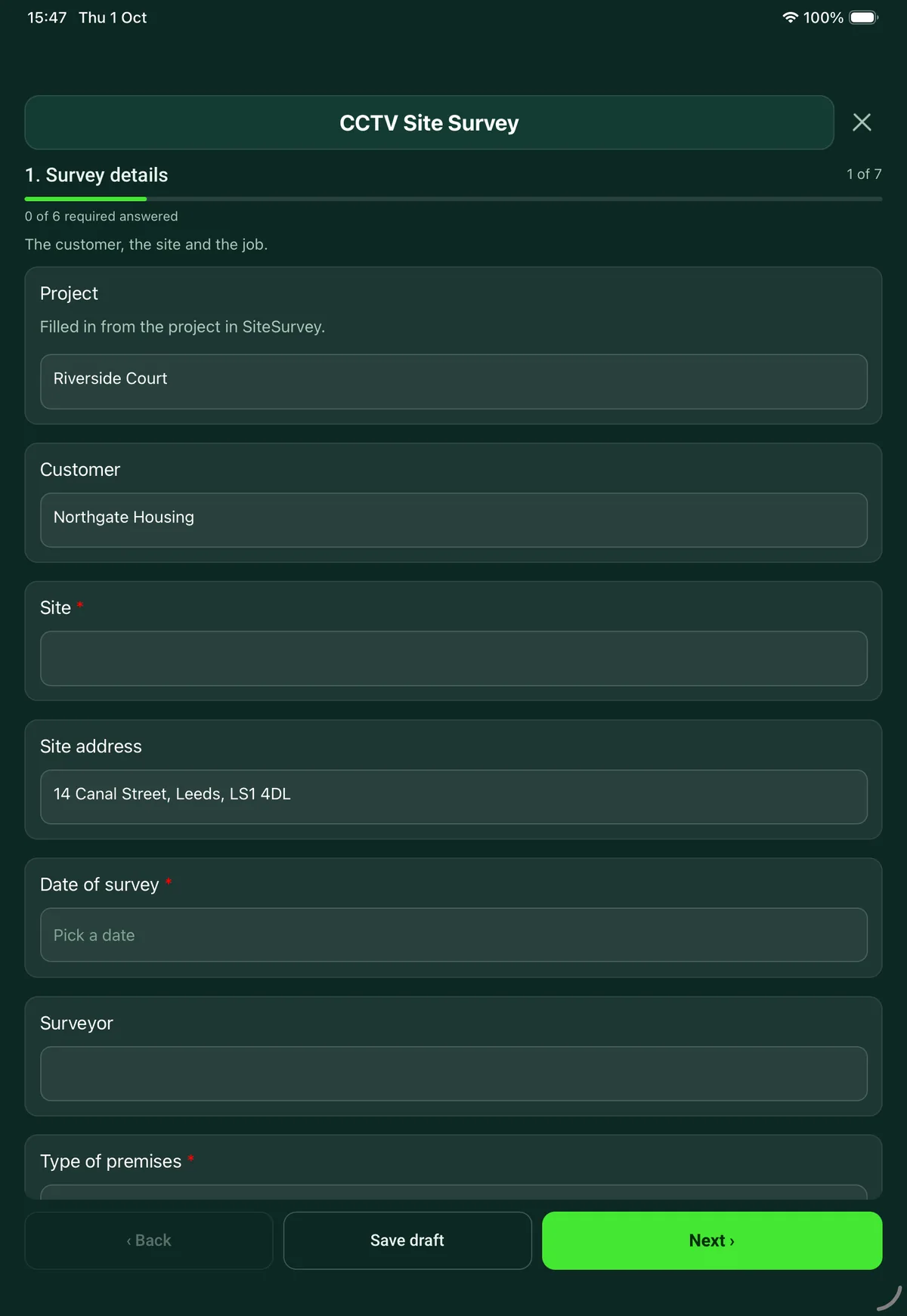
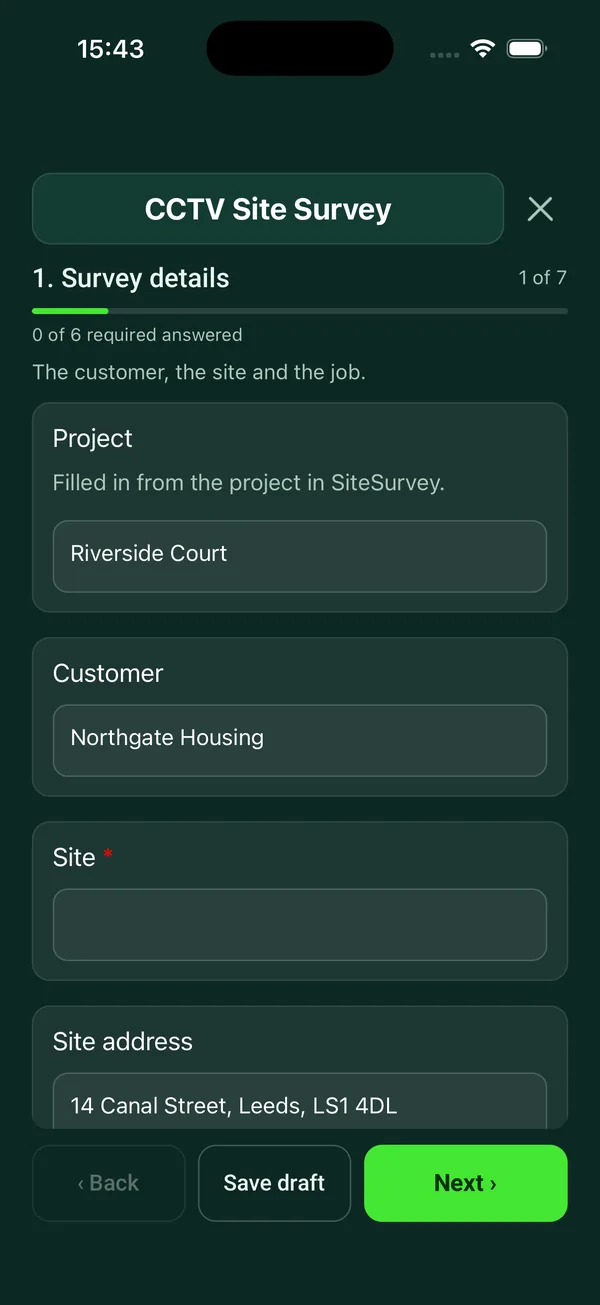
Every question in the CCTV site survey template
Pre-installation CCTV survey: purpose and data protection, camera by camera positions and views, lighting, cabling, recorder and network. 7 sections and 65 questions. Follow-up questions and guidance appear only when an answer calls for them, so the person on site never sees the ones that do not apply.
Make it your own: every question is editable
This is a starting point, not a fixed form. Once it is in your SiteSurvey account you can reword any question, add or remove questions, sections and answer options, and add your own logo, so it fits the way your team works and the jobs you do.
Details you only enter once
Add this form to a project in SiteSurvey and it fills in what the project already knows, so nobody on site retypes it and every form on the job uses the same names. Anything filled in can still be changed.
- Project: the project name
- Customer: the project's customer
- Site: the site, when the form is opened for a space or a product
- Site address: the site address, from the space or the project
Survey details
The customer, the site and the job.
- ProjectShort answer
Filled in from the project in SiteSurvey.
Fills in from the project name - CustomerShort answerFills in from the project's customer
- Site*Short answerFills in from the site, when the form is opened for a space or a product
- Site addressShort answerFills in from the site address, from the space or the project
- Date of survey*Date
- SurveyorShort answer
- Type of premises*Choose one
- Shop or retail
- Office
- Warehouse or industrial
- School or college
- Housing block or communal areas
- Hospitality
- Construction site
- Private home
- Other (describe)
- What is the job?*Choose one
- New system
- Upgrade or extension
- Taking over an existing system
- Site contactShort answer
- PhoneShort answer
Purpose and data protection
Why the customer wants cameras. This drives every position on page 4.
- What problem is the system meant to solve?*Notes
Use the customer's own words.
- What is the system for?Tick all that apply
- Deter and detect crime
- Staff and visitor safety
- Watch entrances and deliveries
- Health and safety
- Vehicle or number plate capture
- Verify alarms remotely
- Other (describe)
- How will it be watched?Choose one
- Recorded only, reviewed after an event
- Watched live on site
- Remote monitoring centre
- Phone or tablet app
- Who will operate the system and be responsible for the footage?Short answer
- How many days of footage does the customer want to keep?Number
- Why that many days?Short answerShown when “How many days of footage does the customer want to keep?” is answered
- GuidanceRetention. The ICO says UK GDPR and the Data Protection Act 2018 do not set a minimum or maximum retention period for surveillance systems. The purpose decides how long footage is kept, and it should be deleted when it is no longer needed for that purpose.Shown only when the answers above make it relevant
- Has the customer done a data protection impact assessment (DPIA)?Choose one
- Yes
- No
- Not known
Shown only when the answers above make it relevant - CheckDPIA. A DPIA is needed for processing that is likely to result in a high risk to individuals. ICO guidance is that this applies in most cases for surveillance systems. Camera views and retention belong in it, so it should be done before the design is fixed.Shown only when the answers above make it relevant
- CheckPrivate homes. If a camera on a home captures images beyond the boundary, such as a neighbour's property or the street, data protection law applies to that footage. Position cameras to stay within the boundary where you can, and record any that cannot.Shown when “Type of premises” is “Private home”
- Does the customer want audio recording?Yes or No
- WarningAudio. ICO guidance is that surveillance systems should not normally be used to record conversations between members of the public, and that audio should be switched off by default. Record the justification or leave audio off.Shown when “Does the customer want audio recording?” is Yes
- Number of CCTV signs neededNumberShown only when the answers above make it relevant
- GuidanceSigns. People must be told they are being recorded. ICO guidance is that signs should be clearly visible and readable, and say who operates the system, why, and who to contact.Shown only when the answers above make it relevant
Existing system
What is already installed and what can be reused.
- Is there a CCTV system on site now?Yes or No
- Recorder make and modelShort answerShown when “Is there a CCTV system on site now?” is Yes
- Number of camerasNumberShown when “Is there a CCTV system on site now?” is Yes
- Type of systemChoose one
- Analogue
- HD over coax
- IP
- Mixed
- Not known
Shown when “Is there a CCTV system on site now?” is Yes - Can the existing cabling be reused?Choose one
- Yes
- Partly
- No
- Needs testing
Shown when “Is there a CCTV system on site now?” is Yes - Faults and complaints about the existing systemNotesShown when “Is there a CCTV system on site now?” is Yes
- Photos of the existing recorder and camerasPhotosShown when “Is there a CCTV system on site now?” is Yes
Camera positions
One entry for each camera. Stand at the position and photograph the view.
- GuidanceStart from what the picture must show. A wide view that shows someone is there needs far less detail than a view that must identify a stranger or read a number plate. Decide that first, then choose the camera, lens and height.
- CamerasRepeat for each camera. Each one asks:
- Camera referenceShort answer
- Location*Short answer
- What must this camera show?Notes
For example faces of everyone coming through the front door.
- Level of detail neededChoose one
- Overview of an area
- Detect that someone is there
- Recognise a known person
- Identify an unknown person
- Read a number plate
- Camera typeChoose one
- Turret
- Dome
- Bullet
- PTZ
- Fisheye or 360
- Number plate camera
- Not decided
- Indoor or outdoorChoose one
- Indoor
- Outdoor
- Fixing surfaceChoose one
- Brick or block
- Concrete
- Timber or soffit
- Metal cladding
- Suspended ceiling
- Pole or column
- Other (describe)
- Mounting height (m)Number
- Distance to the target (m)Number
- Lighting at nightChoose one
- Well lit
- Some light
- Dark: needs infrared or white light
- Not used at night
- Anything in the way or shining into the lensShort answer
Trees, signs, glass, low sun, headlights.
- Does the view take in a neighbour, a public road or a private area?Yes or No
- CheckPlan privacy masking or move the camera, and tell the customer so it can go in their DPIA.Shown when “Does the view take in a neighbour, a public road or a private area?” is Yes
- PowerChoose one
- PoE from the recorder or switch
- Local power supply
- Not decided
- Cable route back to the recorder or switchNotes
- Estimated cable length (m)Number
- CheckLong cable run. Structured cabling standards allow 90 m of fixed copper cable, and 100 m once patch leads are added. Plan a nearer cabinet, a fibre link or a PoE extender for this position.Shown only when the answers above make it relevant
- Photos: the fixing point and the view from itPhotos
- CamerasWorked out by the form
- Total cable (m)Worked out by the form
Recorder and network
Where the recorder goes and how footage will be viewed.
- Recorder locationShort answer
- Is that location locked or access controlled?Yes or No
- CheckICO guidance is that recorded material should be stored securely, with access restricted to authorised people. Propose a lockable cabinet or another room.Shown when “Is that location locked or access controlled?” is No
- Is there a power socket at the recorder location?Yes or No
- Is a UPS wanted for the recorder?Yes or No
- Is there a network point at the recorder location?Yes or No
- Does the customer want to view cameras remotely?Yes or No
- Internet upload speed (Mbps)NumberShown when “Does the customer want to view cameras remotely?” is Yes
- Where will a monitor go, if any?Short answer
- RecordingChoose one
- Continuous
- On motion or event
- Continuous with event marking
- To a schedule
- Photos of the recorder locationPhotos
Access and safe working
What the install team needs to know before they arrive.
- Hours the work can be doneShort answer
For example out of hours only, or term time only.
- Access restrictionsNotes
Permits, inductions, escorts, parking, keys, areas that need notice.
- Will any of the work be at height?Yes or No
- Access equipment neededChoose one
- Step ladder
- Podium steps
- Mobile tower
- MEWP or scissor lift
- Not decided
- Other (describe)
Shown when “Will any of the work be at height?” is Yes - Was the building built before 2000?Choose one
- Yes
- No
- Not known
- Have you seen the asbestos register for the areas where you will drill or work above ceilings?Choose one
- Seen
- Asked for, not received
- Not asked for
Shown only when the answers above make it relevant - CheckAsbestos. Buildings built before 2000 can contain asbestos. Get the asbestos register from the person in charge of the building before anyone drills, fixes to walls or lifts ceiling tiles.Shown only when the answers above make it relevant
- Other hazards the install team should know aboutNotes
Summary and sign-off
What you are proposing and what happens next.
- Summary of the proposed systemNotes
- What the customer needs to do before installationNotes
For example DPIA, signs, power, network access.
- Surveyor nameShort answer
- Surveyor signatureSignature
See it filled in
A completed CCTV site survey report, made by SiteSurvey from a fictional site visit: every answer, the photos, the guidance that applied and the sign-off, ready to send as a PDF.
CCTV site survey FAQs
Does the customer need a DPIA before CCTV is installed?
A data protection impact assessment is needed for processing that is likely to result in a high risk to individuals. ICO guidance is that this legal requirement applies in most cases for video surveillance, because of the privacy risks involved. The form asks whether the customer has done one and, if not, prompts the surveyor to say so before the design is fixed.
How long can CCTV footage be kept?
The ICO says UK GDPR and the Data Protection Act 2018 do not set a minimum or maximum retention period for surveillance systems. The purpose of the system decides how long footage is kept, and it should be deleted when it is no longer needed for that purpose. The form records the number of days the customer wants, which also sizes the storage.
What CCTV signs are needed?
People must be told they are being recorded. ICO guidance is that signs should be clearly visible and readable, and should say who operates the system, why, and who to contact. The form records how many signs the site needs.
Can the system record audio?
ICO guidance is that surveillance systems should not normally be used to record conversations between members of the public, and that audio should be switched off by default. If the customer asks for audio, the form shows this and asks the surveyor to record the justification or leave audio off.
Does it work for CCTV on a private home?
Yes. Choose private home as the type of premises. The business questions on DPIA and signs are hidden, and the form explains that if a camera captures images beyond the boundary, such as a neighbour's property or the street, data protection law applies to that footage. Each camera has a question on whether its view takes in a neighbour, a public road or a private area.
How does the form help choose the right camera?
Each camera entry starts with what the picture must show and the level of detail: an overview, detecting that someone is there, recognising a known person, identifying a stranger or reading a number plate. It then records the distance to the target, mounting height, lighting at night and obstructions, with photos of the fixing point and the view from it.
Related
Related templates
Templates that go with the CCTV site survey form
Service visit for a CCTV system: recorder, storage and retention, date and time, camera by camera image checks, signs, defects and sign-off.
Wireless survey for a new or existing network: requirements, building, signal readings area by area, access point positions, cabling and PoE.
Containment and cable routes, comms room and cabinet, power and cooling, existing and required outlets by area.
Room survey for AV installs: dimensions, photos, power and data, ceiling and structure, equipment positions, access.
Use this CCTV site survey form with your team
Add it from the form library in one click, change any question, and every completed form becomes a branded PDF report.
Start your trial →