Form library · AV and IT
IT maintenance checklist
A routine IT maintenance visit form for IT support engineers. It covers the comms or server room, the UPS, each server or storage device, backups, the firewall and network, anything about to expire and optional PC and laptop checks, then the outcome, parts and the customer's signature. Every question is listed below, and you can fill the live form in on this page.
Ready to use from the form library, and every question is yours to edit. Trial from £1, cancel any time.
Try it on your phone
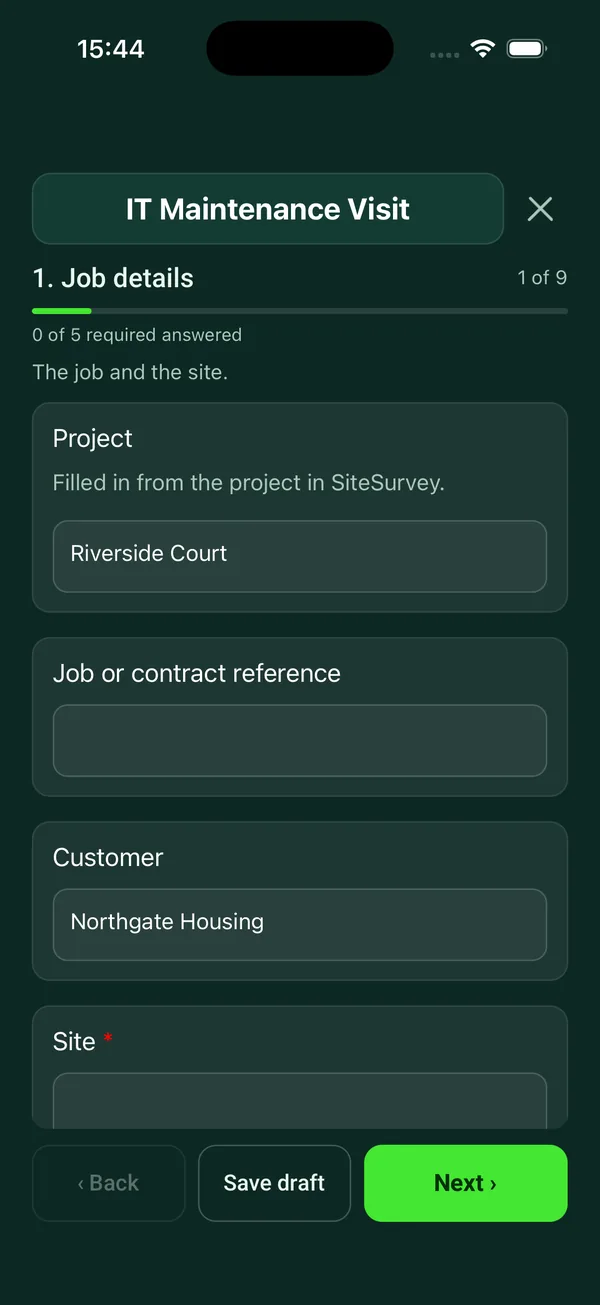
Try it on this phone
Fill in the IT maintenance on your phone now
See how the IT maintenance looks on your phone
Scan the code with your phone camera. It opens the real form, no sign-up needed.
Open the live example and fill it in, just as your team would on site. No sign-up needed.
See it on this phoneEvery question is editable. Add this form to your account, then change the wording, add or remove questions and options, and make it fit your own jobs.
What should an IT maintenance checklist include?
An IT maintenance checklist should cover the server or comms room (security, temperature and cooling), the UPS (status, load, runtime, battery age and self test), each server (hardware alerts, disks, free space, updates and logs), backups and a restore test, firewall firmware, switches and Wi-Fi, and licences or warranties about to expire. It should end with the outcome, parts used and a signature.
Last updated . Facts checked by the SiteSurvey team on 5 October 2026 against NCSC Cyber Essentials: Requirements for IT Infrastructure v3.3 and NCSC on offline backups in an online world.
Try the IT maintenance form live
Answer a few questions and watch it adapt. Your answers are not saved, and any photos you add are deleted within the hour.
This is the real form as your team would use it: questions appear as you answer, scores work themselves out and you can add photos and signatures. No sign-up needed.
Want to see one filled in? See a completed IT maintenance report (PDF), made by SiteSurvey from a fictional site visit.
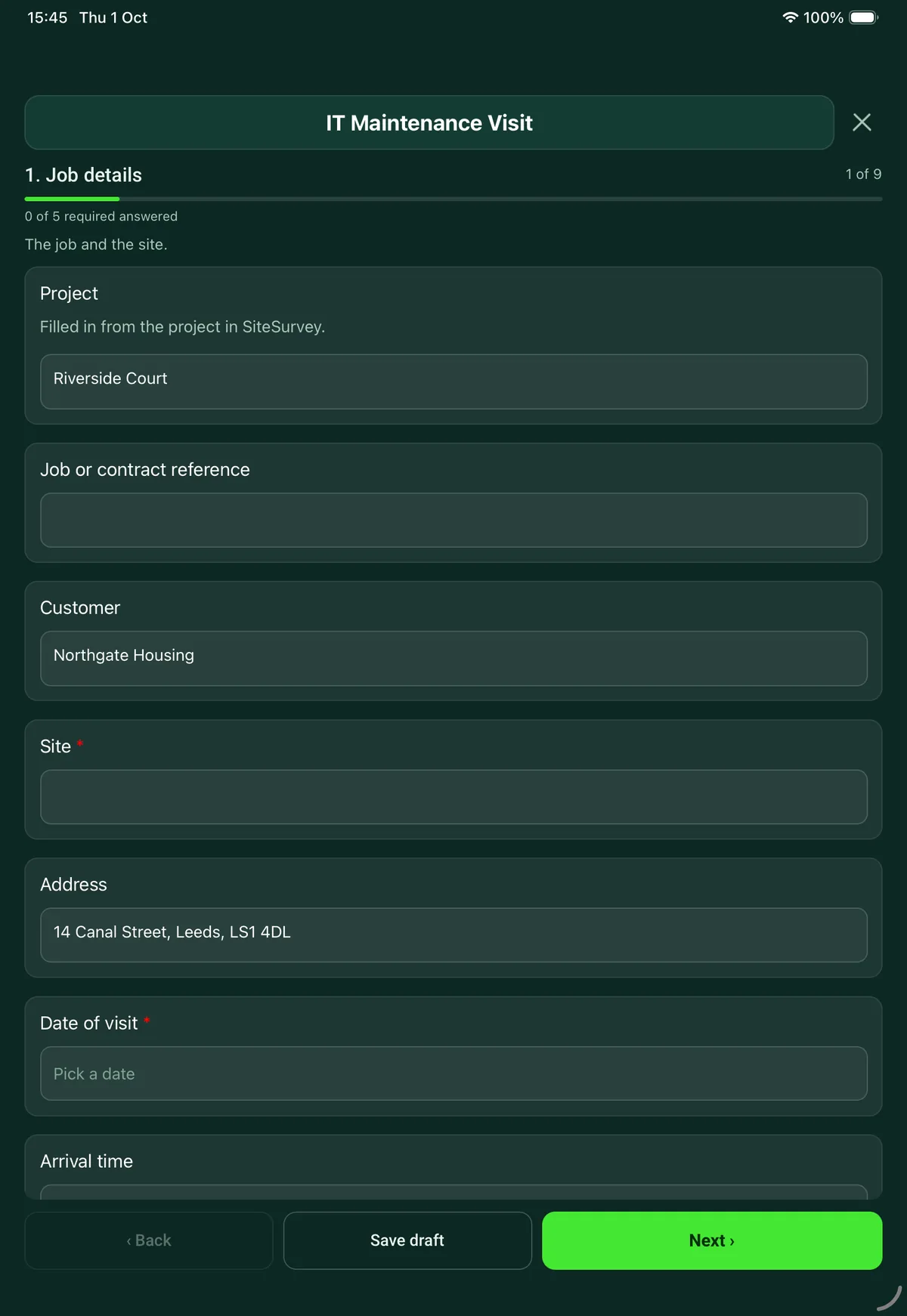
Fill it in on a phone or tablet
Your team completes the it maintenance visit on site in the SiteSurvey app on iPhone, iPad and Android phones and tablets. The project name and address fill in for them, it works without signal, and it syncs when the device is back online with photos kept against the question they answer.
Customers and subcontractors do not need the app: send them a link and they can fill it in from any browser.
Every question in the IT maintenance template
Routine IT maintenance visit: comms room, UPS, servers and storage, backups, updates, network and PC checks, with defects and sign-off. 9 sections and 79 questions. Follow-up questions and guidance appear only when an answer calls for them, so the person on site never sees the ones that do not apply.
Make it your own: every question is editable
This is a starting point, not a fixed form. Once it is in your SiteSurvey account you can reword any question, add or remove questions, sections and answer options, and add your own logo, so it fits the way your team works and the jobs you do.
Details you only enter once
Add this form to a project in SiteSurvey and it fills in what the project already knows, so nobody on site retypes it and every form on the job uses the same names. Anything filled in can still be changed.
- Project: the project name
- Customer: the project's customer
- Site: the site, when the form is opened for a space or a product
- Address: the site address, from the space or the project
Job details
The job and the site.
- ProjectShort answer
Filled in from the project in SiteSurvey.
Fills in from the project name - Job or contract referenceShort answer
- CustomerShort answerFills in from the project's customer
- Site*Short answerFills in from the site, when the form is opened for a space or a product
- AddressShort answerFills in from the site address, from the space or the project
- Date of visit*Date
- Arrival timeTime
- Type of visit*Choose one
- Planned maintenance
- Call-out for a fault
- Return visit
- What was reported, and by whom?NotesShown when “Type of visit” is “Call-out for a fault”
- Reference of the earlier jobShort answerShown when “Type of visit” is “Return visit”
- Engineer nameShort answer
Comms or server room
The room the equipment lives in.
- Is the room or cabinet locked?Yes or No
- Temperature at the front of the cabinet (°C)Number
- CheckThis is above 27 °C, the top of the ASHRAE recommended range for air going into IT equipment. Check the cooling and anything blocking the airflow.Shown only when the answers above make it relevant
- CoolingChoose one
- Working
- Not working
- None fitted
- Is the room clean, dry and free of stored items?Yes or No
- Any sign of water, leaks or pipes above the equipment?Yes or No
- Photos of the room and cabinetPhotos
UPS
Battery backup for the servers and network.
- Is there a UPS?Yes or No
- UPS make and modelShort answerShown when “Is there a UPS?” is Yes
- Status on the displayChoose one
- Normal
- On battery
- Alarm or fault showing
- Replace battery warning
Shown when “Is there a UPS?” is Yes - WarningTell the site contact now: the equipment could lose power without warning.Shown only when the answers above make it relevant
- Load (%)NumberShown when “Is there a UPS?” is Yes
- Runtime shown (minutes)NumberShown when “Is there a UPS?” is Yes
- Age of the batteries (years)NumberShown when “Is there a UPS?” is Yes
- Self testChoose one
- Passed
- Failed
- Not run
Shown when “Is there a UPS?” is Yes - GuidanceUPS batteries wear out and the life depends on the type and the room temperature. Check the maker's replacement interval against the age you recorded.Shown when “Is there a UPS?” is Yes
Servers and storage
One entry for each server, NAS or host.
- Are there servers or storage devices on site?Yes or No
- Servers and storageRepeat for each server. Each one asks:Shown when “Are there servers or storage devices on site?” is Yes
- Name*Short answer
- What it doesShort answer
- Hardware lights and alertsChoose one
- Normal
- Warning
- Fault
- Disks or RAIDChoose one
- Healthy
- Degraded
- Failed
- WarningA degraded array has lost its protection: another disk failure could lose the data. Replace the disk and check the last backup before you leave.Shown only when the answers above make it relevant
- Free disk space (%)Number
- CheckUnder 15% free. Plan a clean up or more storage before it fills.Shown only when the answers above make it relevant
- Does the operating system still get security updates?Choose one
- Yes
- No
- Not known
- WarningCyber Essentials requires software to be licensed and supported, and removed from devices when it becomes unsupported. Raise a replacement or upgrade with the customer.Shown when “Does the operating system still get security updates?” is “No”
- Security updatesChoose one
- Up to date
- Installed on this visit
- Outstanding
- Release date of the oldest outstanding critical or high risk updateDateShown when “Security updates” is “Outstanding”
- Event logs reviewed?Yes or No
- Anti-malware running and up to date?Yes or No
- Errors found and action takenNotes
- GuidanceUpdates. Cyber Essentials requires updates that fix critical or high risk vulnerabilities to be installed within 14 days of release.Shown when “Are there servers or storage devices on site?” is Yes
- Servers checkedWorked out by the formShown when “Are there servers or storage devices on site?” is Yes
- Were user and admin accounts checked for leavers and accounts no longer needed?Choose one
- Yes, none found
- Yes, accounts disabled
- Not checked
Backups
Whether the data could be brought back today.
- Last backup job*Choose one
- Completed
- Completed with errors
- Failed
- No backup set up
- Date of the last good backupDateShown only when the answers above make it relevant
- Days since the last good backupWorked out by the formShown when “Date of the last good backup” is answered and “Date of visit” is answered
- WarningThere is no working backup. Tell the customer today and record who you told.Shown only when the answers above make it relevant
- Is there a copy off site or in the cloud?Yes or No
- Did you restore a file as a test on this visit?Yes or No
- Date of the last restore testDateShown when “Did you restore a file as a test on this visit?” is No
- Backup notesNotes
Network and subscriptions
Firewall, switches, Wi-Fi and anything about to expire.
- Firewall firmwareChoose one
- Up to date
- Updated on this visit
- Update outstanding
- No longer supported
- Not checked
- SwitchesChoose one
- OK
- Defect
- Not checked
- Wi-FiChoose one
- OK
- Defect
- Not checked
- Internet speed, download (Mbps)Number
- Internet speed, upload (Mbps)Number
- Is anything due to expire in the next 90 days?Yes or No
Licences, warranties, domain names, certificates, support contracts.
- What, and when?NotesShown when “Is anything due to expire in the next 90 days?” is Yes
PCs and laptops
Optional: one entry for each device you check.
- Did you check any PCs or laptops?Yes or No
- Devices checkedRepeat for each device. Each one asks:Shown when “Did you check any PCs or laptops?” is Yes
- Device name or asset tag*Short answer
- UserShort answer
- UpdatesChoose one
- Up to date
- Installed on this visit
- Outstanding
- Release date of the oldest outstanding critical or high risk updateDateShown when “Updates” is “Outstanding”
- Anti-malwareChoose one
- Running and up to date
- Out of date
- Not installed
- Free disk space (%)Number
- Cleaned: vents, keyboard, screen?Yes or No
- Issues found and action takenNotes
- Devices checkedWorked out by the formShown when “Did you check any PCs or laptops?” is Yes
Outcome and parts
How the system was left and what happens next.
- Outcome of the visit*Choose one
- No issues outstanding
- Issues outstanding
- Urgent issue outstanding
- What needs doing next, and who will do it?NotesShown only when the answers above make it relevant
- RecommendationsNotes
- Did you use any parts or materials?Yes or No
- Parts and materials usedRepeat for each part. Each one asks:Shown when “Did you use any parts or materials?” is Yes
- ItemShort answer
- Part numberShort answer
- QuantityNumber
- Next visit dueDate
- Departure timeTime
Sign-off
Customer and engineer.
- Is the customer or their representative available to sign?Yes or No
- Why not, and who will you send the report to?Short answerShown when “Is the customer or their representative available to sign?” is No
- Customer nameShort answerShown when “Is the customer or their representative available to sign?” is Yes
- PositionShort answerShown when “Is the customer or their representative available to sign?” is Yes
- Customer commentNotesShown when “Is the customer or their representative available to sign?” is Yes
- Customer signatureSignatureShown when “Is the customer or their representative available to sign?” is Yes
- Engineer nameShort answer
- Engineer signatureSignature
See it filled in
A completed IT maintenance report, made by SiteSurvey from a fictional site visit: every answer, the photos, the guidance that applied and the sign-off, ready to send as a PDF.
IT maintenance FAQs
What does the UPS maintenance check cover?
The status on the display, the load, the runtime shown, the age of the batteries and the result of a self test. If the UPS is on battery, in alarm or asking for a battery replacement, the form tells the engineer to warn the site contact straight away. Battery life depends on the type and the room temperature, so the form says to check the maker's replacement interval against the age recorded.
What is checked on each server?
Hardware lights and alerts, disk or RAID status, free disk space, whether the operating system still gets security updates, the state of updates, event logs and anti-malware. A degraded or failed array shows a warning to replace the disk and check the last backup before leaving, and free space under 15% is flagged. The 15% figure is this form's own prompt.
How quickly should updates be installed?
Cyber Essentials requires updates that fix critical or high risk vulnerabilities to be installed within 14 days of release, and requires software to be removed from devices when it becomes unsupported. The form shows both points next to the server checks.
How does it check backups?
It records whether the last backup job completed, completed with errors or failed, the date of the last good backup and the days since, whether there is a copy off site or in the cloud, and whether a file was restored as a test on the visit, or when it last was. A failed or missing backup shows a warning to tell the customer today. The NCSC says backups should be tested regularly to check they work.
What temperature should a server room be?
The form records the temperature at the front of the cabinet and flags a reading above 27 °C, the top of the ASHRAE recommended range for air going into IT equipment. It also records whether the cooling is working and whether there is any sign of water near the equipment.
Does it work as a computer maintenance checklist too?
Yes. The PC and laptop page is optional, with an entry for each device: updates, anti-malware, free disk space, cleaning and any issues. The servers page is hidden if the site has none, so the same form suits a small office with only PCs and a router.
Related
Related templates
Templates that go with the IT maintenance form
On-site IT audit for a small or mid-sized organisation: network, servers and cloud, devices, backup, accounts and security, with rated findings.
Cabinet by cabinet audit: equipment by U position, power, cooling, labelling, cable management.
Service visit for a CCTV system: recorder, storage and retention, date and time, camera by camera image checks, signs, defects and sign-off.
Preventive maintenance for meeting room and classroom AV: room by room display, audio, video call and control checks, defects and sign-off.
Use this IT maintenance form with your team
Add it from the form library in one click, change any question, and every completed form becomes a branded PDF report.
Start your trial →