Form library · Quality and compliance
Non-conformance report template
A non-conformance and corrective action report in five steps: what was found, containment, root cause using 5 whys, corrective actions, then verify and close. It suits a failed inspection, a customer complaint, a supplier problem or an audit finding. Every question is listed below, and you can fill the live form in on this page.
Ready to use from the form library, and every question is yours to edit. Trial from £1, cancel any time.
Try it on your phone
Try it on this phone
Fill in the non-conformance report on your phone now
See how the non-conformance report looks on your phone
Scan the code with your phone camera. It opens the real form, no sign-up needed.
Open the live example and fill it in, just as your team would on site. No sign-up needed.
See it on this phoneEvery question is editable. Add this form to your account, then change the wording, add or remove questions and options, and make it fit your own jobs.
What should a non-conformance report include?
A non-conformance report should state the requirement and what actually happened, with evidence. It should record what was done straight away to contain the problem and what happens to the affected product or work. It then needs the root cause, corrective actions with an owner and a due date, and a later check that the actions worked before the report is closed.
Last updated . Facts checked by the SiteSurvey team on 5 October 2026 against Improvement Cymru Academy (Public Health Wales) toolkit guide: the 5 whys and HSE investigating accidents and incidents (HSG245).
Try the non-conformance report form live
Answer a few questions and watch it adapt. Your answers are not saved, and any photos you add are deleted within the hour.
This is the real form as your team would use it: questions appear as you answer, scores work themselves out and you can add photos and signatures. No sign-up needed.
Want to see one filled in? See a completed non-conformance report report (PDF), made by SiteSurvey from a fictional site visit.
Fill it in on a phone or tablet
Your team completes the non-conformance and corrective action report on site in the SiteSurvey app on iPhone, iPad and Android phones and tablets. The project name and address fill in for them, it works without signal, and it syncs when the device is back online with photos kept against the question they answer.
Customers and subcontractors do not need the app: send them a link and they can fill it in from any browser.
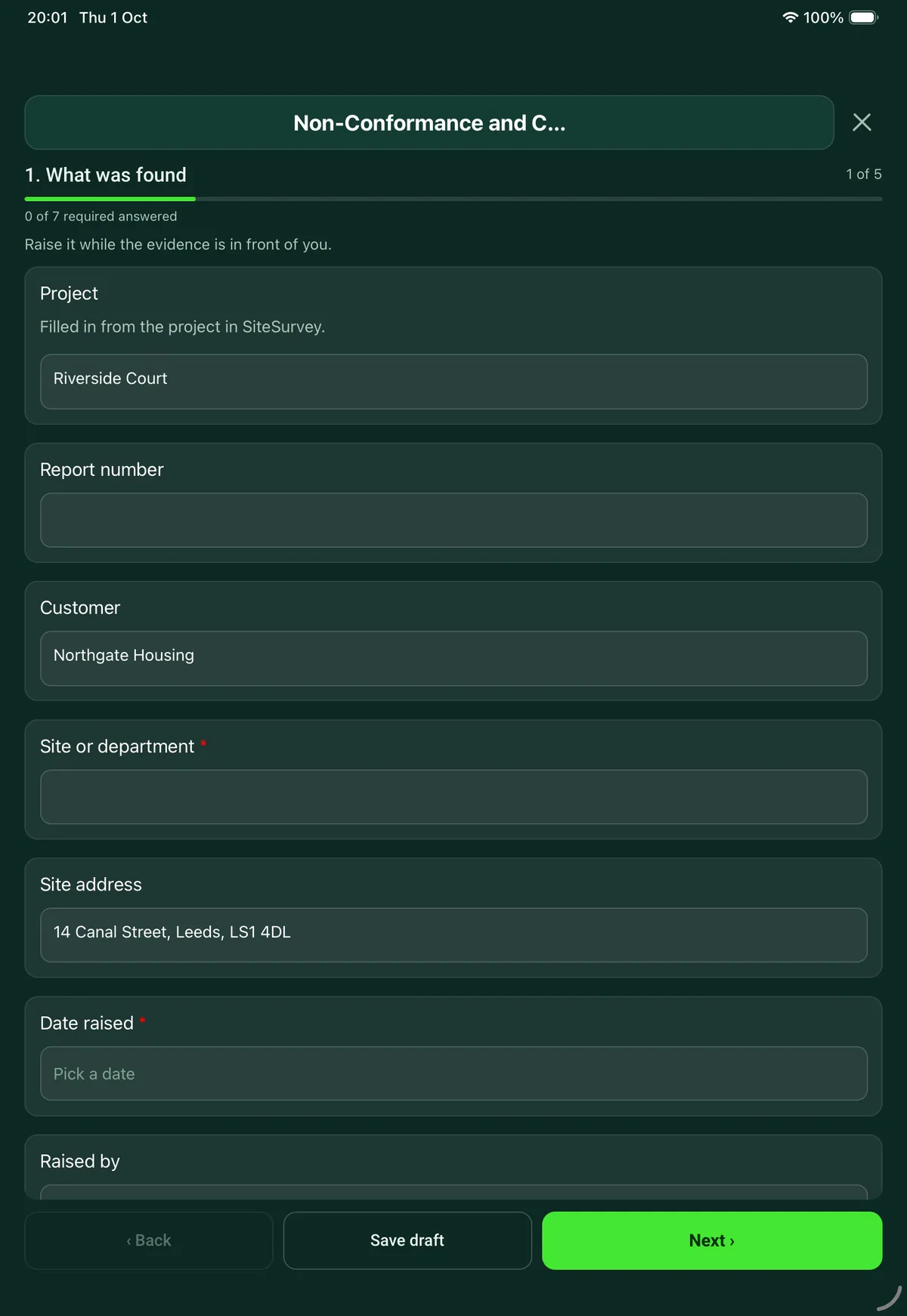
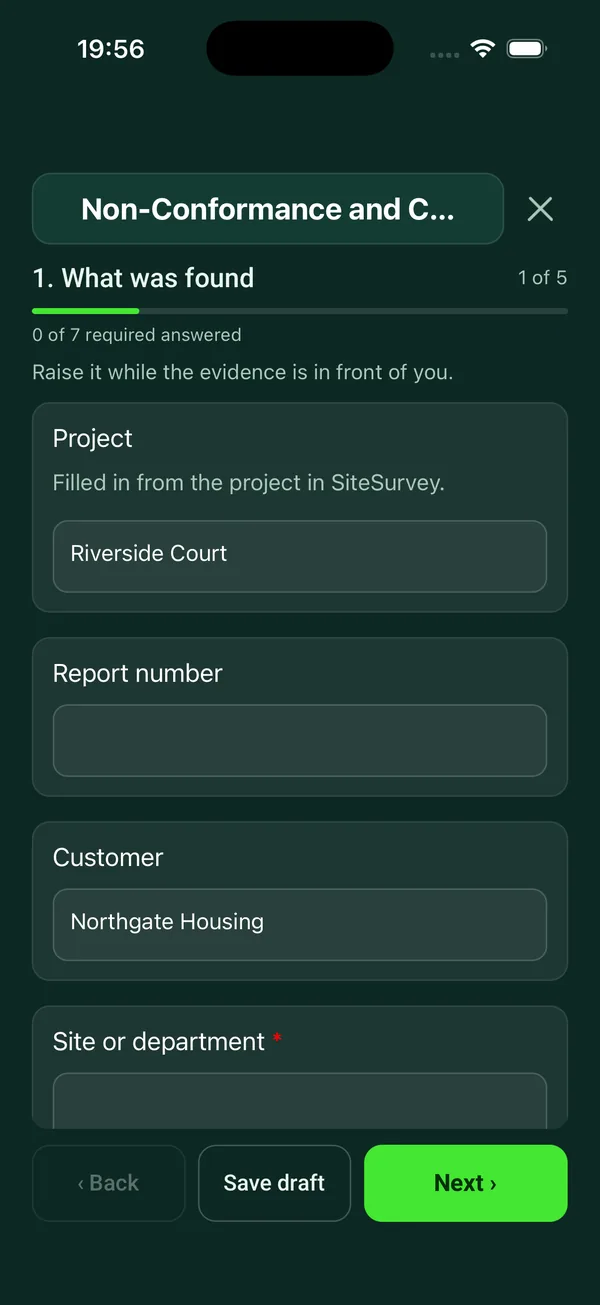
Every question in the non-conformance report template
Record a non-conformance, contain it, find the root cause with 5 whys, set corrective actions with owners and dates, then verify and close. 5 sections and 44 questions. Follow-up questions and guidance appear only when an answer calls for them, so the person on site never sees the ones that do not apply.
Make it your own: every question is editable
This is a starting point, not a fixed form. Once it is in your SiteSurvey account you can reword any question, add or remove questions, sections and answer options, and add your own logo, so it fits the way your team works and the jobs you do.
Details you only enter once
Add this form to a project in SiteSurvey and it fills in what the project already knows, so nobody on site retypes it and every form on the job uses the same names. Anything filled in can still be changed.
- Project: the project name
- Customer: the project's customer
- Site or department: the site, when the form is opened for a space or a product
- Site address: the site address, from the space or the project
What was found
Raise it while the evidence is in front of you.
- ProjectShort answer
Filled in from the project in SiteSurvey.
Fills in from the project name - Report numberShort answer
- CustomerShort answerFills in from the project's customer
- Site or department*Short answerFills in from the site, when the form is opened for a space or a product
- Site addressShort answerFills in from the site address, from the space or the project
- Date raised*Date
- Raised byShort answer
- How was it found?Choose one
- Internal audit
- Inspection or test
- Customer complaint
- Supplier delivery
- Observation on site or on the line
- Incident or near miss
- What is it about?Choose one
- Product or material
- Workmanship
- A process not followed
- A document or record
- A supplier
- Severity*Choose one
- Minor
- Major
- Critical
- What should have happened?Notes
The requirement: drawing, specification, procedure or standard, with its reference.
- What did happen?*Notes
Facts only: what, where, when and how many.
- Quantity or extent affectedShort answer
- Photos of the evidencePhotos
Containment
Stop it spreading before you work out why.
- What was done straight away?Notes
- What happens to the affected product or work?Choose one
- Quarantined
- Reworked or repaired
- Scrapped
- Returned to the supplier
- Used as it is, with approval
- Not applicable
- Who approved using it as it is?Short answerShown when “What happens to the affected product or work?” is “Used as it is, with approval”
- Could other batches, sites or jobs have the same problem?Yes or No
- What has been checked?Short answerShown when “Could other batches, sites or jobs have the same problem?” is Yes
- Does the customer need to be told?Yes or No
- Who was told, and when?Short answerShown when “Does the customer need to be told?” is Yes
Root cause: 5 whys
Ask why until you reach something you can change.
- GuidanceStart from what happened and ask why. Take each answer and ask why again. Five is a guide, not a rule: stop when the answer is a process, a method or a missing control that you can change, not a person to blame.
- Why did it happen?Short answer
- Why was that?Short answerShown when “Why did it happen?” is answered
- Why was that?Short answerShown when “Why was that?” is answered
- Why was that?Short answerShown when “Why was that?” is answered
- Why was that?Short answerShown when “Why was that?” is answered
- Root cause*Notes
- Where does the cause sit?Choose one
- People and training
- Method or procedure
- Material
- Machine or equipment
- Measurement
- Environment
- Other (describe)
- Should an existing check have caught this earlier?Yes or No
- Why did it not?Short answerShown when “Should an existing check have caught this earlier?” is Yes
Corrective actions
Fix this one, then stop it happening again.
- ActionsRepeat for each action. Each one asks:
- Action*Notes
- TypeChoose one
- Correction: fixes this case
- Corrective action: removes the cause
- OwnerShort answer
- DueDate
- CompletedDate
- ActionsWorked out by the form
- CompletedWorked out by the form
Verify and close
Check the fix worked before you close the report.
- Date effectiveness was checkedDate
- Did the actions work?Choose one
- Yes
- No
- Too early to say
- What evidence did you look at?Notes
- Which procedures, risks or documents have been changed?Notes
- CheckThe cause has not been removed. Go back to the 5 whys: the root cause was probably one step further on.Shown when “Did the actions work?” is “No”
- Status*Choose one
- Open
- Closed
- Closed byShort answerShown when “Status” is “Closed”
- SignatureSignatureShown when “Status” is “Closed”
See it filled in
A completed non-conformance report report, made by SiteSurvey from a fictional site visit: every answer, the photos, the guidance that applied and the sign-off, ready to send as a PDF.
Non-conformance report FAQs
How does the 5 whys root cause analysis work in the form?
Start from what happened and ask why. Each answer opens the next why, up to five. Five is a guide, not a rule, and you may reach the cause in fewer: stop when the answer is a process, a method or a missing control that you can change, not a person to blame. You then record the root cause and where it sits, such as method, material, equipment or training.
What is the difference between a correction and a corrective action?
The form uses correction for an action that fixes this case, such as reworking the part, and corrective action for one that removes the cause so it does not happen again. Each action has an owner, a due date and a completed date, and the form counts the actions and how many are done.
Can I use it as an 8D or CAPA report?
It covers the same ground in fewer steps: describe the problem, contain it, find the root cause, set corrective actions, verify they worked and close. It does not use the 8D numbering or team roles. The form can be edited in SiteSurvey if your customer needs their own headings.
What does containment record?
What was done straight away, and what happens to the affected product or work: quarantined, reworked, scrapped, returned to the supplier or used as it is with approval, naming who approved it. It also asks whether other batches, sites or jobs could have the same problem and whether the customer needs to be told.
How is a report closed?
By checking the actions worked. The form records the date effectiveness was checked, the evidence looked at, which procedures or documents were changed and whether the actions worked. If they did not, it sends you back to the 5 whys. The person closing the report signs on the device. In the SiteSurvey app it works offline and syncs when the device is back online, and the record goes out as a PDF or a share link.
Can it be used after an incident or near miss?
Yes: choose incident or near miss as how it was found. HSE's investigation workbook follows the same path: gather the information, analyse it, decide the risk controls and act on an action plan. Record the incident itself on an incident report as well.
Related
Related templates
Templates that go with the non-conformance report form
Internal audit of a quality, health and safety or environmental management system, a 5S area or a procedure, with findings, corrective actions and sign-off.
One issue, fast: where, what, photo, priority, who owns it.
Structured walk of a work area: what you saw against the standard, the eight wastes, conversations with the people doing the work, observations and actions.
Record equipment return authorisation, reported faults, arrival condition and the proposed resolution in one traceable record.
Use this non-conformance report form with your team
Add it from the form library in one click, change any question, and every completed form becomes a branded PDF report.
Start your trial →