A proof of visit for grounds maintenance contracts. Record the team, hours and weather, then each area with the tasks done (grass, edges, hedges, beds, leaves, litter, hard surfaces, weed control), photos and any issue found. The form checks for active bird nests before hedge or tree work and records any nest left uncut, records pesticide use and green waste, and gets the client's signature. Every question is listed below, and you can fill the live form in on this page.
✎Every question is editable. Add this form to your account, then change the wording, add or remove questions and options, and make it fit your own jobs.
Prefer paper? Download a printable copy: PDF or Word
What should a grounds maintenance visit record include?
A grounds maintenance visit record should show the date, team and hours, each area visited with the tasks done and photos, any issues found such as damage or fly-tipping, any pesticide use, how green waste was dealt with, and the client's sign-off. Dated records with photos prove each visit in the contract was made.
Film the whole garden, lawn and edges, planted beds, and a final view before signing off visible maintenance work.
Record the site, scheduled work and visit date before filming. Walk a repeatable route from overview to lawn edge, beds and a final view. Describe visible outcomes and missed locations, then compare with the agreed specification.
POINT 01
Garden overview
Show the maintained area from a fixed starting position so later close-ups can be located.
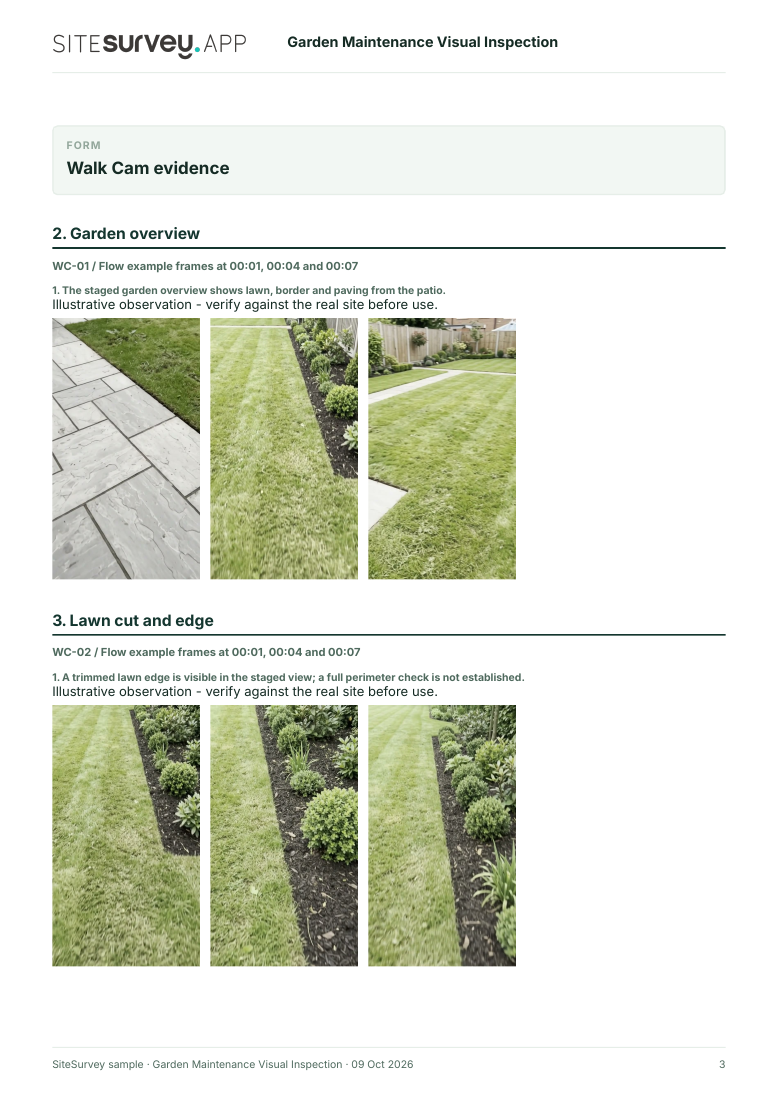
The staged garden overview shows lawn, border and paving from the patio.
POINT 02
Lawn cut and edge
Move along an accessible lawn edge under consistent light and show any missed growth or clippings.
A trimmed lawn edge is visible in the staged view; a full perimeter check is not established.
POINT 03
Planting bed and debris
Record the bed surface, obvious weeds and retained plantings without disturbing them.
The planted border is shown in context; hidden roots and plant health are not assessed.
POINT 04
Final planting and context view
Show the remaining accessible planting and finish with wider garden context. Note paths or areas not shown.
The staged final clip shows planting bed detail; the path and wider property are not established.
See the footage in a report
A fictional six-page example with the four points, twelve stills from the clips, observations, follow-up actions and the limits of a visual record.
A phone recording shows visible condition at one visit. It does not prove plant health, treatment effectiveness, hidden ground condition or that all contracted work was completed. Check the agreed maintenance scope separately. Example footage was generated in Google Flow and the observations are scripted; no real site is shown. Walk Cam works inside any form in the app. How Walk Cam works · All visual inspections
Every question in the grounds maintenance template
A grounds maintenance visit record: each area with tasks done, photos and issues, weed control, nesting bird checks before hedge work, waste removed, and the client's sign-off as proof of visit. 3 sections and 41 questions. Follow-up questions and guidance appear only when an answer calls for them, so the person on site never sees the ones that do not apply.
✎
Make it your own: every question is editable
This is a starting point, not a fixed form. Once it is in your SiteSurvey account you can reword any question, add or remove questions, sections and answer options, and add your own logo, so it fits the way your team works and the jobs you do.
Details you only enter once
Add this form to a project in SiteSurvey and it fills in what the project already knows, so nobody on site retypes it and every form on the job uses the same names. Anything filled in can still be changed.
Project: the project name
Client: the project's customer
Site: the site, when the form is opened for a space or a product
Site address: the site address, from the space or the project
1
Visit
ProjectShort answer
Fills in from the project name
ClientShort answer
Fills in from the project's customer
Site*Short answer
Fills in from the site, when the form is opened for a space or a product
Site addressShort answer
Fills in from the site address, from the space or the project
Visit date*Date
TimeTime
Team leader and team*Short answer
Hours on site (each)Number
Hours each person spent on site.
People in the teamNumber
Person-hours on siteWorked out by the form
Shown only when the answers above make it relevant
Weather captureAnswer
Record estimated current conditions for this visit. Keep your observations, visibility and local site conditions in the existing field below.
WeatherChoose one
Dry
Wet
Frost
Windy
2
Areas
Areas
Repeat for each area. Each one asks:
Area*Short answer
Where the area is (GPS)Short answer
Optional. Mark the area once and the next team finds it, or mark where an issue is.
DoneTick all that apply
Grass cut
Edges trimmed
Hedges cut
Shrub beds weeded
Leaves cleared
Litter picked
Hard surfaces swept
Weed control applied
Watering
Green waste removed
Scheduled work for this areaChoose one
All done
Partly done
Not done
What was not done, why, and when it will beShort answer
Shown only when the answers above make it relevant
Hedge length cut (m)Number
Optional. By tape or pacing, or from the site schedule.
Shown when “Done” includes “Hedges cut”
is_partlyWorked out by the form
is_issueWorked out by the form
PhotosPhotos
Issue found (damage, fly-tipping, hazards)Short answer
Areas visitedWorked out by the form
All scheduled work doneWorked out by the form
Partly or not doneWorked out by the form
Areas with an issue for the clientWorked out by the form
Hedge cut (m)Worked out by the form
Shown only when the answers above make it relevant
CheckSome scheduled work was not finished. Say what was left, why and when it will be done, so the client is not surprised.
Shown only when the answers above make it relevant
Was any hedge or tree work done?Yes or No
Checked for active bird nests first?Yes or No
Shown when “Was any hedge or tree work done?” is Yes
WarningIt is an offence to intentionally take, damage or destroy the nest of any wild bird while it is in use or being built (section 1 of the Wildlife and Countryside Act 1981). Check hedges and trees before cutting, especially in the breeding season, and leave any active nest alone.
Shown when “Was any hedge or tree work done?” is Yes and “Checked for active bird nests first?” is No
Was an active nest found?Yes or No
Shown when “Was any hedge or tree work done?” is Yes and “Checked for active bird nests first?” is Yes
Where, and what was left uncutShort answer
Shown when “Was an active nest found?” is Yes
Length of hedge left uncut (m)Number
Optional. Use a tape, or measure from a photo with something of known size in the same plane, such as a 1.83 m (6 ft) fence panel or a gate.
Shown when “Was an active nest found?” is Yes
Were any pesticides or herbicides used?Yes or No
Product, area treated and doseShort answer
Shown when “Were any pesticides or herbicides used?” is Yes
CheckProfessional users must keep a record of each plant protection product they use, with the product name, the time and dose of application and the area treated, for at least 3 years. Record it on the pesticide application record as well.
Shown when “Were any pesticides or herbicides used?” is Yes
Green wasteChoose one
Removed from site
Composted on site
Bagged for collection
None
Walk Cam: garden maintenance visual inspectionWalk Cam video with voice-to-text
Optional. Film the four guided points on the SiteSurvey app; each clip keeps its spoken note.
3
Sign-off
Notes for the next visitNotes
Client or site contact nameShort answer
Client or site contact signatureSignature
Completed by*Short answer
SignatureSignature
See it filled in
A completed grounds maintenance report, made by SiteSurvey from a fictional site visit: every answer, the photos, the guidance that applied and the sign-off, ready to send as a PDF.
It is an offence to intentionally take, damage or destroy the nest of any wild bird while it is in use or being built. GOV.UK advises timing work such as hedge and tree cutting to avoid the breeding season. The form asks whether nests were checked, warns if not, and records any active nest left uncut.
What about weed killers?
Professional users must keep a record of each plant protection product they use, with the product name, the time and dose of application and the area treated, for at least 3 years. The form records the product, area and dose for the visit; use the pesticide application record for the full details.
Can each area have photos?
Yes. Each area has its own photos, so the client sees the result area by area.
Does the client sign?
Yes. The client or site contact signs on your phone, and the record goes as a PDF or a link.
Can I note issues for the client?
Yes. Record damage, fly-tipping or hazards in each area so the client can act on them.
Who uses this?
Grounds maintenance and landscaping contractors, housing associations, councils, schools and business parks.