Hold to record. Keep holding while you film and speak; release to save the clip and its transcribed answer.
Four phone-format example clips made in Google Flow. Fictional inspection; no customer site is shown.
App-style example using Google Flow footage. The animated recording interface and gradually appearing words are scripted; no real inspection or live transcription took place.
The full visual example
Watch all four inspection points.
Each short clip shows one point in the cleaning route. The footage is AI-generated and the observations are scripted examples, not findings from a real site inspection.
POINT 01
Floor edges and traffic routes
Record the corridor overview, then move close to visible debris, residue or damp patches. State the exact location and raise immediate slip or trip hazards.
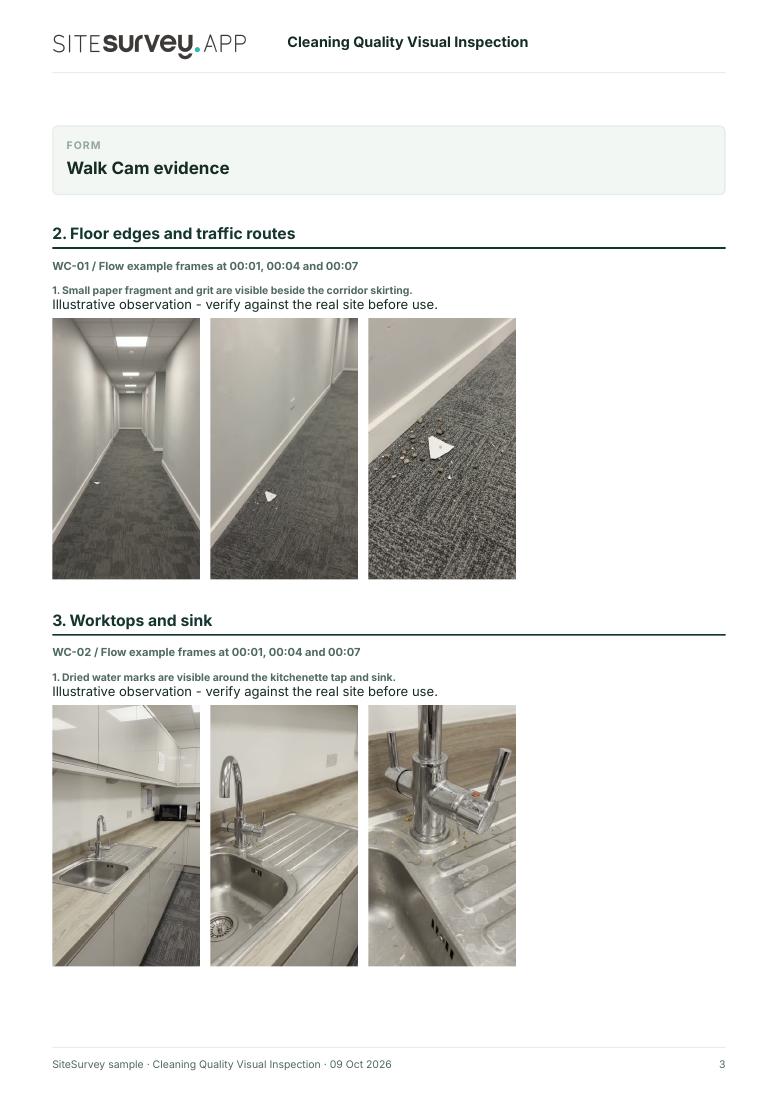
Small paper fragment and grit remain beside the corridor skirting.
POINT 02
Worktops and sink
Show accessible counter and sink surfaces in suitable light. Describe visible crumbs, marks or residue without assuming how a surface was cleaned.
Dried water marks are visible around the kitchenette tap and sink.
POINT 03
Desk and touchpoints
Film accessible desks and frequently touched surfaces. Explain which surface is affected and avoid recording confidential screen content or documents.
Smudges are visible on the shared desktop and monitor base.
POINT 04
Bins and final presentation
Show the bin, liner and nearby floor. Note visible litter or unfinished presentation and say what needs rechecking.
The bin liner is loose and litter remains beside the bin.
What can a visual cleaning inspection record?
A guided video inspection can document visible condition, pinpoint missed work and show the area needing follow-up. HSE notes that cleaning can also create slip and trip risks, including damp floors; a visible hazard should be addressed through the site's safety process. Video alone does not prove disinfection or compliance with a specialist cleaning standard.
Identify the site, area and visit before recording. Keep each observation attached to its location. Record areas you could not see and revisit the same points after corrective work.
01
Floor edges and traffic routes
Record the corridor overview, then move close to visible debris, residue or damp patches. State the exact location and raise immediate slip or trip hazards.
Example observation
“Small paper fragment and grit remain beside the corridor skirting.”
Scripted example, not a real site finding.02
Worktops and sink
Show accessible counter and sink surfaces in suitable light. Describe visible crumbs, marks or residue without assuming how a surface was cleaned.
Example observation
“Dried water marks are visible around the kitchenette tap and sink.”
Scripted example, not a real site finding.03
Desk and touchpoints
Film accessible desks and frequently touched surfaces. Explain which surface is affected and avoid recording confidential screen content or documents.
Example observation
“Smudges are visible on the shared desktop and monitor base.”
Scripted example, not a real site finding.04
Bins and final presentation
Show the bin, liner and nearby floor. Note visible litter or unfinished presentation and say what needs rechecking.
Example observation
“The bin liner is loose and litter remains beside the bin.”
Scripted example, not a real site finding.
How to use the record
Make visible findings actionable.
Locate the missed work
Film a room overview before moving close to a finding. Say the room, surface and position so someone else can find it.
Deal with hazards
HSE identifies wet floors and cleaning equipment as possible slip and trip hazards. Raise a hazard through the site's process rather than relying on a clip alone. HSE guidance ↗
Use the right standard
Visible condition is only part of a cleaning assessment. NHS England's healthcare guidance separates visual technical audits from checks of cleaning efficacy. This office example does not claim that standard. NHS England guidance ↗
Inspection scope
Walk Cam records what the inspector shows and says. It does not judge hygiene, disinfection efficacy, contract acceptance or workplace safety automatically.
Questions, answered
Cleaning inspection FAQs
What does a cleaning quality visual inspection show?
It records visible condition at a stated place and time. The inspector follows guided points, films each area and describes what they can see. The recording can help a cleaning team find missed work and verify follow-up.
Is this the same as a cleaning audit form?
No. This example focuses on visual evidence and precise location. A cleaning audit may also score contract standards, frequencies, chemicals, methods and other records. Use the appropriate form and assessment process where those are needed.
Can video prove a surface was disinfected?
No. A phone video does not establish cleaning method, microbial safety or disinfection efficacy. It records visible condition only.
What is in the sample report?
A completed fictional example with site and visit details, four visual observations, still frames, follow-up actions and limitations. The full portrait clips are previewed on this page.
Sources and review
Guidance checked 9 October 2026. The four-point route is a SiteSurvey example, not a method prescribed by these sources.
A specialist example of visual technical audits and separate efficacy checks in healthcare. This generic office example is not an NHS audit.
Search research: Keywords Everywhere estimated 260 UK monthly searches for “cleaning inspection” when checked 9 October 2026. This is a broad query, not a forecast of visits to this page.
SiteSurvey Walk Cam explains the product capability. The clips are AI-generated examples.