
Form library · Facilities and maintenance

Culvert inspection checklist

An inspection of a culvert, its trash screen and outlet, done from the bank or a safe platform and never from inside. Record the watercourse, the structure and why you are inspecting, then the water level and flow, and check the channel upstream, the trash screen and its bars, the headwall and wing walls, the banks, the outlet and safe access, each with what is wrong. Record the debris found and whether it was cleared, with photos. The form warns when a blockage could cause flooding, ends with an optional Walk Cam route, and records who it was reported to and actions. Every question is listed below, and you can fill the live form in on this page.

Ready to use from the form library, and every question is yours to edit. Trial from £1, cancel any time.

Try it on your phone

Try it on this phone

Fill in the culvert inspection on your phone now

See how the culvert inspection looks on your phone

Scan the code with your phone camera. It opens the real form, no sign-up needed.

Open the live example and fill it in, just as your team would on site. No sign-up needed.

See it on this phone

Every question is editable. Add this form to your account, then change the wording, add or remove questions and options, and make it fit your own jobs.

Or start your trial with this form ready →

Prefer paper? Download a printable copy: PDF or Word

One email, and we won't add you to a mailing list.

Who is responsible for clearing a culvert?

In England, GOV.UK says you normally own the stretch of watercourse on or under your land, including a culvert, and that owners must let water flow naturally and should keep any trash screen, weir or other structure clear. It also says do not go inside a culvert, as you could get trapped or poisoned by gases: if it needs clearing or repairing, contact your risk management authority, which is the Environment Agency for a main river or the lead local flood authority or internal drainage board for other watercourses.

Last updated . Facts checked by the SiteSurvey team on 17 October 2026 against GOV.UK: owning a watercourse (Environment Agency) and Environment Agency: culvert, screens and outfall manual (project summary).

Try the culvert inspection form live

Answer a few questions and watch it adapt. Your answers are not saved, and any photos you add are deleted within the hour.

Live form: Culvert and Trash Screen InspectionOpen full screen ↗
See a filled-in example

Open the completed example to see fictional readings, notes, photos and calculations. Choose Blank form to try entering your own answers.

Want to see one filled in? See a completed culvert inspection report (PDF), made by SiteSurvey from a fictional site visit.

Walk Cam route · four guided clips

Record the culvert inspection on video

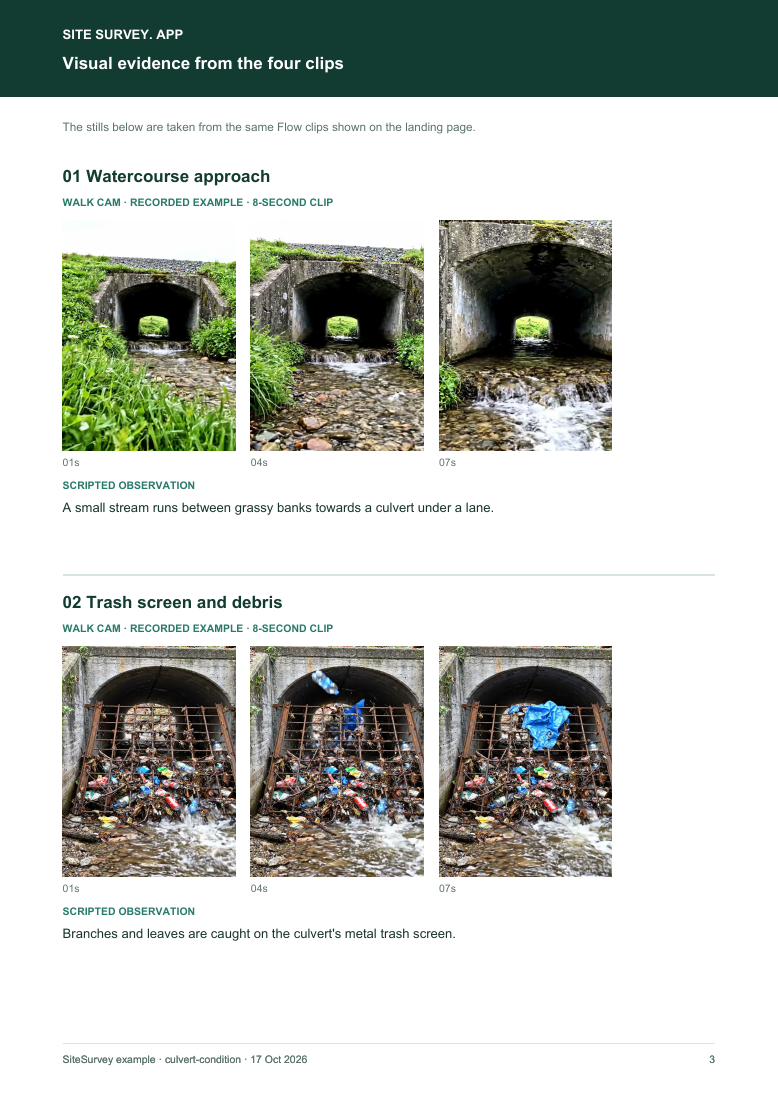
Film the watercourse into the culvert, the screen and any debris, the headwall and the outlet, all from the bank.

Record the location, watercourse, date and water level. Stay on the bank and never enter the water or the culvert. The four AI-generated clips illustrate one route, not a real culvert.

See the footage in a report

A fictional six-page example with the four points, twelve stills from the clips, observations, follow-up actions and the limits of a visual record.

View the visual evidence (PDF) ↗ · Download the full sample report

Visual evidence page from the culvert and trash screen inspection visual route sample report, with footage stills and observations

Video records what can be seen from outside. It cannot show the inside of the culvert, its structural condition or flood capacity. Example footage was generated in Google Flow and the observations are scripted; no real site is shown. Walk Cam works inside any form in the app. How Walk Cam works · All visual inspections

Every question in the culvert inspection template

A culvert and trash screen inspection from the bank: watercourse and water level, flow, screen and debris, headwall, wing walls, banks and outlet, debris cleared, photos, who was told and actions. Never enter a culvert. 3 sections and 56 questions. Follow-up questions and guidance appear only when an answer calls for them, so the person on site never sees the ones that do not apply.

Make it your own: every question is editable

This is a starting point, not a fixed form. Once it is in your SiteSurvey account you can reword any question, add or remove questions, sections and answer options, and add your own logo, so it fits the way your team works and the jobs you do.

Details you only enter once

Add this form to a project in SiteSurvey and it fills in what the project already knows, so nobody on site retypes it and every form on the job uses the same names. Anything filled in can still be changed.

  • Project: the project name
  • Client: the project's customer
  • Site: the site, when the form is opened for a space or a product
  • Site address: the site address, from the space or the project

Site

  • ProjectShort answer
    Fills in from the project name
  • ClientShort answer
    Fills in from the project's customer
  • Site*Short answer
    Fills in from the site, when the form is opened for a space or a product
  • Site addressShort answer
    Fills in from the site address, from the space or the project
  • Inspection date*Date
  • TimeTime
  • Inspector*Short answer
  • Watercourse and culvert reference*Short answer
  • StructureChoose one
    • Culvert with trash screen
    • Culvert, no screen
    • Outfall
    • Outfall with screen
  • Inlet position (GPS)Short answer

    Optional. Mark the culvert inlet or screen from the bank, so the next inspector and the authority find it.

  • Reason for the inspectionChoose one
    • Routine
    • Before forecast heavy rain
    • After a flood or storm
    • After a report of a blockage
  • WarningInspect from the bank or a safe platform and do not enter the water. GOV.UK (Environment Agency): do not go inside a culvert, you could get trapped or poisoned by gases. If it needs clearing or repairing, contact your risk management authority for advice.
  • GuidanceGOV.UK (England): you normally own the stretch of watercourse on or under your land, including a culvert, or up to its centre if it is on your boundary. Owners must let water flow naturally and should keep any trash screen, weir or other structure clear.
  • Weather captureAnswer

    Record estimated current conditions and add what you observe on site.

Inspection

  • Water levelChoose one
    • Low
    • Normal
    • High
    • In flood
  • Flow through the culvert*Choose one
    • Flowing freely
    • Slowed
    • Blocked or backing up
  • Height of the culvert opening (m)Number

    Optional. From the asset record or drawing, soffit to bed, or measure from a photo taken square on from the bank (an estimate). Do not enter the water.

  • Gap from the water to the top of the opening (m)Number

    Optional. Measure from a photo taken square on from the bank, using a known size in the same plane such as the screen width or the opening height from the asset record. Do not enter the water.

  • Opening above the water (%)Worked out by the form
    Shown only when the answers above make it relevant
  • Channel upstream clear of fallen trees and large debrisChoose one
    • OK
    • Defect
    • Not applicable
  • What is wrong?Short answer
    Shown when “Channel upstream clear of fallen trees and large debris” is “Defect”
  • Trash screen clear of debrisChoose one
    • OK
    • Defect
    • Not applicable
  • What is wrong?Short answer
    Shown when “Trash screen clear of debris” is “Defect”
  • Share of the screen blocked (%)Number

    Your estimate from the bank, before any clearing.

    Shown only when the answers above make it relevant
  • Clear when blocked by more than (%)Number

    Optional. From the owner's maintenance plan for this screen.

    Shown only when the answers above make it relevant
  • Against the clearance triggerWorked out by the form
    Shown only when the answers above make it relevant
  • Screen bars and fixings intactChoose one
    • OK
    • Defect
    • Not applicable
  • What is wrong?Short answer
    Shown when “Screen bars and fixings intact” is “Defect”
  • Headwall and wing walls: no cracks or missing blocksChoose one
    • OK
    • Defect
    • Not applicable
  • What is wrong?Short answer
    Shown when “Headwall and wing walls: no cracks or missing blocks” is “Defect”
  • Banks: no erosion or collapseChoose one
    • OK
    • Defect
    • Not applicable
  • What is wrong?Short answer
    Shown when “Banks: no erosion or collapse” is “Defect”
  • Outlet clear and flowingChoose one
    • OK
    • Defect
    • Not applicable
  • What is wrong?Short answer
    Shown when “Outlet clear and flowing” is “Defect”
  • Safe access, handrails and platformChoose one
    • OK
    • Defect
    • Not applicable
  • What is wrong?Short answer
    Shown when “Safe access, handrails and platform” is “Defect”
  • Checks OKWorked out by the form
  • DefectsWorked out by the form
  • Not applicableWorked out by the form
  • Debris foundTick all that apply
    • Branches
    • Leaves and vegetation
    • Litter and plastics
    • Silt
    • Large items
  • Was debris cleared during this visit?Yes or No
  • How it was cleared, and where the debris wentShort answer
    Shown when “Was debris cleared during this visit?” is Yes
  • Debris removed (bags)Number
    Shown when “Was debris cleared during this visit?” is Yes
  • CheckThe screen is blocked beyond the clearance trigger and was not cleared on this visit. Arrange clearance, and report it if it could cause flooding.
    Shown only when the answers above make it relevant
  • WarningA blocked culvert or screen can cause flooding. Report blockages that could cause flooding: GOV.UK says the risk management authority is the Environment Agency for a main river, or the lead local flood authority or internal drainage board for any other watercourse.
    Shown only when the answers above make it relevant
  • Photos (from the bank)Photos
  • Walk Cam: culvert and trash screen inspectionWalk Cam video with voice-to-text

    Optional. Film the four guided points on the SiteSurvey app; each clip keeps its spoken note.
Actions and sign-off

  • Reported to (owner or risk management authority) and referenceShort answer
  • GuidanceGOV.UK: find out which permissions you need before you maintain, repair, build or remove anything in or around a watercourse, including a culvert.
  • Are further actions needed?Yes or No
  • Further actions
    Repeat for each action. Each one asks:
    Shown when “Are further actions needed?” is Yes
    • What needs doing?*Notes
    • PriorityChoose one
      • Urgent
      • High
      • Medium
      • Low
    • Who will do it?Short answer
    • Due dateDate
    • StatusChoose one
      • Open
      • In progress
      • Completed
  • Actions open or in progressWorked out by the form
    Shown when “Are further actions needed?” is Yes
  • Next inspection dueDate

    Set by the owner's own inspection regime. Also inspect before forecast heavy rain and after a flood or storm.

  • Days until the next inspectionWorked out by the form
    Shown when “Inspection date” is answered and “Next inspection due” is answered
  • CheckCheck the date. The next date is before the date of this visit.
    Shown only when the answers above make it relevant
  • Inspector name*Short answer
  • Position or companyShort answer
  • Inspector signatureSignature
  • CheckSigning records what was found on the day. It does not make unsafe equipment safe or replace a thorough examination, design check or service by a competent person.

Scope and responsibility

A visual record from outside the culvert. It is not a confined space entry, a structural survey, a hydraulic assessment or permission to work in a watercourse.

What a useful entry looks like

Screen, structure and flow findings

Record what can be seen from the bank: debris on the screen, cracks, erosion and how freely water flows. Say who it was reported to and the reference.

Branches and plastic across the lower third of the screen, flow slowed. Raked clear from the platform and reported to the council drainage team.

Fictional example of record wording. Use the actual evidence and approved arrangements for your job; this is not a completed report or an instruction to carry out the work.

See it filled in

A completed culvert inspection report, made by SiteSurvey from a fictional site visit: every answer, the photos, the guidance that applied and the sign-off, ready to send as a PDF.

See completed form (PDF) ↗

Culvert inspection FAQs

Can I go into the culvert to check it?

No. GOV.UK says do not go inside a culvert, you could get trapped or poisoned by gases. Inspect from the bank or a safe platform and do not enter the water. The Walk Cam route is filmed the same way.

What is a trash screen for?

A screen or grille across the culvert entrance that catches debris before it gets inside. It only works if it is kept clear, which is why GOV.UK says owners should keep any trash screen clear. The Environment Agency's culvert, screens and outfall manual project says culverts and screens can completely restrict flow.

Who do I report a blockage to?

GOV.UK says you can report blockages which could cause flooding. The risk management authority is the Environment Agency for a main river, or the lead local flood authority or internal drainage board for any other watercourse.

Do I need permission to repair it?

GOV.UK says you must find out which permissions and licences you need to maintain, repair, build or remove anything in or around a watercourse, including a culvert, and that the authorities are unlikely to give permission to build a new culvert.

When should culverts be checked?

Set your own routine, and add checks before forecast heavy rain and after a flood, storm or report of a blockage. The form records which it was.

Who uses this?

Council parks and highways teams, estates and grounds managers, farmers and landowners, golf courses, rail and road operators and drainage boards.

Related

Use this culvert inspection form with your team

Add it from the form library in one click, change any question, and every completed form becomes a branded PDF report.

Start your trial →