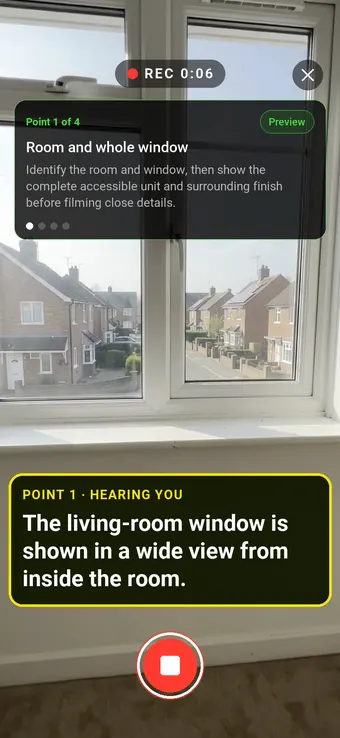
Show exactly which window needs attention. Start with the room and whole unit, then film the seal, glazing and nearby finish so a repairer can find the concern.
Hold to record. Keep holding while you film and speak; release to save the clip and its transcribed answer.
Four 9:16 example clips generated in Google Flow. Fictional inspection; no customer site is shown.
App-style example using Google Flow footage. The animated recording interface and gradually appearing words are scripted; no real inspection or live transcription took place.
The full visual example
Watch all four inspection points.
Each short clip shows one point in the guided route. The footage is AI-generated and the observations are scripted examples, not findings from a real inspection.
POINT 01
Room and whole window
Identify the room and window, then show the complete accessible unit and surrounding finish before filming close details.
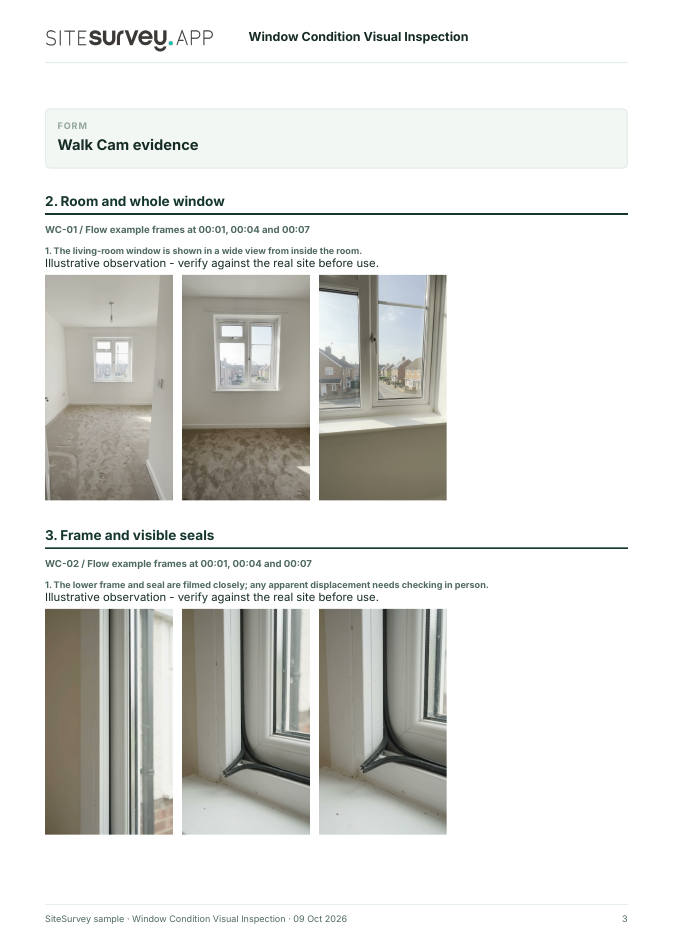
The living-room window is shown in a wide view from inside the room.
POINT 02
Frame and visible seals
Move slowly along accessible frame corners, hinges and weather seals. Locate apparent gaps or displaced material without declaring a performance failure.
The lower frame and seal are filmed closely; any apparent displacement needs checking in person.
POINT 03
Glazing and pane edges
Show the glass, corners and pane edges in steady light. Record visible chips, cracks or apparent condensation between panes, if present.
The glazed unit and lower edge are recorded from inside; no glass performance test was performed.
POINT 04
Sill and adjacent finish
Film the sill, jamb and nearby wall to locate marks or damage. Describe what is visible without claiming a cause of water ingress.
The sill and adjacent painted finish are shown in context; a small mark would require follow-up.
What can a window condition visual inspection record?
Record the property, room and window identifier. Film a wide view before moving to accessible frame, seals, glazing and adjacent finishes. Include a scale or location note where it helps a repairer. This record covers visible condition from safe access only. Footage cannot establish thermal performance, water tightness, installation compliance, the cause of staining or the condition of concealed fixings. Do not operate an unsafe window for a recording.
The six-page sample contains four inspection points, twelve footage stills, scripted observations and follow-up actions. The preview shows the first visual-evidence page.
Record the property, room and window identifier. Film a wide view before moving to accessible frame, seals, glazing and adjacent finishes. Include a scale or location note where it helps a repairer.
01
Room and whole window
Identify the room and window, then show the complete accessible unit and surrounding finish before filming close details.
Example observation
“The living-room window is shown in a wide view from inside the room.”
Scripted example, not a real finding.02
Frame and visible seals
Move slowly along accessible frame corners, hinges and weather seals. Locate apparent gaps or displaced material without declaring a performance failure.
Example observation
“The lower frame and seal are filmed closely; any apparent displacement needs checking in person.”
Scripted example, not a real finding.03
Glazing and pane edges
Show the glass, corners and pane edges in steady light. Record visible chips, cracks or apparent condensation between panes, if present.
Example observation
“The glazed unit and lower edge are recorded from inside; no glass performance test was performed.”
Scripted example, not a real finding.04
Sill and adjacent finish
Film the sill, jamb and nearby wall to locate marks or damage. Describe what is visible without claiming a cause of water ingress.
Example observation
“The sill and adjacent painted finish are shown in context; a small mark would require follow-up.”
Scripted example, not a real finding.
How to use the record
Make the visual evidence useful.
Identify the visit
Record the asset or site, visit stage, date and inspector. Keep each clip attached to its point and note anything inaccessible.
Describe, then escalate
Say what the camera shows and where it is. Record the next action without guessing the cause or declaring a specialist result from video.
This record covers visible condition from safe access only. Footage cannot establish thermal performance, water tightness, installation compliance, the cause of staining or the condition of concealed fixings. Do not operate an unsafe window for a recording.
Questions, answered
Window condition visual inspection FAQs
Can video diagnose a failed window seal?
No. It can show an apparent gap, damage or condensation, but the cause and repair need an appropriate on-site assessment.
Should the window be opened for the clip?
Only if it is safe and within the inspector's task. A visible-condition recording does not require operating a window that may be unsafe or defective.
How do I identify the right window in a report?
Record the property, room, elevation or window number, visit date and the view used for each clip.
What is in the sample report?
A fictional completed record with four points, footage stills, scripted observations, follow-up actions and limits of the visual visit.
Sources and review
Guidance checked 9 October 2026. The four-point route is a SiteSurvey example, not a method prescribed by these sources.
Explains the main parts of a window, including frame and sealed glazing unit, and points readers to manufacturer or supplier guidance.
Search research: Keywords Everywhere estimated 720 UK monthly searches for “window inspection” when checked 9 October 2026. The query also covers installation, performance testing and specialist services; software demand is unverified. This is not a traffic or conversion forecast.
SiteSurvey Walk Cam explains the product capability. The clips are AI-generated examples.