Show what changed between visits. Follow the same route, film accessible rooms and the outside, and give the property manager a precise location for each concern.
Hold to record. Keep holding while you film and speak; release to save the clip and its transcribed answer.
Four 9:16 example clips generated in Google Flow. Fictional inspection; no customer site is shown.
App-style example using Google Flow footage. The animated recording interface and gradually appearing words are scripted; no real inspection or live transcription took place.
The full visual example
Watch all four inspection points.
Each short clip shows one point in the guided route. The footage is AI-generated and the observations are scripted examples, not findings from a real inspection.
POINT 01
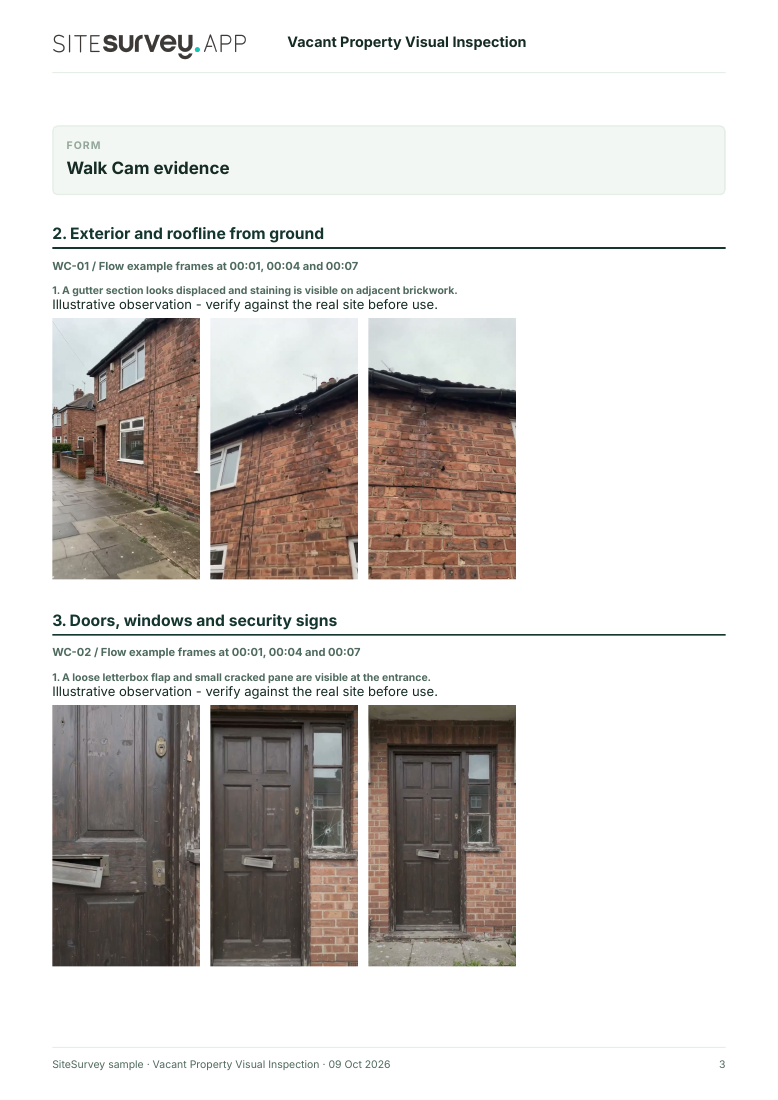
Exterior and roofline from ground
Show the front elevation and accessible sides from a safe position. Locate visible damage, staining or loose materials without entering an unsafe area.
A gutter section looks displaced and staining is visible on adjacent brickwork.
POINT 02
Doors, windows and security signs
Film accessible entrances, frames and glazing. Describe visible damage and signs of interference; do not claim that locks or alarms were tested.
A loose letterbox flap and small cracked pane are visible at the entrance.
POINT 03
Accessible rooms and visible leaks
Follow the agreed internal route only where access is safe. Record room identity, visible marks and any changed condition. Do not diagnose the cause of damp from video.
A brown mark and peeling paint are visible near an upstairs ceiling corner.
POINT 04
Rear grounds and boundaries
Show accessible paths, vegetation and boundary features. Locate overgrowth or damage that needs attention and note any area you cannot see.
Vegetation is overgrown and parts of the rear boundary are obscured from view.
What can a vacant property visual inspection record?
Identify the property, visit date and last known condition. Record the same accessible route on each visit and escalate concerns through the owner's process. Note every area you could not enter safely. This is a record of accessible visible condition at the visit. It does not test locks, services, moisture sources, structural safety or compliance with an insurance policy.
The six-page sample contains four inspection points, twelve footage stills, scripted observations and follow-up actions. The preview shows the first visual-evidence page.
Identify the property, visit date and last known condition. Record the same accessible route on each visit and escalate concerns through the owner's process. Note every area you could not enter safely.
01
Exterior and roofline from ground
Show the front elevation and accessible sides from a safe position. Locate visible damage, staining or loose materials without entering an unsafe area.
Example observation
“A gutter section looks displaced and staining is visible on adjacent brickwork.”
Scripted example, not a real finding.02
Doors, windows and security signs
Film accessible entrances, frames and glazing. Describe visible damage and signs of interference; do not claim that locks or alarms were tested.
Example observation
“A loose letterbox flap and small cracked pane are visible at the entrance.”
Scripted example, not a real finding.03
Accessible rooms and visible leaks
Follow the agreed internal route only where access is safe. Record room identity, visible marks and any changed condition. Do not diagnose the cause of damp from video.
Example observation
“A brown mark and peeling paint are visible near an upstairs ceiling corner.”
Scripted example, not a real finding.04
Rear grounds and boundaries
Show accessible paths, vegetation and boundary features. Locate overgrowth or damage that needs attention and note any area you cannot see.
Example observation
“Vegetation is overgrown and parts of the rear boundary are obscured from view.”
Scripted example, not a real finding.
How to use the record
Make the visual evidence useful.
Identify the visit
Record the asset or site, visit stage, date and inspector. Keep each clip attached to its point and note anything inaccessible.
Describe, then escalate
Say what the camera shows and where it is. Record the next action without guessing the cause or declaring a specialist result from video.
This is a record of accessible visible condition at the visit. It does not test locks, services, moisture sources, structural safety or compliance with an insurance policy.
Questions, answered
Vacant property visual inspection FAQs
What can a vacant property visual inspection record?
It can show accessible visible condition at a stated visit and help compare the same locations over time. It should identify the property, inspector, date, route, findings and access limits.
Does video prove that a vacant property is secure or insured?
No. A video cannot test locks, alarms or services, and insurance conditions vary by policy. Follow the owner's and insurer's actual inspection requirements.
What should happen if entry looks unsafe?
Do not enter to complete a recording. Record the access limit from a safe place and escalate it through the property manager's safety procedure.
What is in the sample report?
A fictional completed report with property and visit details, four visual observations, frames from the example clips, follow-up actions and limitations.
Sources and review
Guidance checked 9 October 2026. The four-point route is a SiteSurvey example, not a method prescribed by these sources.
Notes extra risks at vacant and derelict properties, including unstable surfaces and falling materials; access may be unsafe.
Search research: Keywords Everywhere estimated 170 UK monthly searches for “vacant property inspection” when checked 9 October 2026. Search results include inspection service providers; demand for software must be tested separately. This is not a traffic or conversion forecast.
SiteSurvey Walk Cam explains the product capability. The clips are AI-generated examples.