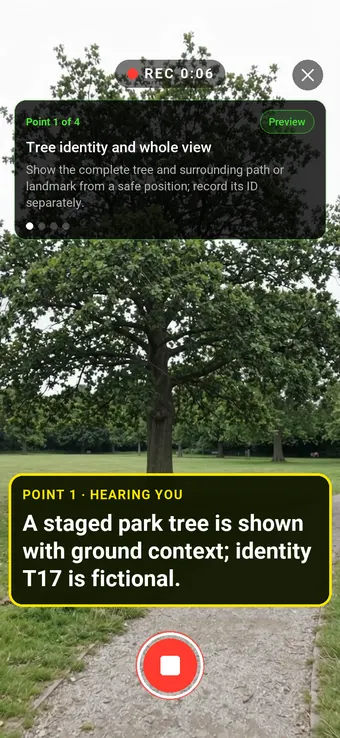
Hold to record. Keep holding while you film and speak; release to save the clip and its transcribed answer.
Four 9:16 example clips generated in Google Flow. Fictional inspection; no customer site is shown.
App-style example using Google Flow footage. The animated recording interface and gradually appearing words are scripted; no real inspection or live transcription took place.
The full visual example
Watch all four inspection points.
Each short clip shows one point in the guided route. The footage is AI-generated and the observations are scripted examples, not findings from a real inspection.
POINT 01
Tree identity and whole view
Show the complete tree and surrounding path or landmark from a safe position; record its ID separately.
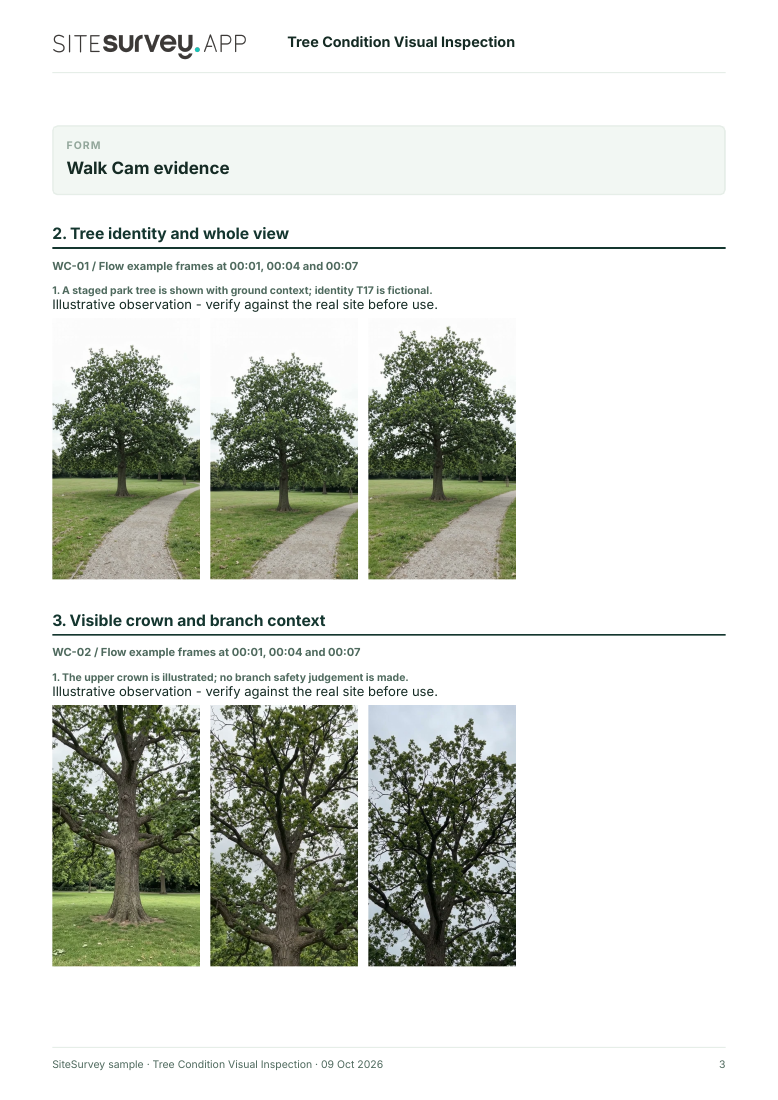
A staged park tree is shown with ground context; identity T17 is fictional.
POINT 02
Visible crown and branch context
From outside any suspect fall zone, film accessible upper crown without claiming branch strength.
The upper crown is illustrated; no branch safety judgement is made.
POINT 03
Trunk and accessible surface
Show visible trunk features from a distance; do not infer internal decay from appearance alone.
The trunk surface is shown; internal condition is unknown.
POINT 04
Ground and base context
Show accessible ground around the base without digging or disturbing roots.
The staged ground near the base is visible; root stability is not tested.
What can a tree condition visual inspection record?
Record the tree ID, site and ground conditions. From a safe position, show the whole tree before accessible crown, trunk and root-zone context. Do not stand under a suspected unstable branch or enter an unsafe area. Escalate concerns for competent arboricultural assessment. Phone video cannot establish structural stability, decay extent, species-specific risk, hidden roots or treatment needs. It is a dated visual record, not a formal tree safety inspection.
The six-page sample contains four inspection points, twelve footage stills, scripted observations and follow-up actions. The preview shows the first visual-evidence page.
Record the tree ID, site and ground conditions. From a safe position, show the whole tree before accessible crown, trunk and root-zone context. Do not stand under a suspected unstable branch or enter an unsafe area. Escalate concerns for competent arboricultural assessment.
01
Tree identity and whole view
Show the complete tree and surrounding path or landmark from a safe position; record its ID separately.
Example observation
“A staged park tree is shown with ground context; identity T17 is fictional.”
Scripted example, not a real finding.02
Visible crown and branch context
From outside any suspect fall zone, film accessible upper crown without claiming branch strength.
Example observation
“The upper crown is illustrated; no branch safety judgement is made.”
Scripted example, not a real finding.03
Trunk and accessible surface
Show visible trunk features from a distance; do not infer internal decay from appearance alone.
Example observation
“The trunk surface is shown; internal condition is unknown.”
Scripted example, not a real finding.04
Ground and base context
Show accessible ground around the base without digging or disturbing roots.
Example observation
“The staged ground near the base is visible; root stability is not tested.”
Scripted example, not a real finding.
How to use the record
Make the visual evidence useful.
Identify the visit
Record the asset or site, visit stage, date and inspector. Keep each clip attached to its point and note anything inaccessible.
Describe, then escalate
Say what the camera shows and where it is. Record the next action without guessing the cause or declaring a specialist result from video.
Use the relevant guidance
Discusses owner and manager responsibilities, suitable inspection procedures and signs that may merit further review. Forest Research · Hazards from trees ↗
Inspection scope
Phone video cannot establish structural stability, decay extent, species-specific risk, hidden roots or treatment needs. It is a dated visual record, not a formal tree safety inspection.
Questions, answered
Tree condition visual inspection FAQs
Can a phone video prove a tree is safe?
No. Tree risk depends on factors a clip cannot establish; use a competent arboricultural assessment where indicated.
Should a person stand under a damaged branch to film it?
No. Keep a safe distance and follow local access controls.
What helps a specialist locate the concern?
Tree ID or map reference, a whole-tree view, and a clearly located detail view.
Does every visible mark mean a hazard?
No. The significance of a visible feature depends on the tree and setting, and requires competent judgement.
Sources and review
Guidance checked 9 October 2026. The four-point route is a SiteSurvey example, not a method prescribed by these sources.
Shows how a public tree manager uses documented checks and escalates significant observed defects.
Search research: Keywords Everywhere estimated 1300 UK monthly searches for “tree inspection” when checked 9 October 2026. The measured phrase often implies qualified tree-risk assessment. Validate visual-recording software intent before indexing. This is not a traffic or conversion forecast.
SiteSurvey Walk Cam explains the product capability. The clips are AI-generated examples.