POINT 01
Safe property overview
Film from a safe public or authorised point, naming the property and areas you cannot access.
The example property and grounds are visible from a distance.
Visual inspection library · Property and grounds
When it is safe to record, show the affected area from a wide position before moving to visible debris, building fabric and access limits.
Hold to record. Keep holding while you film and speak; release to save the clip and its transcribed answer.
Four 9:16 example clips generated in Google Flow. Fictional inspection; no customer site is shown.
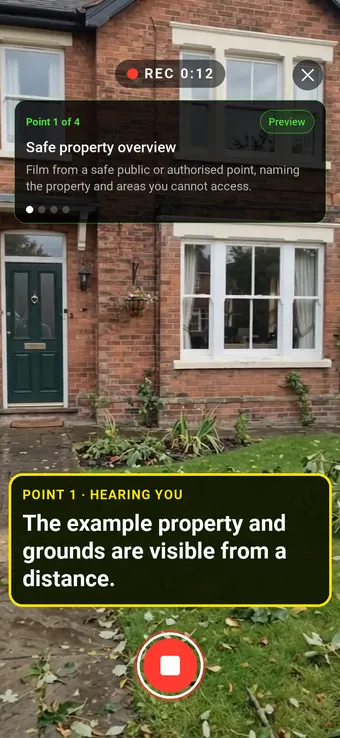
App-style example using Google Flow footage. The animated recording interface and gradually appearing words are scripted; no real inspection or live transcription took place.
The full visual example
Each short clip shows one point in the guided route. The footage is AI-generated and the observations are scripted examples, not findings from a real inspection.
Film from a safe public or authorised point, naming the property and areas you cannot access.
The example property and grounds are visible from a distance.
Show fallen material and its position without moving it or stepping beneath unstable objects.
A fallen branch and smaller twigs lie across a paved path in the example; their cause is not established.
Show the accessible wall and roofline only from a safe ground-level viewpoint.
A brick side elevation, roof edge and a visibly misaligned gutter section are shown from ground level; attachment and roof condition remain unconfirmed.
End by recording any cordon, blocked route or area that the camera could not safely inspect.
Barrier tape and branches mark a garden route as restricted in the example; the area beyond was not inspected.
Record the location, event date if known, visit time and weather/access conditions. Do not enter an unsafe building or move debris for a better clip. The four AI-generated scenes illustrate similar post-storm conditions but are independent clips, not one real property visit. This records only what is safely visible after a reported storm. It cannot establish the cause or date of damage, structural safety, insurance coverage or claim value. Urgent hazards need the responsible emergency or competent service.
Last updated . Facts checked on 9 October 2026 against Met Office · Stay safe in a storm and Association of British Insurers · Storms.
A completed visual example
The six-page sample contains four inspection points, twelve footage stills, scripted observations and follow-up actions. The preview shows the first visual-evidence page.
Fictional sample. Footage was generated in Flow and observations are scripted; pages 3–4 contain still frames from all four clips.
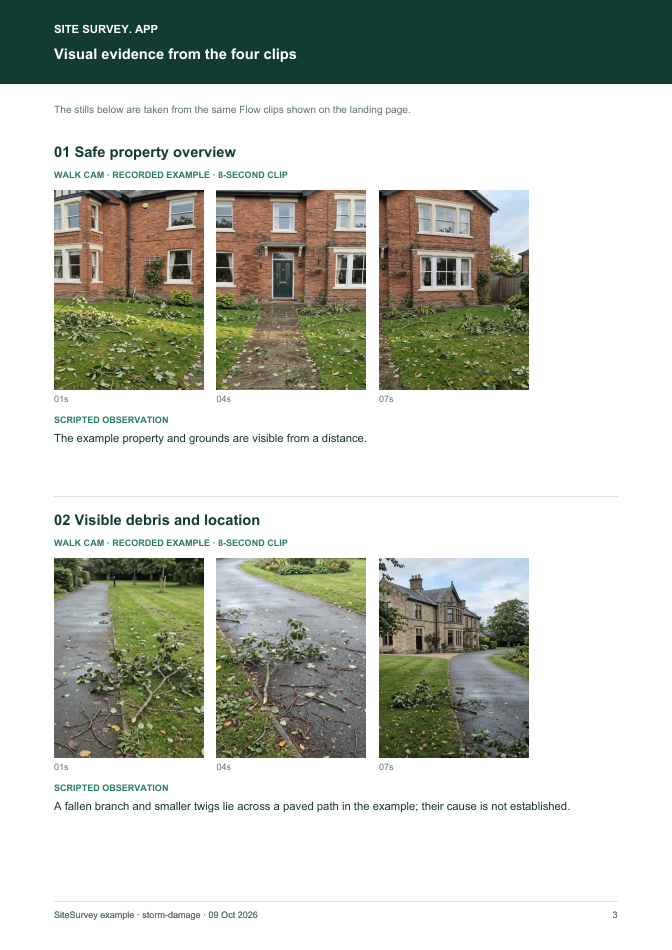 Visual evidence · page 3 of 6 ↗
The guided route
Record the location, event date if known, visit time and weather/access conditions. Do not enter an unsafe building or move debris for a better clip. The four AI-generated scenes illustrate similar post-storm conditions but are independent clips, not one real property visit.
Film from a safe public or authorised point, naming the property and areas you cannot access.
“The example property and grounds are visible from a distance.”Scripted example, not a real finding.
Show fallen material and its position without moving it or stepping beneath unstable objects.
“A fallen branch and smaller twigs lie across a paved path in the example; their cause is not established.”Scripted example, not a real finding.
Show the accessible wall and roofline only from a safe ground-level viewpoint.
“A brick side elevation, roof edge and a visibly misaligned gutter section are shown from ground level; attachment and roof condition remain unconfirmed.”Scripted example, not a real finding.
End by recording any cordon, blocked route or area that the camera could not safely inspect.
“Barrier tape and branches mark a garden route as restricted in the example; the area beyond was not inspected.”Scripted example, not a real finding.
How to use the record
Record the asset or site, visit stage, date and inspector. Keep each clip attached to its point and note anything inaccessible.
Say what the camera shows and where it is. Record the next action without guessing the cause or declaring a specialist result from video.
Advises against going outside to repair damage while a storm is in progress. Met Office · Stay safe in a storm ↗
This records only what is safely visible after a reported storm. It cannot establish the cause or date of damage, structural safety, insurance coverage or claim value. Urgent hazards need the responsible emergency or competent service.
Questions, answered
No. It shows condition at a recorded visit; cause and timing require other evidence and assessment.
Follow immediate safety and insurer guidance; never delay urgent action for footage.
No. Refer any stability concern to a competent professional.
Four safely recorded viewpoints, stills, scripted observations, actions and access limits.
Guidance checked 9 October 2026. The four-point route is a SiteSurvey example, not a method prescribed by these sources.
Advises against going outside to repair damage while a storm is in progress.
Advises contacting the insurer after storm damage and taking photos or video of safe temporary repairs; policy and claim decisions remain with the insurer.
Search research: Keywords Everywhere estimated 210 UK monthly searches for “storm damage report” when checked 9 October 2026. Only a related phrase showed volume; the exact inspection-checklist phrase was zero in the research. Search intent and a dedicated URL still need validation. This is not a traffic or conversion forecast.
SiteSurvey Walk Cam explains the product capability. The clips are AI-generated examples.