Record the visible condition at interchange. Film each accessible face, say where a finding is, and hand a clear record to the person making the decision.
Hold to record. Keep holding while you film and speak; release to save the clip and its transcribed answer.
Four 9:16 example clips generated in Google Flow. Fictional asset; no container was physically inspected.
App-style example using Google Flow footage. The animated recording interface and gradually appearing words are scripted; no real inspection or live transcription took place.
The full visual example
Watch all four inspection points.
Each short clip shows one point in the container route. The footage is AI-generated and the observations are scripted examples, not findings from a physical inspection.
POINT 01
Floor and interior
Identify the container and film a wide interior view. Move toward visible marks or debris on accessible floorboards and lower walls. Note the threshold and any area obscured from view.
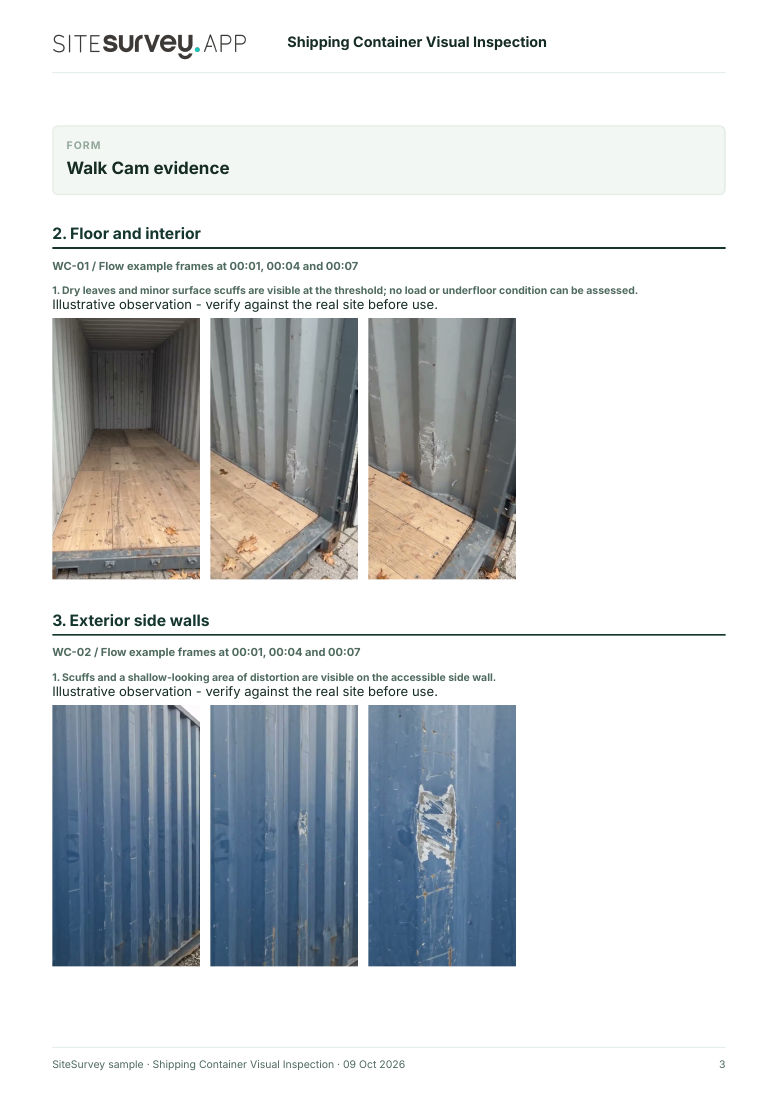
Dry leaves and surface scuffs are visible at the threshold; the underside was not inspected.
POINT 02
Exterior side walls
Record each accessible side from end to end, then show visible scrapes, dents or deformation with enough context to locate them. Do not infer structural acceptability from footage.
Scuffs and a shallow-looking distortion are visible on one side wall.
POINT 03
Doors and closure
Show both doors, locking bars, hinges and visible seals. Record wear or damage by position. Physical operation and seal checks require the appropriate on-site procedure.
Surface wear appears around the door area; seal performance was not tested.
POINT 04
Corner post and lower structure
Show accessible corner posts, castings and lower rails. Describe visible corrosion or damage and refer any suspected structural issue for competent review.
Surface rust staining is visible at the lower corner.
What can a shipping container video inspection establish?
It can document accessible visible condition and the location of a finding at a stated visit. The UCIRC provides inspection and repair criteria for physical damage and deformation; a narrated phone video alone cannot apply those criteria or certify a container as safe or cargo-worthy. The IMO's CSC examination framework is separate.
Identify the asset and interchange stage first. Keep the camera steady enough to locate an observation and record anything inaccessible. Use the same views at a later visit when comparing condition.
01
Floor and interior
Identify the container and film a wide interior view. Move toward visible marks or debris on accessible floorboards and lower walls. Note the threshold and any area obscured from view.
Example observation
“Dry leaves and surface scuffs are visible at the threshold; the underside was not inspected.”
Scripted example, not a real depot finding.02
Exterior side walls
Record each accessible side from end to end, then show visible scrapes, dents or deformation with enough context to locate them. Do not infer structural acceptability from footage.
Example observation
“Scuffs and a shallow-looking distortion are visible on one side wall.”
Scripted example, not a real depot finding.03
Doors and closure
Show both doors, locking bars, hinges and visible seals. Record wear or damage by position. Physical operation and seal checks require the appropriate on-site procedure.
Example observation
“Surface wear appears around the door area; seal performance was not tested.”
Scripted example, not a real depot finding.04
Corner post and lower structure
Show accessible corner posts, castings and lower rails. Describe visible corrosion or damage and refer any suspected structural issue for competent review.
Example observation
“Surface rust staining is visible at the lower corner.”
Scripted example, not a real depot finding.
How to use the record
Make visible condition reviewable.
Match the right asset
Record the container identifier, location and visit stage in the report. Keep each clip attached to its point and note any obscured area.
Apply the right criteria
UCIRC describes criteria for container damage and deformation. A recording helps locate an issue, but a competent person must apply the relevant criteria. UCIRC Revision 3 ↗
Keep safety checks separate
The IMO's CSC framework covers safety approval, examination and maintenance. This page does not offer a CSC examination or structural certification. IMO overview ↗
Inspection scope
Walk Cam records what the inspector shows and says. It does not test door operation, seal tightness, strength, load suitability or cargo-worthiness automatically.
Questions, answered
Container inspection FAQs
What does a shipping container visual inspection record?
It records accessible visible condition at a named container and a stated time. Guided phone clips and spoken observations can help locate a finding for follow-up.
Can a Walk Cam video certify that a container is cargo-worthy?
No. The video is evidence of what the camera showed. Acceptance, repair and safety decisions require the applicable inspection criteria and competent assessment.
Does this replace a CSC examination?
No. The International Convention for Safe Containers has separate safety approval, examination and maintenance requirements. This example does not perform or certify them.
What is included in the sample report?
A fictional six-page example contains asset and visit details, four observations, still frames taken from the Flow clips, follow-up actions and scope limitations. The clips play on this page.
Sources and review
Guidance checked 9 October 2026. The four-point route is a SiteSurvey example, not a method prescribed by these sources.
Industry criteria for inspecting physical damage, structural deformation, cleanliness and visible pest contamination in steel general-purpose containers.
Explains the separate framework for safety approval, examination and maintenance of containers.
Search research: Keywords Everywhere estimated 70 UK monthly searches for “shipping container inspection” and 320 for the broader “container inspection” when checked 9 October 2026. These are query estimates, not a forecast of visits to this page.
SiteSurvey Walk Cam explains the product capability. The clips are AI-generated examples.