Visual inspection library · Property and refurbishment
Pre-works condition visual inspection
Walk the accessible areas before refurbishment begins. Film each existing visible mark in its zone context so the later team can locate and compare it.
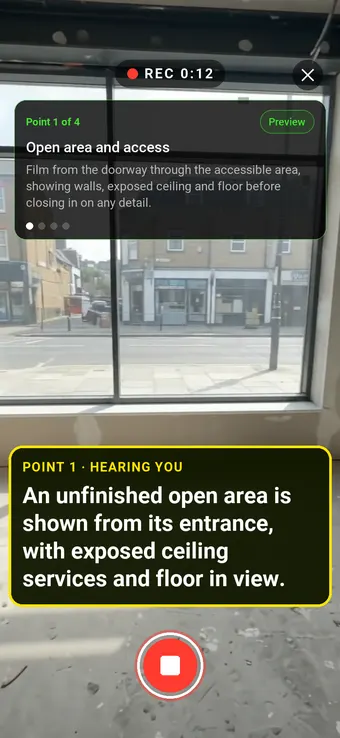
Hold to record. Keep holding while you film and speak; release to save the clip and its transcribed answer.
Four 9:16 example clips generated in Google Flow. Fictional inspection; no customer site is shown.
App-style example using Google Flow footage. The animated recording interface and gradually appearing words are scripted; no real inspection or live transcription took place.
The full visual example
Watch all four inspection points.
Each short clip shows one point in the guided route. The footage is AI-generated and the observations are scripted examples, not findings from a real inspection.
POINT 01
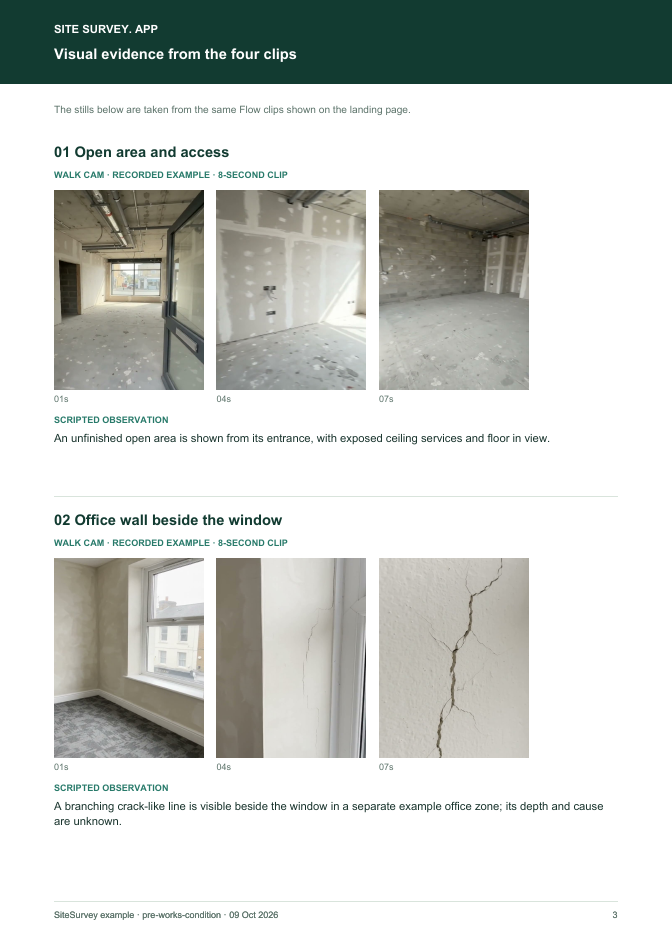
Open area and access
Film from the doorway through the accessible area, showing walls, exposed ceiling and floor before closing in on any detail.
An unfinished open area is shown from its entrance, with exposed ceiling services and floor in view.
POINT 02
Office wall beside the window
Start with the window and surrounding wall, then move close to the visible line without interpreting its cause.
A branching crack-like line is visible beside the window in a separate example office zone; its depth and cause are unknown.
POINT 03
Floor surface and skirting
Sweep the accessible floor edge and skirting with enough wider context to locate surface marks.
A grey floor with surface marks and skirting along a separate example room wall is visible.
POINT 04
Doorway and external threshold
Show the door frame and accessible threshold from a safe position, including adjacent paving.
The entrance frame has visible scuffs and the adjacent threshold and paving are recorded.
What can a pre-works condition visual inspection record?
Record the property reference, visit date, access limits and planned work area. Start with a wide zone view; keep each close-up tied to a fixed feature and a spoken location. The four AI clips illustrate separate zones, not a continuous camera walk. This is a video record of accessible visible condition. It is not a formal agreed schedule of condition, structural diagnosis or proof of when a mark arose. Where a lease or contract requires a schedule, agree its author, scope and status separately.
The six-page sample contains four inspection points, twelve footage stills, scripted observations and follow-up actions. The preview shows the first visual-evidence page.
Record the property reference, visit date, access limits and planned work area. Start with a wide zone view; keep each close-up tied to a fixed feature and a spoken location. The four AI clips illustrate separate zones, not a continuous camera walk.
01
Open area and access
Film from the doorway through the accessible area, showing walls, exposed ceiling and floor before closing in on any detail.
Example observation
“An unfinished open area is shown from its entrance, with exposed ceiling services and floor in view.”
Scripted example, not a real finding.02
Office wall beside the window
Start with the window and surrounding wall, then move close to the visible line without interpreting its cause.
Example observation
“A branching crack-like line is visible beside the window in a separate example office zone; its depth and cause are unknown.”
Scripted example, not a real finding.03
Floor surface and skirting
Sweep the accessible floor edge and skirting with enough wider context to locate surface marks.
Example observation
“A grey floor with surface marks and skirting along a separate example room wall is visible.”
Scripted example, not a real finding.04
Doorway and external threshold
Show the door frame and accessible threshold from a safe position, including adjacent paving.
Example observation
“The entrance frame has visible scuffs and the adjacent threshold and paving are recorded.”
Scripted example, not a real finding.
How to use the record
Make the visual evidence useful.
Identify the visit
Record the asset or site, visit stage, date and inspector. Keep each clip attached to its point and note anything inaccessible.
Describe, then escalate
Say what the camera shows and where it is. Record the next action without guessing the cause or declaring a specialist result from video.
This is a video record of accessible visible condition. It is not a formal agreed schedule of condition, structural diagnosis or proof of when a mark arose. Where a lease or contract requires a schedule, agree its author, scope and status separately.
Questions, answered
Pre-works condition visual inspection FAQs
Does this replace a schedule of condition?
No. It is a supporting visual record. A formal or agreed schedule may need a defined scope, author, date and acceptance under the relevant lease or contract.
Can the video show when damage happened?
No. Compare reliable dated records and other evidence; a single clip cannot establish causation or timing.
How should inaccessible areas be handled?
Name them in the report and do not imply the camera inspected them.
What is in the sample report?
A fictional six-page visual report with four point records, twelve stills from the clips, observations, follow-up and scope limits.
Sources and review
Guidance checked 9 October 2026. The four-point route is a SiteSurvey example, not a method prescribed by these sources.
Explains that a lease schedule of condition may contain written descriptions or photographs and should be prepared and agreed before the lease where required.
Explains the separate professional scope of schedules of condition and why an inspection must identify inaccessible areas and limits.
Search research: Keywords Everywhere estimated 720 UK monthly searches for “schedule of condition” when checked 9 October 2026. This broader query often seeks a formal schedule or template. Demand for a video-led pre-works record specifically is unverified. This is not a traffic or conversion forecast.
SiteSurvey Walk Cam explains the product capability. The clips are AI-generated examples.