Give each ladder its own visual record. Film the whole asset, then show its feet, rails, rungs and locking parts so the responsible person can locate a concern.
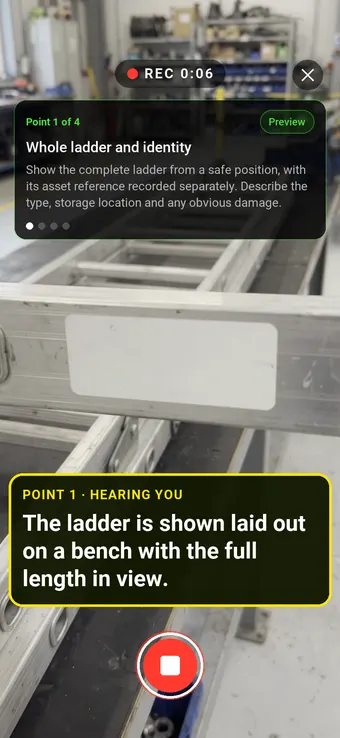
Hold to record. Keep holding while you film and speak; release to save the clip and its transcribed answer.
Four 9:16 example clips generated in Google Flow. Fictional inspection; no customer site is shown.
App-style example using Google Flow footage. The animated recording interface and gradually appearing words are scripted; no real inspection or live transcription took place.
The full visual example
Watch all four inspection points.
Each short clip shows one point in the guided route. The footage is AI-generated and the observations are scripted examples, not findings from a real inspection.
POINT 01
Whole ladder and identity
Show the complete ladder from a safe position, with its asset reference recorded separately. Describe the type, storage location and any obvious damage.
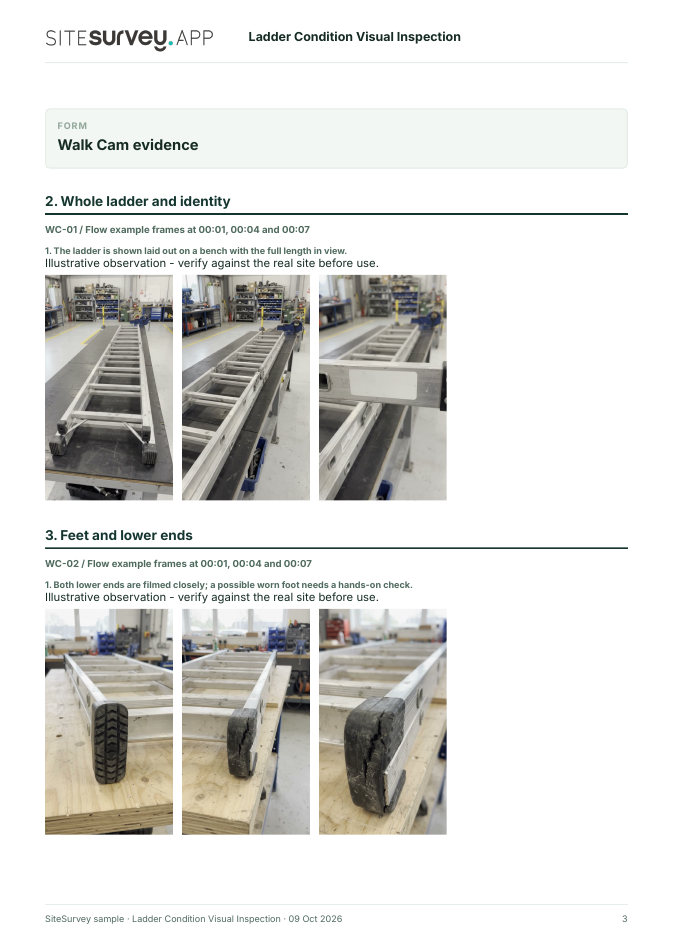
The ladder is shown laid out on a bench with the full length in view.
POINT 02
Feet and lower ends
Film each foot and the adjacent lower stile in close view. Look for wear, missing material or distortion without relying on video to prove grip.
Both lower ends are filmed closely; a possible worn foot needs a hands-on check.
POINT 03
Stiles and rungs
Move along the accessible rails and rungs, keeping the affected location in context. Record visible dents, bends, cracks or loose-looking connections.
The camera passes along the side rails and rungs to document accessible visible condition.
POINT 04
Locking parts and label
Show visible catches, stays and label area without operating the ladder for the camera. Note anything hidden or unreadable.
The locking area and label position are shown; correct engagement was not tested.
What can a ladder condition visual inspection record?
Identify the ladder, manufacturer and site before filming. Record an overview, then visible condition at the feet, stiles, rungs and locking parts. Note anything obscured or needing a hands-on check. This is an example visual evidence record. HSE distinguishes a user's pre-use check from a detailed visual inspection recorded by a competent person. Filming does not establish that the ladder is safe, replace the manufacturer's instructions or authorise use.
The six-page sample contains four inspection points, twelve footage stills, scripted observations and follow-up actions. The preview shows the first visual-evidence page.
Identify the ladder, manufacturer and site before filming. Record an overview, then visible condition at the feet, stiles, rungs and locking parts. Note anything obscured or needing a hands-on check.
01
Whole ladder and identity
Show the complete ladder from a safe position, with its asset reference recorded separately. Describe the type, storage location and any obvious damage.
Example observation
“The ladder is shown laid out on a bench with the full length in view.”
Scripted example, not a real finding.02
Feet and lower ends
Film each foot and the adjacent lower stile in close view. Look for wear, missing material or distortion without relying on video to prove grip.
Example observation
“Both lower ends are filmed closely; a possible worn foot needs a hands-on check.”
Scripted example, not a real finding.03
Stiles and rungs
Move along the accessible rails and rungs, keeping the affected location in context. Record visible dents, bends, cracks or loose-looking connections.
Example observation
“The camera passes along the side rails and rungs to document accessible visible condition.”
Scripted example, not a real finding.04
Locking parts and label
Show visible catches, stays and label area without operating the ladder for the camera. Note anything hidden or unreadable.
Example observation
“The locking area and label position are shown; correct engagement was not tested.”
Scripted example, not a real finding.
How to use the record
Make the visual evidence useful.
Identify the visit
Record the asset or site, visit stage, date and inspector. Keep each clip attached to its point and note anything inaccessible.
Describe, then escalate
Say what the camera shows and where it is. Record the next action without guessing the cause or declaring a specialist result from video.
This is an example visual evidence record. HSE distinguishes a user's pre-use check from a detailed visual inspection recorded by a competent person. Filming does not establish that the ladder is safe, replace the manufacturer's instructions or authorise use.
Questions, answered
Ladder condition visual inspection FAQs
Is a video the same as a ladder inspection?
No. It can document visible condition at a stated time. A competent person must conduct any required detailed inspection, apply the manufacturer's instructions and record the result.
Does a daily pre-use ladder check need a report?
HSE says the user's pre-use check is for immediate use and does not need to be recorded. Recorded detailed visual inspections are a separate employer responsibility.
What should happen if a foot or rung looks damaged?
Do not treat the recording as approval to use the ladder. Follow the employer's process for removing suspect equipment from use and obtaining a competent assessment.
What does the sample report show?
A fictional equipment record with four guided points, stills from AI-generated footage, scripted observations, follow-up actions and inspection limits.
Sources and review
Guidance checked 9 October 2026. The four-point route is a SiteSurvey example, not a method prescribed by these sources.
Explains how inspection scope and frequency should reflect the risks and type of equipment.
Search research: Keywords Everywhere estimated 1300 UK monthly searches for “ladder inspection” when checked 9 October 2026. The broad query includes safety guidance, checklists and inspection services; software demand is unverified. This is not a traffic or conversion forecast.
SiteSurvey Walk Cam explains the product capability. The clips are AI-generated examples.