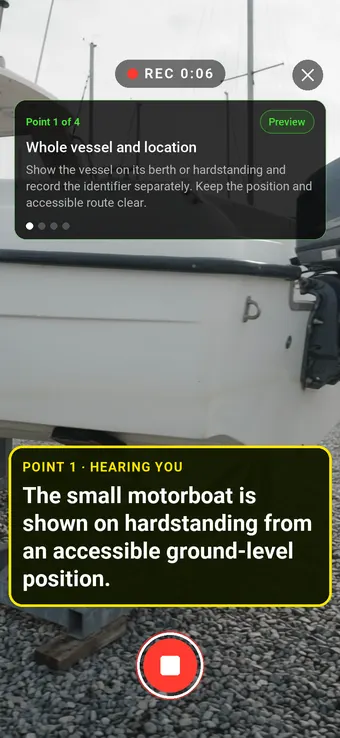
Record what can actually be seen at the boatyard. Follow the same route around the vessel and give each visible concern a location, clip and next action.
Hold to record. Keep holding while you film and speak; release to save the clip and its transcribed answer.
Four 9:16 example clips generated in Google Flow. Fictional inspection; no customer site is shown.
App-style example using Google Flow footage. The animated recording interface and gradually appearing words are scripted; no real inspection or live transcription took place.
The full visual example
Watch all four inspection points.
Each short clip shows one point in the guided route. The footage is AI-generated and the observations are scripted examples, not findings from a real inspection.
POINT 01
Whole vessel and location
Show the vessel on its berth or hardstanding and record the identifier separately. Keep the position and accessible route clear.
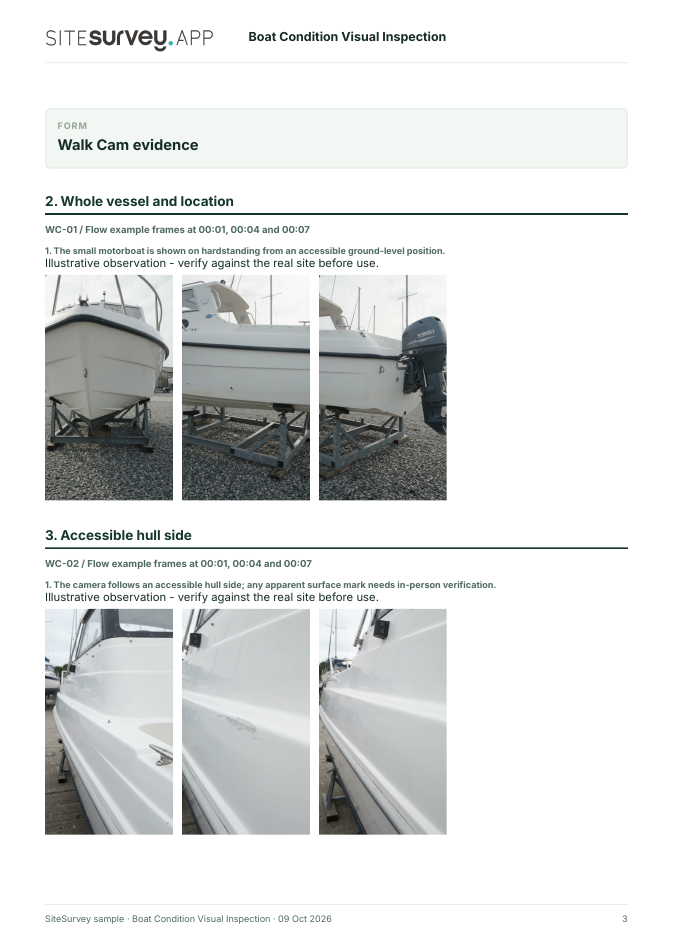
The small motorboat is shown on hardstanding from an accessible ground-level position.
POINT 02
Accessible hull side
Film one accessible hull side from a safe position, locating scuffs, cracks, blisters or staining in relation to the bow or stern.
The camera follows an accessible hull side; any apparent surface mark needs in-person verification.
POINT 03
Deck edge and fittings
Show accessible cleats, rails and visible fixings, keeping each feature in context. Do not assume a fitting is secure from footage alone.
Deck fittings and surrounding surfaces are filmed in a short close view.
POINT 04
Cockpit and visible interior
Pan across accessible seating, hatch exteriors and glazing. Record any visible wear and list areas that remained closed or obscured.
The open cockpit and visible seating are recorded; closed spaces and systems remain unchecked.
What can a boat condition visual inspection record?
Identify the vessel, location and whether it is afloat or ashore. Record an accessible outside route, then visible hull, deck fittings and cockpit areas. State which surfaces and systems could not be checked. This is an accessible visual condition record, not a marine survey, structural assessment, engine test, safety-equipment check or seaworthiness declaration. A buyer should obtain an appropriate professional survey where needed.
The six-page sample contains four inspection points, twelve footage stills, scripted observations and follow-up actions. The preview shows the first visual-evidence page.
Identify the vessel, location and whether it is afloat or ashore. Record an accessible outside route, then visible hull, deck fittings and cockpit areas. State which surfaces and systems could not be checked.
01
Whole vessel and location
Show the vessel on its berth or hardstanding and record the identifier separately. Keep the position and accessible route clear.
Example observation
“The small motorboat is shown on hardstanding from an accessible ground-level position.”
Scripted example, not a real finding.02
Accessible hull side
Film one accessible hull side from a safe position, locating scuffs, cracks, blisters or staining in relation to the bow or stern.
Example observation
“The camera follows an accessible hull side; any apparent surface mark needs in-person verification.”
Scripted example, not a real finding.03
Deck edge and fittings
Show accessible cleats, rails and visible fixings, keeping each feature in context. Do not assume a fitting is secure from footage alone.
Example observation
“Deck fittings and surrounding surfaces are filmed in a short close view.”
Scripted example, not a real finding.04
Cockpit and visible interior
Pan across accessible seating, hatch exteriors and glazing. Record any visible wear and list areas that remained closed or obscured.
Example observation
“The open cockpit and visible seating are recorded; closed spaces and systems remain unchecked.”
Scripted example, not a real finding.
How to use the record
Make the visual evidence useful.
Identify the visit
Record the asset or site, visit stage, date and inspector. Keep each clip attached to its point and note anything inaccessible.
Describe, then escalate
Say what the camera shows and where it is. Record the next action without guessing the cause or declaring a specialist result from video.
This is an accessible visual condition record, not a marine survey, structural assessment, engine test, safety-equipment check or seaworthiness declaration. A buyer should obtain an appropriate professional survey where needed.
Questions, answered
Boat condition visual inspection FAQs
Does this replace a pre-purchase marine survey?
No. It is a visual evidence record of accessible areas. RYA recommends a survey by a suitable marine surveyor when buying a second-hand boat.
Can the footage show that a boat is seaworthy?
No. It does not establish structural condition, system operation or seaworthiness, particularly where areas are inaccessible or underwater.
What details should identify the boat?
Record the vessel name or identifier, location, afloat or ashore status, date, recorder and any access limits alongside the clips.
What does the example report contain?
A fictional visit record with four visual points, stills from generated footage, scripted observations, next actions and explicit exclusions.
Sources and review
Guidance checked 9 October 2026. The four-point route is a SiteSurvey example, not a method prescribed by these sources.
Recommends a survey by a suitable marine surveyor for a second-hand boat after viewing and offer acceptance.
Search research: Keywords Everywhere estimated 880 UK monthly searches for “boat inspection” when checked 9 October 2026. Search intent spans pre-purchase surveys, servicing and owner guidance; software buyer demand is unverified. This is not a traffic or conversion forecast.
SiteSurvey Walk Cam explains the product capability. The clips are AI-generated examples.