Visual inspection library · Galleries and art handling
Art condition visual inspection
Show the whole work before moving to detail. Capture the surface and frame in a repeatable order, with each spoken observation attached to its location.
Hold to record. Keep holding while you film and speak; release to save the clip and its transcribed answer.
Four 9:16 example clips generated in Google Flow. Fictional inspection; no customer site is shown.
App-style example using Google Flow footage. The animated recording interface and gradually appearing words are scripted; no real inspection or live transcription took place.
The full visual example
Watch all four inspection points.
Each short clip shows one point in the guided route. The footage is AI-generated and the observations are scripted examples, not findings from a real inspection.
POINT 01
Object identity and full view
Record the object identifier in the report, then show the whole front and frame in steady light. Keep the work's orientation and scale clear without relying on a close-up alone.
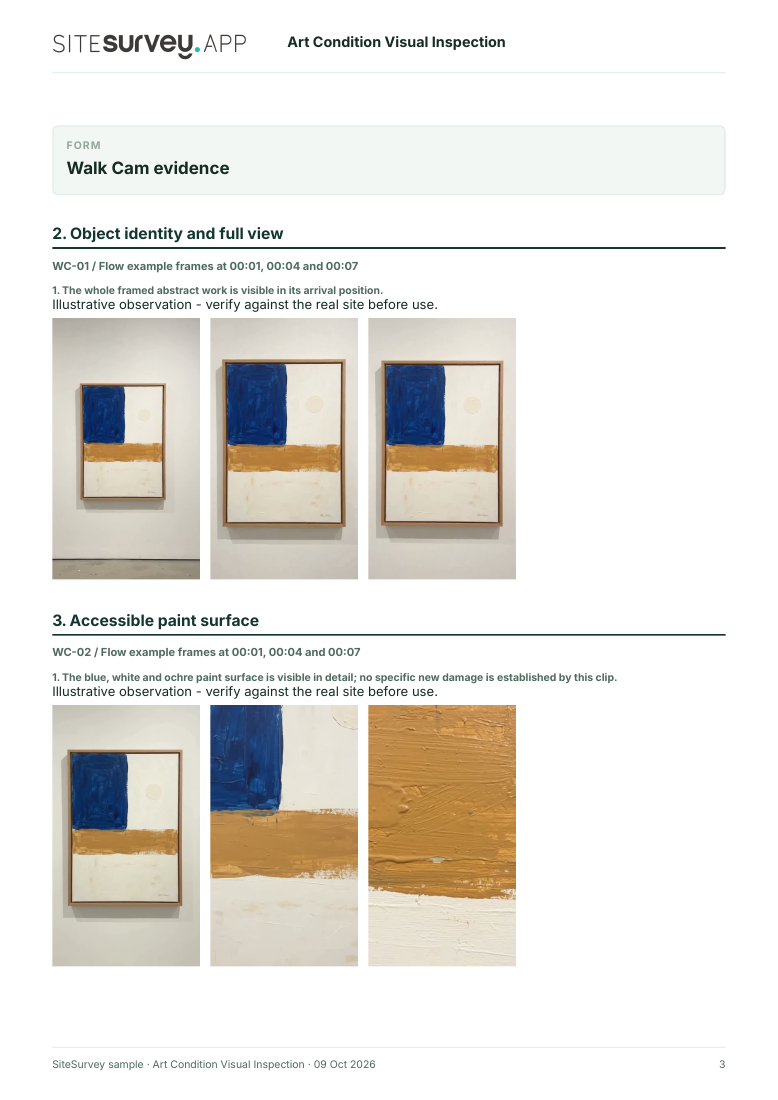
The whole framed abstract work is visible in its arrival position.
POINT 02
Accessible paint surface
Move slowly across the accessible face under suitable light. Describe a visible mark by relative position without diagnosing its cause or touching the surface.
The blue, white and ochre paint surface is visible in detail; no specific new damage is established by this clip.
POINT 03
Frame and visible edges
Show frame corners, joints and visible edges. Record a nick or looseness only if it is actually observable; do not assume hidden fixings are sound.
The upper-right oak frame corner and adjacent edge are visible; this view alone does not establish the condition of all joints.
POINT 04
Final view and handover context
Finish with the whole work and its immediate support or packing context. Note the movement stage, any area not viewed and who received the record.
The framed work is shown at handover; its reverse was not examined.
What can an art condition visual inspection record?
Identify the object, movement stage and location before filming. Record an overview first, then accessible detail in steady light. Use the same orientation at departure and note any access or handling limit. This phone video records visible appearance only. It does not authenticate, value, diagnose or conserve an artwork, and it does not replace a specialist condition report when one is required.
The six-page sample contains four inspection points, twelve footage stills, scripted observations and follow-up actions. The preview shows the first visual-evidence page.
Identify the object, movement stage and location before filming. Record an overview first, then accessible detail in steady light. Use the same orientation at departure and note any access or handling limit.
01
Object identity and full view
Record the object identifier in the report, then show the whole front and frame in steady light. Keep the work's orientation and scale clear without relying on a close-up alone.
Example observation
“The whole framed abstract work is visible in its arrival position.”
Scripted example, not a real finding.02
Accessible paint surface
Move slowly across the accessible face under suitable light. Describe a visible mark by relative position without diagnosing its cause or touching the surface.
Example observation
“The blue, white and ochre paint surface is visible in detail; no specific new damage is established by this clip.”
Scripted example, not a real finding.03
Frame and visible edges
Show frame corners, joints and visible edges. Record a nick or looseness only if it is actually observable; do not assume hidden fixings are sound.
Example observation
“The upper-right oak frame corner and adjacent edge are visible; this view alone does not establish the condition of all joints.”
Scripted example, not a real finding.04
Final view and handover context
Finish with the whole work and its immediate support or packing context. Note the movement stage, any area not viewed and who received the record.
Example observation
“The framed work is shown at handover; its reverse was not examined.”
Scripted example, not a real finding.
How to use the record
Make the visual evidence useful.
Identify the visit
Record the asset or site, visit stage, date and inspector. Keep each clip attached to its point and note anything inaccessible.
Describe, then escalate
Say what the camera shows and where it is. Record the next action without guessing the cause or declaring a specialist result from video.
This phone video records visible appearance only. It does not authenticate, value, diagnose or conserve an artwork, and it does not replace a specialist condition report when one is required.
Questions, answered
Art condition visual inspection FAQs
What does an art condition video record?
It can record a work's visible appearance at a particular movement or review, including the whole work, accessible surface, frame and the location of a mark.
Can a phone video replace a conservator's condition report?
No. A specialist report may require close examination, consistent imaging, material knowledge and treatment judgement beyond this video workflow.
Why record the whole work before details?
An overview helps identify the object and locate detail views. It also gives a repeatable comparison at later movement stages.
What is in the sample report?
A fictional completed example with object and movement details, four visual observations, frames from the clips, follow-up and scope notes.
Sources and review
Guidance checked 9 October 2026. The four-point route is a SiteSurvey example, not a method prescribed by these sources.
Describes condition checking as a collections-management process, including checks at points of risk such as movement.
Search research: Keywords Everywhere estimated 90 UK monthly searches for “art condition report” when checked 9 October 2026. Some searches seek specialist conservation reports rather than recording software; that intent needs separate validation. This is not a traffic or conversion forecast.
SiteSurvey Walk Cam explains the product capability. The clips are AI-generated examples.