A condition record for plant and tools going out on hire and coming back. Record the hire contract, whether it is check-out or return, the item and its serial or asset tag, the hour meter and fuel level. Check the bodywork, tracks or tyres, hydraulics, controls and guards, attachments and documents, with a detail box for each defect and photos of every side. At check-out, confirm evidence of the last inspection went with the item. On return, record cleanliness and damage, and get both signatures. Every question is listed below, and you can fill the live form in on this page.
✎Every question is editable. Add this form to your account, then change the wording, add or remove questions and options, and make it fit your own jobs.
Prefer paper? Download a printable copy: PDF or Word
What should be checked when plant goes on and off hire?
At check-out and return, record the item and serial number, hour meter reading and fuel level, and check the bodywork and glass, tracks or tyres, hydraulics and hoses, controls, guards and safety devices, attachments and documents, with dated photos of every side. At check-out, hand over evidence of the last inspection. On return, note cleanliness, damage and missing parts. Signatures from both sides settle disputes about who caused damage.
Capture asset identity, wide condition, exposed surfaces and accessories at both handover points.
Confirm the equipment ID, hire agreement and handover stage. Film a wide view before visible damage details and supplied accessories. Repeat the route on return and preserve both original records.
POINT 01
Asset identity and context
Show the ID plate or hire label and whole item without exposing customer details.
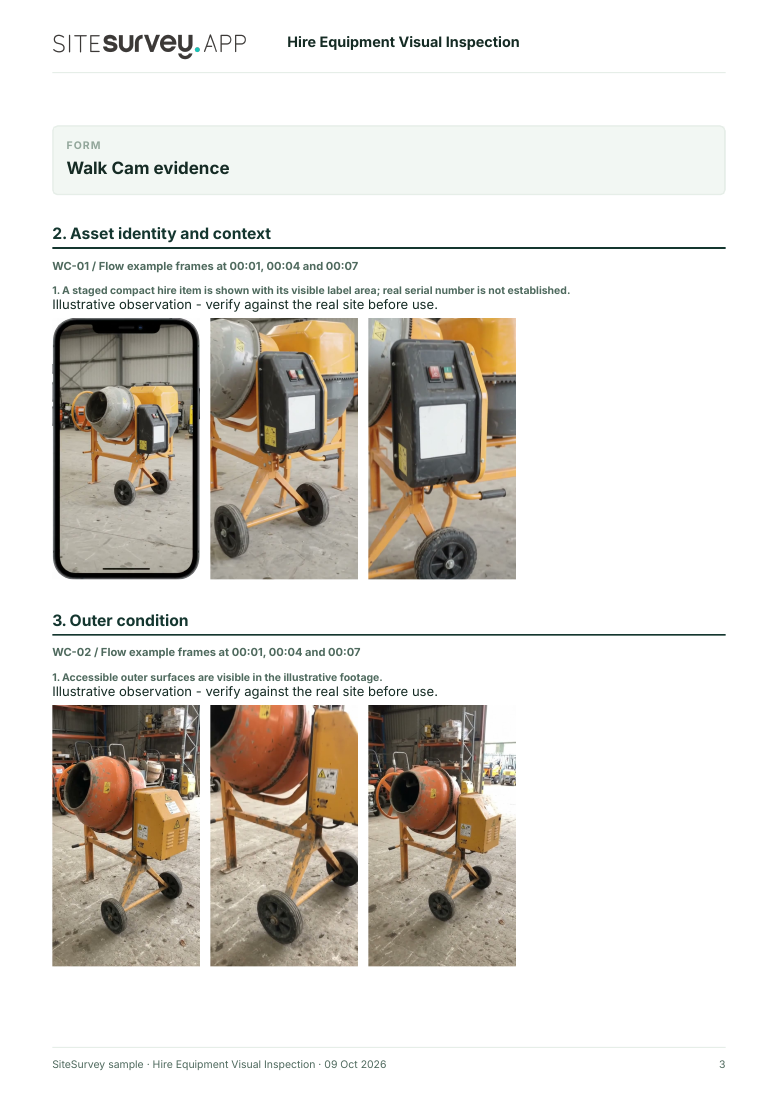
A staged compact hire item is shown with its visible label area; real serial number is not established.
POINT 02
Outer condition
Film accessible casing, frame and wheels from a steady distance before close-ups.
Accessible outer surfaces are visible in the illustrative footage.
POINT 03
Visible fittings and accessories
Show supplied handles, guards and accessories without operating or dismantling the item.
Visible fittings are illustrated; completeness and function are not proven.
POINT 04
Return view and exceptions
Repeat the wide handover view and state what was not visible or supplied.
The staged return view documents accessible surfaces only.
See the footage in a report
A fictional six-page example with the four points, twelve stills from the clips, observations, follow-up actions and the limits of a visual record.
Video records visible condition only. It cannot establish mechanical or electrical safety, hidden damage, operation, ownership of a defect or liability. Complete the equipment-specific inspection and test process required by risk assessment and manufacturer guidance. Example footage was generated in Google Flow and the observations are scripted; no real site is shown. Walk Cam works inside any form in the app. How Walk Cam works · All visual inspections
Every question in the plant hire checklist template
A plant and tool hire check-out and return record: item and serial scan, hours, fuel, condition photos at check-out and return, safety checks, damage and missing parts, and both signatures. 3 sections and 36 questions. Follow-up questions and guidance appear only when an answer calls for them, so the person on site never sees the ones that do not apply.
✎
Make it your own: every question is editable
This is a starting point, not a fixed form. Once it is in your SiteSurvey account you can reword any question, add or remove questions, sections and answer options, and add your own logo, so it fits the way your team works and the jobs you do.
Details you only enter once
Add this form to a project in SiteSurvey and it fills in what the project already knows, so nobody on site retypes it and every form on the job uses the same names. Anything filled in can still be changed.
Project: the project name
Client: the project's customer
Site: the site, when the form is opened for a space or a product
Site address: the site address, from the space or the project
1
Hire
ProjectShort answer
Fills in from the project name
ClientShort answer
Fills in from the project's customer
Site*Short answer
Fills in from the site, when the form is opened for a space or a product
Site addressShort answer
Fills in from the site address, from the space or the project
Date*Date
TimeTime
Hire contract number*Short answer
Stage*Choose one
Check-out (on hire)
Return (off hire)
Item (for example 1.5 t excavator, breaker, tower)*Short answer
Scan the serial plate or asset tagScan a label: serial number, asset number
Optional. Scan the label or tag to capture its numbers.
Hour meter readingNumber
Fuel levelChoose one
Full
3/4
1/2
1/4
Empty
Not applicable
2
Condition
Bodywork, panels and glassChoose one
OK
Defect
Not applicable
What is wrong?Short answer
Shown when “Bodywork, panels and glass” is “Defect”
Tracks, tyres or wheelsChoose one
OK
Defect
Not applicable
What is wrong?Short answer
Shown when “Tracks, tyres or wheels” is “Defect”
Hydraulics, hoses and leaksChoose one
OK
Defect
Not applicable
What is wrong?Short answer
Shown when “Hydraulics, hoses and leaks” is “Defect”
Controls, guards and safety devicesChoose one
OK
Defect
Not applicable
What is wrong?Short answer
Shown when “Controls, guards and safety devices” is “Defect”
Attachments and accessoriesChoose one
OK
Defect
Not applicable
What is wrong?Short answer
Shown when “Attachments and accessories” is “Defect”
Manual, certificates and inspection tagChoose one
OK
Defect
Not applicable
What is wrong?Short answer
Shown when “Manual, certificates and inspection tag” is “Defect”
Checks OKWorked out by the form
DefectsWorked out by the form
Not applicableWorked out by the form
WarningOne or more defects recorded. Agree them with the other party and photograph them before the plant moves.
Shown only when the answers above make it relevant
Photos of every side and any damage*Photos
Evidence of the last inspection handed over (inspection report or tag)?Yes or No
Shown when “Stage” is “Check-out (on hire)”
Returned clean?Yes or No
Shown when “Stage” is “Return (off hire)”
Damage or missing parts foundNotes
Shown when “Stage” is “Return (off hire)”
CheckProvision and Use of Work Equipment Regulations 1998 (PUWER), regulation 6: where safety depends on how equipment is installed, it must be inspected after installation and before first use, and after assembly at a new site, with the result recorded. Equipment that leaves the hire company must go with physical evidence of its last inspection, such as an inspection report. Lifting equipment is covered by the Lifting Operations and Lifting Equipment Regulations 1998 (LOLER) instead: regulation 9 requires thorough examination by a competent person, and regulation 9(4) says lifting equipment leaving the hire company must be accompanied by physical evidence that the last thorough examination was carried out. Ask for the report of thorough examination for lifting plant and accessories.
Shown when “Stage” is “Check-out (on hire)”
Walk Cam: hire equipment visual inspectionWalk Cam video with voice-to-text
Optional. Film the four guided points on the SiteSurvey app; each clip keeps its spoken note.
3
Signatures
Hirer's representativeShort answer
Hirer signatureSignature
Hire company representative*Short answer
Hire company signatureSignature
See it filled in
A completed plant hire checklist report, made by SiteSurvey from a fictional site visit: every answer, the photos, the guidance that applied and the sign-off, ready to send as a PDF.
Most hire disputes are about damage. Dated photos at check-out and return show the condition each time and protect both the hirer and the hire company.
What does PUWER say?
PUWER regulation 6 requires equipment whose safety depends on how it is installed to be inspected after installation and after assembly at a new site, with the result recorded. Equipment that leaves the hire company must go with physical evidence of its last inspection, such as an inspection report or tag. Lifting equipment is covered by LOLER instead.
Who maintains hired plant?
HSE's PUWER code of practice says the hire company and the hirer should agree who will carry out safety-related maintenance, and set it out in writing.
Can I scan the serial plate?
Yes. Scan the serial plate or asset tag on the SiteSurvey app so the record matches the item exactly.
Do both sides sign?
Yes. The hirer's representative and the hire company both sign, and the record goes as a PDF or a link.
Who uses this?
Plant and tool hire companies, contractors hiring plant, and site managers.