Visual inspection library · Fabrication and welding
Visual weld surface inspection
Show the component, the joint and the full bead before filming a local surface detail. Keep every observation attached to a weld identifier and review stage.
Hold to record. Keep holding while you film and speak; release to save the clip and its transcribed answer.
Four 9:16 example clips generated in Google Flow. Fictional inspection; no customer site is shown.
App-style example using Google Flow footage. The animated recording interface and gradually appearing words are scripted; no real inspection or live transcription took place.
The full visual example
Watch all four inspection points.
Each short clip shows one point in the guided route. The footage is AI-generated and the observations are scripted examples, not findings from a real inspection.
POINT 01
Component and joint identity
Begin wide enough to locate the component and weld. Record the joint identifier, stage and drawing or work order reference separately in the report.
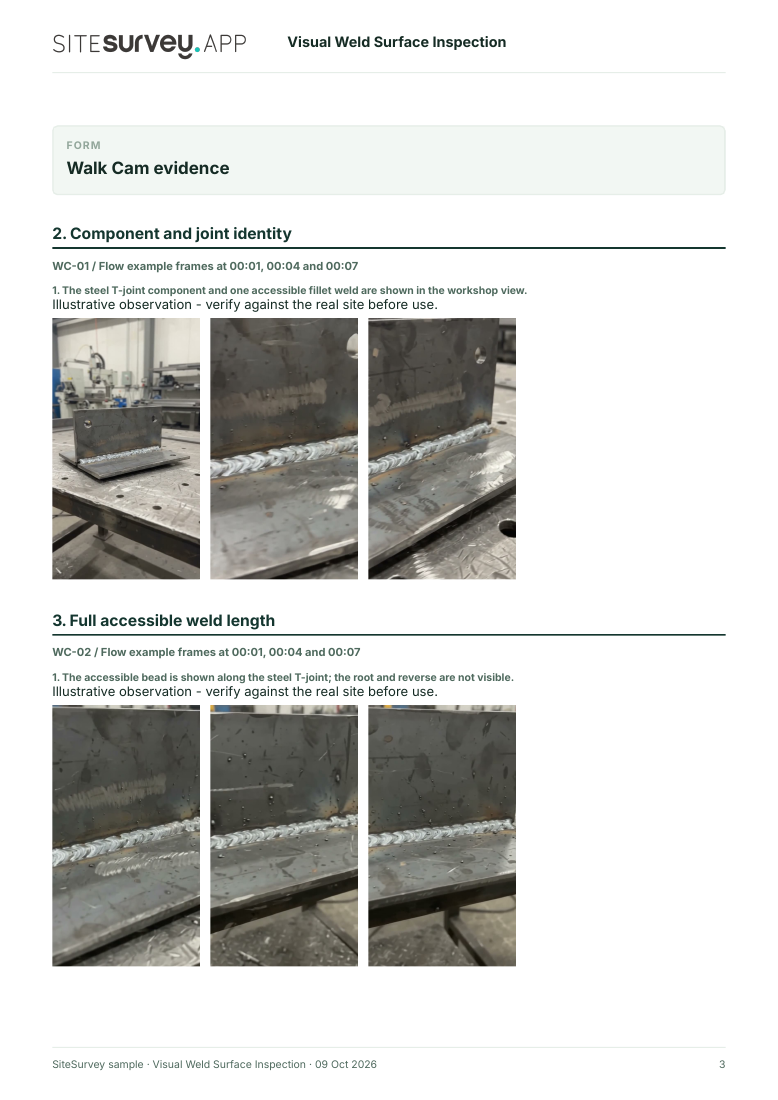
The steel T-joint component and one accessible fillet weld are shown in the workshop view.
POINT 02
Full accessible weld length
Move steadily along the accessible bead to preserve orientation, start and stop position. Avoid calling the weld acceptable from a video view.
The accessible bead is shown along the steel T-joint; the root and reverse are not visible.
POINT 03
Local surface detail
Film any area needing closer review in adequate light and say where it sits along the bead. Do not identify a discontinuity unless the footage supports it.
A closer view records visible weld-surface texture; no defect type or dimension is established by the clip.
POINT 04
Final orientation and review handoff
Return to a wider view so the local image can be located on the component. Note conditions that the camera could not show.
The example closes on a welded steel assembly in context. The synthetic clip is illustrative and no acceptance or compliance decision is recorded.
What can a visual weld surface inspection record?
Record the component and weld identifier, work stage, drawing or procedure reference, and the person responsible for formal inspection. Film the accessible weld surface in adequate light, from whole joint to detail, without disturbing the component. Phone footage records visible surfaces only. It cannot measure the weld, reveal internal flaws or establish acceptance. A competent inspector must apply the specified procedure and criteria.
The six-page sample contains four inspection points, twelve footage stills, scripted observations and follow-up actions. The preview shows the first visual-evidence page.
Record the component and weld identifier, work stage, drawing or procedure reference, and the person responsible for formal inspection. Film the accessible weld surface in adequate light, from whole joint to detail, without disturbing the component.
01
Component and joint identity
Begin wide enough to locate the component and weld. Record the joint identifier, stage and drawing or work order reference separately in the report.
Example observation
“The steel T-joint component and one accessible fillet weld are shown in the workshop view.”
Scripted example, not a real finding.02
Full accessible weld length
Move steadily along the accessible bead to preserve orientation, start and stop position. Avoid calling the weld acceptable from a video view.
Example observation
“The accessible bead is shown along the steel T-joint; the root and reverse are not visible.”
Scripted example, not a real finding.03
Local surface detail
Film any area needing closer review in adequate light and say where it sits along the bead. Do not identify a discontinuity unless the footage supports it.
Example observation
“A closer view records visible weld-surface texture; no defect type or dimension is established by the clip.”
Scripted example, not a real finding.04
Final orientation and review handoff
Return to a wider view so the local image can be located on the component. Note conditions that the camera could not show.
Example observation
“The example closes on a welded steel assembly in context. The synthetic clip is illustrative and no acceptance or compliance decision is recorded.”
Scripted example, not a real finding.
How to use the record
Make the visual evidence useful.
Identify the visit
Record the asset or site, visit stage, date and inspector. Keep each clip attached to its point and note anything inaccessible.
Describe, then escalate
Say what the camera shows and where it is. Record the next action without guessing the cause or declaring a specialist result from video.
Phone footage records visible surfaces only. It cannot measure the weld, reveal internal flaws or establish acceptance. A competent inspector must apply the specified procedure and criteria.
Questions, answered
Visual weld surface inspection FAQs
Can a phone video certify a weld?
No. Acceptance depends on the applicable specification, qualified inspection, suitable lighting and equipment, measurements and any required non-destructive testing.
What should a weld video include?
Identify the component and joint, show the accessible weld length, then a closer view of any area needing review with its position stated.
Can video show internal weld flaws?
A normal surface video cannot establish internal condition. The required examination method follows the specification and competent inspector’s judgement.
How is this different from a weld inspection checklist?
The checklist records required checks and decisions. This guided visual route adds location-linked footage and spoken observations for review; it does not make the decision itself.
Sources and review
Guidance checked 9 October 2026. The four-point route is a SiteSurvey example, not a method prescribed by these sources.
Distinguishes visual inspection of a completed welded joint from the wider welding inspection process.
Search research: Keywords Everywhere estimated 1000 UK monthly searches for “visual weld inspection” when checked 9 October 2026. Search results mix formal inspection services, standards and checklist templates; the video-recording intent still needs validation. This is not a traffic or conversion forecast.
SiteSurvey Walk Cam explains the product capability. The clips are AI-generated examples.