Visual inspection library · Property and facilities
Pest evidence visual inspection
Give a pest professional a clear visual record of what was seen and where. Film the room first, then the signs, affected packaging and a possible access gap without disturbing the area.
Hold to record. Keep holding while you film and speak; release to save the clip and its transcribed answer.
Four 9:16 example clips generated in Google Flow. Fictional inspection; no customer site is shown.
App-style example using Google Flow footage. The animated recording interface and gradually appearing words are scripted; no real inspection or live transcription took place.
The full visual example
Watch all four inspection points.
Each short clip shows one point in the guided route. The footage is AI-generated and the observations are scripted examples, not findings from a real inspection.
POINT 01
Room and access route
Film the room entrance, shelving and wall or floor zone so a reviewer can locate later close-ups. Record the room identifier and avoid people or confidential labels.
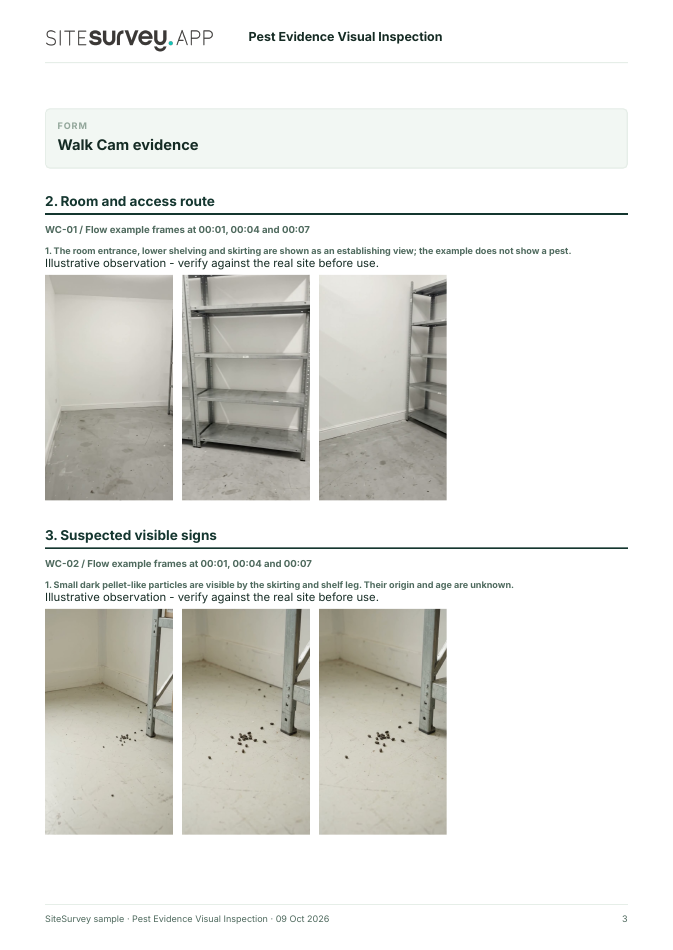
The room entrance, lower shelving and skirting are shown as an establishing view; the example does not show a pest.
POINT 02
Suspected visible signs
From a safe standing position, show the small particles or marks and an adjacent fixed feature. Do not touch, sweep, sample or identify them from the clip alone.
Small dark pellet-like particles are visible by the skirting and shelf leg. Their origin and age are unknown.
POINT 03
Package and stored goods
Show a damaged-looking package corner in relation to its shelf and nearby goods. Avoid opening or moving a potentially affected package for filming.
A lower-shelf cardboard package has a rough-looking torn corner and paper fibres. The cause is not established.
POINT 04
Visible service opening
Record the accessible gap around a wall penetration and the surrounding surface. Do not claim it is an entry route without assessment.
A small visible gap surrounds a service-pipe penetration near the floor. No animal passage is shown.
What can a pest evidence visual inspection record?
Identify the premises, room, visit date and recorder. Begin with a wide establishing view. Then record visible signs, damaged-looking packaging and an accessible service gap, stating exactly where each was seen. Do not move contaminated materials just to film. Footage records appearance and location. It cannot identify a pest, confirm current activity, establish an entry route or prescribe treatment. A competent professional must assess the real premises.
The six-page sample contains four inspection points, twelve footage stills, scripted observations and follow-up actions. The preview shows the first visual-evidence page.
Identify the premises, room, visit date and recorder. Begin with a wide establishing view. Then record visible signs, damaged-looking packaging and an accessible service gap, stating exactly where each was seen. Do not move contaminated materials just to film.
01
Room and access route
Film the room entrance, shelving and wall or floor zone so a reviewer can locate later close-ups. Record the room identifier and avoid people or confidential labels.
Example observation
“The room entrance, lower shelving and skirting are shown as an establishing view; the example does not show a pest.”
Scripted example, not a real finding.02
Suspected visible signs
From a safe standing position, show the small particles or marks and an adjacent fixed feature. Do not touch, sweep, sample or identify them from the clip alone.
Example observation
“Small dark pellet-like particles are visible by the skirting and shelf leg. Their origin and age are unknown.”
Scripted example, not a real finding.03
Package and stored goods
Show a damaged-looking package corner in relation to its shelf and nearby goods. Avoid opening or moving a potentially affected package for filming.
Example observation
“A lower-shelf cardboard package has a rough-looking torn corner and paper fibres. The cause is not established.”
Scripted example, not a real finding.04
Visible service opening
Record the accessible gap around a wall penetration and the surrounding surface. Do not claim it is an entry route without assessment.
Example observation
“A small visible gap surrounds a service-pipe penetration near the floor. No animal passage is shown.”
Scripted example, not a real finding.
How to use the record
Make the visual evidence useful.
Identify the visit
Record the asset or site, visit stage, date and inspector. Keep each clip attached to its point and note anything inaccessible.
Describe, then escalate
Say what the camera shows and where it is. Record the next action without guessing the cause or declaring a specialist result from video.
Footage records appearance and location. It cannot identify a pest, confirm current activity, establish an entry route or prescribe treatment. A competent professional must assess the real premises.
Questions, answered
Pest evidence visual inspection FAQs
Can the video identify the pest?
No. It records the appearance and location of possible signs. A competent professional should identify the cause and decide what action is appropriate.
Is this the same as a pest-control visit report?
No. This Walk Cam template collects four short visual evidence clips for follow-up; the separate visit report can document professional findings, treatment and monitoring.
Should I move suspected droppings or goods for a clearer shot?
No. Record what is visible from a safe position and follow the premises' hygiene and incident procedures.
What does the sample report include?
A fictional storeroom visit with four clip stills, location-linked observations, follow-up actions, source links and clear limits on what footage proves.
Sources and review
Guidance checked 9 October 2026. The four-point route is a SiteSurvey example, not a method prescribed by these sources.
FSA guidance includes pest control among the prerequisite programmes for food safety management.
Search research: Keywords Everywhere estimated 4400 UK monthly searches for “pest inspection” when checked 9 October 2026. The broad UK query is dominated by pest-control services and advice. This estimate does not establish demand for inspection software; this page covers a narrower evidence-recording workflow. This is not a traffic or conversion forecast.
SiteSurvey Walk Cam explains the product capability. The clips are AI-generated examples.