Hold to record. Keep holding while you film and speak; release to save the clip and its transcribed answer.
Four 9:16 example clips generated in Google Flow. Fictional inspection; no customer site is shown.
App-style example using Google Flow footage. The animated recording interface and gradually appearing words are scripted; no real inspection or live transcription took place.
The full visual example
Watch all four inspection points.
Each short clip shows one point in the guided route. The footage is AI-generated and the observations are scripted examples, not findings from a real inspection.
POINT 01
Whole corridor route
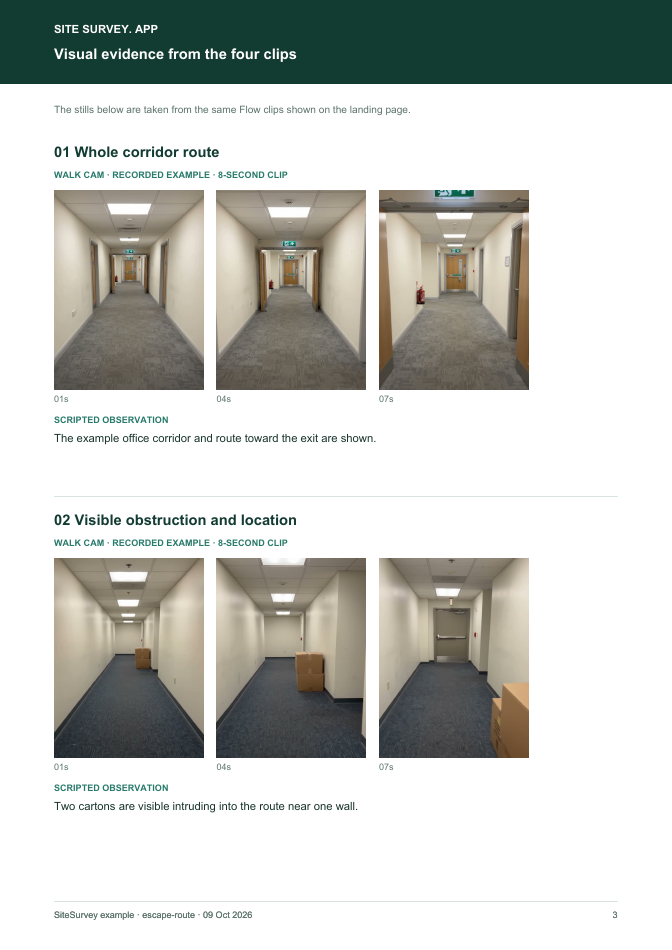
Start at the named corridor entrance and show the path toward the final exit in one steady view.
The example office corridor and route toward the exit are shown.
POINT 02
Visible obstruction and location
Show the object and the amount of route it occupies, with the final exit or fixed reference visible. Do not delay hazard control to finish filming.
A carton is visible intruding into the route near one wall.
POINT 03
Final exit area
Show the floor area, visible signage and approach to the exit. Do not claim door operation unless it is separately checked.
The example final exit approach and sign are visible.
POINT 04
Matched view after clearance
Return to the same corridor viewpoint once the obstruction has been removed and record the time of the recheck.
The formerly obstructed corridor position appears clear in the follow-up clip.
What can an escape-route visual walkthrough record?
Identify the building, floor and route. Record the full path, locate any visible obstruction, show the final exit area and repeat the same view after corrective action where safe. This is an evidence record of visible route condition at one time. It is not a fire risk assessment, structural fire-escape inspection, evacuation-plan review or declaration of compliance. Manage an obstruction immediately under site procedure.
The six-page sample contains four inspection points, twelve footage stills, scripted observations and follow-up actions. The preview shows the first visual-evidence page.
Identify the building, floor and route. Record the full path, locate any visible obstruction, show the final exit area and repeat the same view after corrective action where safe.
01
Whole corridor route
Start at the named corridor entrance and show the path toward the final exit in one steady view.
Example observation
“The example office corridor and route toward the exit are shown.”
Scripted example, not a real finding.02
Visible obstruction and location
Show the object and the amount of route it occupies, with the final exit or fixed reference visible. Do not delay hazard control to finish filming.
Example observation
“A carton is visible intruding into the route near one wall.”
Scripted example, not a real finding.03
Final exit area
Show the floor area, visible signage and approach to the exit. Do not claim door operation unless it is separately checked.
Example observation
“The example final exit approach and sign are visible.”
Scripted example, not a real finding.04
Matched view after clearance
Return to the same corridor viewpoint once the obstruction has been removed and record the time of the recheck.
Example observation
“The formerly obstructed corridor position appears clear in the follow-up clip.”
Scripted example, not a real finding.
How to use the record
Make the visual evidence useful.
Identify the visit
Record the asset or site, visit stage, date and inspector. Keep each clip attached to its point and note anything inaccessible.
Describe, then escalate
Say what the camera shows and where it is. Record the next action without guessing the cause or declaring a specialist result from video.
This is an evidence record of visible route condition at one time. It is not a fire risk assessment, structural fire-escape inspection, evacuation-plan review or declaration of compliance. Manage an obstruction immediately under site procedure.
Questions, answered
Escape-route visual walkthrough FAQs
Is this a fire risk assessment?
No. It is a narrow visual route record. The premises still needs its applicable fire risk assessment and management arrangements.
What should happen when an exit route is blocked?
Use the premises' immediate clearance and escalation procedure. Recording the issue must not delay making the route available.
Does a video prove the exit door opens?
No. A visible approach is not an operational test. Record any authorised door check separately.
What is in the completed example?
A fictional before-and-after route record with four visual points, stills, actions and scope limits.
Sources and review
Guidance checked 9 October 2026. The four-point route is a SiteSurvey example, not a method prescribed by these sources.
Explains management of escape routes, including keeping corridors and stairways clear.
Search research: Keywords Everywhere estimated 320 UK monthly searches for “fire escape inspection” when checked 9 October 2026. This phrase also retrieves structural fire-escape inspections; the page narrowly addresses an indoor route walkthrough. This is not a traffic or conversion forecast.
SiteSurvey Walk Cam explains the product capability. The clips are AI-generated examples.